使用python批量配置服务器,进行ros安装及安全加固
主代码:
batch_deployment.py
使用:
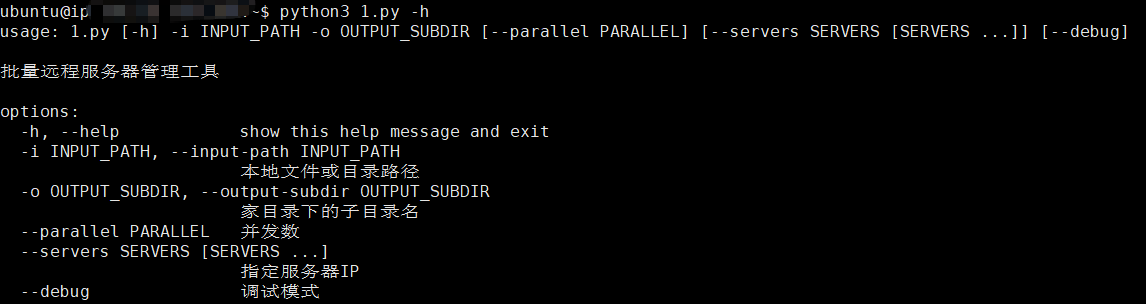
#!/usr/bin/env python3
# -*- coding: utf-8 -*-
# 此脚本用于批量拷贝文件、安装ros、修改root密码、进行安全加固等操作-需与security_hardening.sh一起使用
import paramiko
import sys
import time
import argparse
import os
import traceback
import logging
from concurrent.futures import ThreadPoolExecutor, as_completed
# 配置日志
logging.basicConfig(
level=logging.INFO,
format='%(asctime)s – %(levelname)s – %(message)s',
handlers=[
logging.FileHandler('install.log', encoding='utf-8'),
logging.StreamHandler()
]
)
logger = logging.getLogger(__name__)
# 服务器列表
SERVERS = [
("ip", "用户", "密码"),
("ip", "用户", "密码"),
]
NEW_ROOT_PASSWORD = "Liangdao@admin!"
SSH_PORT = 22
SSH_TIMEOUT = 30
LDE_TAR_NAME = "LDE-v1.12.30.release.20.tar.gz"
class RemoteServerManager:
def __init__(self, ip, hostname, password):
self.ip = ip
self.hostname = hostname
self.password = password
self.username = hostname
self.ssh_client = None
self.home_dir = f"/home/{hostname}"
def connect(self):
"""建立SSH连接"""
try:
print("\\n" + "=" * 80)
print(f"SSH连接详细信息:")
print(f" 主机名: {self.hostname}")
print(f" IP地址: {self.ip}")
print(f" 端口: {SSH_PORT}")
print(f" 用户名: {self.username}")
print(f" 家目录: {self.home_dir}")
print("=" * 80)
self.ssh_client = paramiko.SSHClient()
self.ssh_client.set_missing_host_key_policy(paramiko.AutoAddPolicy())
self.ssh_client.connect(
hostname=self.ip,
port=SSH_PORT,
username=self.username,
password=self.password,
timeout=SSH_TIMEOUT,
look_for_keys=False,
allow_agent=False
)
logger.info(f"[{self.hostname}] {self.ip} – SSH连接成功 (用户: {self.username})")
return True
except Exception as e:
logger.error(f"[{self.hostname}] {self.ip} – 连接失败: {str(e)}")
return False
def close(self):
"""关闭SSH连接"""
if self.ssh_client:
try:
self.ssh_client.close()
except:
pass
def execute_command_simple(self, command, timeout=60):
"""执行简单命令(不使用sudo)"""
try:
stdin, stdout, stderr = self.ssh_client.exec_command(command, timeout=timeout)
exit_status = stdout.channel.recv_exit_status()
output = stdout.read().decode('utf-8', errors='ignore')
error = stderr.read().decode('utf-8', errors='ignore')
return exit_status, output, error
except Exception as e:
return –1, "", str(e)
def execute_with_sudo(self, command, timeout=300):
"""使用sudo执行命令"""
try:
full_command = f"echo '{self.password}' | sudo -S bash -c '{command}' 2>&1"
stdin, stdout, stderr = self.ssh_client.exec_command(
full_command,
timeout=timeout,
get_pty=True
)
exit_status = stdout.channel.recv_exit_status()
output = stdout.read().decode('utf-8', errors='ignore')
# 清理输出中的密码提示
lines = output.split('\\n')
cleaned_output = '\\n'.join([
line for line in lines
if not any(kw in line.lower() for kw in ['sudo', 'password', '[sudo]'])
])
return exit_status, cleaned_output, ""
except Exception as e:
logger.error(f"[{self.hostname}] 命令执行异常: {str(e)}")
return –1, "", str(e)
def check_root_password(self, target_password):
"""检查root密码是否已经是目标密码"""
logger.info(f"[{self.hostname}] {self.ip} – 检查root密码是否已经是目标密码…")
try:
# 方法1: 尝试使用目标密码su到root并执行命令
command = f"echo '{target_password}' | su -c 'whoami' 2>&1"
exit_status, output, error = self.execute_command_simple(command, timeout=10)
if exit_status == 0 and "root" in output:
logger.info(f"[{self.hostname}] ✓ root密码已经是目标密码,跳过修改")
return True
# 方法2: 使用当前用户sudo权限测试
command = f"echo '{target_password}' | sudo -S -k su -c 'whoami' 2>&1"
exit_status, output, error = self.execute_command_simple(command, timeout=10)
if exit_status == 0 and "root" in output:
logger.info(f"[{self.hostname}] ✓ root密码已经是目标密码,跳过修改")
return True
logger.info(f"[{self.hostname}] root密码不是目标密码,需要修改")
return False
except Exception as e:
logger.warning(f"[{self.hostname}] 检查root密码异常: {str(e)},将尝试修改")
return False
def change_root_password(self, new_password):
"""修改root密码(先检查是否需要修改)"""
logger.info(f"[{self.hostname}] {self.ip} – 开始修改root密码流程…")
# 先检查密码是否已经是目标密码
if self.check_root_password(new_password):
return True
try:
# 测试sudo是否可用
exit_status, output, error = self.execute_with_sudo("whoami")
if exit_status != 0 or "root" not in output:
logger.error(f"[{self.hostname}] sudo测试失败: {output}")
return False
logger.debug(f"[{self.hostname}] sudo测试成功,开始修改密码")
# 使用chpasswd修改密码
command = f"echo 'root:{new_password}' | chpasswd"
exit_status, output, error = self.execute_with_sudo(command)
if exit_status == 0:
# 验证密码是否修改成功
time.sleep(2)
if self.check_root_password(new_password):
logger.info(f"[{self.hostname}] {self.ip} – ✓ root密码修改成功并验证通过")
return True
else:
logger.warning(f"[{self.hostname}] 密码修改命令执行成功,但验证失败")
return True # 仍然返回True,因为命令执行成功
logger.error(f"[{self.hostname}] {self.ip} – ✗ root密码修改失败")
logger.error(f"输出: {output}")
return False
except Exception as e:
logger.error(f"[{self.hostname}] ✗ root密码修改异常: {str(e)}")
return False
def delete_python_files(self, remote_subdir):
"""删除指定目录下的所有.py文件"""
remote_path = os.path.join(self.home_dir, remote_subdir)
logger.info(f"[{self.hostname}] {self.ip} – 删除目录中的Python文件: {remote_path}")
try:
command = f"find {remote_path} -type f -name '*.py' -delete 2>/dev/null || true"
exit_status, output, error = self.execute_command_simple(command)
logger.info(f"[{self.hostname}] {self.ip} – ✓ Python文件删除完成")
return True
except Exception as e:
logger.warning(f"[{self.hostname}] Python文件删除异常: {str(e)}")
return True
def copy_files(self, local_path, remote_subdir):
"""拷贝文件到用户家目录"""
remote_path = os.path.join(self.home_dir, remote_subdir)
logger.info(f"[{self.hostname}] {self.ip} – 开始拷贝文件: {local_path} -> {remote_path}")
try:
self.execute_command_simple(f"mkdir -p {remote_path}")
sftp = self.ssh_client.open_sftp()
if os.path.isfile(local_path):
remote_file = os.path.join(remote_path, os.path.basename(local_path))
sftp.put(local_path, remote_file)
logger.info(f"[{self.hostname}] 文件拷贝成功: {os.path.basename(local_path)}")
elif os.path.isdir(local_path):
self._copy_directory(sftp, local_path, remote_path)
logger.info(f"[{self.hostname}] 目录拷贝成功")
else:
logger.error(f"[{self.hostname}] 路径不存在: {local_path}")
sftp.close()
return False
sftp.close()
logger.info(f"[{self.hostname}] {self.ip} – ✓ 文件拷贝完成")
return True
except Exception as e:
logger.error(f"[{self.hostname}] ✗ 文件拷贝失败: {str(e)}")
return False
def _copy_directory(self, sftp, local_dir, remote_dir):
"""递归拷贝目录"""
try:
self.execute_command_simple(f"mkdir -p {remote_dir}")
for item in os.listdir(local_dir):
local_item = os.path.join(local_dir, item)
remote_item = os.path.join(remote_dir, item)
if os.path.isfile(local_item):
sftp.put(local_item, remote_item)
elif os.path.isdir(local_item):
self._copy_directory(sftp, local_item, remote_item)
except Exception as e:
logger.error(f"[{self.hostname}] 递归拷贝失败: {str(e)}")
raise
def install_ros(self):
"""使用root用户安装ROS Noetic"""
logger.info(f"[{self.hostname}] {self.ip} – 开始安装ROS(将使用root用户执行)…")
try:
# 检查ROS是否已安装
exit_status, output, _ = self.execute_with_sudo("test -d /opt/ros/noetic && echo 'exists'")
if "exists" in output:
logger.info(f"[{self.hostname}] ROS已经安装")
return True
# 下载fishros安装脚本到root家目录
logger.info(f"[{self.hostname}] 下载fishros安装脚本到root目录…")
exit_status, _, error = self.execute_with_sudo(
"cd /root && wget -q http://fishros.com/install -O fishros && chmod +x fishros",
timeout=120
)
if exit_status != 0:
logger.error(f"[{self.hostname}] 下载fishros失败: {error}")
return False
# 安装expect
logger.info(f"[{self.hostname}] 安装expect工具…")
self.execute_with_sudo("apt-get update -qq && apt-get install -y -qq expect", timeout=300)
# 创建expect脚本(在root目录下,使用su root执行)
expect_script = f"""#!/usr/bin/expect -f
set timeout 7200
log_user 1
# 先su到root,然后执行fishros
spawn bash -c "echo '{NEW_ROOT_PASSWORD}' | su – root -c 'cd /root && bash fishros'"
# 第一步:选择任务 – 输入1 (一键安装ROS)
expect {{
"*请输入*内的数字*" {{
send "1\\\\r"
}}
timeout {{
puts "等待第一个提示超时"
exit 1
}}
}}
# 第二步:选择是否换源 – 输入1 (更换系统源再继续安装)
expect {{
"*请输入*内的数字*" {{
send "1\\\\r"
}}
timeout {{
puts "等待第二个提示超时"
exit 1
}}
}}
# 第三步:选择换源方式 – 输入2 (更换系统源并清理第三方源)
expect {{
"*请输入*内的数字*" {{
send "2\\\\r"
}}
timeout {{
puts "等待第三个提示超时"
exit 1
}}
}}
# 第四步:源选择方式 – 输入1 (自动测速选择最快的源)
expect {{
"*请输入*内的数字*" {{
send "1\\\\r"
}}
timeout {{
puts "等待第四个提示超时"
exit 1
}}
}}
# 第五步:选择ROS镜像源 – 输入1 (中科大镜像源)
expect {{
"*请输入*内的数字*" {{
send "1\\\\r"
}}
timeout {{
puts "等待第五个提示超时"
exit 1
}}
}}
# 第六步:选择ROS版本 – 输入3 (noetic ROS1)
expect {{
"*请输入*内的数字*" {{
send "3\\\\r"
}}
timeout {{
puts "等待第六个提示超时"
exit 1
}}
}}
# 第七步:选择具体版本 – 输入1 (桌面版)
expect {{
"*请输入*内的数字*" {{
send "1\\\\r"
}}
timeout {{
puts "等待第七个提示超时"
exit 1
}}
}}
# 等待安装完成
expect {{
eof {{
puts "安装脚本执行完成"
}}
timeout {{
puts "安装过程超时,但可能已完成"
}}
}}
"""
# 保存expect脚本到/tmp
self.execute_with_sudo(
f"cat > /tmp/install_ros.exp << 'EOFEXPECT'\\n{expect_script}\\nEOFEXPECT"
)
self.execute_with_sudo("chmod +x /tmp/install_ros.exp")
# 执行expect脚本(作为root)
logger.info(f"[{self.hostname}] 开始使用root用户自动化安装ROS(预计30-60分钟,请耐心等待)…")
logger.info(f"[{self.hostname}] 正在执行安装,这个过程会比较长…")
exit_status, output, error = self.execute_with_sudo(
"expect /tmp/install_ros.exp",
timeout=7200
)
logger.info(f"[{self.hostname}] ROS安装脚本执行完成,开始验证…")
# 等待系统稳定
time.sleep(15)
# 验证安装(重试机制)
for attempt in range(5):
exit_status, output, _ = self.execute_with_sudo(
"bash -c 'source /opt/ros/noetic/setup.bash 2>/dev/null && which roscore'"
)
if exit_status == 0 and "/opt/ros/noetic" in output:
logger.info(f"[{self.hostname}] ✓ ROS安装成功并验证通过")
# 配置环境变量到当前用户的.bashrc
bashrc_path = f"{self.home_dir}/.bashrc"
self.execute_command_simple(
f"grep -qxF 'source /opt/ros/noetic/setup.bash' {bashrc_path} || echo 'source /opt/ros/noetic/setup.bash' >> {bashrc_path}"
)
logger.info(f"[{self.hostname}] ROS环境变量已配置到用户.bashrc")
return True
if attempt < 4:
logger.warning(f"[{self.hostname}] ROS验证失败,10秒后重试({attempt + 1}/5)…")
time.sleep(10)
logger.error(f"[{self.hostname}] ✗ ROS安装验证失败")
return False
except Exception as e:
logger.error(f"[{self.hostname}] ✗ ROS安装失败: {str(e)}")
logger.error(f"详细错误: {traceback.format_exc()}")
return False
def install_node_exporter(self, remote_subdir):
"""安装node_exporter(查找并使用本地文件)"""
logger.info(f"[{self.hostname}] {self.ip} – 开始安装node_exporter…")
try:
# 检查是否已运行
exit_status, output, _ = self.execute_with_sudo("systemctl status node_exporter 2>/dev/null")
if exit_status == 0 and "active (running)" in output:
logger.info(f"[{self.hostname}] node_exporter已经运行")
return True
# 查找node_exporter的tar.gz文件
remote_path = os.path.join(self.home_dir, remote_subdir)
exit_status, output, _ = self.execute_command_simple(
f"find {remote_path} -name 'node_exporter*.tar.gz' -type f | head -n 1"
)
if exit_status != 0 or not output.strip():
logger.error(f"[{self.hostname}] ✗ 未找到node_exporter安装包")
logger.info(f"[{self.hostname}] 尝试列出packages目录内容…")
exit_status, output, _ = self.execute_command_simple(f"ls -la {remote_path}/")
logger.info(f"目录内容:\\n{output}")
return False
tar_path = output.strip()
logger.info(f"[{self.hostname}] 找到node_exporter包: {tar_path}")
# 解压并安装
commands = [
"cd /tmp",
"rm -rf node_exporter-* 2>/dev/null || true",
f"cp {tar_path} /tmp/",
f"tar xzf /tmp/{os.path.basename(tar_path)}",
"find /tmp -type f -name 'node_exporter' -executable | head -n 1 | xargs -I {{}} cp {{}} /usr/local/bin/node_exporter",
"chmod +x /usr/local/bin/node_exporter",
"useradd -rs /bin/false node_exporter 2>/dev/null || true",
]
for cmd in commands:
exit_status, output, error = self.execute_with_sudo(cmd, timeout=120)
if exit_status != 0 and "useradd" not in cmd and "rm -rf" not in cmd:
logger.error(f"[{self.hostname}] 命令失败: {cmd}")
logger.error(f"错误: {output}")
return False
# 创建systemd服务
service_content = """[Unit]
Description=Node Exporter
After=network.target
[Service]
User=node_exporter
Group=node_exporter
Type=simple
ExecStart=/usr/local/bin/node_exporter
[Install]
WantedBy=multi-user.target
"""
self.execute_with_sudo(
f"cat > /etc/systemd/system/node_exporter.service << 'EOF'\\n{service_content}\\nEOF"
)
# 启动服务
self.execute_with_sudo("systemctl daemon-reload")
self.execute_with_sudo("systemctl enable node_exporter")
self.execute_with_sudo("systemctl start node_exporter")
# 检查状态
time.sleep(3)
exit_status, output, _ = self.execute_with_sudo("systemctl status node_exporter –no-pager")
if "active (running)" in output:
logger.info(f"[{self.hostname}] ✓ node_exporter安装并启动成功")
return True
else:
logger.error(f"[{self.hostname}] ✗ node_exporter未正常运行")
return False
except Exception as e:
logger.error(f"[{self.hostname}] ✗ node_exporter安装失败: {str(e)}")
return False
def execute_security_hardening_and_reboot(self, remote_subdir):
"""执行安全加固脚本并重启"""
script_path = os.path.join(self.home_dir, remote_subdir, "security_hardening.sh")
logger.info(f"[{self.hostname}] 开始执行安全加固脚本: {script_path}")
try:
exit_status, _, _ = self.execute_command_simple(f"test -f {script_path}")
if exit_status != 0:
logger.error(f"[{self.hostname}] ✗ 安全加固脚本不存在: {script_path}")
return False
self.execute_command_simple(f"chmod +x {script_path}")
# 使用nohup后台执行
logger.info(f"[{self.hostname}] 执行security_hardening.sh…")
command = f"nohup bash {script_path} > {self.home_dir}/security_hardening.log 2>&1 &"
self.execute_with_sudo(command, timeout=30)
logger.info(f"[{self.hostname}] ✓ 安全加固脚本已启动执行")
time.sleep(5)
logger.info(f"[{self.hostname}] 服务器将在脚本执行后自动重启")
return True
except Exception as e:
if "connection" in str(e).lower() or "socket" in str(e).lower():
logger.info(f"[{self.hostname}] ✓ 安全加固脚本已执行(连接已断开)")
return True
else:
logger.error(f"[{self.hostname}] ✗ 安全加固脚本执行异常: {str(e)}")
return False
def process_server(server_info, input_path, output_subdir):
"""处理单个服务器"""
ip, hostname, password = server_info
logger.info("\\n" + "=" * 80)
logger.info(f"开始处理服务器: [{hostname}] {ip}")
logger.info("=" * 80)
manager = RemoteServerManager(ip, hostname, password)
results = {
'hostname': hostname,
'ip': ip,
'status': 'failed',
'operations': {},
'failed_steps': []
}
try:
if not manager.connect():
results['reason'] = '无法建立SSH连接'
results['failed_steps'].append('SSH连接')
return results
all_success = True
# 步骤1: 修改root密码(带检查)
logger.info(f"\\n[{hostname}] 步骤1/6: 修改root密码")
if manager.change_root_password(NEW_ROOT_PASSWORD):
results['operations']['1_password_change'] = 'success'
else:
results['operations']['1_password_change'] = 'failed'
results['failed_steps'].append('修改root密码')
all_success = False
# 步骤2: 拷贝文件
logger.info(f"\\n[{hostname}] 步骤2/6: 拷贝文件")
if manager.copy_files(input_path, output_subdir):
results['operations']['2_copy_files'] = 'success'
else:
results['operations']['2_copy_files'] = 'failed'
results['failed_steps'].append('拷贝文件')
all_success = False
# 步骤3: 删除Python文件
logger.info(f"\\n[{hostname}] 步骤3/6: 删除Python文件")
manager.delete_python_files(output_subdir)
# 步骤4: 使用root安装ROS
logger.info(f"\\n[{hostname}] 步骤4/6: 使用root用户安装ROS")
if manager.install_ros():
results['operations']['4_install_ros'] = 'success'
else:
results['operations']['4_install_ros'] = 'failed'
results['failed_steps'].append('安装ROS')
all_success = False
# 步骤5: 安装node_exporter
logger.info(f"\\n[{hostname}] 步骤5/6: 安装node_exporter")
if manager.install_node_exporter(output_subdir):
results['operations']['5_node_exporter'] = 'success'
else:
results['operations']['5_node_exporter'] = 'failed'
results['failed_steps'].append('安装node_exporter')
all_success = False
# 步骤6: 安全加固
if all_success:
logger.info(f"\\n[{hostname}] 步骤6/6: 执行安全加固脚本")
if manager.execute_security_hardening_and_reboot(output_subdir):
results['operations']['6_security_hardening'] = 'success'
results['status'] = 'success'
else:
results['operations']['6_security_hardening'] = 'failed'
results['failed_steps'].append('执行安全加固脚本')
results['status'] = 'failed'
else:
logger.warning(f"\\n[{hostname}] 步骤6/6: 跳过(前面有失败)")
results['operations']['6_security_hardening'] = 'skipped'
results['failed_steps'].append('执行安全加固脚本(跳过)')
results['status'] = 'failed'
logger.info(f"\\n[{hostname}] 所有步骤完成")
return results
except KeyboardInterrupt:
logger.warning(f"[{hostname}] 操作被用户中断")
raise
except Exception as e:
logger.error(f"[{hostname}] 处理异常: {str(e)}")
results['reason'] = str(e)
return results
finally:
manager.close()
def main():
parser = argparse.ArgumentParser(description='批量远程服务器管理工具')
parser.add_argument('-i', '–input-path', required=True, help='本地文件或目录路径')
parser.add_argument('-o', '–output-subdir', required=True, help='家目录下的子目录名')
parser.add_argument('–parallel', type=int, default=1, help='并发数')
parser.add_argument('–servers', nargs='+', help='指定服务器IP')
parser.add_argument('–debug', action='store_true', help='调试模式')
args = parser.parse_args()
if args.debug:
logger.setLevel(logging.DEBUG)
if not os.path.exists(args.input_path):
logger.error(f"错误: 路径不存在: {args.input_path}")
sys.exit(1)
servers_to_process = SERVERS
if args.servers:
servers_to_process = [s for s in SERVERS if s[0] in args.servers]
if not servers_to_process:
logger.error("错误: 没有找到匹配的服务器")
sys.exit(1)
print(f"开始处理 {len(servers_to_process)} 台服务器")
print(f"新root密码: {NEW_ROOT_PASSWORD}")
print(f"本地文件路径: {args.input_path}")
print(f"远程目标目录: ~/{args.output_subdir}/")
print(f"并发数: {args.parallel}")
print("\\n执行流程:")
print(" 1. 检查并修改root密码(如已是目标密码则跳过)")
print(" 2. 拷贝文件")
print(" 3. 删除Python文件")
print(" 4. 使用root安装ROS")
print(" 5. 安装node_exporter")
print(" 7. 执行安全加固脚本并重启")
print("=" * 80 + "\\n")
response = input("确认继续执行?(yes/no): ")
if response.lower() not in ['yes', 'y']:
print("操作已取消")
sys.exit(0)
all_results = []
failed_servers = []
try:
with ThreadPoolExecutor(max_workers=args.parallel) as executor:
futures = {
executor.submit(process_server, server, args.input_path, args.output_subdir): server
for server in servers_to_process
}
for future in as_completed(futures):
server = futures[future]
try:
result = future.result()
all_results.append(result)
if result['status'] == 'failed':
failed_servers.append(server)
except Exception as e:
logger.error(f"处理服务器 {server[0]} 异常: {str(e)}")
all_results.append({
'hostname': server[1],
'ip': server[0],
'status': 'failed',
'reason': str(e),
'operations': {},
'failed_steps': ['处理异常']
})
failed_servers.append(server)
except KeyboardInterrupt:
logger.warning("\\n操作被用户中断")
# 打印结果
print("\\n\\n" + "=" * 80)
print("执行结果汇总")
print("=" * 80 + "\\n")
success_count = sum(1 for r in all_results if r['status'] == 'success')
print(f"总计: {len(all_results)} 台服务器")
print(f"✓ 成功: {success_count} 台")
print(f"✗ 失败: {len(all_results) – success_count} 台\\n")
print("详细结果:")
print("-" * 80)
for result in sorted(all_results, key=lambda x: x['hostname']):
status_symbol = "✓" if result['status'] == 'success' else "✗"
print(f"\\n{status_symbol} [{result['hostname']}] {result['ip']}")
print(f" 状态: {result['status']}")
if result.get('operations'):
print(" 步骤:")
step_names = {
'1_password_change': '1. 修改root密码',
'2_copy_files': '2. 拷贝文件',
'4_install_ros': '4. 安装ROS(root)',
'5_node_exporter': '5. node_exporter',
'6_security_hardening': '6. 安全加固'
}
for op, status in sorted(result['operations'].items()):
op_symbol = " ✓" if status == 'success' else " ✗" if status == 'failed' else " ⊘"
op_name = step_names.get(op, op)
print(f"{op_symbol} {op_name}: {status}")
if result.get('failed_steps'):
print(f" 失败步骤: {', '.join(result['failed_steps'])}")
print("\\n" + "=" * 80)
if failed_servers:
print("\\n失败的服务器:")
for server in failed_servers:
print(f" – {server[1]} ({server[0]})")
failed_ips = ' '.join([s[0] for s in failed_servers])
print(
f"\\n重试命令:\\npython3 final_install.py -i {args.input_path} -o {args.output_subdir} –servers {failed_ips}")
print("\\n详细日志: install.log\\n")
if __name__ == "__main__":
try:
main()
except KeyboardInterrupt:
print("\\n\\n程序被用户中断")
sys.exit(1)
except Exception as e:
logger.error(f"程序异常: {str(e)}")
logger.error(traceback.format_exc())
sys.exit(1)
security_hardening.sh –Linux 安全加固脚本
#!/bin/bash
# ==========================================
# Linux 安全加固脚本
# 彻底禁用 USB 存储设备
# 修改 SSH 端口为 2098 并禁止 ssh 服务启动
# ==========================================
# 不使用 set -e,手动处理错误
set +e
ROOT_PASSWORD="定义root密码"
LOG_FILE="/var/log/security_hardening.log"
# 日志函数
log() {
echo "[$(date '+%Y-%m-%d %H:%M:%S')] $*" | tee –a "$LOG_FILE"
}
log "=========================================="
log "开始执行安全加固脚本"
log "=========================================="
log ""
log "=========================================="
log "第一步: 彻底禁用 USB 存储设备"
log "=========================================="
# ===== 方法1: 禁用 usb-storage 和 uas 模块 =====
BLACKLIST_FILE="/etc/modprobe.d/blacklist-usb-storage.conf"
log "配置模块黑名单…"
cat > "$BLACKLIST_FILE" << 'EOF'
# 禁用 USB 存储相关模块
blacklist usb_storage
blacklist uas
# 防止模块被自动加载
install usb_storage /bin/true
install uas /bin/true
EOF
chown root:root "$BLACKLIST_FILE" 2>/dev/null
chmod 644 "$BLACKLIST_FILE" 2>/dev/null
log "✓ 已配置模块黑名单"
# ===== 方法2: 卸载已加载的模块 =====
log "卸载当前已加载的 USB 存储模块…"
modprobe –r uas 2>/dev/null || true
modprobe –r usb_storage 2>/dev/null || true
log "✓ 已卸载模块"
# ===== 方法3: 使用 udev 规则阻止 USB 存储设备 =====
UDEV_RULE_FILE="/etc/udev/rules.d/10-disable-usb-storage.rules"
log "创建 udev 规则…"
cat > "$UDEV_RULE_FILE" << 'EOF'
# ============================================
# 彻底禁用 USB 存储设备 (U盘/移动硬盘)
# 但保留键盘、鼠标、打印机等设备
# ============================================
# 方式1: 阻止 USB 存储设备的驱动绑定
ACTION=="add", SUBSYSTEMS=="usb", DRIVERS=="usb-storage", ATTR{authorized}="0"
ACTION=="add", SUBSYSTEMS=="usb", DRIVERS=="uas", ATTR{authorized}="0"
# 方式2: 通过设备类型识别并阻止
# bDeviceClass=08 表示大容量存储设备
ACTION=="add", SUBSYSTEMS=="usb", ATTRS{bDeviceClass}=="08", ATTR{authorized}="0"
# 方式3: 阻止块设备挂载
ACTION=="add", SUBSYSTEM=="block", SUBSYSTEMS=="usb", ENV{UDISKS_IGNORE}="1"
ACTION=="add", SUBSYSTEM=="block", SUBSYSTEMS=="usb", OPTIONS+="ignore_device"
# 方式4: 针对 SCSI 设备 (USB 存储通常通过 SCSI 层)
ACTION=="add", SUBSYSTEM=="scsi", ATTRS{type}=="0", SUBSYSTEMS=="usb", ENV{UDISKS_IGNORE}="1"
# ============================================
# 允许的设备类型 (不受影响)
# ============================================
# bDeviceClass=03: HID 设备 (键盘、鼠标)
# bDeviceClass=07: 打印机
# bDeviceClass=09: USB Hub
# bDeviceClass=0e: 视频设备 (摄像头)
# bDeviceClass=01: 音频设备
ACTION=="add", SUBSYSTEMS=="usb", ATTRS{bDeviceClass}=="03", GOTO="usb_storage_end"
ACTION=="add", SUBSYSTEMS=="usb", ATTRS{bDeviceClass}=="07", GOTO="usb_storage_end"
ACTION=="add", SUBSYSTEMS=="usb", ATTRS{bDeviceClass}=="09", GOTO="usb_storage_end"
LABEL="usb_storage_end"
EOF
chown root:root "$UDEV_RULE_FILE" 2>/dev/null
chmod 644 "$UDEV_RULE_FILE" 2>/dev/null
log "✓ 已创建 udev 规则"
# ===== 方法4: 禁用 udisks2 自动挂载 USB 存储 =====
UDISKS_CONF="/etc/udisks2/mount_options.conf"
log "配置 udisks2…"
mkdir –p /etc/udisks2 2>/dev/null
cat > "$UDISKS_CONF" << 'EOF'
# 禁用 USB 存储设备自动挂载
[defaults]
usb_defaults=noauto,noexec,nosuid,nodev
EOF
log "✓ 已配置 udisks2"
# ===== 方法5: 卸载现有的 USB 存储设备 =====
log "检查并卸载现有 USB 存储设备…"
if command –v lsblk >/dev/null 2>&1; then
for device in $(lsblk –d –o NAME,TRAN 2>/dev/null | grep usb | awk '{print $1}'); do
log " 发现 USB 设备: /dev/$device"
# 卸载所有挂载点
for mountpoint in $(lsblk –ln –o MOUNTPOINT /dev/$device 2>/dev/null | grep –v '^$'); do
log " 卸载: $mountpoint"
umount "$mountpoint" 2>/dev/null || true
done
# 删除设备
if [ –e "/sys/block/$device/device/delete" ]; then
log " 删除设备: $device"
echo 1 > "/sys/block/$device/device/delete" 2>/dev/null || true
fi
done
fi
# ===== 重新加载配置 =====
log "重新加载 udev 规则…"
if command –v udevadm >/dev/null 2>&1; then
udevadm control —reload–rules 2>/dev/null || true
udevadm trigger —action=add 2>/dev/null || true
fi
log "更新 initramfs…"
if command –v update-initramfs >/dev/null 2>&1; then
update-initramfs –u 2>/dev/null || true
fi
log "✓ USB 存储设备已彻底禁用!"
log ""
log "=========================================="
log "第二步: 修改 root 密码"
log "=========================================="
echo "root:${ROOT_PASSWORD}" | chpasswd 2>/dev/null
if [ $? -eq 0 ]; then
log "✓ Root 密码已设置为: ${ROOT_PASSWORD}"
ROOT_LOGIN_SUCCESS=true
else
log "✗ Root 密码设置失败!"
ROOT_LOGIN_SUCCESS=false
fi
log ""
log "=========================================="
log "第三步: 禁止非 root 用户使用 sudo"
log "=========================================="
if [ "$ROOT_LOGIN_SUCCESS" = true ]; then
SUDOERS_BACKUP="/etc/sudoers.backup.$(date +%Y%m%d_%H%M%S)"
cp /etc/sudoers "$SUDOERS_BACKUP" 2>/dev/null
log "✓ 已备份 sudoers 到: $SUDOERS_BACKUP"
SUDOERS_TEMP=$(mktemp)
cat > "$SUDOERS_TEMP" << 'EOF'
# sudoers 文件 – 仅允许 root 用户
Defaults env_reset
Defaults mail_badpass
Defaults secure_path="/usr/local/sbin:/usr/local/bin:/usr/sbin:/usr/bin:/sbin:/bin"
root ALL=(ALL:ALL) ALL
EOF
if visudo –c –f "$SUDOERS_TEMP" 2>/dev/null; then
cp "$SUDOERS_TEMP" /etc/sudoers 2>/dev/null
chmod 440 /etc/sudoers 2>/dev/null
chown root:root /etc/sudoers 2>/dev/null
log "✓ sudoers 配置已更新"
# 清空 sudo 组
SUDO_MEMBERS=$(getent group sudo 2>/dev/null | cut –d: –f4)
if [ –n "$SUDO_MEMBERS" ]; then
IFS=',' read –ra MEMBERS <<< "$SUDO_MEMBERS"
for user in "${MEMBERS[@]}"; do
gpasswd –d "$user" sudo 2>/dev/null
log " – 已从 sudo 组移除: $user"
done
fi
if getent group admin > /dev/null 2>&1; then
ADMIN_MEMBERS=$(getent group admin 2>/dev/null | cut –d: –f4)
if [ –n "$ADMIN_MEMBERS" ]; then
IFS=',' read –ra MEMBERS <<< "$ADMIN_MEMBERS"
for user in "${MEMBERS[@]}"; do
gpasswd –d "$user" admin 2>/dev/null
log " – 已从 admin 组移除: $user"
done
fi
fi
log "✓ 已清空 sudo 和 admin 组成员"
else
log "✗ sudoers 配置验证失败"
fi
rm –f "$SUDOERS_TEMP" 2>/dev/null
fi
log ""
log "=========================================="
log "第四步: 修改 SSH 端口为 2098"
log "=========================================="
SSHD_CONF="/etc/ssh/sshd_config"
TIMESTAMP="$(date +%Y%m%d_%H%M%S)"
SSHD_BACKUP="${SSHD_CONF}.backup.${TIMESTAMP}"
# 备份配置
if [ –f "$SSHD_CONF" ]; then
log "备份 $SSHD_CONF -> $SSHD_BACKUP"
cp "$SSHD_CONF" "$SSHD_BACKUP" 2>/dev/null
else
log "警告: 未找到 $SSHD_CONF"
fi
# 修改或添加 Port 2098
if [ –f "$SSHD_CONF" ]; then
# 替换已有的 Port 行
sed –i.bak –E "s/^#?Port[[:space:]]+[0-9]+/Port 2098/" "$SSHD_CONF" 2>/dev/null
# 如果没有 Port 行,则追加
if ! grep –E –q "^[[:space:]]*Port[[:space:]]+2098" "$SSHD_CONF"; then
echo "Port 2098" >> "$SSHD_CONF"
fi
chown root:root "$SSHD_CONF" 2>/dev/null
chmod 644 "$SSHD_CONF" 2>/dev/null
log "✓ 已将 SSH 端口设置为 2098"
# 语法检查
if sshd –t 2>/tmp/sshd_test_err.txt; then
log "✓ sshd 配置语法检查通过"
else
log "✗ sshd 配置语法检查失败,正在回滚…"
cp "$SSHD_BACKUP" "$SSHD_CONF" 2>/dev/null
log "已回滚到备份配置"
fi
rm –f /tmp/sshd_test_err.txt 2>/dev/null
fi
log ""
log "=========================================="
log "第五步: 禁止 SSH 服务启动(延迟执行)"
log "=========================================="
# 创建一个延迟脚本,在当前SSH会话断开后再禁用SSH
cat > /tmp/disable_ssh_delayed.sh << 'EOFSCRIPT'
#!/bin/bash
# 等待30秒,让当前SSH会话有时间断开
sleep 30
# 停止并禁止 SSH 服务
systemctl stop ssh.service 2>/dev/null || true
systemctl stop sshd.service 2>/dev/null || true
systemctl disable ssh.service 2>/dev/null || true
systemctl disable sshd.service 2>/dev/null || true
systemctl mask ssh.service 2>/dev/null || true
systemctl mask sshd.service 2>/dev/null || true
# 如果存在 /etc/init.d/ssh 脚本
if [ –x /etc/init.d/ssh ]; then
/etc/init.d/ssh stop 2>/dev/null || true
if command –v update-rc.d >/dev/null 2>&1; then
update-rc.d –f ssh remove 2>/dev/null || true
fi
fi
# 终止 sshd 进程(在等待期后)
sleep 5
pkill –f /usr/sbin/sshd 2>/dev/null || true
pkill –f /usr/sbin/ssh 2>/dev/null || true
# 记录完成
echo "[$(date '+%Y-%m-%d %H:%M:%S')] SSH服务已禁用" >> /var/log/security_hardening.log
EOFSCRIPT
chmod +x /tmp/disable_ssh_delayed.sh
log "✓ 已创建SSH禁用延迟脚本"
log ""
log "=========================================="
log "第六步: 准备重启系统"
log "=========================================="
# 创建重启脚本
cat > /tmp/reboot_system.sh << 'EOFREBOOT'
#!/bin/bash
# 先执行SSH禁用
/tmp/disable_ssh_delayed.sh &
# 等待一段时间后重启
sleep 60
echo "[$(date '+%Y-%m-%d %H:%M:%S')] 系统即将重启" >> /var/log/security_hardening.log
sync
reboot
EOFREBOOT
chmod +x /tmp/reboot_system.sh
log ""
log "=========================================="
log "安全加固配置完成!"
log "=========================================="
log "已完成以下配置:"
log " ✓ 禁用 USB 存储模块"
log " ✓ 配置 udev 规则"
log " ✓ 修改 root 密码: ${ROOT_PASSWORD}"
log " ✓ 限制 sudo 权限"
log " ✓ 修改 SSH 端口为 2098"
log ""
log "系统将在 60 秒后自动重启"
log "SSH 服务将在重启前被禁用"
log ""
# 在后台启动重启脚本,让当前脚本可以正常退出
nohup /tmp/reboot_system.sh >/dev/null 2>&1 &
log "已启动自动重启程序"
exit 0