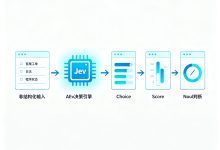
Day 7 我们完成了鸿蒙端 SSE 流式通信与聊天页面。今天重构后端架构,引入 多智能体协作工作流:内容智能体负责生成高质量回答,格式智能体负责将内容转换为标准 A2UI JSON,彻底解决输出格式不稳定的问题。
0. 今日目标
| 架构重构 | 单智能体 → 双智能体协作(ContentAgent + FormatAgent) |
| 职责分离 | 内容生成与格式转换解耦,各司其职 |
| 输出规范 | 强制 A2UI JSON 格式,动态 surfaceId,避免格式错乱 |
| 工作流编排 | Sequential Pipeline:内容 → 格式,顺序执行 |
| 编码修复 | WebFlux 过滤器强制 UTF-8,彻底解决 SSE 中文乱码 |
一、问题背景:为什么需要工作流?
1.1 单智能体的问题
Day 4 的配置中,单个 Jarvis 智能体同时承担内容生成和格式转换两个职责:
// 旧配置:一个智能体干两件事
String sysPrompt = """
你是一个助手…(内容生成指令)
【模式选择规则】
1. 简单问题用 Markdown
2. 结构化数据用 Card
你必须直接输出 JSON…
""";
问题:
- 提示词过长,模型容易"遗忘"后半部分的格式要求
- 内容生成和格式转换的思维方式不同,混在一起互相干扰
- 输出格式不稳定,时而 Markdown 时而 JSON,前端解析失败
1.2 双智能体协作方案
┌─────────────────┐ ┌─────────────────┐ ┌─────────────────┐
│ 用户输入 │ ──► │ ContentAgent │ ──► │ FormatAgent │
│ "现在几点?" │ │ (内容智能体) │ │ (格式智能体) │
└─────────────────┘ └─────────────────┘ └─────────────────┘
│ │
▼ ▼
"北京时间 15:30" {"version":"v0.9",…}
│
▼
SSE 流式输出
| ContentAgent | 理解意图、生成内容、调用工具 | 纯文本/Markdown |
| FormatAgent | 将内容转换为 A2UI JSON 格式 | 标准 AG-UI JSON |
二、智能体配置:AgentConfiguration.java
2.1 内容智能体系统提示词
专注内容质量,不操心格式:
static final String CONTENT_AGENT_PROMPT = """
你是一个专业的内容生成助手。
你的职责是:
1. 理解用户的需求和意图
2. 生成高质量、准确的内容
3. 根据场景选择合适的内容形式
【输出格式要求】
– 必须使用 Markdown 格式输出内容
– 标题使用 #、##、### 等层级标记
– 列表使用 – 或 1. 2. 3. 等标记
– 重点内容使用 **加粗** 或 *斜体*
– 代码使用 `代码块` 或 ```语言 代码```标记
– 表格使用 | 列1 | 列2 | 格式
你只需要输出内容本身,不需要考虑最终展示格式。
内容将会被另一个格式助手处理成最终的展示格式。
请确保内容:
– 准确无误
– 逻辑清晰
– 语言流畅
– 适合目标受众
""";
2.2 格式智能体系统提示词
专注格式规范,强制 JSON 输出:
static final String FORMAT_AGENT_PROMPT = """
你是一个专业的格式转换助手。
你必须调用 `a2ui_generation` skill 将任何内容转换为 A2UI JSON 格式。
【绝对禁止】
– 禁止输出任何非 JSON 内容(问候语、解释、布局说明等)
– 禁止使用 Markdown 代码块标记(```json)
– 禁止在 JSON 前后添加任何文字
– 禁止自行编造 A2UI 组件结构,必须通过 skill 生成
【输出规则】
你必须直接输出 JSON,从 { 开始,到 } 结束,中间不要有任何非 JSON 内容。
【surfaceId 生成规则 – 必须严格遵守】
– 每次回复必须生成唯一的 surfaceId
– 格式:使用 "surface_" 加上当前时间戳(毫秒)或随机数
– 示例:surface_1717027200000、surface_42857
– 绝对不能使用固定的 surfaceId(如 markdown_surface)
【模式选择 – 必须严格遵守】
1. 简单问题(问候、问答、解释、建议、聊天等):必须使用 Markdown 组件展示
– 示例输出(注意 surfaceId 是动态的):
{
"version": "v0.9",
"updateComponents": {
"surfaceId": "surface_1717027200000",
"components": [
{
"id": "root",
"component": "Markdown",
"content": "# 标题\\\\n\\\\n正文内容"
}
]
}
}
2. 结构化数据展示(列表、表格、数据卡片、图表等):必须调用 `a2ui_generation` skill 生成 Card + 组件组合
– 调用 skill 时,将需要展示的内容作为 skill 参数传入
– skill 会返回符合 A2UI v0.9 规范的 JSON,你直接输出即可
⚠️ 注意:问候、打招呼、简单问答等场景,绝对不要调用 skill,必须直接输出 Markdown 组件格式!
再次强调:你的回复必须且只能包含一个合法的 JSON 对象。
""";
2.3 完整配置类
package com.example.demo;
import io.agentscope.core.ReActAgent;
import io.agentscope.core.agent.Agent;
import io.agentscope.core.memory.InMemoryMemory;
import io.agentscope.core.model.DashScopeChatModel;
import io.agentscope.core.model.Model;
import io.agentscope.core.skill.SkillBox;
import io.agentscope.core.tool.Toolkit;
import io.agentscope.spring.boot.agui.common.AguiAgentRegistryCustomizer;
import org.springframework.context.annotation.Bean;
import org.springframework.context.annotation.Configuration;
/**
* 智能体配置类
* 配置 AgentScope AG-UI 集成,支持多智能体协作
*/
@Configuration
public class AgentConfiguration {
static final String CONTENT_AGENT_PROMPT = "…"; // 上文内容
static final String FORMAT_AGENT_PROMPT = "…"; // 上文内容
/**
* 共享模型实例(避免重复创建)
*/
@Bean
Model sharedModel() {
return DashScopeChatModel.builder()
.apiKey(System.getenv("DASHSCOPE_API_KEY"))
.modelName("qwen3.7-max")
.stream(true)
.build();
}
/**
* 注册 AG-UI 智能体工厂
*/
@Bean
public AguiAgentRegistryCustomizer aguiAgentRegistryCustomizer(Model model) {
return registry -> {
registry.registerFactory("content", () -> createContentAgent(model));
registry.registerFactory("format", () -> createFormatAgent(model));
};
}
/**
* 内容智能体 Bean(供工作流注入)
*/
@Bean("contentAgent")
Agent contentAgent(Model model) {
Toolkit toolkit = new Toolkit();
toolkit.registerTool(new AgentTools());
return ReActAgent.builder()
.name("ContentAgent")
.sysPrompt(CONTENT_AGENT_PROMPT)
.model(model)
.toolkit(toolkit)
.skillBox(new SkillBox(toolkit))
.memory(new InMemoryMemory())
.build();
}
/**
* 格式智能体 Bean(供工作流注入)
*/
@Bean("formatAgent")
Agent formatAgent(Model model) {
Toolkit toolkit = new Toolkit();
toolkit.registerTool(new AgentTools());
SkillBox skillBox = new SkillBox(toolkit);
skillBox.registerSkill(AgentSkills.createA2UIGenerationSkill());
return ReActAgent.builder()
.name("FormatAgent")
.sysPrompt(FORMAT_AGENT_PROMPT)
.model(model)
.toolkit(toolkit)
.skillBox(skillBox)
.memory(new InMemoryMemory())
.build();
}
}
三、工作流编排:WorkflowConfiguration.java
3.1 Sequential Pipeline 模式
用户输入 ──► ContentAgent.call() ──► 收集完整内容 ──► FormatAgent.call() ──► A2UI JSON
(流式输出) (reduce聚合) (流式输出)
3.2 完整实现
package com.example.demo;
import io.agentscope.core.agent.Agent;
import io.agentscope.core.message.Msg;
import org.springframework.context.annotation.Bean;
import org.springframework.context.annotation.Configuration;
import reactor.core.publisher.Flux;
import reactor.core.publisher.Mono;
/**
* 工作流编排配置类
* Sequential Pipeline:内容智能体 → 格式智能体
*/
@Configuration
public class WorkflowConfiguration {
@Bean
public WorkflowPipelineService workflowPipelineService(Agent contentAgent, Agent formatAgent) {
return new WorkflowPipelineService(contentAgent, formatAgent);
}
/**
* 工作流 Pipeline 服务
*/
public static class WorkflowPipelineService {
private final Agent contentAgent;
private final Agent formatAgent;
public WorkflowPipelineService(Agent contentAgent, Agent formatAgent) {
this.contentAgent = contentAgent;
this.formatAgent = formatAgent;
}
/**
* 同步执行(非流式,返回完整结果)
*/
public Mono<String> executeSequential(String userInput) {
return contentAgent.call(Msg.builder().textContent(userInput).build())
.flatMap(contentResponse -> {
String generatedContent = contentResponse != null
? contentResponse.getTextContent()
: "";
return formatAgent.call(Msg.builder()
.textContent("请将以下内容转换为 A2UI 格式:\\n\\n" + generatedContent)
.build())
.map(formatResponse -> formatResponse != null
? formatResponse.getTextContent()
: "");
});
}
/**
* 流式执行(SSE,ContentAgent 聚合后 FormatAgent 流式输出)
*/
public Flux<String> executeSequentialStream(String userInput) {
// 第一步:ContentAgent 流式生成,聚合为完整内容
return contentAgent.call(Msg.builder().textContent(userInput).build())
.flux()
.filter(response -> response != null && response.getTextContent() != null)
.map(Msg::getTextContent)
.reduce("", String::concat) // 聚合所有流式片段
// 第二步:FormatAgent 将完整内容转换为 A2UI,流式输出
.flatMapMany(generatedContent ->
formatAgent.call(Msg.builder()
.textContent("请将以下内容转换为 A2UI 格式:\\n\\n" + generatedContent)
.build())
.flux()
.filter(response -> response != null && response.getTextContent() != null)
.map(Msg::getTextContent)
);
}
}
}
3.3 工作流对比
| 同步 | executeSequential | 简单请求、调试 | 等待完整结果后返回 |
| 流式 | executeSequentialStream | 生产环境、用户体验好 | ContentAgent 聚合后,FormatAgent 流式输出 |
注意:当前流式实现中 ContentAgent 是聚合后再传给 FormatAgent的,所以用户会看到"等待 → 一次性输出"的体验。如需更细粒度的流式感,可将 ContentAgent 的流式片段实时推送给前端,最后再由 FormatAgent 输出最终 JSON。
四、聊天控制器:ChatController.java
4.1 新接口
package com.example.demo;
import io.agentscope.core.agui.registry.AguiAgentRegistry;
import org.springframework.http.codec.ServerSentEvent;
import org.springframework.web.bind.annotation.PostMapping;
import org.springframework.web.bind.annotation.RequestParam;
import org.springframework.web.bind.annotation.RestController;
import reactor.core.publisher.Flux;
import reactor.core.publisher.Mono;
/**
* 聊天控制器
* 支持多智能体协作工作流
*/
@RestController
public class ChatController {
private final AguiAgentRegistry agentRegistry;
private final WorkflowConfiguration.WorkflowPipelineService workflowPipelineService;
public ChatController(AguiAgentRegistry agentRegistry,
WorkflowConfiguration.WorkflowPipelineService workflowPipelineService) {
this.agentRegistry = agentRegistry;
this.workflowPipelineService = workflowPipelineService;
}
/**
* 多智能体协作接口(工作流编排)
* POST /chat
*
* 流程:ContentAgent 生成内容 → FormatAgent 转换为 A2UI JSON
*/
@PostMapping(value = "/chat", produces = "text/event-stream;charset=UTF-8")
public Flux<ServerSentEvent<String>> chatCollaborate(
@RequestParam(defaultValue = "你好!现在北京时间几点?") String message) {
return workflowPipelineService.executeSequentialStream(message)
.map(text -> ServerSentEvent.<String>builder()
.event("message")
.data(text)
.build())
.concatWith(Mono.just(
ServerSentEvent.<String>builder()
.event("done")
.data("[DONE]")
.build()
));
}
}
4.2 接口变更
| GET /chat/stream | POST /chat | 改为 POST,更符合语义 |
| agentId=jarvis | 无需指定 | 工作流自动调度 Content + Format |
| 单智能体 | 双智能体协作 | 内容质量与格式稳定性大幅提升 |
五、编码修复:WebFlux UTF-8 过滤器
5.1 问题
SSE 流式输出中文时出现乱码,即使 application.yml 已配置 UTF-8。
5.2 根因
Spring WebFlux 的 MediaType.TEXT_EVENT_STREAM 默认不包含 charset=UTF-8,浏览器/客户端按系统默认编码解析。
5.3 修复方案
添加 WebFlux 过滤器,强制 SSE 响应头包含 UTF-8:
package com.example.demo;
import org.springframework.context.annotation.Bean;
import org.springframework.context.annotation.Configuration;
import org.springframework.http.MediaType;
import org.springframework.web.server.WebFilter;
import org.springframework.web.server.ServerWebExchange;
import org.springframework.web.server.WebFilterChain;
import reactor.core.publisher.Mono;
/**
* WebFlux 编码过滤器
* 强制所有 SSE 响应使用 UTF-8 编码
*/
@Configuration
public class WebFluxConfig {
@Bean
public WebFilter encodingFilter() {
return (ServerWebExchange exchange, WebFilterChain chain) -> {
String contentType = exchange.getResponse().getHeaders().getFirst("Content-Type");
if (contentType != null && contentType.contains("text/event-stream")) {
exchange.getResponse().getHeaders().setContentType(
MediaType.parseMediaType("text/event-stream;charset=UTF-8")
);
}
return chain.filter(exchange);
};
}
}
5.4 验证
curl -N -X POST "http://localhost:8080/chat?message=你好" \\
-H "Accept: text/event-stream"
# 响应头应包含:
# Content-Type: text/event-stream;charset=UTF-8
六、Day 8 小结
| ContentAgent + FormatAgent 双智能体配置 | ✅ |
| Sequential Pipeline 工作流编排 | ✅ |
| 动态 surfaceId 生成规则 | ✅ |
| A2UI JSON 格式强制规范 | ✅ |
| WebFlux UTF-8 编码过滤器 | ✅ |
| POST /chat 新接口 | ✅ |
七、输出对比
旧输出(单智能体,不稳定)
// 有时输出 Markdown
你好!当前北京时间是 15:30。
// 有时输出 JSON,但格式错乱
```json
{"version":"v0.9", …}
// 有时 surfaceId 固定,导致前端冲突
{“updateComponents”:{“surfaceId”:“markdown_surface”,…}}
### 新输出(双智能体,稳定)
```json
// 统一标准 A2UI JSON,动态 surfaceId
{
"version": "v0.9",
"updateComponents": {
"surfaceId": "surface_1717027200000",
"components": [
{
"id": "root",
"component": "Markdown",
"content": "# 北京时间\\n\\n当前时间:**15:30**\\n\\n…"
}
]
}
}
八、下一步(Day 9 预告)
提示:
- 双智能体模式增加了 LLM 调用次数(2 次),成本相应增加,但输出稳定性大幅提升
- 如需降低成本,可将 FormatAgent 替换为规则引擎(模板渲染),但灵活性下降
- surfaceId 必须唯一,建议使用 System.currentTimeMillis() 或 UUID 生成