⭐ 本文内容:了解 Spring AI 结构化输出与原生结构化输出,同时对二者的使用有最佳实践方式。
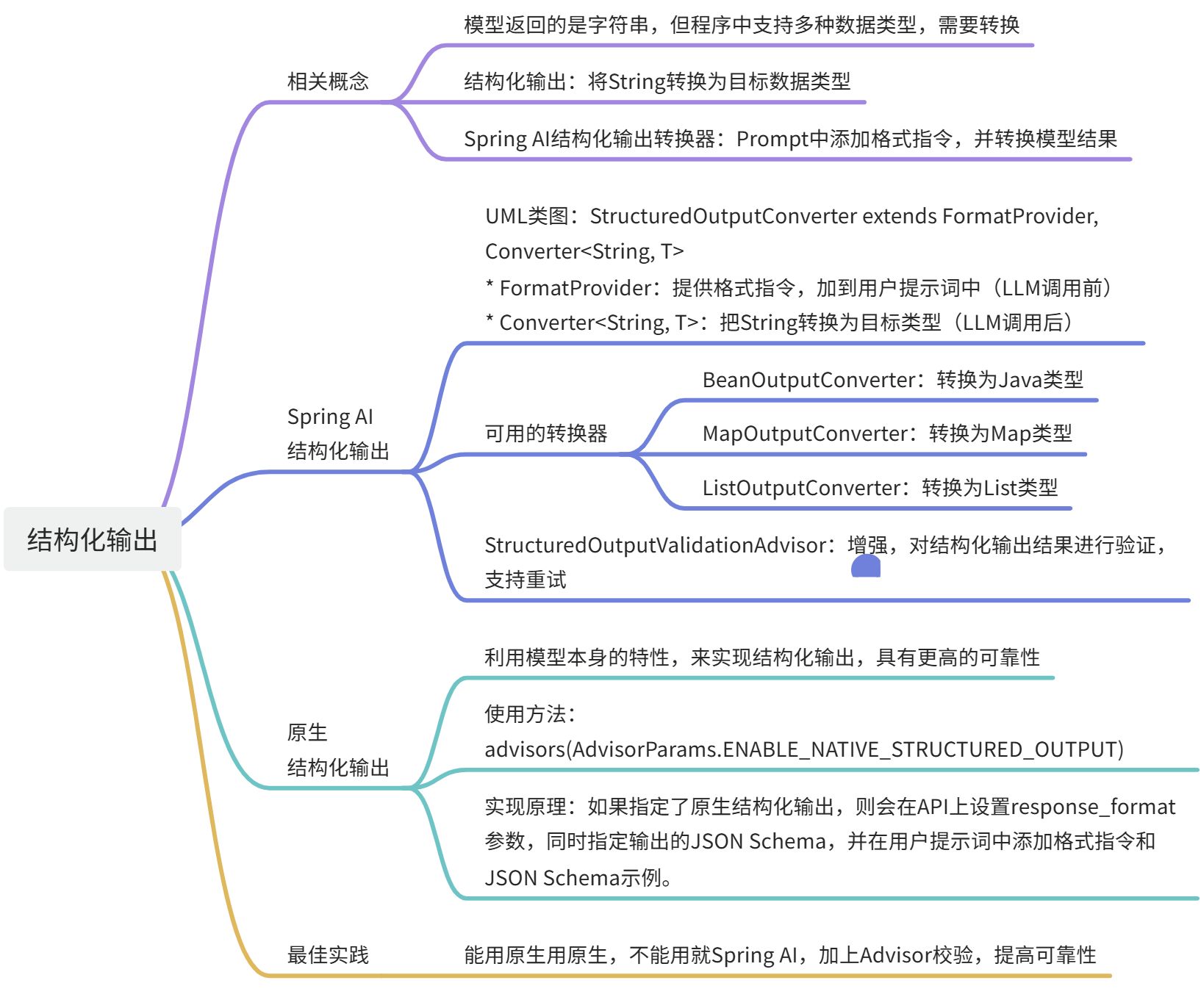
相关概念
🤒 AI 模型的输出,通常以字符串(String)的形式返回。如果我们要求 AI 返回 JSON 格式,那么返回的数据只是个字符串,不一定是个 JSON 数据结构。
🚩 结构化输出(String -> 目标数据结构):上述复杂性导致了一个专门领域的出现,涉及创建 Prompt 以产生预期的输出,然后将生成的字符串转换为可用于应用程序集成的数据结构。
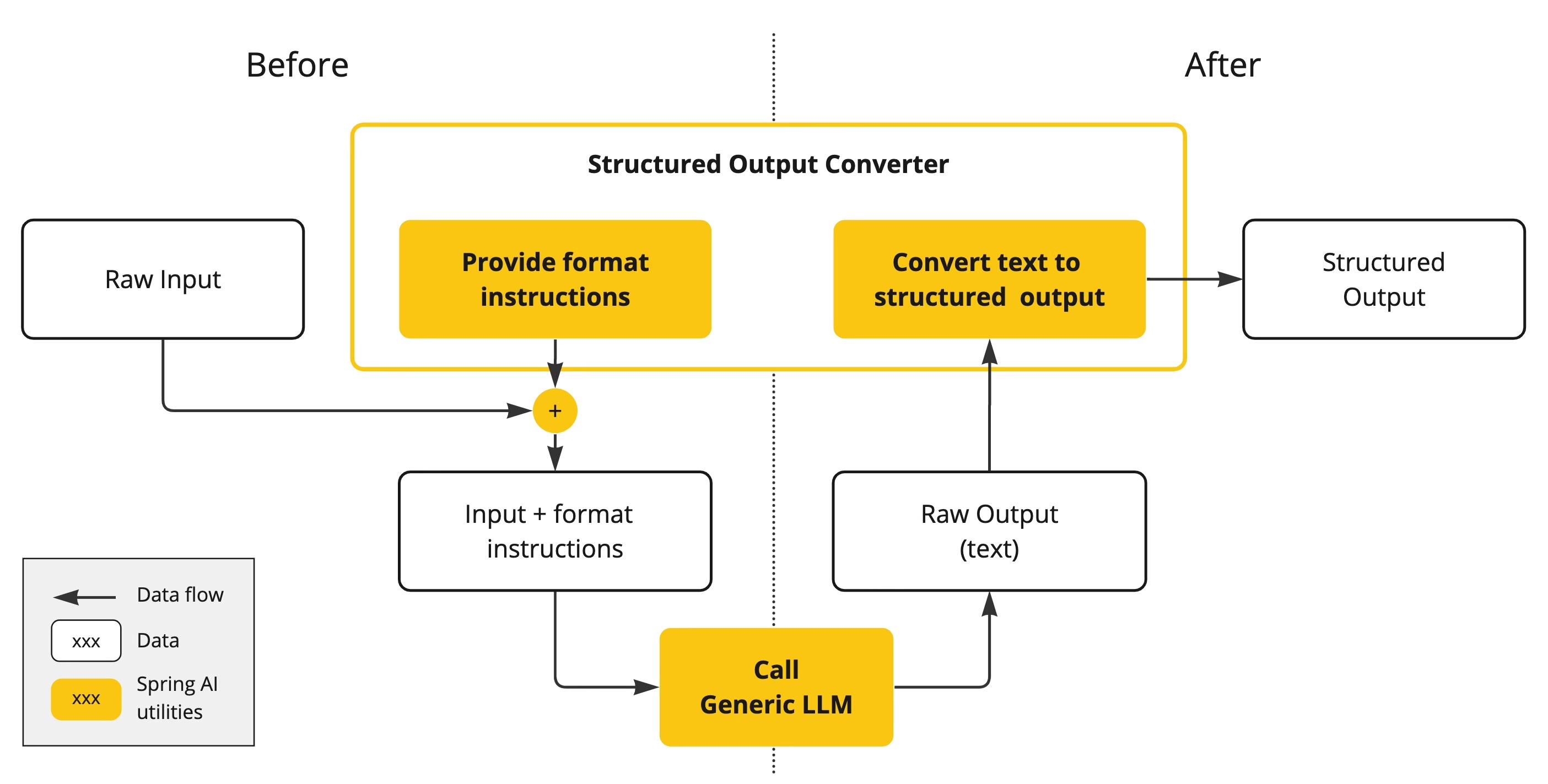
🚀 Spring AI 结构化输出转换器(Structured Output Converter):帮助将 LLM 输出结果转换为一个结构化的格式。其在 LLM 调用前后扮演着重要角色,确保能够实现预期的数据结构。
- LLM 调用前:转换器会在 prompt 提示词中添加格式指令,为模型生成所需的输出结构提供明确的知道。这些作为蓝图,引导模型的响应以符合特定的格式。
- LLM 调用后:转换器会拿到 LLM 返回的字符串,然后利用转换器,将其转换为目标结构类型(比如 JSON、XML、指定的类等)。
:::color1 🤒 加了转换器,就一定能拿到预期的数据结构吗?
不是 100%能!因为模型不一定能理解 Prompt 中的格式指令。所以我们必须加个校验机制,判断是否返回了预期的数据结构。
:::
Spring AI – 结构化输出 转换器
以下是 Spring AI 提供的结构化输出解决方案。通过在 LLM 调用前添加 Prompt 提示词,并在 LLM 调用后通过转换器将字符串输出转换为预期的类型。
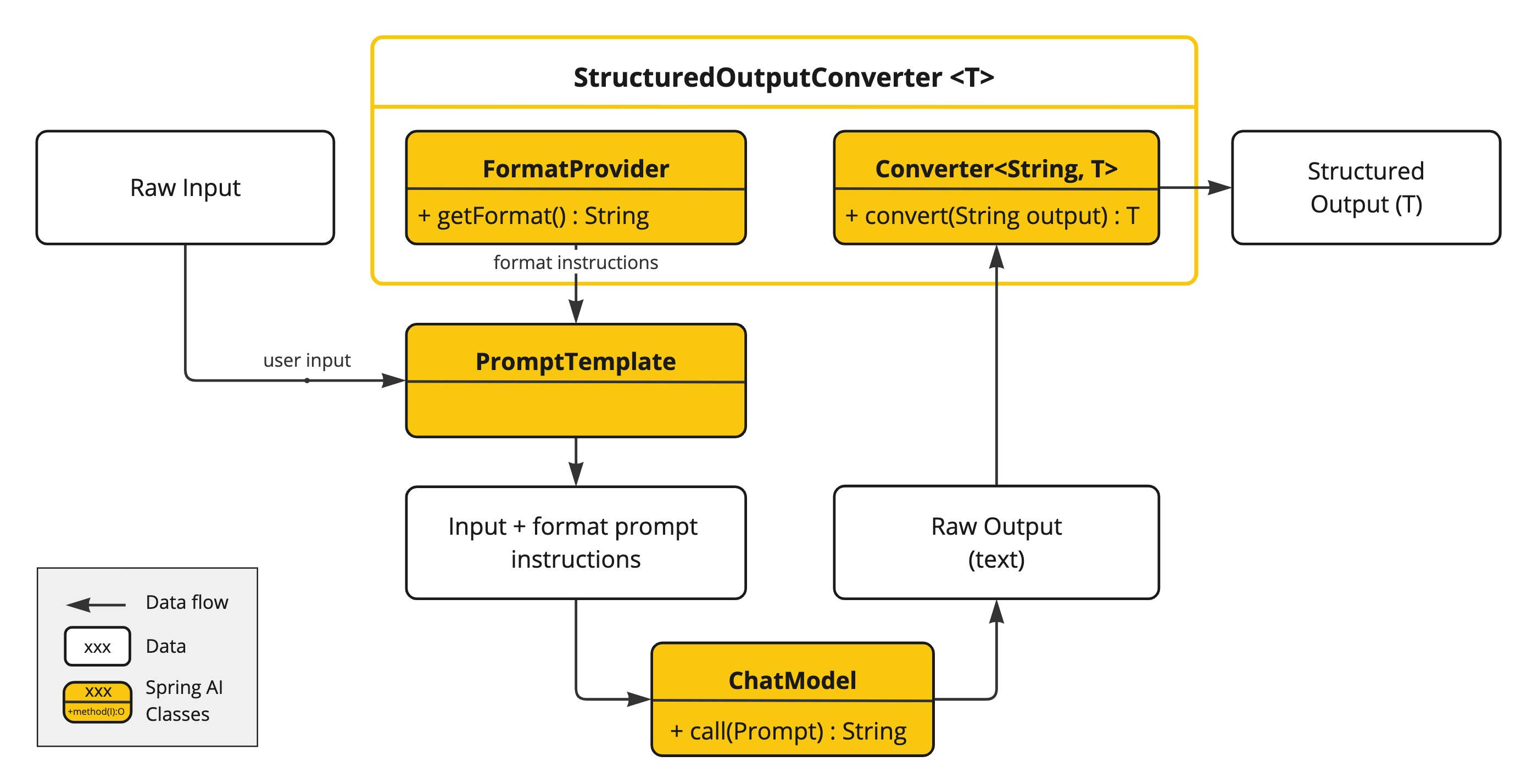
UML 类图
StructuredOutputConverter 是 Spring AI 结构化输出的核心 API 接口,其 extends 于 FormatProvider(LLM 调用前)和 Converter<String, T>(LLM 调用后),前者则是定义在 Prompt 提示词中添加的格式指令,后者提供将模型的字符串返回转换为目标类型。
可用的转换器
StructuredOutputConverter共有 5 个实现类,如下标黄部分:
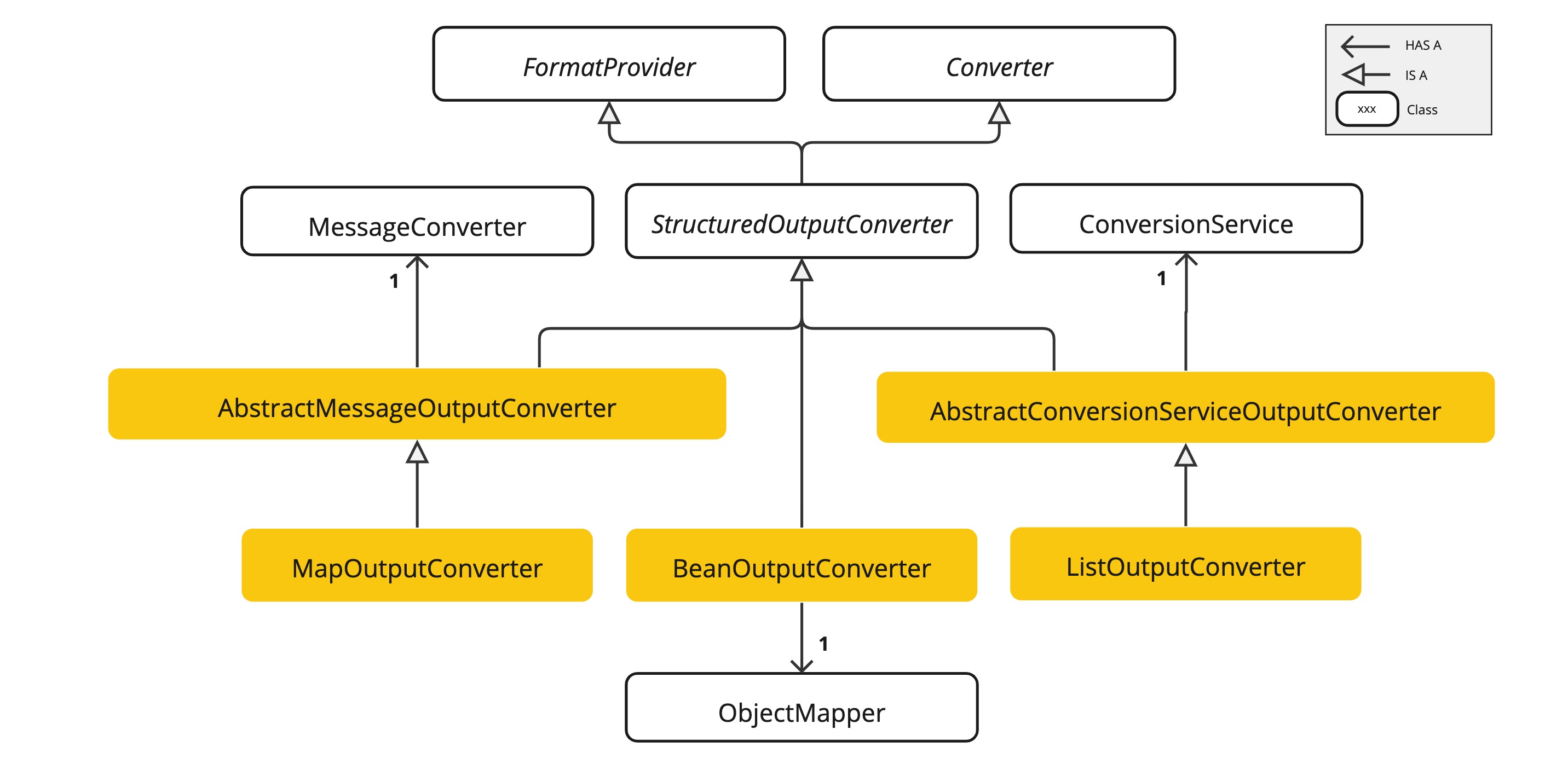
两个抽象类:
1、AbstractConversionServiceOutputConverter<T>提供了一个预配置的通用转换服务(ConversionService 接口,spring-core 包提供,默认实现类 DefaultConversionService)。不提供 FormatProvider实现。
2、AbstractMessageOutputConverter<T>提供了一个预配置的消息转换器(MessageConverter 接口,spring-messageing 包提供)。不提供 FormatProvider实现。
三个实现类:
1、**BeanOutputConverter<T>**配置指定的 Java 类(例如 Bean)或 ParameterizedTypeReference。FormatProvider 实现会指示 AI 模型生成一个符合 DRAFT_2020_12 的 JSON 响应,这个响应基于指定的 Json 类派生的 JSON Schema。之后,会使用 ObjectMapper 将模型返回的 JSON 输出字符串反序列化为目标类的 Java 对象实例。**生成 JSON Schema 时,支持使用 ****@JsonProperty(required=true)****注解和 ****@JsonPropertyOrder**注解。【本质上,模型调用前告知模型要返回 JSON,且提供 JSON Schema。模型调用后,利用 ObjectMapper 将其反序列化为 Java 对象】
2、**MapOutputConverter**提供 FormatProvider实现来指导 AI 模型生成符合 RFC8259 标准的 JSON 响应。之后,会利用 MessageConverter将 JSON 转换为java.util.Map<String, Object>实例。【本质上,调用调用前告知模型要返回 JSON,且提供 JSON Schema。模型调用后,利用**MessageConverter**将 JSON 转换为 Map 对象】
3、ListOutputConverter提供一个专为逗号分隔列表输出设计的FormatProvider实现,并使用 ConversionService将 JSON 字符串转换为 java.util.List对象。【本质上,调用调用前告知模型要返回 JSON,且提供 JSON Schema。模型调用后,利用**ConversionService**将 JSON 转换为 List 对象】
BeanOutputConverter
源码解读
关键点 1:**FormatProvider**实现,返回 JSON,并提供 JSON Schema。JSON Schema 中支持使用@JsonProperty(required=true) 注解指定属性是否必填,支持使用 @JsonPropertyOrder注解指定 JSON 属性的出现顺序。
/**
* Generates the JSON schema for the target type.
*/
private void generateSchema() {
JacksonModule jacksonModule = new JacksonModule(JacksonOption.RESPECT_JSONPROPERTY_REQUIRED,
JacksonOption.RESPECT_JSONPROPERTY_ORDER);
SchemaGeneratorConfigBuilder configBuilder = new SchemaGeneratorConfigBuilder(
com.github.victools.jsonschema.generator.SchemaVersion.DRAFT_2020_12,
com.github.victools.jsonschema.generator.OptionPreset.PLAIN_JSON)
.with(jacksonModule)
.with(Option.FORBIDDEN_ADDITIONAL_PROPERTIES_BY_DEFAULT);
configBuilder.forFields().withRequiredCheck(f -> true);
if (KotlinDetector.isKotlinReflectPresent()) {
configBuilder.with(new KotlinModule());
}
SchemaGeneratorConfig config = configBuilder.build();
SchemaGenerator generator = new SchemaGenerator(config);
JsonNode jsonNode = generator.generateSchema(this.type);
ObjectWriter objectWriter = this.objectMapper.writer(new DefaultPrettyPrinter()
.withObjectIndenter(new DefaultIndenter().withLinefeed(System.lineSeparator())));
try {
this.jsonSchema = objectWriter.writeValueAsString(jsonNode);
}
catch (JsonProcessingException e) {
logger.error("Could not pretty print json schema for jsonNode: {}", jsonNode);
throw new RuntimeException("Could not pretty print json schema for " + this.type, e);
}
}
/**
* Provides the expected format of the response, instructing that it should adhere to
* the generated JSON schema.
* @return The instruction format string.
*/
@Override
public String getFormat() {
String template = """
Your response should be in JSON format.
Do not include any explanations, only provide a RFC8259 compliant JSON response following this format without deviation.
Do not include markdown code blocks in your response.
Remove the ```json markdown from the output.
Here is the JSON Schema instance your output must adhere to:
```%s```
""";
return String.format(template, this.jsonSchema);
}
关键点 2:将模型输出的 JSON 字符串,通过 ObjectMapper 反序列化为 Bean。
/**
* Parses the given text to transform it to the desired target type.
* @param text The LLM output in string format.
* @return The parsed output in the desired target type.
*/
@SuppressWarnings("unchecked")
@Override
public T convert(@NonNull String text) {
try {
// Clean the text using the configured text cleaner
text = this.textCleaner.clean(text);
return (T) this.objectMapper.readValue(text, this.objectMapper.constructType(this.type));
}
catch (JsonProcessingException e) {
logger.error(SENSITIVE_DATA_MARKER,
"Could not parse the given text to the desired target type: \\"{}\\" into {}", text, this.type);
throw new RuntimeException(e);
}
}
使用示例
使用 entity 方法指定 Java 类或者使用 ParameterizedTypeReference 引用即可。
@GetMapping("/demo1")
@ResponseBody
public Movies simpleChat() {
Prompt prompt = new Prompt("你好,帮我找下成龙的5部高分电影", OpenAiChatOptions.builder()
.temperature(0.7)
.build());
return chatClient.prompt(prompt).call().entity(Movies.class);
}
@JsonPropertyOrder({"actor", "movieNames"})
public record Movies(@JsonProperty(required = true) String actor,
@JsonProperty(required = true) List<String> movieNames) {
}
传递的 Format 提示词:可以看到,按指定顺序。
Your response should be in JSON format.
Do not include any explanations, only provide a RFC8259 compliant JSON response following this format without deviation.
Do not include markdown code blocks in your response.
Remove the ```json markdown from the output.
Here is the JSON Schema instance your output must adhere to:
```{
"$schema" : "https://json-schema.org/draft/2020-12/schema",
"type" : "object",
"properties" : {
"actor" : {
"type" : "string"
},
"movieNames" : {
"type" : "array",
"items" : {
"type" : "string"
}
}
},
"required" : [ "actor", "movieNames" ],
"additionalProperties" : false
}```
}]
最终效果:
- 模型返回字符串:"{\\n \\"actor\\": \\"成龙\\",\\n \\"movieNames\\": [\\"警察故事\\", \\"A计划\\", \\"醉拳\\", \\"红番区\\", \\"我是谁\\"]\\n}"
- 转换后的 JSON:

MapOutputConverter
源码解读
关键点 1:**FormatProvider**实现,要求返回 JSON(RFC8259 格式)。
@Override
public String getFormat() {
String raw = """
Your response should be in JSON format.
The data structure for the JSON should match this Java class: %s
Do not include any explanations, only provide a RFC8259 compliant JSON response following this format without deviation.
Remove the ```json markdown surrounding the output including the trailing "```".
""";
return String.format(raw, HashMap.class.getName());
}
关键点 2:将模型输出的 JSON 字符串,通过 MessageConverter 转换为 Map。
@Override
public Map<String, Object> convert(@NonNull String text) {
if (text.startsWith("```json") && text.endsWith("```")) {
text = text.substring(7, text.length() – 3);
}
Message<?> message = MessageBuilder.withPayload(text.getBytes(StandardCharsets.UTF_8)).build();
return (Map) this.getMessageConverter().fromMessage(message, HashMap.class);
}
使用示例
很简单,直接使用 ParameterizedTypeReference 引用即可。需引导模型,告知 Map 中 value 是什么,key 是什么。
@GetMapping("/demo2")
@ResponseBody
public Map<String, Object> simpleChat2() {
Prompt prompt = new Prompt("你好,帮我找下成龙的5部高分电影,key是电影名称,value是评分", OpenAiChatOptions.builder()
.temperature(0.7)
.build());
return chatClient.prompt(prompt).call().entity(new ParameterizedTypeReference<Map<String, Object>>() {});
}
生成的 JSON Schema:
Your response should be in JSON format.
Do not include any explanations, only provide a RFC8259 compliant JSON response following this format without deviation.
Do not include markdown code blocks in your response.
Remove the ```json markdown from the output.
Here is the JSON Schema instance your output must adhere to:
```{
"$schema" : "https://json-schema.org/draft/2020-12/schema",
"type" : "object",
"additionalProperties" : false
}```
}]
最终效果:
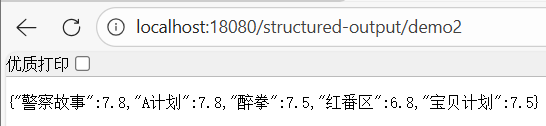
- 模型返回字符串:"{\\r\\n \\"警察故事\\": 7.8,\\r\\n \\"A计划\\": 7.8,\\r\\n \\"醉拳\\": 7.5,\\r\\n \\"红番区\\": 6.8,\\r\\n \\"宝贝计划\\": 7.5\\r\\n}"
- 转换后的 Map:
ListOutputConverter
源码解读
关键点 1:**FormatProvider**实现,要求逗号分隔来返回。
@Override
public String getFormat() {
return """
Respond with only a list of comma-separated values, without any leading or trailing text.
Example format: foo, bar, baz
""";
}
关键点 2:将模型输出的 JSON 字符串,通过 ConversionService 转换为 List。
@Override
public List<String> convert(@NonNull String text) {
return this.getConversionService().convert(text, List.class);
}
使用示例
很简单,和 Map 一样,使用 ParameterizedTypeReference 引用即可。
@GetMapping("/demo3")
@ResponseBody
public List<String> simpleChat3() {
Prompt prompt = new Prompt("你好,帮我找下成龙的5部高分电影", OpenAiChatOptions.builder()
.temperature(0.7)
.build());
return chatClient.prompt(prompt).call().entity(new ParameterizedTypeReference<List<String>>() {});
}
生成的 JSON Schema:
Your response should be in JSON format.
Do not include any explanations, only provide a RFC8259 compliant JSON response following this format without deviation.
Do not include markdown code blocks in your response.
Remove the ```json markdown from the output.
Here is the JSON Schema instance your output must adhere to:
```{
"$schema" : "https://json-schema.org/draft/2020-12/schema",
"type" : "array",
"items" : {
"type" : "string"
}
}```
}]
最终效果:
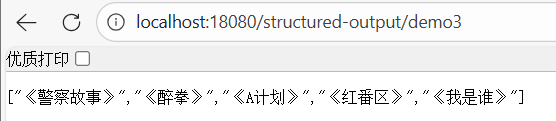
- 模型返回字符串:"[\\"《警察故事》\\",\\"《醉拳》\\",\\"《A计划》\\",\\"《红番区》\\",\\"《我是谁》\\"]"
- 转换后的 List:
StructuredOutputValidationAdvisor
由于模型并非稳定返回相同结果,所以如果返回了错误结果,程序就会报错(无法转换)。
解决办法:**使用 ****StructuredOutputValidationAdvisor**增强结构化输出的体验,其会校验输出结构能否转换为预期的格式,如果失败,支持重试几次。
@GetMapping("/demo4")
@ResponseBody
public Movies simpleChat4() {
Prompt prompt = new Prompt("你好,帮我找下成龙的5部高分电影", OpenAiChatOptions.builder()
.temperature(0.7)
.build());
return chatClient.prompt(prompt)
.advisors(StructuredOutputValidationAdvisor.builder().outputType(Movies.class).maxRepeatAttempts(3).build())
.call()
.entity(Movies.class);
}
原生 – 结构化输出(Native Structured Output)
相关概念
目前很多 AI 模型支持了原生结构化输出,比如 DeepSeek、OpenAI 等。
使用原生结构化输出时,BeanOutputConverter生成的 JSON Schema 会直接发送到模型的结构化输出 API,从而消除提示词中的格式说明。其具有如下优势:
- 更可靠:通过模型来保证输出符合方案规范。
- 更简洁的提示词:不需要添加额外的格式指令。
- 更好性能:模型自身在内部优化结构化输出。
使用方式
通过 Advisor 参数来实现,即 AdvisorParams.ENABLE_NATIVE_STRUCTURED_OUTPUT。
@GetMapping("/demo5")
@ResponseBody
public Movies simpleChat5() {
Prompt prompt = new Prompt("你好,帮我找下成龙的5部高分电影", OpenAiChatOptions.builder()
.temperature(0.7)
.build());
return chatClient.prompt(prompt)
.advisors(AdvisorParams.ENABLE_NATIVE_STRUCTURED_OUTPUT)
.advisors(StructuredOutputValidationAdvisor.builder().outputType(Movies.class).maxRepeatAttempts(3).build())
.call()
.entity(Movies.class);
}
加入上述配置后,即可看到请求中添加了如下上下文配置:
- spring.ai.chat.client.structured.output.native=true
- spring.ai.chat.client.output.format=xxx
ChatClientRequest[prompt=Prompt{messages=[UserMessage{content='你好,帮我找下成龙的5部高分电影', metadata={messageType=USER}, messageType=USER}], modelOptions=OpenAiChatOptions: {"streamUsage":false,"temperature":0.7}}, context={spring.ai.chat.client.structured.output.schema={
"$schema" : "https://json-schema.org/draft/2020-12/schema",
"type" : "object",
"properties" : {
"actor" : {
"type" : "string"
},
"movieNames" : {
"type" : "array",
"items" : {
"type" : "string"
}
}
},
"required" : [ "actor", "movieNames" ],
"additionalProperties" : false
}, spring.ai.chat.client.structured.output.native=true, spring.ai.chat.client.output.format=Your response should be in JSON format.
Do not include any explanations, only provide a RFC8259 compliant JSON response following this format without deviation.
Do not include markdown code blocks in your response.
Remove the ```json markdown from the output.
Here is the JSON Schema instance your output must adhere to:
```{
"$schema" : "https://json-schema.org/draft/2020-12/schema",
"type" : "object",
"properties" : {
"actor" : {
"type" : "string"
},
"movieNames" : {
"type" : "array",
"items" : {
"type" : "string"
}
}
},
"required" : [ "actor", "movieNames" ],
"additionalProperties" : false
}```
}]
如果没有使用原生结构化输出,则不会添加上述两个上下文配置项。
ChatClientRequest[prompt=Prompt{messages=[UserMessage{content='你好,帮我找下成龙的5部高分电影', metadata={messageType=USER}, messageType=USER}], modelOptions=OpenAiChatOptions: {"streamUsage":false,"temperature":0.7}}, context={spring.ai.chat.client.output.format=Your response should be in JSON format.
Do not include any explanations, only provide a RFC8259 compliant JSON response following this format without deviation.
Do not include markdown code blocks in your response.
Remove the ```json markdown from the output.
Here is the JSON Schema instance your output must adhere to:
```{
"$schema" : "https://json-schema.org/draft/2020-12/schema",
"type" : "object",
"properties" : {
"actor" : {
"type" : "string"
},
"movieNames" : {
"type" : "array",
"items" : {
"type" : "string"
}
}
},
"required" : [ "actor", "movieNames" ],
"additionalProperties" : false
}```
}]
源码解读
下面,从源码角度来看整个原生结构化输出的实现原理。
如何设置的原生结构化输出?
以 DeepSeek API 调用为例,其会在请求体设置 response_format 来实现原生的结构化输出能力。
现在的例子中,我使用的是 spring-ai-starter-model-openai,所以本质上来说,也与上述请求参数类似,毕竟 DeepSeek API 是兼容 OpenAI API 的。
response = client.chat.completions.create(
model="deepseek-chat",
messages=messages,
response_format={
'type': 'json_object'
}
)
所以,后续就会朝着这个方向去分析。
源码调试
为什么加个 AdvisorParams.ENABLE_NATIVE_STRUCTURED_OUTPUT就能生效?在 AdvisorParams中类可以看到引用了 ChatClientAttributes中的配置项,并设置值为 true。
public final class AdvisorParams {
public static final Consumer<ChatClient.AdvisorSpec> ENABLE_NATIVE_STRUCTURED_OUTPUT = a -> a
.param(ChatClientAttributes.STRUCTURED_OUTPUT_NATIVE.getKey(), true);
}
public enum ChatClientAttributes {
OUTPUT_FORMAT("spring.ai.chat.client.output.format"),
STRUCTURED_OUTPUT_SCHEMA("spring.ai.chat.client.structured.output.schema"),
STRUCTURED_OUTPUT_NATIVE("spring.ai.chat.client.structured.output.native");
private final String key;
// …
}
利用 spring.ai.chat.client.structured.output.native作为关键字,在 ChatModelCallAdvisor中找了实现代码:
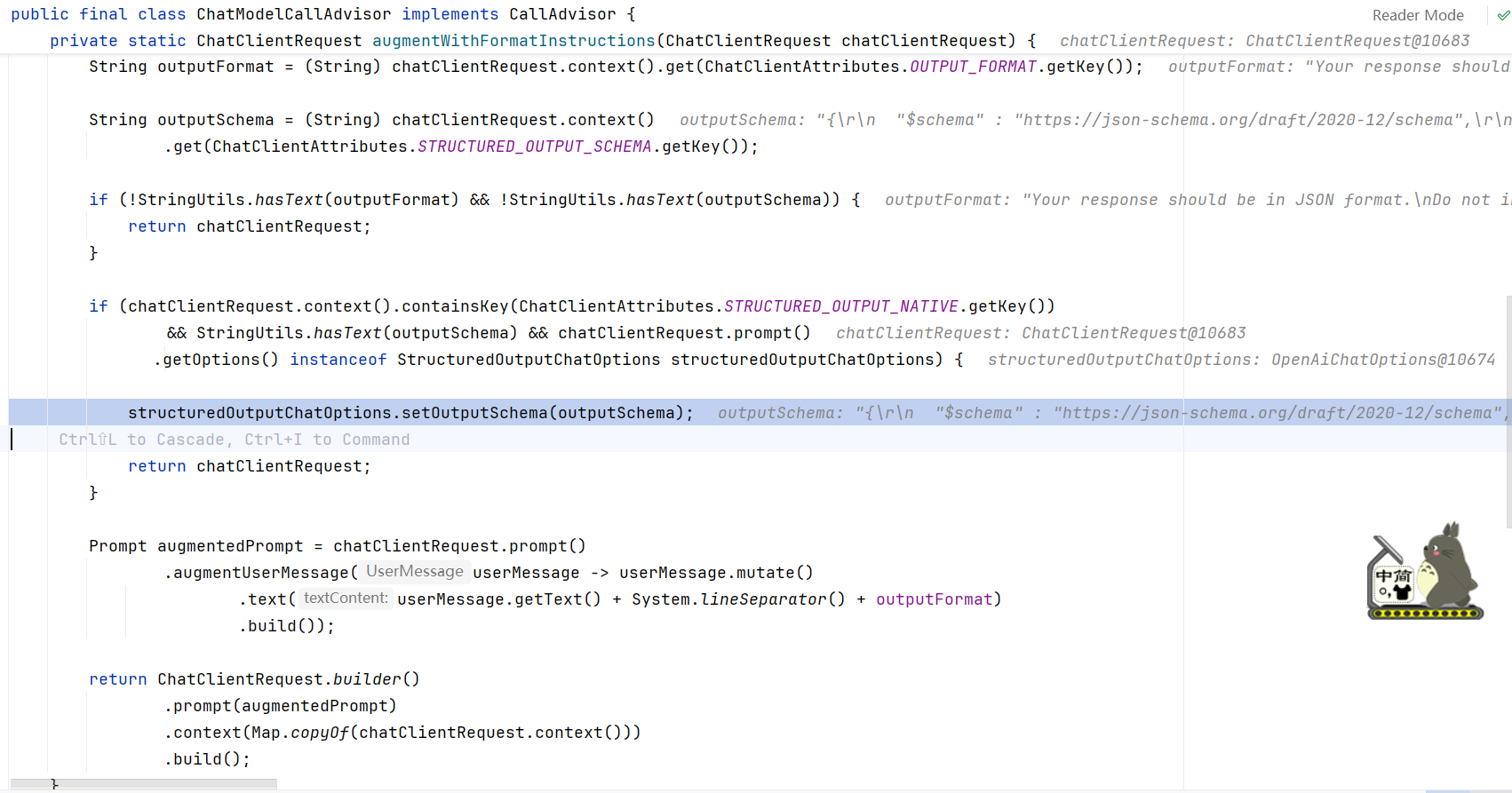
其实现原理如下:
1、先了解这三个配置的含义
- spring.ai.chat.client.structured.output.native是否开启原生结构化输出,默认 false。
- spring.ai.chat.client.structured.output.schema原生结构化输出的 JSON Schema。会说明有哪些属性,属性类型、是否必填等信息。
- spring.ai.chat.client.output.format输出格式,会在用户提示词上追加。告诉大模型要返回什么样的输出格式。
2、再看实现原理
- 如果 spring.ai.chat.client.structured.output.native=true,即使用原生结构化输出。则设置 spring.ai.chat.client.structured.output.schema。
- 然后,将 spring.ai.chat.client.output.format添加到用户 Prompt 中。
3、outputSchema:仅仅是一个 JSON Schema
{
"$schema" : "https://json-schema.org/draft/2020-12/schema",
"type" : "object",
"properties" : {
"actor" : {
"type" : "string"
},
"movieNames" : {
"type" : "array",
"items" : {
"type" : "string"
}
}
},
"required" : [ "actor", "movieNames" ],
"additionalProperties" : false
}
4、outputFormat:包含提示词,以及 JSON Schema。
Your response should be in JSON format.
Do not include any explanations, only provide a RFC8259 compliant JSON response following this format without deviation.
Do not include markdown code blocks in your response.
Remove the ```json markdown from the output.
Here is the JSON Schema instance your output must adhere to:
```{
"$schema" : "https://json-schema.org/draft/2020-12/schema",
"type" : "object",
"properties" : {
"actor" : {
"type" : "string"
},
"movieNames" : {
"type" : "array",
"items" : {
"type" : "string"
}
}
},
"required" : [ "actor", "movieNames" ],
"additionalProperties" : false
}```
5、Debug 效果
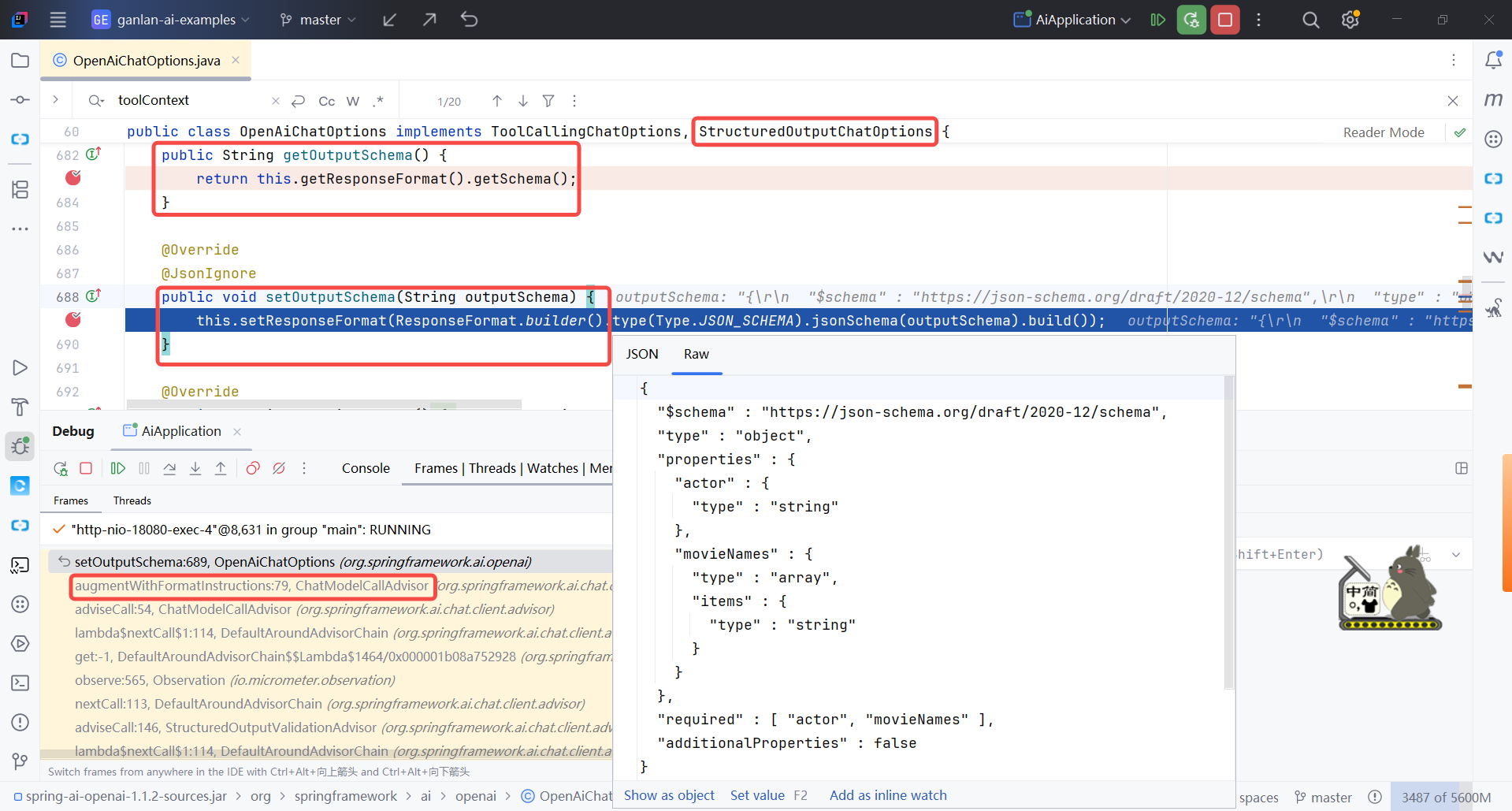
原生结构化输出,是不是非常简单!🚀
最佳实践
1、如果模型支持原生结构化输出,那么一定首选原生实现。因为可靠性高,但不是 100%可靠。
2、如果模型不支持原生结构化输出,那么就使用 Spring AI 的结构化输出实现。
3、不管是原始还是 Spring AI 的结构化输出,建议添加上 StructuredOutputValidationAdvisor,实现可靠性的提高。
StructuredOutputValidationAdvisor.builder().outputType(Movies.class).maxRepeatAttempts(3).build();
至此,结构化输出介绍完毕!🚀🚀🚀
参考
1.https://docs.spring.io/spring-ai/reference/api/structured-output-converter.html
2.格式化输出(Structured Output)
相关博文
1.第 1 篇 Spring AI Aliaba – AI 快速体验 2.第 2 篇 Spring AI Alibaba 初体验:原来 Java 也能轻松玩转 AI Agent 3.第 3 篇 Spring AI – Model API 入门指南 4.第 4 篇 深入理解 Spring AI ChatClient:一篇就够了,比官方文档更友好 5.第 5 篇 Spring AI – Tool Calling 全面解析:从基础到高级应用 6.第 6 篇 AI调用外部工具就这么简单:Spring AI Alibaba 工具集成指南 7.第 7 篇 Spring AI 结构化输出完全指南:从原理到最佳实践