🚀
鸿蒙应用开发:从零到精通的完整实战路线
一、章节概述
✅ 学习目标
💡 核心重点
实战路线、技术要点、实战案例、学习方法与经验、未来发展趋势
⚠️ 前置基础
已完成第1-33章内容,具备鸿蒙应用开发的全流程技能,了解鸿蒙应用开发的基本概念与技术
二、鸿蒙应用开发的完整实战路线
2.1 入门阶段(0-3个月)
2.1.1 学习目标
2.1.2 学习内容
- 官方文档:《鸿蒙应用开发入门》《方舟开发框架指南》《ArkTS语言参考》
- 书籍:《鸿蒙APP开发从入门到精通》《鸿蒙应用开发实战》
- 视频课程:华为云学院《鸿蒙应用开发入门》《DevEco Studio使用指南》
- 实践练习:开发智能待办应用、天气应用、计算器应用
2.1.3 实战案例:智能待办应用
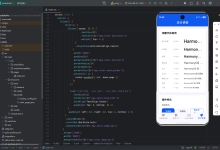
// entry/src/main/ets/pages/TodoPage.ets 智能待办应用
@Entry
@Component
struct TodoPage {
@State todos: Array<Todo> = [];
@State inputText: string = '';
aboutToAppear() {
this.loadTodos();
}
private async loadTodos() {
try {
// 调用本地存储API加载待办任务
const todosStr = await preferences.get('todos', '[]');
this.todos = JSON.parse(todosStr);
} catch (err) {
console.error(`加载待办任务失败: ${JSON.stringify(err)}`);
}
}
private async saveTodos() {
try {
// 调用本地存储API保存待办任务
await preferences.put('todos', JSON.stringify(this.todos));
await preferences.flush();
} catch (err) {
console.error(`保存待办任务失败: ${JSON.stringify(err)}`);
}
}
private addTodo() {
if (this.inputText.trim() === '') {
promptAction.showToast({ message: '请输入待办任务', duration: 2000 });
return;
}
this.todos.push({
id: Date.now().toString(),
text: this.inputText,
completed: false
});
this.inputText = '';
this.saveTodos();
}
private toggleTodo(id: string) {
const index = this.todos.findIndex(todo => todo.id === id);
if (index !== -1) {
this.todos[index].completed = !this.todos[index].completed;
this.saveTodos();
}
}
private deleteTodo(id: string) {
const index = this.todos.findIndex(todo => todo.id === id);
if (index !== -1) {
this.todos.splice(index, 1);
this.saveTodos();
}
}
build() {
Column({ space: 16 }) {
Text('智能待办应用')
.fontSize(28)
.fontWeight(FontWeight.Bold)
.fontColor(Color.Black);
Row({ space: 8 }) {
TextInput({ text: this.inputText, placeholder: '请输入待办任务' })
.width('70%')
.height(48)
.backgroundColor(Color.White)
.borderRadius(8)
.padding({ left: 12, right: 12 })
.onChange((value) => {
this.inputText = value;
})
.onSubmit(() => {
this.addTodo();
});
Button('添加')
.width('30%')
.height(48)
.backgroundColor(Color.Green)
.fontColor(Color.White)
.onClick(() => {
this.addTodo();
});
}
.width('100%');
List({ space: 12 }) {
LazyForEach(new TodoDataSource(this.todos), (item: Todo) => {
ListItem() {
Row({ space: 12 }) {
Checkbox()
.selected(item.completed)
.onChange((value) => {
this.toggleTodo(item.id);
});
Text(item.text)
.fontSize(16)
.fontColor(item.completed ? Color.Gray : Color.Black)
.textDecoration(item.completed ? TextDecorationType.LineThrough : TextDecorationType.None)
.layoutWeight(1);
Button('删除')
.width(80)
.height(40)
.backgroundColor(Color.Red)
.fontColor(Color.White)
.onClick(() => {
this.deleteTodo(item.id);
});
}
.width('100%')
.height(60)
.padding({ left: 12, right: 12 })
.backgroundColor(Color.White)
.borderRadius(8)
.shadow({ offsetX: 0, offsetY: 2, radius: 4, color: '#00000014' });
}
});
}
.width('100%')
.height('100%')
.layoutWeight(1);
}
.padding(24)
.backgroundColor(Color.White);
}
}
interface Todo {
id: string;
text: string;
completed: boolean;
}
class TodoDataSource implements IDataSource {
private todos: Array<Todo> = [];
constructor(todos: Array<Todo>) {
this.todos = todos;
}
totalCount(): number {
return this.todos.length;
}
getData(index: number): Todo {
return this.todos[index];
}
notifyDataChanged(): void {
// 数据更新时调用
}
notifyDataAdd(index: number): void {
// 数据添加时调用
}
notifyDataChange(index: number): void {
// 数据修改时调用
}
notifyDataDelete(index: number): void {
// 数据删除时调用
}
}
三、鸿蒙应用开发的技术要点
3.1 基础概念
- 方舟开发框架:提供声明式UI编程模型,支持跨设备协同工作
- ArkTS语言:基于TypeScript扩展而来,增强了类型安全与代码可读性
- ArkUI组件:提供丰富的组件库,支持自定义组件
- Ability组件:负责处理应用的生命周期、用户交互、数据处理等
- Stage模型:基于“应用-组件-页面”的三层结构,简化了应用的开发与维护
3.2 技术架构
鸿蒙应用开发的技术架构分为应用层、框架层、系统服务层、内核层。其核心特性包括:
- 应用层:负责实现应用的界面与功能
- 框架层:提供应用开发的核心框架与组件
- 系统服务层:提供系统服务与功能
- 内核层:负责管理系统的硬件与资源
3.3 全流程开发
鸿蒙应用开发的全流程包括项目创建、界面设计、代码实现、调试与测试、打包与发布。其核心要点包括:
- 项目创建:使用DevEco Studio创建鸿蒙应用项目
- 界面设计:使用ArkUI组件实现应用的界面
- 代码实现:使用ArkTS语言实现应用的功能
- 调试与测试:使用DevEco Studio的调试与测试功能
- 打包与发布:使用DevEco Studio打包应用,发布到华为应用市场
四、鸿蒙应用开发的实战案例
4.1 简单应用:天气应用
// entry/src/main/ets/pages/WeatherPage.ets 天气应用
@Entry
@Component
struct WeatherPage {
@State weather: string = '晴天';
@State temperature: string = '25°C';
build() {
Column({ space: 16 }) {
Text('天气应用')
.fontSize(28)
.fontWeight(FontWeight.Bold)
.fontColor(Color.Black);
Text(this.weather)
.fontSize(24)
.fontColor(Color.Blue);
Text(this.temperature)
.fontSize(24)
.fontColor(Color.Red);
Button('获取天气')
.width(120)
.height(48)
.backgroundColor(Color.Green)
.fontColor(Color.White)
.onClick(() => {
this.getWeather();
});
}
.padding(24)
.backgroundColor(Color.White);
}
private async getWeather() {
try {
// 调用天气API获取天气数据
const response = await fetch('https://api.example.com/weather');
const data = await response.json();
this.weather = data.weather;
this.temperature = data.temperature;
} catch (err) {
console.error(`获取天气失败: ${JSON.stringify(err)}`);
}
}
}
4.2 复杂应用:购物应用
// entry/src/main/ets/pages/ShoppingPage.ets 购物应用
@Entry
@Component
struct ShoppingPage {
@State products: Array<Product> = [];
aboutToAppear() {
this.initProducts();
}
private async initProducts() {
try {
// 调用产品API获取产品数据
const response = await fetch('https://api.example.com/products');
const data = await response.json();
this.products = data.products;
} catch (err) {
console.error(`获取产品数据失败: ${JSON.stringify(err)}`);
}
}
build() {
Column({ space: 16 }) {
Text('购物应用')
.fontSize(28)
.fontWeight(FontWeight.Bold)
.fontColor(Color.Black);
List({ space: 12 }) {
LazyForEach(new ProductDataSource(this.products), (item: Product) => {
ListItem() {
ProductCard({ item });
}
});
}
.width('100%')
.height('100%')
.layoutWeight(1);
}
.padding(24)
.backgroundColor(Color.White);
}
}
@Component
struct ProductCard {
@Prop item: Product;
build() {
Column({ space: 12 }) {
Image(item.image)
.width('100%')
.height(180)
.borderRadius(8);
Text(item.name)
.fontSize(16)
.fontColor(Color.Black)
.width('100%')
.textAlign(TextAlign.Center);
Text(`价格: ${item.price}元`)
.fontSize(14)
.fontColor(Color.Red)
.width('100%')
.textAlign(TextAlign.Center);
Button('加入购物车')
.width('100%')
.height(48)
.backgroundColor(Color.Blue)
.fontColor(Color.White)
.onClick(() => {
this.addToCart();
});
}
.width('100%')
.padding(12)
.backgroundColor(Color.White)
.borderRadius(8)
.shadow({ offsetX: 0, offsetY: 2, radius: 4, color: '#00000014' });
}
private async addToCart() {
try {
// 调用购物车API将产品加入购物车
await fetch('https://api.example.com/cart', {
method: 'POST',
body: JSON.stringify(this.item),
headers: { 'Content-Type': 'application/json' }
});
promptAction.showToast({
message: '已加入购物车',
duration: 2000
});
} catch (err) {
console.error(`加入购物车失败: ${JSON.stringify(err)}`);
promptAction.showToast({
message: '加入购物车失败',
duration: 2000
});
}
}
}
interface Product {
id: string;
name: string;
price: number;
image: string;
}
五、鸿蒙应用开发的学习方法与经验
5.1 系统学习
5.2 实践练习
5.3 社区交流
六、鸿蒙应用开发的未来发展趋势
6.1 技术发展趋势
6.2 生态建设趋势
6.3 商业应用趋势
七、总结与建议
7.1 全书总结
《鸿蒙APP开发从入门到精通》全书共34章,涵盖了鸿蒙应用开发的全流程,从基础概念到进阶技术,再到实战案例,最后到未来发展趋势与学习资源推荐,帮助读者全面掌握鸿蒙应用开发的技能。
通过本书的学习,读者可以:
7.2 建议
7.3 未来展望
鸿蒙应用开发具有广阔的发展前景,随着华为鸿蒙系统的不断完善与推广,鸿蒙应用的数量与质量将不断提升,开发者的职业发展空间也将不断扩大。希望本书能够帮助读者在鸿蒙应用开发领域取得成功!🚀