坦克大战游戏开发实战(十)-游戏主循环优化
前言
游戏主循环是游戏的核心引擎,负责协调所有游戏系统的更新和渲染。优秀的主循环设计能够确保游戏流畅运行,提供稳定的帧率和良好的性能。本文将详细讲解游戏主循环的优化策略,包括帧率控制、性能监控、系统协调等核心内容。
主循环优化的重要性
#mermaid-svg-kUsKRqElqTXG2PRC{font-family:\”trebuchet ms\”,verdana,arial,sans-serif;font-size:16px;fill:#333;}@keyframes edge-animation-frame{from{stroke-dashoffset:0;}}@keyframes dash{to{stroke-dashoffset:0;}}#mermaid-svg-kUsKRqElqTXG2PRC .edge-animation-slow{stroke-dasharray:9,5!important;stroke-dashoffset:900;animation:dash 50s linear infinite;stroke-linecap:round;}#mermaid-svg-kUsKRqElqTXG2PRC .edge-animation-fast{stroke-dasharray:9,5!important;stroke-dashoffset:900;animation:dash 20s linear infinite;stroke-linecap:round;}#mermaid-svg-kUsKRqElqTXG2PRC .error-icon{fill:#552222;}#mermaid-svg-kUsKRqElqTXG2PRC .error-text{fill:#552222;stroke:#552222;}#mermaid-svg-kUsKRqElqTXG2PRC .edge-thickness-normal{stroke-width:1px;}#mermaid-svg-kUsKRqElqTXG2PRC .edge-thickness-thick{stroke-width:3.5px;}#mermaid-svg-kUsKRqElqTXG2PRC .edge-pattern-solid{stroke-dasharray:0;}#mermaid-svg-kUsKRqElqTXG2PRC .edge-thickness-invisible{stroke-width:0;fill:none;}#mermaid-svg-kUsKRqElqTXG2PRC .edge-pattern-dashed{stroke-dasharray:3;}#mermaid-svg-kUsKRqElqTXG2PRC .edge-pattern-dotted{stroke-dasharray:2;}#mermaid-svg-kUsKRqElqTXG2PRC .marker{fill:#333333;stroke:#333333;}#mermaid-svg-kUsKRqElqTXG2PRC .marker.cross{stroke:#333333;}#mermaid-svg-kUsKRqElqTXG2PRC svg{font-family:\”trebuchet ms\”,verdana,arial,sans-serif;font-size:16px;}#mermaid-svg-kUsKRqElqTXG2PRC p{margin:0;}#mermaid-svg-kUsKRqElqTXG2PRC .label{font-family:\”trebuchet ms\”,verdana,arial,sans-serif;color:#333;}#mermaid-svg-kUsKRqElqTXG2PRC .cluster-label text{fill:#333;}#mermaid-svg-kUsKRqElqTXG2PRC .cluster-label span{color:#333;}#mermaid-svg-kUsKRqElqTXG2PRC .cluster-label span p{background-color:transparent;}#mermaid-svg-kUsKRqElqTXG2PRC .label text,#mermaid-svg-kUsKRqElqTXG2PRC span{fill:#333;color:#333;}#mermaid-svg-kUsKRqElqTXG2PRC .node rect,#mermaid-svg-kUsKRqElqTXG2PRC .node circle,#mermaid-svg-kUsKRqElqTXG2PRC .node ellipse,#mermaid-svg-kUsKRqElqTXG2PRC .node polygon,#mermaid-svg-kUsKRqElqTXG2PRC .node path{fill:#ECECFF;stroke:#9370DB;stroke-width:1px;}#mermaid-svg-kUsKRqElqTXG2PRC .rough-node .label text,#mermaid-svg-kUsKRqElqTXG2PRC .node .label text,#mermaid-svg-kUsKRqElqTXG2PRC .image-shape .label,#mermaid-svg-kUsKRqElqTXG2PRC .icon-shape .label{text-anchor:middle;}#mermaid-svg-kUsKRqElqTXG2PRC .node .katex path{fill:#000;stroke:#000;stroke-width:1px;}#mermaid-svg-kUsKRqElqTXG2PRC .rough-node .label,#mermaid-svg-kUsKRqElqTXG2PRC .node .label,#mermaid-svg-kUsKRqElqTXG2PRC .image-shape .label,#mermaid-svg-kUsKRqElqTXG2PRC .icon-shape .label{text-align:center;}#mermaid-svg-kUsKRqElqTXG2PRC .node.clickable{cursor:pointer;}#mermaid-svg-kUsKRqElqTXG2PRC .root .anchor path{fill:#333333!important;stroke-width:0;stroke:#333333;}#mermaid-svg-kUsKRqElqTXG2PRC .arrowheadPath{fill:#333333;}#mermaid-svg-kUsKRqElqTXG2PRC .edgePath .path{stroke:#333333;stroke-width:2.0px;}#mermaid-svg-kUsKRqElqTXG2PRC .flowchart-link{stroke:#333333;fill:none;}#mermaid-svg-kUsKRqElqTXG2PRC .edgeLabel{background-color:rgba(232,232,232, 0.8);text-align:center;}#mermaid-svg-kUsKRqElqTXG2PRC .edgeLabel p{background-color:rgba(232,232,232, 0.8);}#mermaid-svg-kUsKRqElqTXG2PRC .edgeLabel rect{opacity:0.5;background-color:rgba(232,232,232, 0.8);fill:rgba(232,232,232, 0.8);}#mermaid-svg-kUsKRqElqTXG2PRC .labelBkg{background-color:rgba(232, 232, 232, 0.5);}#mermaid-svg-kUsKRqElqTXG2PRC .cluster rect{fill:#ffffde;stroke:#aaaa33;stroke-width:1px;}#mermaid-svg-kUsKRqElqTXG2PRC .cluster text{fill:#333;}#mermaid-svg-kUsKRqElqTXG2PRC .cluster span{color:#333;}#mermaid-svg-kUsKRqElqTXG2PRC div.mermaidTooltip{position:absolute;text-align:center;max-width:200px;padding:2px;font-family:\”trebuchet ms\”,verdana,arial,sans-serif;font-size:12px;background:hsl(80, 100%, 96.2745098039%);border:1px solid #aaaa33;border-radius:2px;pointer-events:none;z-index:100;}#mermaid-svg-kUsKRqElqTXG2PRC .flowchartTitleText{text-anchor:middle;font-size:18px;fill:#333;}#mermaid-svg-kUsKRqElqTXG2PRC rect.text{fill:none;stroke-width:0;}#mermaid-svg-kUsKRqElqTXG2PRC .icon-shape,#mermaid-svg-kUsKRqElqTXG2PRC .image-shape{background-color:rgba(232,232,232, 0.8);text-align:center;}#mermaid-svg-kUsKRqElqTXG2PRC .icon-shape p,#mermaid-svg-kUsKRqElqTXG2PRC .image-shape p{background-color:rgba(232,232,232, 0.8);padding:2px;}#mermaid-svg-kUsKRqElqTXG2PRC .icon-shape .label rect,#mermaid-svg-kUsKRqElqTXG2PRC .image-shape .label rect{opacity:0.5;background-color:rgba(232,232,232, 0.8);fill:rgba(232,232,232, 0.8);}#mermaid-svg-kUsKRqElqTXG2PRC .label-icon{display:inline-block;height:1em;overflow:visible;vertical-align:-0.125em;}#mermaid-svg-kUsKRqElqTXG2PRC .node .label-icon path{fill:currentColor;stroke:revert;stroke-width:revert;}#mermaid-svg-kUsKRqElqTXG2PRC :root{–mermaid-font-family:\”trebuchet ms\”,verdana,arial,sans-serif;}
游戏主循环
帧率控制
目标帧率
帧时间计算
帧率限制
系统更新
输入处理
游戏逻辑
物理模拟
渲染优化
批量渲染
视口裁剪
一、主循环基础架构
1.1 主循环结构
游戏主循环通常包含输入处理、游戏逻辑更新、渲染等核心步骤:
class GameLoop {
private isRunning: boolean = false;
private lastTime: number = 0;
private deltaTime: number = 0;
// 目标帧率
private targetFPS: number = 60;
private frameInterval: number = 1000 / 60;
// 性能统计
private fps: number = 0;
private frameCount: number = 0;
private fpsTimer: number = 0;
// 游戏系统
private inputManager: InputManager;
private gameLogic: GameLogic;
private renderer: GameRenderer;
}
1.2 主循环实现
start(): void {
this.isRunning = true;
this.lastTime = performance.now();
this.run();
}
private run(): void {
if (!this.isRunning) {
return;
}
const currentTime = performance.now();
const elapsed = currentTime – this.lastTime;
// 帧率限制
if (elapsed >= this.frameInterval) {
this.deltaTime = elapsed / 1000; // 转换为秒
this.lastTime = currentTime – (elapsed % this.frameInterval);
// 执行游戏循环
this.update(this.deltaTime);
this.render();
// 更新FPS统计
this.updateFPS(elapsed);
}
// 继续下一帧
requestAnimationFrame(() => this.run());
}
1.3 帧率控制
// 动态调整目标帧率
setTargetFPS(fps: number): void {
this.targetFPS = fps;
this.frameInterval = 1000 / fps;
}
// 根据设备性能自动调整帧率
autoAdjustFPS(): void {
// 检测设备性能
const performance = this.detectPerformance();
if (performance === 'high') {
this.setTargetFPS(60);
} else if (performance === 'medium') {
this.setTargetFPS(45);
} else {
this.setTargetFPS(30);
}
}
#mermaid-svg-skzZqU3dLjVYZxRk{font-family:\”trebuchet ms\”,verdana,arial,sans-serif;font-size:16px;fill:#333;}@keyframes edge-animation-frame{from{stroke-dashoffset:0;}}@keyframes dash{to{stroke-dashoffset:0;}}#mermaid-svg-skzZqU3dLjVYZxRk .edge-animation-slow{stroke-dasharray:9,5!important;stroke-dashoffset:900;animation:dash 50s linear infinite;stroke-linecap:round;}#mermaid-svg-skzZqU3dLjVYZxRk .edge-animation-fast{stroke-dasharray:9,5!important;stroke-dashoffset:900;animation:dash 20s linear infinite;stroke-linecap:round;}#mermaid-svg-skzZqU3dLjVYZxRk .error-icon{fill:#552222;}#mermaid-svg-skzZqU3dLjVYZxRk .error-text{fill:#552222;stroke:#552222;}#mermaid-svg-skzZqU3dLjVYZxRk .edge-thickness-normal{stroke-width:1px;}#mermaid-svg-skzZqU3dLjVYZxRk .edge-thickness-thick{stroke-width:3.5px;}#mermaid-svg-skzZqU3dLjVYZxRk .edge-pattern-solid{stroke-dasharray:0;}#mermaid-svg-skzZqU3dLjVYZxRk .edge-thickness-invisible{stroke-width:0;fill:none;}#mermaid-svg-skzZqU3dLjVYZxRk .edge-pattern-dashed{stroke-dasharray:3;}#mermaid-svg-skzZqU3dLjVYZxRk .edge-pattern-dotted{stroke-dasharray:2;}#mermaid-svg-skzZqU3dLjVYZxRk .marker{fill:#333333;stroke:#333333;}#mermaid-svg-skzZqU3dLjVYZxRk .marker.cross{stroke:#333333;}#mermaid-svg-skzZqU3dLjVYZxRk svg{font-family:\”trebuchet ms\”,verdana,arial,sans-serif;font-size:16px;}#mermaid-svg-skzZqU3dLjVYZxRk p{margin:0;}#mermaid-svg-skzZqU3dLjVYZxRk .label{font-family:\”trebuchet ms\”,verdana,arial,sans-serif;color:#333;}#mermaid-svg-skzZqU3dLjVYZxRk .cluster-label text{fill:#333;}#mermaid-svg-skzZqU3dLjVYZxRk .cluster-label span{color:#333;}#mermaid-svg-skzZqU3dLjVYZxRk .cluster-label span p{background-color:transparent;}#mermaid-svg-skzZqU3dLjVYZxRk .label text,#mermaid-svg-skzZqU3dLjVYZxRk span{fill:#333;color:#333;}#mermaid-svg-skzZqU3dLjVYZxRk .node rect,#mermaid-svg-skzZqU3dLjVYZxRk .node circle,#mermaid-svg-skzZqU3dLjVYZxRk .node ellipse,#mermaid-svg-skzZqU3dLjVYZxRk .node polygon,#mermaid-svg-skzZqU3dLjVYZxRk .node path{fill:#ECECFF;stroke:#9370DB;stroke-width:1px;}#mermaid-svg-skzZqU3dLjVYZxRk .rough-node .label text,#mermaid-svg-skzZqU3dLjVYZxRk .node .label text,#mermaid-svg-skzZqU3dLjVYZxRk .image-shape .label,#mermaid-svg-skzZqU3dLjVYZxRk .icon-shape .label{text-anchor:middle;}#mermaid-svg-skzZqU3dLjVYZxRk .node .katex path{fill:#000;stroke:#000;stroke-width:1px;}#mermaid-svg-skzZqU3dLjVYZxRk .rough-node .label,#mermaid-svg-skzZqU3dLjVYZxRk .node .label,#mermaid-svg-skzZqU3dLjVYZxRk .image-shape .label,#mermaid-svg-skzZqU3dLjVYZxRk .icon-shape .label{text-align:center;}#mermaid-svg-skzZqU3dLjVYZxRk .node.clickable{cursor:pointer;}#mermaid-svg-skzZqU3dLjVYZxRk .root .anchor path{fill:#333333!important;stroke-width:0;stroke:#333333;}#mermaid-svg-skzZqU3dLjVYZxRk .arrowheadPath{fill:#333333;}#mermaid-svg-skzZqU3dLjVYZxRk .edgePath .path{stroke:#333333;stroke-width:2.0px;}#mermaid-svg-skzZqU3dLjVYZxRk .flowchart-link{stroke:#333333;fill:none;}#mermaid-svg-skzZqU3dLjVYZxRk .edgeLabel{background-color:rgba(232,232,232, 0.8);text-align:center;}#mermaid-svg-skzZqU3dLjVYZxRk .edgeLabel p{background-color:rgba(232,232,232, 0.8);}#mermaid-svg-skzZqU3dLjVYZxRk .edgeLabel rect{opacity:0.5;background-color:rgba(232,232,232, 0.8);fill:rgba(232,232,232, 0.8);}#mermaid-svg-skzZqU3dLjVYZxRk .labelBkg{background-color:rgba(232, 232, 232, 0.5);}#mermaid-svg-skzZqU3dLjVYZxRk .cluster rect{fill:#ffffde;stroke:#aaaa33;stroke-width:1px;}#mermaid-svg-skzZqU3dLjVYZxRk .cluster text{fill:#333;}#mermaid-svg-skzZqU3dLjVYZxRk .cluster span{color:#333;}#mermaid-svg-skzZqU3dLjVYZxRk div.mermaidTooltip{position:absolute;text-align:center;max-width:200px;padding:2px;font-family:\”trebuchet ms\”,verdana,arial,sans-serif;font-size:12px;background:hsl(80, 100%, 96.2745098039%);border:1px solid #aaaa33;border-radius:2px;pointer-events:none;z-index:100;}#mermaid-svg-skzZqU3dLjVYZxRk .flowchartTitleText{text-anchor:middle;font-size:18px;fill:#333;}#mermaid-svg-skzZqU3dLjVYZxRk rect.text{fill:none;stroke-width:0;}#mermaid-svg-skzZqU3dLjVYZxRk .icon-shape,#mermaid-svg-skzZqU3dLjVYZxRk .image-shape{background-color:rgba(232,232,232, 0.8);text-align:center;}#mermaid-svg-skzZqU3dLjVYZxRk .icon-shape p,#mermaid-svg-skzZqU3dLjVYZxRk .image-shape p{background-color:rgba(232,232,232, 0.8);padding:2px;}#mermaid-svg-skzZqU3dLjVYZxRk .icon-shape .label rect,#mermaid-svg-skzZqU3dLjVYZxRk .image-shape .label rect{opacity:0.5;background-color:rgba(232,232,232, 0.8);fill:rgba(232,232,232, 0.8);}#mermaid-svg-skzZqU3dLjVYZxRk .label-icon{display:inline-block;height:1em;overflow:visible;vertical-align:-0.125em;}#mermaid-svg-skzZqU3dLjVYZxRk .node .label-icon path{fill:currentColor;stroke:revert;stroke-width:revert;}#mermaid-svg-skzZqU3dLjVYZxRk :root{–mermaid-font-family:\”trebuchet ms\”,verdana,arial,sans-serif;}
满足
不满足
主循环启动
计算帧时间
帧率限制检查
更新游戏逻辑
跳过本帧
渲染画面
更新FPS统计
继续下一帧
二、系统协调优化
2.1 更新顺序优化
合理的更新顺序能够提高游戏逻辑的正确性和性能:
update(deltaTime: number): void {
// 1. 输入处理(最先执行)
this.processInput();
// 2. 游戏逻辑更新
this.updateGameLogic(deltaTime);
// 3. 物理模拟
this.updatePhysics(deltaTime);
// 4. 碰撞检测
this.checkCollisions();
// 5. 特效更新
this.updateEffects(deltaTime);
// 6. AI更新
this.updateAI(deltaTime);
// 7. 音效更新
this.updateAudio();
}
2.2 分时更新
对于非关键系统,使用分时更新降低性能消耗:
class TimeSlicedUpdater {
private updateGroups: Map<string, UpdateGroup> = new Map();
private currentGroupIndex: number = 0;
// 分时更新配置
private config = {
input: { priority: 1, frequency: 1 }, // 每帧更新
physics: { priority: 2, frequency: 1 }, // 每帧更新
ai: { priority: 3, frequency: 2 }, // 每2帧更新
effects: { priority: 4, frequency: 3 }, // 每3帧更新
audio: { priority: 5, frequency: 4 } // 每4帧更新
};
update(deltaTime: number, frameCount: number): void {
for (const [name, group] of this.updateGroups) {
const config = this.config[name];
// 检查是否需要更新
if (frameCount % config.frequency === 0) {
group.update(deltaTime);
}
}
}
}
2.3 优先级系统
class PrioritySystem {
private systems: GameSystem[] = [];
addSystem(system: GameSystem, priority: number): void {
system.priority = priority;
this.systems.push(system);
this.systems.sort((a, b) => a.priority – b.priority);
}
update(deltaTime: number): void {
for (const system of this.systems) {
if (system.isEnabled) {
system.update(deltaTime);
}
}
}
}
interface GameSystem {
priority: number;
isEnabled: boolean;
update(deltaTime: number): void;
}
三、性能监控
3.1 性能统计类
class PerformanceMonitor {
// FPS统计
private fps: number = 0;
private frameCount: number = 0;
private fpsTimer: number = 0;
// 帧时间统计
private frameTimes: number[] = [];
private maxFrameTimeSamples: number = 60;
// 系统耗时统计
private systemTimes: Map<string, number[]> = new Map();
// 性能警告阈值
private warningThreshold = {
lowFPS: 30,
highFrameTime: 33, // 33ms = 30FPS
memoryUsage: 100 * 1024 * 1024 // 100MB
};
}
3.2 性能数据收集
// 更新FPS统计
updateFPS(deltaTime: number): void {
this.frameCount++;
this.fpsTimer += deltaTime;
if (this.fpsTimer >= 1.0) {
this.fps = this.frameCount;
this.frameCount = 0;
this.fpsTimer = 0;
// 检查性能警告
this.checkPerformanceWarning();
}
}
// 记录帧时间
recordFrameTime(frameTime: number): void {
this.frameTimes.push(frameTime);
if (this.frameTimes.length > this.maxFrameTimeSamples) {
this.frameTimes.shift();
}
}
// 记录系统耗时
recordSystemTime(systemName: string, time: number): void {
if (!this.systemTimes.has(systemName)) {
this.systemTimes.set(systemName, []);
}
const times = this.systemTimes.get(systemName)!;
times.push(time);
if (times.length > this.maxFrameTimeSamples) {
times.shift();
}
}
3.3 性能报告
// 生成性能报告
generateReport(): PerformanceReport {
return {
fps: this.fps,
avgFrameTime: this.calculateAverage(this.frameTimes),
maxFrameTime: Math.max(…this.frameTimes),
minFrameTime: Math.min(…this.frameTimes),
systemPerformance: this.getSystemPerformance(),
memoryUsage: this.getMemoryUsage()
};
}
private getSystemPerformance(): Map<string, SystemPerformance> {
const result = new Map<string, SystemPerformance>();
for (const [name, times] of this.systemTimes) {
result.set(name, {
avgTime: this.calculateAverage(times),
maxTime: Math.max(…times),
minTime: Math.min(…times)
});
}
return result;
}
3.4 性能警告
private checkPerformanceWarning(): void {
// FPS过低警告
if (this.fps < this.warningThreshold.lowFPS) {
console.warn(`性能警告:FPS过低 (${this.fps})`);
this.onLowFPS(this.fps);
}
// 帧时间过长警告
const avgFrameTime = this.calculateAverage(this.frameTimes);
if (avgFrameTime > this.warningThreshold.highFrameTime) {
console.warn(`性能警告:帧时间过长 (${avgFrameTime}ms)`);
this.onHighFrameTime(avgFrameTime);
}
}
#mermaid-svg-vDvqDrHuBB7NxbmL{font-family:\”trebuchet ms\”,verdana,arial,sans-serif;font-size:16px;fill:#333;}@keyframes edge-animation-frame{from{stroke-dashoffset:0;}}@keyframes dash{to{stroke-dashoffset:0;}}#mermaid-svg-vDvqDrHuBB7NxbmL .edge-animation-slow{stroke-dasharray:9,5!important;stroke-dashoffset:900;animation:dash 50s linear infinite;stroke-linecap:round;}#mermaid-svg-vDvqDrHuBB7NxbmL .edge-animation-fast{stroke-dasharray:9,5!important;stroke-dashoffset:900;animation:dash 20s linear infinite;stroke-linecap:round;}#mermaid-svg-vDvqDrHuBB7NxbmL .error-icon{fill:#552222;}#mermaid-svg-vDvqDrHuBB7NxbmL .error-text{fill:#552222;stroke:#552222;}#mermaid-svg-vDvqDrHuBB7NxbmL .edge-thickness-normal{stroke-width:1px;}#mermaid-svg-vDvqDrHuBB7NxbmL .edge-thickness-thick{stroke-width:3.5px;}#mermaid-svg-vDvqDrHuBB7NxbmL .edge-pattern-solid{stroke-dasharray:0;}#mermaid-svg-vDvqDrHuBB7NxbmL .edge-thickness-invisible{stroke-width:0;fill:none;}#mermaid-svg-vDvqDrHuBB7NxbmL .edge-pattern-dashed{stroke-dasharray:3;}#mermaid-svg-vDvqDrHuBB7NxbmL .edge-pattern-dotted{stroke-dasharray:2;}#mermaid-svg-vDvqDrHuBB7NxbmL .marker{fill:#333333;stroke:#333333;}#mermaid-svg-vDvqDrHuBB7NxbmL .marker.cross{stroke:#333333;}#mermaid-svg-vDvqDrHuBB7NxbmL svg{font-family:\”trebuchet ms\”,verdana,arial,sans-serif;font-size:16px;}#mermaid-svg-vDvqDrHuBB7NxbmL p{margin:0;}#mermaid-svg-vDvqDrHuBB7NxbmL .label{font-family:\”trebuchet ms\”,verdana,arial,sans-serif;color:#333;}#mermaid-svg-vDvqDrHuBB7NxbmL .cluster-label text{fill:#333;}#mermaid-svg-vDvqDrHuBB7NxbmL .cluster-label span{color:#333;}#mermaid-svg-vDvqDrHuBB7NxbmL .cluster-label span p{background-color:transparent;}#mermaid-svg-vDvqDrHuBB7NxbmL .label text,#mermaid-svg-vDvqDrHuBB7NxbmL span{fill:#333;color:#333;}#mermaid-svg-vDvqDrHuBB7NxbmL .node rect,#mermaid-svg-vDvqDrHuBB7NxbmL .node circle,#mermaid-svg-vDvqDrHuBB7NxbmL .node ellipse,#mermaid-svg-vDvqDrHuBB7NxbmL .node polygon,#mermaid-svg-vDvqDrHuBB7NxbmL .node path{fill:#ECECFF;stroke:#9370DB;stroke-width:1px;}#mermaid-svg-vDvqDrHuBB7NxbmL .rough-node .label text,#mermaid-svg-vDvqDrHuBB7NxbmL .node .label text,#mermaid-svg-vDvqDrHuBB7NxbmL .image-shape .label,#mermaid-svg-vDvqDrHuBB7NxbmL .icon-shape .label{text-anchor:middle;}#mermaid-svg-vDvqDrHuBB7NxbmL .node .katex path{fill:#000;stroke:#000;stroke-width:1px;}#mermaid-svg-vDvqDrHuBB7NxbmL .rough-node .label,#mermaid-svg-vDvqDrHuBB7NxbmL .node .label,#mermaid-svg-vDvqDrHuBB7NxbmL .image-shape .label,#mermaid-svg-vDvqDrHuBB7NxbmL .icon-shape .label{text-align:center;}#mermaid-svg-vDvqDrHuBB7NxbmL .node.clickable{cursor:pointer;}#mermaid-svg-vDvqDrHuBB7NxbmL .root .anchor path{fill:#333333!important;stroke-width:0;stroke:#333333;}#mermaid-svg-vDvqDrHuBB7NxbmL .arrowheadPath{fill:#333333;}#mermaid-svg-vDvqDrHuBB7NxbmL .edgePath .path{stroke:#333333;stroke-width:2.0px;}#mermaid-svg-vDvqDrHuBB7NxbmL .flowchart-link{stroke:#333333;fill:none;}#mermaid-svg-vDvqDrHuBB7NxbmL .edgeLabel{background-color:rgba(232,232,232, 0.8);text-align:center;}#mermaid-svg-vDvqDrHuBB7NxbmL .edgeLabel p{background-color:rgba(232,232,232, 0.8);}#mermaid-svg-vDvqDrHuBB7NxbmL .edgeLabel rect{opacity:0.5;background-color:rgba(232,232,232, 0.8);fill:rgba(232,232,232, 0.8);}#mermaid-svg-vDvqDrHuBB7NxbmL .labelBkg{background-color:rgba(232, 232, 232, 0.5);}#mermaid-svg-vDvqDrHuBB7NxbmL .cluster rect{fill:#ffffde;stroke:#aaaa33;stroke-width:1px;}#mermaid-svg-vDvqDrHuBB7NxbmL .cluster text{fill:#333;}#mermaid-svg-vDvqDrHuBB7NxbmL .cluster span{color:#333;}#mermaid-svg-vDvqDrHuBB7NxbmL div.mermaidTooltip{position:absolute;text-align:center;max-width:200px;padding:2px;font-family:\”trebuchet ms\”,verdana,arial,sans-serif;font-size:12px;background:hsl(80, 100%, 96.2745098039%);border:1px solid #aaaa33;border-radius:2px;pointer-events:none;z-index:100;}#mermaid-svg-vDvqDrHuBB7NxbmL .flowchartTitleText{text-anchor:middle;font-size:18px;fill:#333;}#mermaid-svg-vDvqDrHuBB7NxbmL rect.text{fill:none;stroke-width:0;}#mermaid-svg-vDvqDrHuBB7NxbmL .icon-shape,#mermaid-svg-vDvqDrHuBB7NxbmL .image-shape{background-color:rgba(232,232,232, 0.8);text-align:center;}#mermaid-svg-vDvqDrHuBB7NxbmL .icon-shape p,#mermaid-svg-vDvqDrHuBB7NxbmL .image-shape p{background-color:rgba(232,232,232, 0.8);padding:2px;}#mermaid-svg-vDvqDrHuBB7NxbmL .icon-shape .label rect,#mermaid-svg-vDvqDrHuBB7NxbmL .image-shape .label rect{opacity:0.5;background-color:rgba(232,232,232, 0.8);fill:rgba(232,232,232, 0.8);}#mermaid-svg-vDvqDrHuBB7NxbmL .label-icon{display:inline-block;height:1em;overflow:visible;vertical-align:-0.125em;}#mermaid-svg-vDvqDrHuBB7NxbmL .node .label-icon path{fill:currentColor;stroke:revert;stroke-width:revert;}#mermaid-svg-vDvqDrHuBB7NxbmL :root{–mermaid-font-family:\”trebuchet ms\”,verdana,arial,sans-serif;}
性能监控
数据收集
FPS统计
帧时间统计
系统耗时统计
数据分析
平均值计算
最大值计算
趋势分析
性能警告
FPS警告
帧时间警告
内存警告
四、渲染优化
4.1 批量渲染
class BatchRenderer {
private batches: Map<string, RenderBatch> = new Map();
// 添加到批次
addToBatch(batchName: string, renderItem: RenderItem): void {
if (!this.batches.has(batchName)) {
this.batches.set(batchName, new RenderBatch());
}
this.batches.get(batchName)!.items.push(renderItem);
}
// 批量渲染
render(canvas: CanvasRenderingContext2D): void {
for (const [name, batch] of this.batches) {
// 批量设置状态
this.applyBatchState(canvas, batch);
// 批量绘制
for (const item of batch.items) {
this.renderItem(canvas, item);
}
// 清空批次
batch.items = [];
}
}
}
4.2 视口裁剪
class ViewportCulling {
private viewport: Rect = { x: 0, y: 0, width: 800, height: 600 };
private margin: number = 50; // 边距
// 检查是否在视口内
isInViewport(x: number, y: number, width: number, height: number): boolean {
return x + width > this.viewport.x – this.margin &&
x < this.viewport.x + this.viewport.width + this.margin &&
y + height > this.viewport.y – this.margin &&
y < this.viewport.y + this.viewport.height + this.margin;
}
// 过滤视口外的对象
cullObjects(objects: GameObject[]): GameObject[] {
return objects.filter(obj => this.isInViewport(obj.x, obj.y, obj.width, obj.height));
}
}
4.3 渲染缓存
class RenderCache {
private cache: Map<string, ImageData> = new Map();
private canvas: CanvasRenderingContext2D;
// 缓存渲染结果
cacheRender(key: string, renderFunc: () => void): void {
// 创建离屏Canvas
const offscreen = document.createElement('canvas');
const offCtx = offscreen.getContext('2d')!;
// 渲染到离屏Canvas
renderFunc();
// 保存图像数据
const imageData = offCtx.getImageData(0, 0, offscreen.width, offscreen.height);
this.cache.set(key, imageData);
}
// 使用缓存渲染
renderCached(key: string, x: number, y: number): void {
const imageData = this.cache.get(key);
if (imageData) {
this.canvas.putImageData(imageData, x, y);
}
}
}
五、内存管理
5.1 对象池管理
class ObjectPoolManager {
private pools: Map<string, ObjectPool<any>> = new Map();
// 创建对象池
createPool<T>(name: string, factory: () => T, initialSize: number = 10): void {
const pool = new ObjectPool<T>(factory, initialSize);
this.pools.set(name, pool);
}
// 获取对象
get<T>(name: string): T {
const pool = this.pools.get(name);
if (pool) {
return pool.get();
}
throw new Error(`对象池 ${name} 不存在`);
}
// 释放对象
release<T>(name: string, obj: T): void {
const pool = this.pools.get(name);
if (pool) {
pool.release(obj);
}
}
}
5.2 内存监控
class MemoryMonitor {
private memoryLimit: number = 200 * 1024 * 1024; // 200MB
private warningThreshold: number = 0.8; // 80%
// 检查内存使用
checkMemoryUsage(): MemoryStatus {
const usage = this.getCurrentMemoryUsage();
const percentage = usage / this.memoryLimit;
return {
usage: usage,
limit: this.memoryLimit,
percentage: percentage,
isWarning: percentage >= this.warningThreshold
};
}
// 内存清理
cleanup(): void {
// 清理对象池
this.objectPoolManager.cleanup();
// 清理缓存
this.renderCache.clear();
// 触发垃圾回收(如果可用)
if (typeof gc === 'function') {
gc();
}
}
}
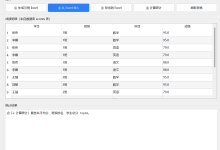
图 1 内存日志监控

六、优化策略应用
6.1 根据性能动态调整
class DynamicOptimizer {
private performanceLevel: 'high' | 'medium' | 'low' = 'high';
// 根据性能调整游戏质量
adjustQuality(fps: number): void {
if (fps >= 55) {
this.performanceLevel = 'high';
this.setHighQuality();
} else if (fps >= 40) {
this.performanceLevel = 'medium';
this.setMediumQuality();
} else {
this.performanceLevel = 'low';
this.setLowQuality();
}
}
private setHighQuality(): void {
this.particleManager.setMaxParticles(200);
this.effectManager.enableAllEffects();
this.renderer.setRenderScale(1.0);
}
private setMediumQuality(): void {
this.particleManager.setMaxParticles(100);
this.effectManager.disableHeavyEffects();
this.renderer.setRenderScale(0.9);
}
private setLowQuality(): void {
this.particleManager.setMaxParticles(50);
this.effectManager.disableAllEffects();
this.renderer.setRenderScale(0.8);
}
}
6.2 预加载优化
class PreloadManager {
private loadedResources: Map<string, any> = new Map();
private loadingQueue: LoadTask[] = [];
// 预加载资源
async preloadResources(): Promise<void> {
// 按优先级排序
this.loadingQueue.sort((a, b) => a.priority – b.priority);
// 分批加载
const batchSize = 5;
for (let i = 0; i < this.loadingQueue.length; i += batchSize) {
const batch = this.loadingQueue.slice(i, i + batchSize);
await Promise.all(batch.map(task => this.loadResource(task)));
}
}
private async loadResource(task: LoadTask): Promise<void> {
const resource = await task.load();
this.loadedResources.set(task.key, resource);
}
}
七、调试工具
7.1 性能分析器
class PerformanceProfiler {
private profileData: Map<string, ProfileData> = new Map();
// 开始性能分析
startProfile(name: string): void {
const data: ProfileData = {
startTime: performance.now(),
endTime: 0,
duration: 0
};
this.profileData.set(name, data);
}
// 结束性能分析
endProfile(name: string): number {
const data = this.profileData.get(name);
if (data) {
data.endTime = performance.now();
data.duration = data.endTime – data.startTime;
return data.duration;
}
return 0;
}
// 输出性能报告
printReport(): void {
console.log('=== 性能分析报告 ===');
for (const [name, data] of this.profileData) {
console.log(`${name}: ${data.duration.toFixed(2)}ms`);
}
}
}
7.2 调试渲染
class DebugRenderer {
private enabled: boolean = false;
// 绘制调试信息
drawDebugInfo(canvas: CanvasRenderingContext2D): void {
if (!this.enabled) {
return;
}
// 绘制FPS
canvas.fillStyle = '#00FF00';
canvas.font = '16px Arial';
canvas.fillText(`FPS: ${this.fps}`, 10, 20);
// 绘制帧时间
canvas.fillText(`Frame Time: ${this.frameTime.toFixed(2)}ms`, 10, 40);
// 绘制对象数量
canvas.fillText(`Objects: ${this.objectCount}`, 10, 60);
// 绘制内存使用
canvas.fillText(`Memory: ${this.memoryUsage.toFixed(2)}MB`, 10, 80);
}
}
八、总结
8.1 核心优化要点
8.2 性能优化建议
8.3 扩展方向
系列文章导航:
下期预告: 坦克大战游戏开发实战(十一)-碰撞检测系统增强