大家好呀,我是残念,希望在你看完之后,能对你有所帮助,有什么不足请指正!共同学习交流哦! 本文由:残念ing原创CSDN首发,如需要转载请通知 个人主页:残念ing-CSDN博客,欢迎各位→点赞👍 + 收藏⭐️ + 留言📝 📣系列专栏:[残念ing 的【Linux】系列专栏——CSDN博客] 
目录
- 1. 进程通信
- 2. 什么是管道
- 3. 匿名管道
-
- 3.1 用fork来共享管道原理
- 3.2 通过文件描述符的角度—理解管道
- 3.3 从内核级的角度—管道的本质:先让不同的进程看到同一份资源!
- 3.4 管道的五大特性和四种场景
- 4 进程池
-
- 4.1 模拟实现:
- 5 命名管道
-
- 5.1 创建一个命名管道
- 5.2 创建命名管道(代码模拟用命名管道实现server与client间的通信)
- 5.3 匿名管道与命名管道的区别
- 5.4 命名管道的打开规则
- 6 system V共享内存
-
- 6.1 什么是共享内存
- 6.2 了解共享内存函数
- 6.3 模拟实现通过共享内存进行sever和client间的通信
- 6.4 解决共享内存缺乏访问控制(安全问题)可以借助管道来实现
- 7 system V消息队列
- 8 system V信号量
-
- 8.1 并发编程概念
- 8.2 信号量
- 9 内核是如何组织管理IPC资源的
1. 进程通信
进程具有独立性,如何通信呢? 前提:先得让不同的进程看到同一份资源。同一份自己就是某种形式的内存空间,这一份资源只能是操作系统。 文件资源:管道、内存资源:共享内存、计数器:数据量 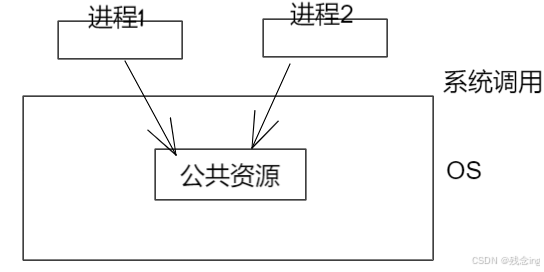
本地通信:同一台主机,同一个OS,不同的进程之间通信。
网络通信:TODO
标准:为某间事的统一设计的
进程间通信分类 管道(一种古老,经典的通信方式): · 匿名管道pipe · 命名管道 System V IPC · System V 消息队列 · System V 共享内存 · System V 信号量
2. 什么是管道
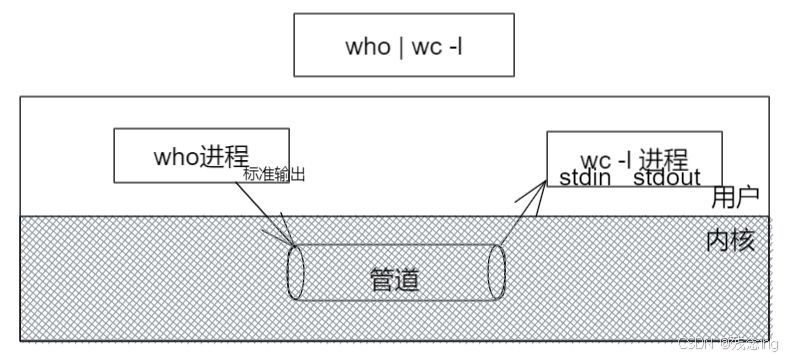
管道是Unix中最古老的进程间通信的形式,我们把从一个进程连接到另一个进程的一个数据流称为一个“管道”
补充
who //看当前有几个用户登录
who | wc -l //统计当前的登录用户
3. 匿名管道
3.1 用fork来共享管道原理
3.2 通过文件描述符的角度—理解管道
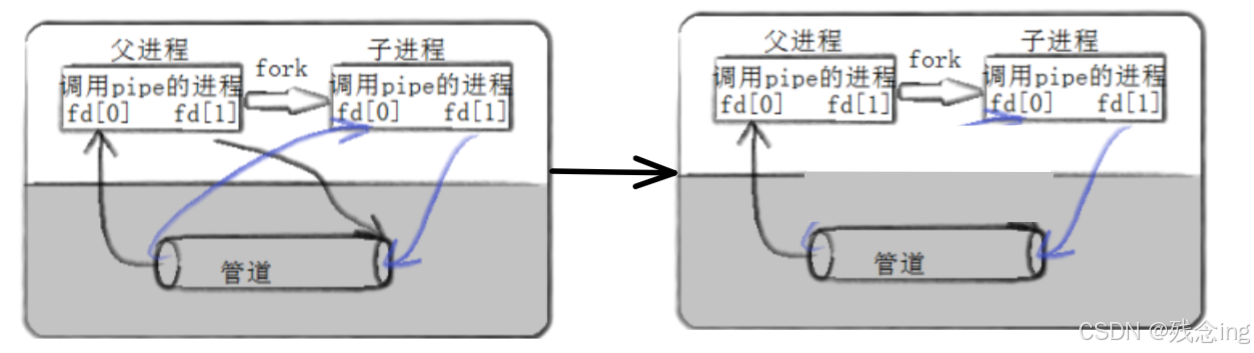
父进程创建管道 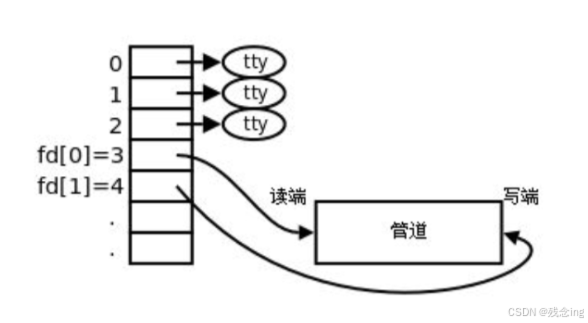
父进程fork出子进程 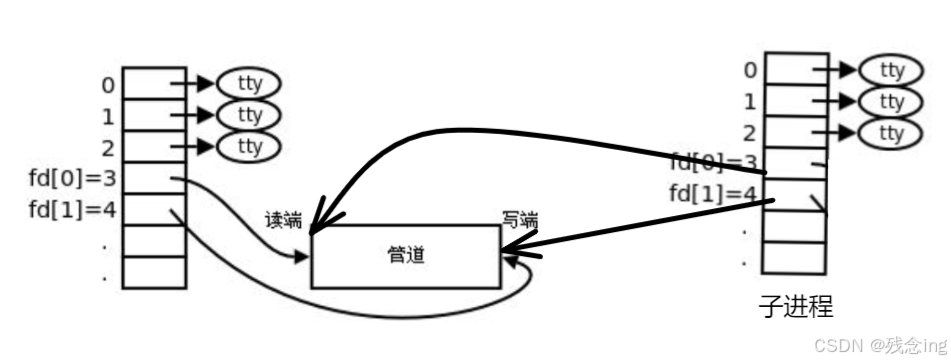
父进程关闭fd[0],子进程关闭fd[1] 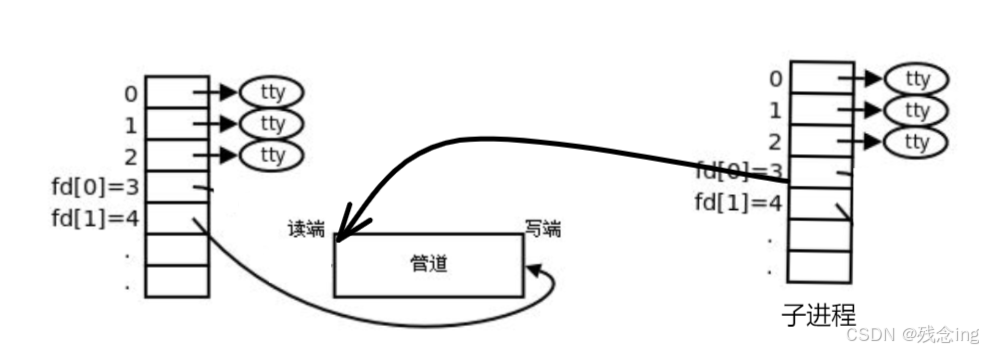
3.3 从内核级的角度—管道的本质:先让不同的进程看到同一份资源!
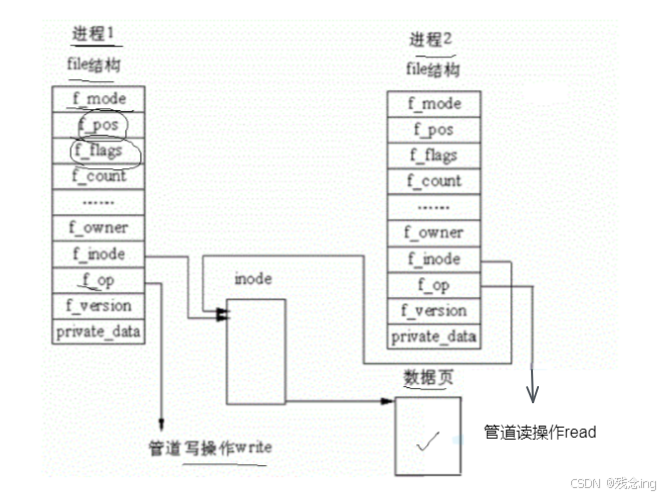
先打开管道再创建子进程,利用的原理是:子进程继承父进程的特性
为什么叫做管道,而且只是单向管道?
早些时候,根据需求只需要单向,而且简单
匿名管道:不需要路径(磁盘),也不需要名字,只要想用的时候直接在内核中创建就行。
3.4 管道的五大特性和四种场景
场景:
特性:
4 进程池

4.1 模拟实现:
//Channel.hpp
#ifndef __CHANNEL_HPP__ //如果我们没有定义防止头文件被重复被包含
#define __CHANNEL_HPP__
#include<iostream>
#include<unistd.h>
#include<string>
using namespace std;
// 先描述
class channel
{
public:
channel(int wtd, pid_t who) : _wtd(wtd), _who(who)
{
_name = "channel" + to_string(wtd) + "–" + to_string(who);
}
string Name()
{
return _name;
}
// 发送任务到管道
void Send(int cmd)
{
write(_wtd, &cmd, sizeof(cmd));
}
void Close()
{
close(_wtd);
}
pid_t Id()
{
return _who;
}
~channel() {}
private:
int _wtd;
string _name;
pid_t _who;
};
#endif
//ProcessPool.hpp
#include <iostream>
#include <string>
#include <unistd.h>
#include <stdlib.h>
#include <sys/types.h>
#include <sys/wait.h>
#include <vector>
#include <functional>
#include "Task.hpp"
#include"Channel.hpp"
using namespace std;
using work_t = function<void()>;
enum
{
OK = 0,
ARGCEROOR,
PIPEROOR,
FORKEROOR,
};
class ProcessPool
{
public:
ProcessPool(int n,work_t w):nums(n),work(w)
{}
// work_t work:回调
int InitProcesspool()
{
for (int i = 0; i < nums; i++)
{
// 1 创建管道
int pipedor[2] = {0};
int n = pipe(pipedor);
if (n < 0)
{
return PIPEROOR;
}
// 2 创建指定个数的进程
pid_t pid = fork();
if (pid < 0)
{
return FORKEROOR;
}
if (pid == 0)
{
// child 进程
close(pipedor[1]);
dup2(pipedor[0], 0);
work();
// 退出
exit(0);
}
// 父进程
close(pipedor[0]);
channels.emplace_back(pipedor[1], pid);
// channel c(pipedor[1],pid);
// channels.push_back(c);
// pid_t id = waitpid(pid, nullptr, 0);
}
return OK;
}
void DispatchTask()
{
int who = 0;
int n = 10;
while (n—)
{
// 选择一个任务(int)
int retask = tm.SelectTask();
// 选择一个子进程
channel &cee = channels[who++];
who %= channels.size();
cout << "*****************************************" << endl;
cout << "send " << retask << "channl: " << cee.Name() << "—" << n << endl;
cout << "*****************************************" << endl;
// 派发任务
cee.Send(retask);
sleep(1);
}
}
void CloseProcessPool()
{
for (auto &c : channels)
{
c.Close();
}
for (auto &c : channels)
{
pid_t rid = waitpid(c.Id(), nullptr, 0);
if (rid > 0)
{
cout << " child " << rid << " wait " << endl;
}
}
}
private:
vector<channel> channels;
int nums;
work_t work;
};
//Task.hpp
#include<iostream>
#include<unordered_map>
#include<functional>
#include<time.h>
#include<sys/types.h>
#include<unistd.h>
using namespace std;
using tast_t=function<void()>;
void Task1()
{
cout<<"我是一个打印任务 : pid :"<<getpid()<<endl;
}
void Task2()
{
cout<<"我是一个日志任务 pid :"<<getpid()<<endl;
}
void Task3()
{
cout<<"我是一个快速任务 pid :"<<getpid()<<endl;
}
static int number=0;
class Task
{
private:
unordered_map<int,tast_t> _tasks;
public:
Task()
{
srand(time(nullptr));
InitTask(Task1);
InitTask(Task2);
InitTask(Task3);
}
//插入任务
void InitTask(tast_t t)
{
_tasks[number++]=t;
}
int SelectTask()
{
return rand()%number;
}
//根据nums派发任务
void Excute(int nums)
{
if(_tasks.find(nums)==_tasks.end())return;
_tasks[nums]();
}
~Task()
{
}
};
Task tm;
void Work()
{
while (true)
{
int cmd = 0;
int n = read(0, &cmd, sizeof(cmd));
if (n == sizeof(cmd))
{
tm.Excute(cmd);
}
else if (n == 0)
{
cout << "pid " << getpid() << " quit " << endl;
break;
}
else
{
}
}
}
//main.cc
#include "ProcessPool.hpp"
//#include "Task.hpp"
void Usage(string proc)
{
cout << "Usage :" << proc << "process nums" << endl;
}
void DegBUg(vector<channel> &channels)
{
for (auto e : channels)
{
cout << e.Name() << endl;
}
}
int main(int argc, char *argv[])
{
if (argc != 2)
{
Usage(argv[0]);
return ARGCEROOR;
}
// vector<channel> channels;
int nums = stoi(argv[1]);
ProcessPool *pp = new ProcessPool(nums, Work);
// 创建进程池
pp->InitProcesspool();
// 派发任务
pp->DispatchTask();
// 关闭进程池
pp->CloseProcessPool();
// 创建进程池
// InitProcesspool(nums, channels, Work);
// // DegBUg(channels);
// // 派发任务
// DispatchTask(channels);
// // 关闭进程池
// CloseProcessPool(channels);
delete pp;
return 0;
}
总结:看待管道,就如同看待文件一样!管道的使用和文件一致,迎合了“Linux一切皆文件思想”。
5 命名管道
思考:管道应用的一个限制就是只能在具有共同祖先(具有亲缘关系)的进程间通信。 如果我们想在不相关的进程之间交换数据,可以使用FIFO文件来做这项工作,它经常被称为命名管道。 命名管道是一种特殊类型的文件
5.1 创建一个命名管道
mkfifo filename
//int mkfifo(const char *filename,mode_t mode);

5.2 创建命名管道(代码模拟用命名管道实现server与client间的通信)
//server.hpp
#pragma once
#include<iostream>
#include"Comm.hpp"
class Init
{
public:
Init()
{
int n=mkfifo(gpipefile.c_str(),gmode);
if(n<0)
{
cout<<"mkfifo error"<<endl;
return;
}
cout<<"mkfifo success "<<endl;
//sleep(15);
}
~Init()
{
int n=unlink(gpipefile.c_str());//关闭fifo
if(n<0)
{
cout<<"unlink error"<<endl;
return;
}
cout<<"unlink success "<<endl;
}
};
Init init;
class Server
{
public:
Server():_fd(gdefultfd)
{
}
bool OpenfifoRead()
{
_fd=Openfifo(gForRead);
if(_fd<0)return false;
return true;
}
int Readfifo(string *out)
{
char buff[gsize];
ssize_t rd=read(_fd,buff,sizeof(buff)–1);
if(rd>0)
{
buff[rd]=0;
*out=buff;
}
return rd;
}
void Closefifo()
{
ClosefifoHelper(_fd);
}
~Server()
{
}
private:
int _fd;
};
//Client.hpp
#pragma once
#include<iostream>
#include"Comm.hpp"
class Client
{
public:
Client():_fd(gdefultfd)
{
}
bool OpenfifoWrite()
{
_fd=Openfifo(gForWrite);
if(_fd<0)return false;
return true;
}
int Sendfifo(const string &in)
{
return write(_fd,in.c_str(),in.size());
}
void Closefifo()
{
if(_fd>0)
::close(_fd);
}
~Client()
{
ClosefifoHelper(_fd);
}
private:
int _fd;
};
//Comm.hpp
#include <iostream>
#include <unistd.h>
#include <sys/types.h>
#include <sys/stat.h>
#include <string>
#include <fcntl.h>
using namespace std;
const string gpipefile = "./fifo";
const mode_t gmode = 0600;
const int gdefultfd = –1;
const int gsize = 1024;
const int gForRead=O_RDONLY;
const int gForWrite=O_WRONLY;
int Openfifo(int flag)
{
//如果读端打开文件时,写端还没有打开,读端就会对用的open就会阻塞
int fd = ::open(gpipefile.c_str(), flag);
if (fd < 0)
{
cerr << "open error" << endl;
return fd;
}
return fd;
}
void ClosefifoHelper(int fd)
{
if (fd >= 0)
::close(fd);
}
//Client.cc
#include<iostream>
#include"Client.hpp"
using namespace std;
int main()
{
Client c;
c.OpenfifoWrite();
string message;
while (true)
{
cout<<"please Enter :";
getline(cin,message);
c.Sendfifo(message);
}
c.Closefifo();
return 0;
}
//Srever.cc
#include<iostream>
#include"Server.hpp"
using namespace std;
int main()
{
Server s;
s.OpenfifoRead();
string message;
while (true)
{
if(s.Readfifo(&message)>0)
{
cout<<"message111111: "<<message<<endl;
}
else
{
break;
}
}
cout<<"Client quit,me too!"<<endl;
s.Closefifo();
return 0;
}
实现的结果: 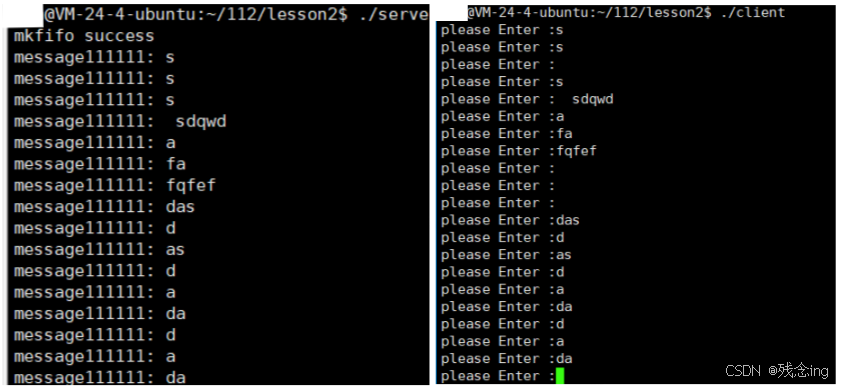
5.3 匿名管道与命名管道的区别
匿名管道由pipe函数创建并打开。 命名管道由mkfifo函数创建,打开用open FIFO(命名管道)与pipe(匿名管道)之间唯一的区别在它们创建与打开的方式不同,一但这些工作完 成之后,它们具有相同的语义。
5.4 命名管道的打开规则
如果当前打开操作是为读而打开FIFO时(O_RDONLY)
O_NONBLOCK disable:阻塞直到有相应进程为写而打开该FIFO O_NONBLOCK enable:立刻返回成功
如果当前打开操作是为写而打开FIFO时(O_WRONLY)
O_NONBLOCK disable:阻塞直到有相应进程为读而打开该FIFO O_NONBLOCK enable:立刻返回失败,错误码为ENXIO
6 system V共享内存
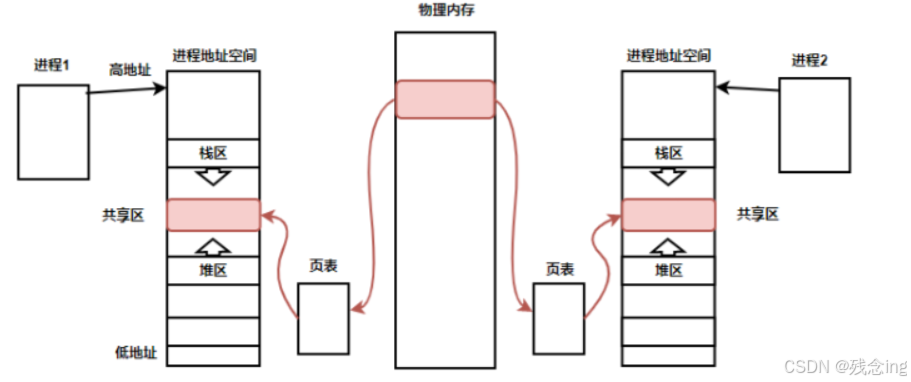
共享内存区是最快的IPC形式。一旦这样的内存映射到共享它的进程的地址空间,这些进程间数据传递不再涉及到内核,换句话说是进程不再通过执行进入内核的系统调用来传递彼此的数据
6.1 什么是共享内存
6.2 了解共享内存函数
shmget函数
功能:用来创建共享内存
原型
int shmget(key_t key, size_t size, int shmflg);
参数
key:这个共享内存段名字
size:共享内存大小
shmflg:由九个权限标志构成,它们的用法和创建文件时使用的mode模式标志是一样的
返回值:成功返回一个非负整数,即该共享内存段的标识码;失败返回-1
注意:key必须由用户输入 shmfig的参数: IPC_CREAT:如果我们单独使用,当shm不存在时,就创建,当存在时,就获取它并放回—保证调用进程能拿到共享内存 IPC_EXCL:单独使用无意义 IPC_CREAT|IPC_EXCL:如果shm不存在,就创建它,如果存在,就出错返回—只能成功,而且一定是性的共享内存。
ftok函数
功能:创建key
key_t ftok(const char* pathname, int proj_id);
pathname:公共路径
proj_id:公共的项目ID
放回:根据算法形成的唯一key
shmat函数
功能:将共享内存段连接到进程地址空间
原型
void *shmat(int shmid, const void *shmaddr, int shmflg);
参数
shmid: 共享内存标识
shmaddr:指定连接的地址
shmflg:它的两个可能取值是SHM_RND和SHM_RDONLY
返回值:成功返回一个指针,指向共享内存第一个节;失败返回-1
补充:
shmaddr为NULL,核心自动选择一个地址
shmaddr不为NULL且shmflg无SHM_RND标记,则以shmaddr为连接地址。
shmaddr不为NULL且shmflg设置了SHM_RND标记,则连接的地址会自动向下调整为SHMLBA的整数倍。公式:shmaddr –
(shmaddr % SHMLBA)
shmflg=SHM_RDONLY,表示连接操作用来只读共享内存
shmdt函数
功能:将共享内存段与当前进程脱离
原型
int shmdt(const void *shmaddr);
参数
shmaddr: 由shmat所返回的指针
返回值:成功返回0;失败返回-1
注意:将共享内存段与当前进程脱离不等于删除共享内存段
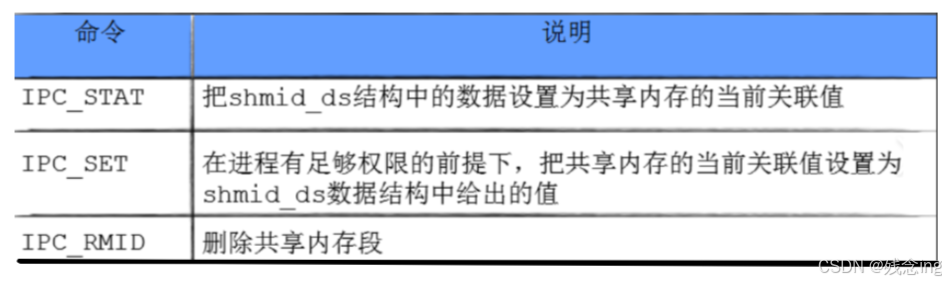
shmctl函数
功能:用于控制共享内存
原型
int shmctl(int shmid, int cmd, struct shmid_ds *buf);
参数
shmid:由shmget返回的共享内存标识码
cmd:将要采取的动作(有三个可取值)
buf:指向一个保存着共享内存的模式状态和访问权限的数据结构
返回值:成功返回0;失败返回-1
6.3 模拟实现通过共享内存进行sever和client间的通信
//ShareMemory.hpp
#pragma once
#include <iostream>
#include <unistd.h>
#include <string>
#include <sys/types.h>
#include <sys/ipc.h>
#include <sys/shm.h>
using namespace std;
const string path = "/home/myh/112";
const int projId = 0x6666;
// 操作系统申请空间,是按照块为单位的。
const int gsize = 4096;
const mode_t gmod = 0600; // 创建权限,为了挂接时有资格挂接
string ToHex(key_t k)
{
char buffer[64];
snprintf(buffer, sizeof(buffer), "0x%x", k);
return buffer;
}
class ShareMemory
{
private:
void CreateShmple(int shmfig)
{
_key = ftok(path.c_str(), projId);
if (_key < 0)
{
cout << "ftok error" << endl;
}
// cout << "key is :" << ToHex(key) << endl;
// 创建共享内存&&获取
// 注意:共享内存也有权限
_shmid = shmget(_key, gsize, shmfig);
if (_shmid < 0)
{
cout << "shmget error " << endl;
return;
}
}
public:
ShareMemory() {}
~ShareMemory() {}
void CreateShm()
{
CreateShmple(IPC_CREAT | IPC_EXCL | gmod);
}
void GetShm()
{
CreateShmple(IPC_CREAT);
}
// 挂接:共享内存挂件到内存地址空间上(shmat)
void AttachShm()
{
_rshmat = shmat(_shmid, nullptr, 0);
if ((long long)_rshmat == –1)
{
cout << "shmat erorr " << endl;
}
cout << "attach done" << (long long)_rshmat << endl;
}
// 去关联:共享内存从内存地址空间上取出(shmdt:去关联)
void DttachShm()
{
shmdt(_rshmat);
cout << "dttach done" << (long long)_rshmat << endl;
}
// 删除共享空间
void DelentShm()
{
int n = shmctl(_shmid, IPC_RMID, nullptr);
cout << "delentshm " << n << endl;
}
void* GetAddr()
{
return _rshmat;
}
private:
int _shmid;
key_t _key;
void *_rshmat;
};
ShareMemory shm;
struct Image
{
char status[32];
char lasttime[48];
char image[4000];
};
//Server.cc
#include "ShareMemory.hpp"
#include"Time.hpp"
#include"Fifo.hpp"
#include <iostream>
using namespace std;
int main()
{
//cout<<GetCurrTime()<<endl;
ShareMemory s;
s.CreateShm();
cout<<"shamid "<<endl;
sleep(5);
s.AttachShm();
sleep(5);
//在这里IPC
struct Image* img=(Image*)s.GetAddr();
while (true)
{
printf("status: %s\\n",img->status);
printf("lasttime: %s\\n",img->lasttime);
printf("image: %s\\n",img->image);
}
//printf("虚拟地址是:%p\\n",strinfo);
s.DttachShm();
sleep(5);
s.DelentShm();
return 0;
}
//client.cc
#include "ShareMemory.hpp"
#include"Time.hpp"
#include"Fifo.hpp"
#include <iostream>
#include<cstring>
using namespace std;
int main()
{
ShareMemory s;
s.GetShm();
cout << "shmid " << endl;
sleep(5);
s.AttachShm();
//在这里IPC
Image* img=(Image*)s.GetAddr();
char c='A';
while (c!='Z')
{
strcpy(img->status,"最新");
strcpy(img->lasttime,GetCurrTime().c_str());
strcpy(img->image,"XXXXXXXXXXXXXXXXXXXX");
sleep(3);
c++;
}
//printf("虚拟地址是:%p\\n",strinfo);
sleep(5);
s.DttachShm();
return 0;
}
结果: 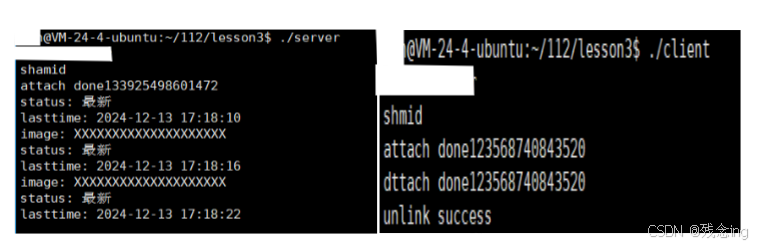 注意:当中途终止了进程,那么共享内存就不会释放(删除),必须要我们自己手动释放(指令or代码)。因为共享内存的生命周期是随内核的
——— Shared Memory Segments ————
key shmid owner perms bytes nattch status
0x660207b6 12 root 600 4096 0
释放指令:
ipcrm –m shmid //12
补充:共享内存没有进⾏同步与互斥!共享内存缺乏访问控制!会带来并发问题
6.4 解决共享内存缺乏访问控制(安全问题)可以借助管道来实现
代码如下:
//Fifo.hpp
#pragma once
#include <iostream>
#include <unistd.h>
#include <sys/types.h>
#include <sys/stat.h>
#include <string>
#include <fcntl.h>
using namespace std;
const string gpipefile = "./fifo";
const mode_t gfifomode = 0600;
const int gdefultfd = –1;
const int gfifosize = 1024;
const int gForRead = O_RDONLY;
const int gForWrite = O_WRONLY;
class Fifo
{
private:
int Openfifo(int flag)
{
// 如果读端打开文件时,写端还没有打开,读端就会对用的open就会阻塞
_fd = ::open(gpipefile.c_str(), flag);
if (_fd < 0)
{
cerr << "open error" << endl;
}
return _fd;
}
public:
Fifo() : _fd(–1)
{
int n = mkfifo(gpipefile.c_str(), gfifomode);
if (n < 0)
{
//cout << "mkfifo error" << endl;
return;
}
cout << "mkfifo success " << endl;
}
bool OpenfifoWrite()
{
_fd = Openfifo(gForWrite);
if (_fd < 0)
return false;
return true;
}
bool OpenfifoRead()
{
_fd = Openfifo(gForRead);
if (_fd < 0)
return false;
return true;
}
int wait()
{
int code = 0;
ssize_t rd = read(_fd, &code, sizeof(code));
if (rd == sizeof(code))
{
return 0;
}
else if (rd == 0)
{
return 1;
}
else
{
return 2;
}
}
int Sendfifo()
{
int code = 1;
return write(_fd, &code, sizeof(code));
}
~Fifo()
{
if (_fd >= 0)
::close(_fd);
int n = unlink(gpipefile.c_str()); // 关闭fifo
if (n < 0)
{
cout << "unlink error" << endl;
return;
}
cout << "unlink success " << endl;
}
private:
int _fd;
};
Fifo fifo;
//ShareMemory.hpp
#pragma once
#include <iostream>
#include <unistd.h>
#include <string>
#include <sys/types.h>
#include <sys/ipc.h>
#include <sys/shm.h>
using namespace std;
const string path = "/home/myh/112";
const int projId = 0x6666;
// 操作系统申请空间,是按照块为单位的。
const int gsize = 4096;
const mode_t gmod = 0600; // 创建权限,为了挂接时有资格挂接
string ToHex(key_t k)
{
char buffer[64];
snprintf(buffer, sizeof(buffer), "0x%x", k);
return buffer;
}
class ShareMemory
{
private:
void CreateShmple(int shmfig)
{
_key = ftok(path.c_str(), projId);
if (_key < 0)
{
cout << "ftok error" << endl;
}
// cout << "key is :" << ToHex(key) << endl;
// 创建共享内存&&获取
// 注意:共享内存也有权限
_shmid = shmget(_key, gsize, shmfig);
if (_shmid < 0)
{
cout << "shmget error " << endl;
return;
}
}
public:
ShareMemory() {}
~ShareMemory() {}
void CreateShm()
{
CreateShmple(IPC_CREAT | IPC_EXCL | gmod);
}
void GetShm()
{
CreateShmple(IPC_CREAT);
}
// 挂接:共享内存挂件到内存地址空间上(shmat)
void AttachShm()
{
_rshmat = shmat(_shmid, nullptr, 0);
if ((long long)_rshmat == –1)
{
cout << "shmat erorr " << endl;
}
cout << "attach done" << (long long)_rshmat << endl;
}
// 去关联:共享内存从内存地址空间上取出(shmdt:去关联)
void DttachShm()
{
shmdt(_rshmat);
cout << "dttach done" << (long long)_rshmat << endl;
}
// 删除共享空间
void DelentShm()
{
int n = shmctl(_shmid, IPC_RMID, nullptr);
cout << "delentshm " << n << endl;
}
void* GetAddr()
{
return _rshmat;
}
private:
int _shmid;
key_t _key;
void *_rshmat;
};
ShareMemory shm;
struct Image
{
char status[32];
char lasttime[48];
char image[4000];
};
//Server.cc
#include "ShareMemory.hpp"
#include"Time.hpp"
#include"Fifo.hpp"
#include <iostream>
using namespace std;
int main()
{
//cout<<GetCurrTime()<<endl;
ShareMemory s;
s.CreateShm();
cout<<"shamid "<<endl;
sleep(5);
s.AttachShm();
fifo.OpenfifoRead();
sleep(5);
//在这里IPC
struct Image* img=(Image*)s.GetAddr();
while (true)
{
fifo.wait();
printf("status: %s\\n",img->status);
printf("lasttime: %s\\n",img->lasttime);
printf("image: %s\\n",img->image);
}
//printf("虚拟地址是:%p\\n",strinfo);
s.DttachShm();
sleep(5);
s.DelentShm();
return 0;
}
//client.cc
#include "ShareMemory.hpp"
#include"Time.hpp"
#include"Fifo.hpp"
#include <iostream>
#include<cstring>
using namespace std;
int main()
{
ShareMemory s;
s.GetShm();
cout << "shmid " << endl;
sleep(5);
s.AttachShm();
fifo.OpenfifoWrite();
//在这里IPC
Image* img=(Image*)s.GetAddr();
char c='A';
while (c!='Z')
{
strcpy(img->status,"最新");
strcpy(img->lasttime,GetCurrTime().c_str());
strcpy(img->image,"XXXXXXXXXXXXXXXXXXXX");
fifo.Sendfifo();
sleep(3);
c++;
}
//printf("虚拟地址是:%p\\n",strinfo);
sleep(5);
s.DttachShm();
return 0;
}
7 system V消息队列
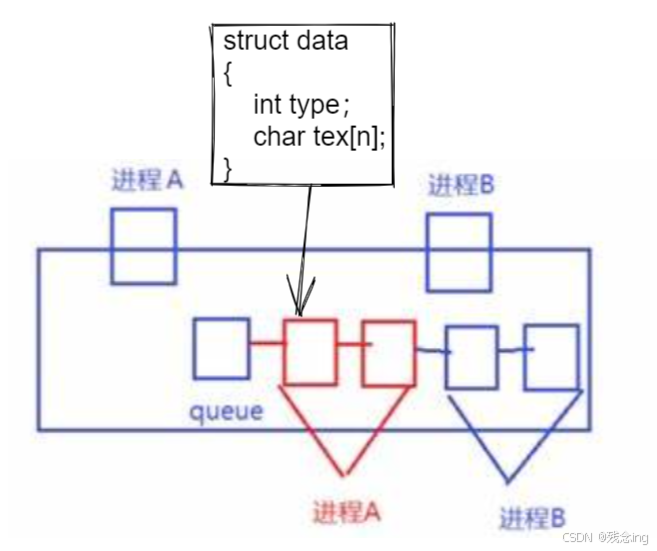
• 消息队列提供了⼀个从⼀个进程向另外⼀个进程发送⼀块数据的⽅法 • 每个数据块都被认为是有⼀个类型,接收者进程接收的数据块可以有不同的类型值 • 特性⽅⾯
• IPC资源必须删除,否则不会⾃动清除,除⾮重启,所以systemVIPC资源的⽣命周期随内核
8 system V信号量
信号量主要⽤于同步和互斥的,下⾯先来看看什么是同步和互斥
8.1 并发编程概念
• 多个执⾏流(进程),能看到的同⼀份公共资源:共享资源 • 被保护起来的资源叫做临界资源 • 保护的⽅式常⻅:互斥与同步 • 任何时刻,只允许⼀个执⾏流访问资源,叫做互斥 • 多个执⾏流,访问临界资源的时候,具有⼀定的顺序性,叫做同步 • 系统中某些资源⼀次只允许⼀个进程使⽤,称这样的资源为临界资源或互斥资源。 • 在进程中涉及到互斥资源的程序段叫临界区。你写的代码=访问临界资源的代码(临界区)+不访问 临界资源的代码(⾮临界区) • 所谓的对共享资源进⾏保护,本质是对访问共享资源的代码进⾏保护 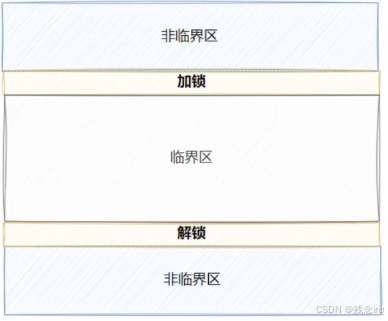
8.2 信号量
特性方面:
IPC资源必须删除,否则不会⾃动清除,除⾮重启,所以system V IPC资源的⽣命周期随内核
理解方面:
信号量是一个计数器
作用方面:
保护临界区
本质方面:
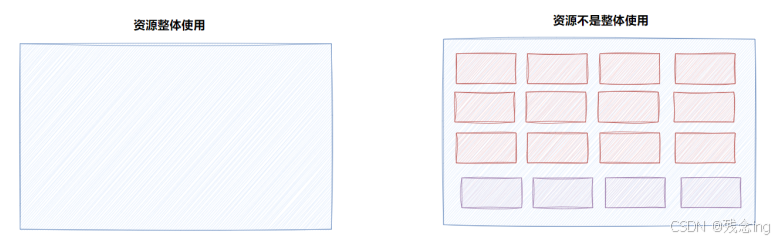
信号量的本质是对资源的预订计算器
操作方面:必须保存原子性
申请资料,计数器–,P操作
释放资源,计数器++,V操作
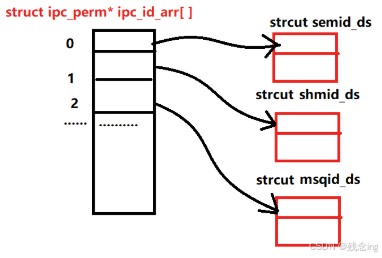
9 内核是如何组织管理IPC资源的
为了管理这些 IPC 资源,内核使用 struct ipc_ids 来存储和管理资源的ID信息。 它包含了资源的最大ID、当前已分配的资源数量等信息。 每个IPC资源都被存储在 struct ipc_id_ary 中,它是一个包含多个 kern_ipc_perm 结构体指针的数组。 通过这种方式,内核可以高效地管理IPC资源。 对应存储的就是对应的信号量,共享内存,消息队列最开始的字段