本节重点
- 学习进程创建:fork / vfork
- 学习进程终止,认识 $?
- 学习进程等待
- 学习进程程序替换
- 实现微型 Shell,重新认识 Shell 的运行原理
目录
- [[#1. 进程创建|1. 进程创建]]
- [[#2. 进程终止|2. 进程终止]]
- [[#3. 进程等待|3. 进程等待]]
- [[#4. 进程程序替换|4. 进程程序替换]]
- [[#5. 自主 Shell 命令行解释器|5. 自主 Shell 命令行解释器]]
1. 进程创建
1.1 fork 函数初识
在 Linux 中,fork 是非常重要的函数。它从已有进程中创建一个新进程,新进程为子进程,原进程为父进程。
#include <unistd.h>
pid_t fork(void);
返回值:在子进程中返回 0,在父进程中返回子进程的 PID,出错时返回 -1。
进程调用 fork,当控制转移到内核中的 fork 代码后,内核会:
- 为子进程分配新的内存块和内核数据结构。
- 将父进程的部分数据结构内容复制到子进程。
- 将子进程添加到系统进程列表中。
- 从 fork 返回,开始由调度器调度。
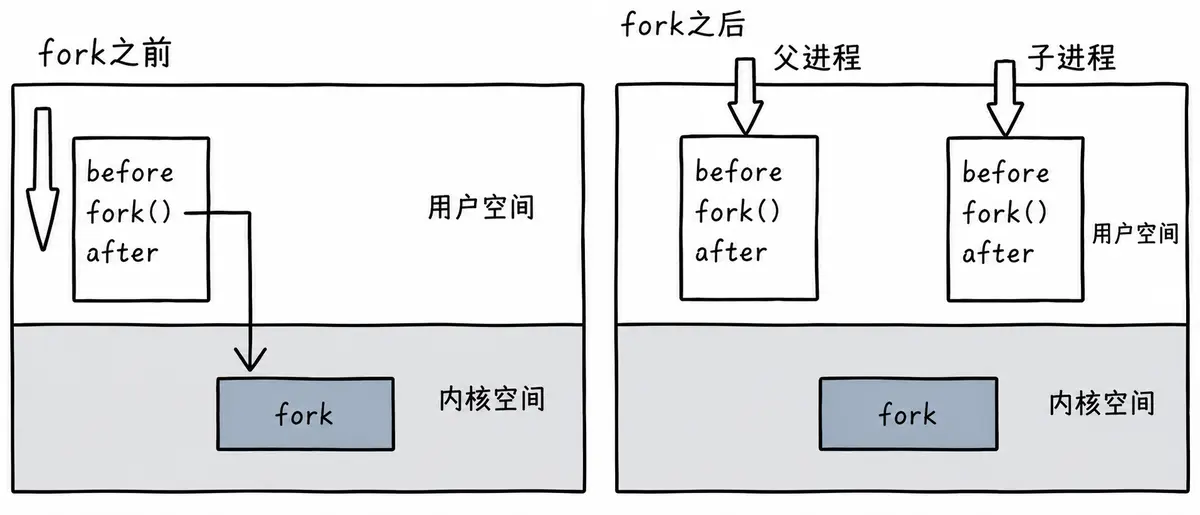
当一个进程调用 fork 之后,就会有两个二进制代码相同的进程,而且它们都运行到了相同的位置。之后,每个进程都可以开始自己的执行过程。示例如下:
int main(void)
{
pid_t pid;
printf("Before: pid is %d\\n", getpid());
if ((pid = fork()) == –1)
perror("fork()"), exit(1);
printf("After:pid is %d, fork return %d\\n", getpid(), pid);
sleep(1);
return 0;
}
运行结果:
[root@localhost linux]# ./a.out
Before: pid is 43676
After:pid is 43676, fork return 43677
After:pid is 43677, fork return 0
这里有三行输出:一行 Before,两行 After。进程 43676 先打印 Before,然后打印 After;另一个 After 由进程 43677 打印。进程 43677 没有打印 Before,原因如下图所示。
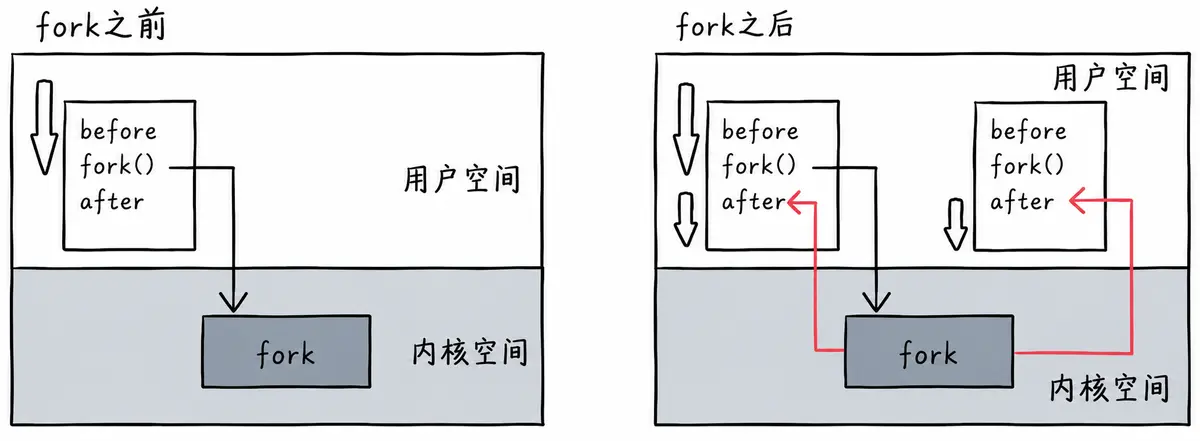
所以,fork 之前由父进程独立执行;fork 之后,父、子两个执行流分别执行。fork 之后谁先执行,完全由调度器决定。
1.2 fork 函数返回值
- 子进程返回 0。
- 父进程返回子进程的 PID。
1.3 写时拷贝
通常,父子进程共享代码;父子进程都不写入时,数据也是共享的。当任意一方试图写入时,便以写时拷贝的方式各自保留一份副本。具体见下图。
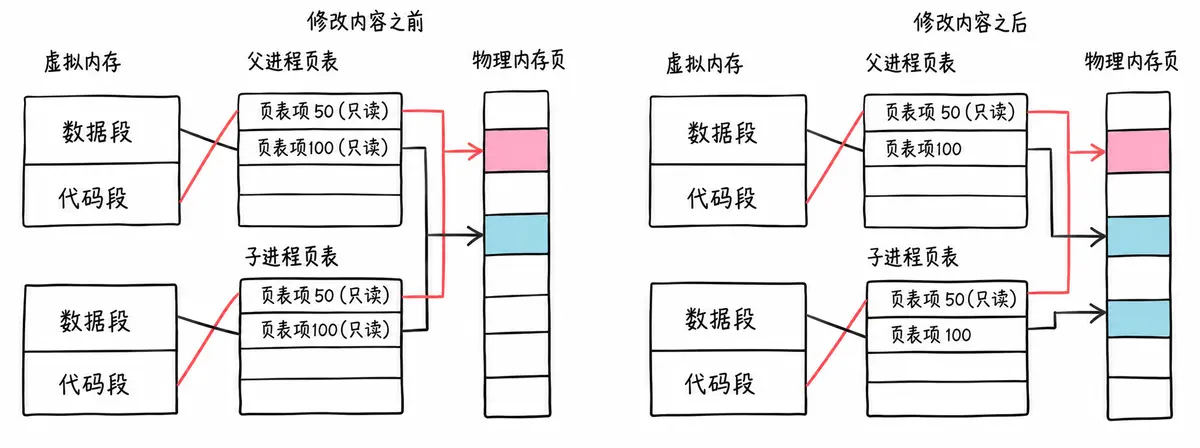
写时拷贝技术使父子进程得以彻底分离,为进程独立性提供技术保证。
写时拷贝是一种延时申请技术,可以提高整机内存的使用率。
1.4 fork 的常规用法
- 父进程希望复制自己,使父子进程同时执行不同的代码段。例如,父进程等待客户端请求,生成子进程处理请求。
- 一个进程需要执行另一个程序。例如,子进程从 fork 返回后调用 exec 函数。
1.5 fork 调用失败的原因
- 系统中有太多进程。
- 实际用户的进程数超过限制。
2. 进程终止
进程终止的本质是释放系统资源,也就是释放进程申请的相关内核数据结构以及对应的数据和代码。
2.1 进程退出场景
- 代码运行完毕,结果正确。
- 代码运行完毕,结果不正确。
- 代码异常终止。
2.2 进程常见退出方法
正常终止,可以通过 echo $? 查看进程退出码:
异常退出:
- Ctrl+C,由信号终止。
2.2.1 退出码
退出码(退出状态)可以告诉我们最后一次执行命令的状态。命令结束后,可以据此判断命令是成功完成,还是以错误结束。其基本思想是:程序返回退出码 0 表示执行成功,任何非 0 退出码都表示执行未成功。
Linux Shell 中的主要退出码如下图所示。
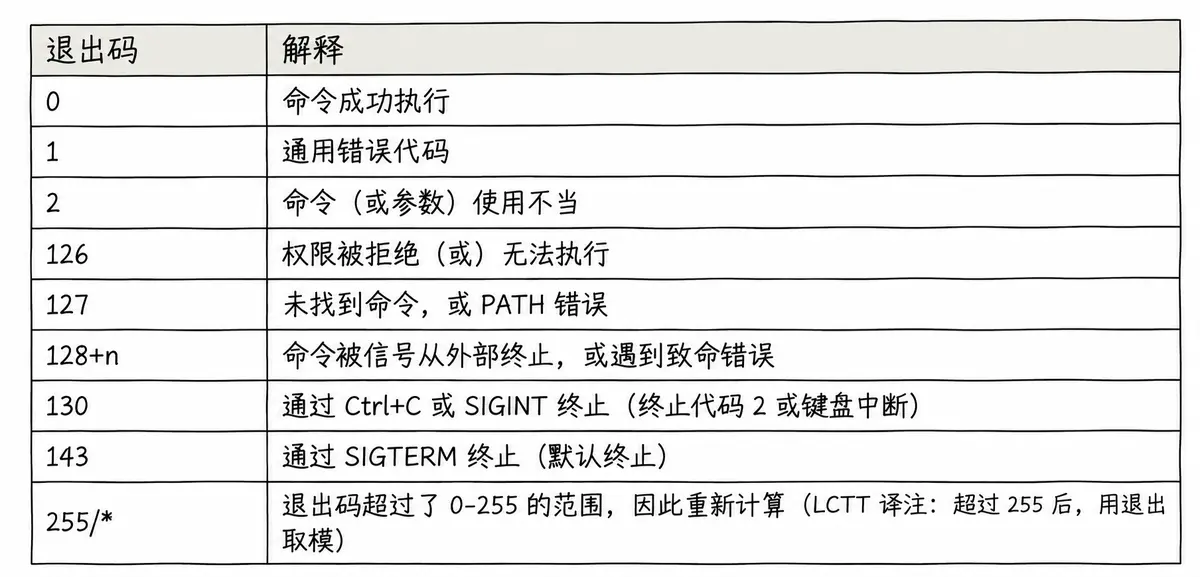
- 退出码 0 表示命令执行无误,这是完成命令的理想状态。
- 退出码 1 可以解释为“不被允许的操作”。例如,在没有 sudo 权限时使用 yum;再例如,除以 0 等操作也会返回错误码 1,对应命令为 let a=1/0。
- 130(SIGINT 或 ^C)和 143(SIGTERM)等终止状态非常典型,它们属于 128+n,其中 n 代表终止信号编号。
- 可以使用 strerror 函数获取退出码对应的描述。
2.2.2 _exit 函数
#include <unistd.h>
void _exit(int status);
参数 status 定义进程的终止状态,父进程通过 wait 获取该值。
虽然 status 是 int,但是只有低 8 位可以被父进程使用。所以调用 _exit(-1) 时,在终端执行 echo $?,会发现返回值是 255。
2.2.3 exit 函数
#include <stdlib.h>
void exit(int status);
exit 最后也会调用 _exit,但在调用 _exit 之前还会:
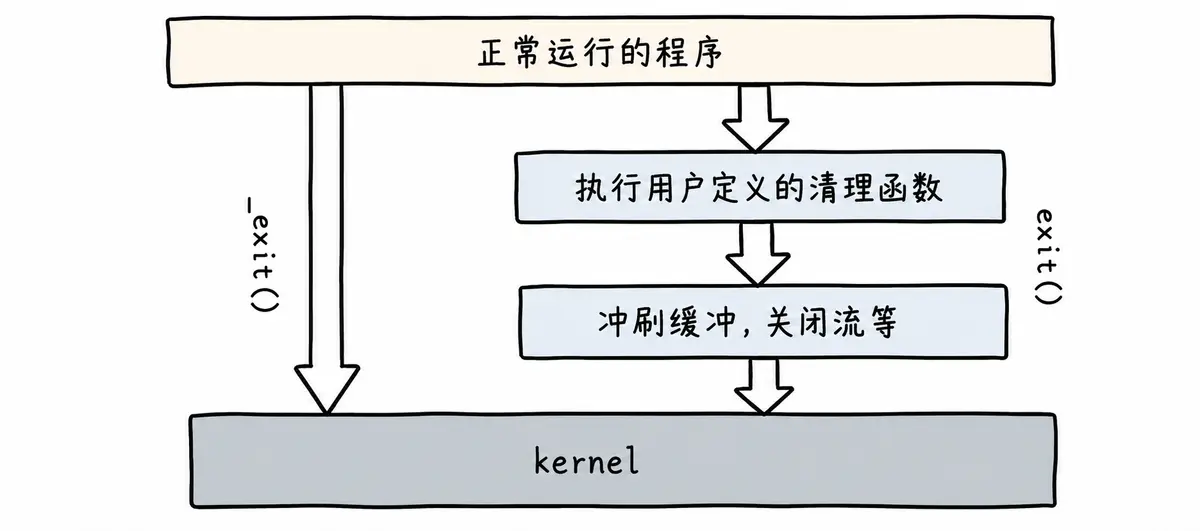
实例:
int main()
{
printf("hello");
exit(0);
}
运行结果:
[root@localhost linux]# ./a.out
hello[root@localhost linux]#
int main()
{
printf("hello");
_exit(0);
}
运行结果:
[root@localhost linux]# ./a.out
[root@localhost linux]#
2.2.4 return 退出
return 是一种更常见的退出进程方式。执行 return n 等同于执行 exit(n),因为调用 main 的运行时函数会将 main 的返回值作为 exit 的参数。
3. 进程等待
3.1 进程等待的必要性
- 子进程退出后,父进程如果不管不顾,就可能造成“僵尸进程”问题,进而造成内存泄漏。
- 进程一旦变成僵尸状态,kill -9 也无能为力,因为没有办法杀死一个已经死去的进程。
- 父进程派给子进程的任务完成得如何,需要被父进程获知。例如,子进程运行完成后,结果是否正确,或者是否正常退出。
- 父进程通过进程等待的方式回收子进程资源,并获取子进程退出信息。
3.2 进程等待的方法
3.2.1 wait 方法
#include <sys/types.h>
#include <sys/wait.h>
pid_t wait(int *status);
- 返回值:成功时返回被等待进程的 PID,失败时返回 -1。
- 参数:status 是输出型参数,用于获取子进程退出状态;不关心时可以设为 NULL。
3.2.2 waitpid 方法
pid_t waitpid(pid_t pid, int *status, int options);
返回值:
- 正常返回时,waitpid 返回收集到的子进程 PID。
- 如果设置了 WNOHANG,且调用时没有已退出的子进程可收集,则返回 0。
- 如果调用出错,则返回 -1,同时设置 errno 指示错误。
参数:
- pid == -1:等待任意一个子进程,与 wait 等效。
- pid > 0:等待进程 ID 等于 pid 的子进程。
- status:输出型参数。
- WIFEXITED(status):如果子进程正常终止,则结果为真,用于判断进程是否正常退出。
- WEXITSTATUS(status):当 WIFEXITED(status) 非零时,提取子进程退出码。
- options:默认为 0,表示阻塞等待。
- WNOHANG:如果 pid 指定的子进程没有结束,waitpid 返回 0,不进行等待;如果已经正常结束,则返回该子进程的 PID。
此外:
- 如果子进程已经退出,调用 wait / waitpid 时会立即返回,同时释放资源并取得子进程退出信息。
- 如果调用 wait / waitpid 时子进程存在且正在正常运行,父进程可能阻塞。
- 如果不存在相应的子进程,则立即出错返回。
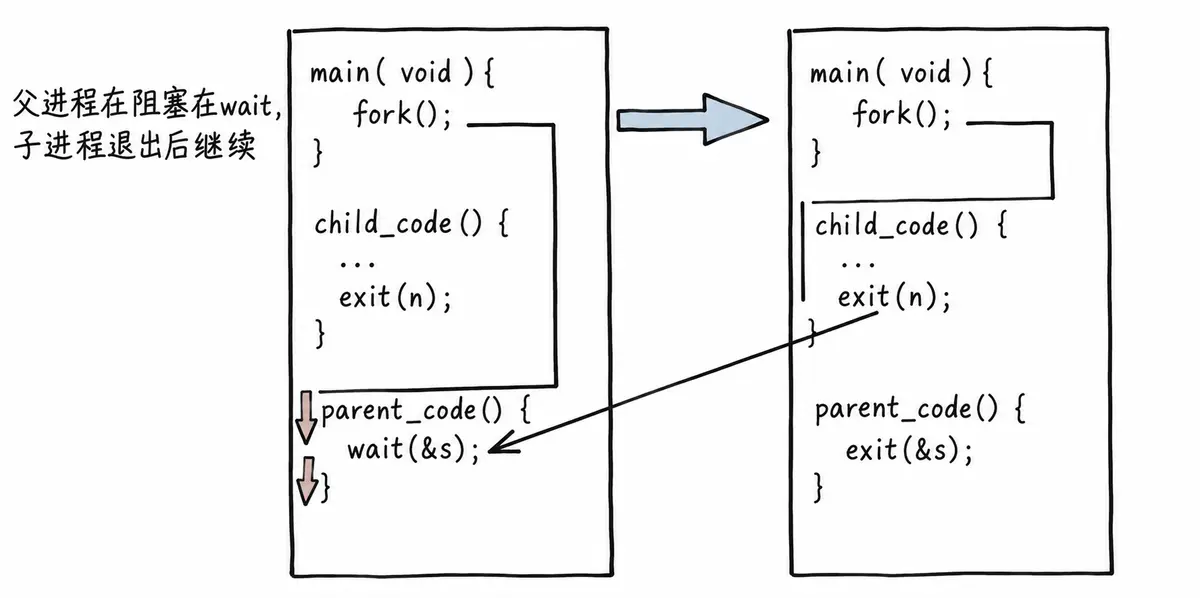
3.2.3 获取子进程 status
- wait 和 waitpid 都有一个 status 参数,该参数是由操作系统填充的输出型参数。
- 如果传入 NULL,表示不关心子进程的退出状态信息。
- 否则,操作系统会通过该参数将子进程的退出信息反馈给父进程。
- status 不能简单地作为普通整数看待,可以将其视为位图。这里只研究 status 的低 16 位。
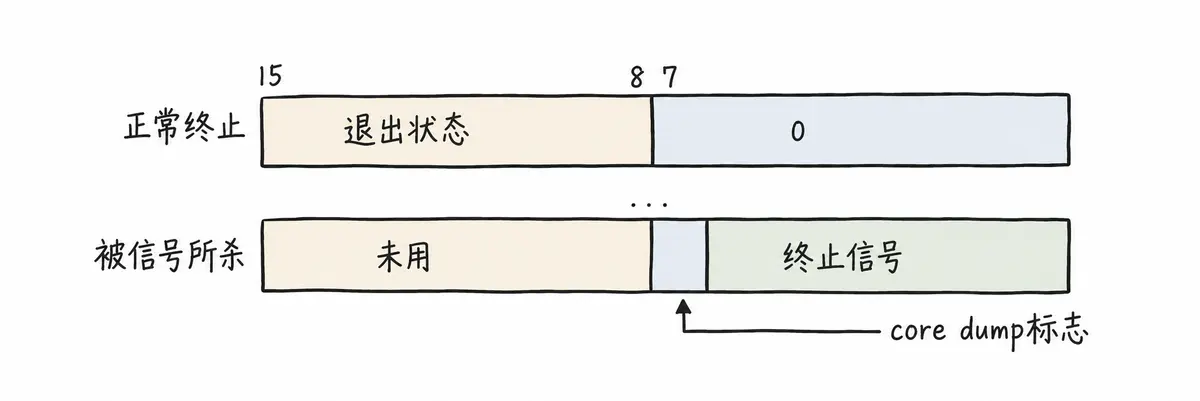
测试代码:
#include <sys/wait.h>
#include <stdio.h>
#include <stdlib.h>
#include <string.h>
#include <errno.h>
#include <unistd.h>
int main(void)
{
pid_t pid;
if ((pid = fork()) == –1)
perror("fork"), exit(1);
if (pid == 0) {
sleep(20);
exit(10);
} else {
int st;
int ret = wait(&st);
if (ret > 0 && (st & 0x7F) == 0) { // 正常退出
printf("child exit code:%d\\n", (st >> 8) & 0xFF);
} else if (ret > 0) { // 异常退出
printf("sig code : %d\\n", st & 0x7F);
}
}
}
测试结果:
# ./a.out # 等 20 秒退出
child exit code:10
# ./a.out # 在其他终端 kill 掉
sig code : 9
3.2.4 阻塞与非阻塞等待
进程的阻塞等待方式:
int main()
{
pid_t pid;
pid = fork();
if (pid < 0) {
printf("%s fork error\\n", __FUNCTION__);
return 1;
} else if (pid == 0) { // child
printf("child is run, pid is : %d\\n", getpid());
sleep(5);
exit(257);
} else {
int status = 0;
pid_t ret = waitpid(–1, &status, 0); // 阻塞式等待,等待 5 秒
printf("this is test for wait\\n");
if (WIFEXITED(status) && ret == pid) {
printf("wait child 5s success, child return code is :%d.\\n",
WEXITSTATUS(status));
} else {
printf("wait child failed, return.\\n");
return 1;
}
}
return 0;
}
运行结果:
[root@localhost linux]# ./a.out
child is run, pid is : 45110
this is test for wait
wait child 5s success, child return code is :1.
进程的非阻塞等待方式:
#include <stdio.h>
#include <stdlib.h>
#include <sys/wait.h>
#include <unistd.h>
#include <vector>
typedef void (*handler_t)(); // 函数指针类型
std::vector<handler_t> handlers; // 函数指针数组
void fun_one()
{
printf("这是一个临时任务1\\n");
}
void fun_two()
{
printf("这是一个临时任务2\\n");
}
void Load()
{
handlers.push_back(fun_one);
handlers.push_back(fun_two);
}
void handler()
{
if (handlers.empty())
Load();
for (auto iter : handlers)
iter();
}
int main()
{
pid_t pid;
pid = fork();
if (pid < 0) {
printf("%s fork error\\n", __FUNCTION__);
return 1;
} else if (pid == 0) { // child
printf("child is run, pid is : %d\\n", getpid());
sleep(5);
exit(1);
} else {
int status = 0;
pid_t ret = 0;
do {
ret = waitpid(–1, &status, WNOHANG); // 非阻塞式等待
if (ret == 0) {
printf("child is running\\n");
}
handler();
} while (ret == 0);
if (WIFEXITED(status) && ret == pid) {
printf("wait child 5s success, child return code is :%d.\\n",
WEXITSTATUS(status));
} else {
printf("wait child failed, return.\\n");
return 1;
}
}
return 0;
}
4. 进程程序替换
fork 之后,父子进程各自执行父进程代码的一部分。如果子进程想执行一个全新的程序,就需要通过进程程序替换完成。
程序替换通过特定接口,将磁盘上一个全新程序的代码和数据加载到调用进程的地址空间中。
4.1 替换原理
用 fork 创建子进程后,子进程执行的是与父进程相同的程序,但可能执行不同的代码分支。子进程往往要调用一种 exec 函数执行另一个程序。当进程调用某种 exec 函数时,该进程的用户空间代码和数据会完全被新程序替换,并从新程序的启动例程开始执行。调用 exec 并不创建新进程,所以调用前后该进程的 PID 并未改变。

4.2 替换函数
共有六种以 exec 开头的函数,统称为 exec 函数:
#include <unistd.h>
int execl(const char *path, const char *arg, ...);
int execlp(const char *file, const char *arg, ...);
int execle(const char *path, const char *arg, ..., char *const envp[]);
int execv(const char *path, char *const argv[]);
int execvp(const char *file, char *const argv[]);
int execve(const char *path, char *const argv[], char *const envp[]);
4.2.1 函数解释
- 这些函数调用成功时,会加载新程序并从启动代码开始执行,不再返回。
- 调用出错时返回 -1。
- 因此,exec 函数只有出错返回值,没有成功返回值。
4.2.2 命名理解
这些函数原型看起来容易混淆,但掌握命名规律后就容易记忆:
- l(list):参数采用列表。
- v(vector):参数使用数组。
- p(path):自动搜索环境变量 PATH 指定的路径。
- e(env):由调用者维护环境变量。
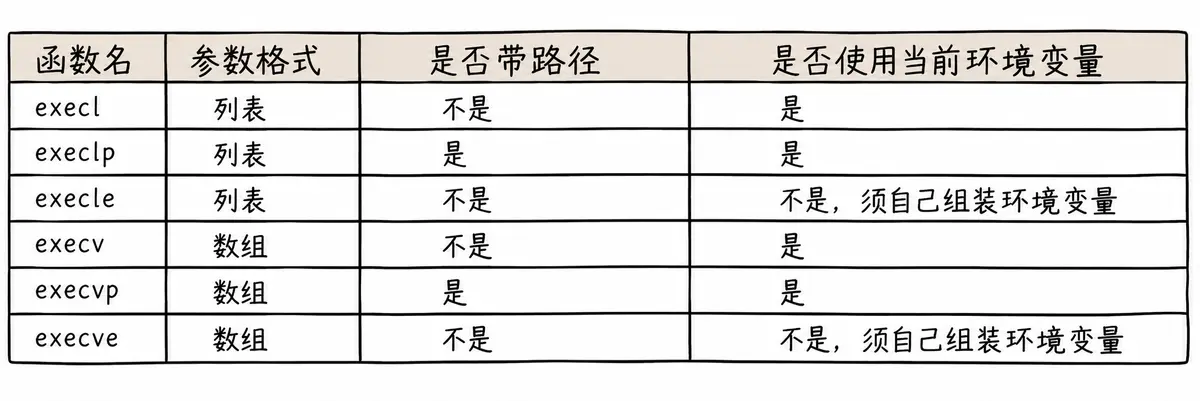
exec 调用示例如下:
#include <unistd.h>
#include <stdlib.h>
int main()
{
char *const argv[] = {"ps", "-ef", NULL};
char *const envp[] = {"PATH=/bin:/usr/bin", "TERM=console", NULL};
execl("/bin/ps", "ps", "-ef", NULL);
// 带 p 的函数可以使用环境变量 PATH,无需写完整路径
execlp("ps", "ps", "-ef", NULL);
// 带 e 的函数需要自行组装环境变量
execle("/bin/ps", "ps", "-ef", NULL, envp);
execv("/bin/ps", argv);
// 带 p 的函数可以使用环境变量 PATH,无需写完整路径
execvp("ps", argv);
// 带 e 的函数需要自行组装环境变量
execve("/bin/ps", argv, envp);
exit(0);
}
事实上,只有 execve 是真正的系统调用,其他五个函数最终都会调用 execve。因此,execve 位于 man 手册第 2 节,其他函数位于 man 手册第 3 节。这些函数之间的关系如下图所示。
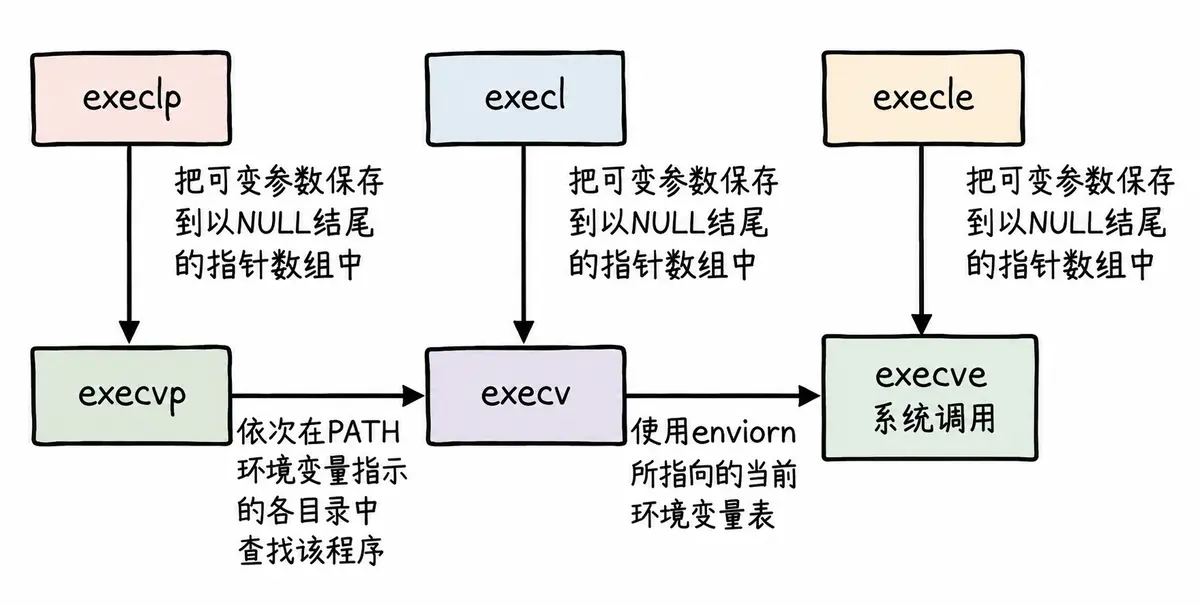
5. 自主 Shell 命令行解释器
5.1 目标
- 能处理普通命令。
- 能处理内建命令。
- 帮助理解内建命令、本地变量和环境变量等概念。
- 帮助理解 Shell 的运行原理。
5.2 实现原理
考虑下面这个与 Shell 的典型互动:
[root@localhost epoll]# ls
client.cpp readme.md server.cpp utility.h
[root@localhost epoll]# ps
PID TTY TIME CMD
3451 pts/0 00:00:00 bash
3514 pts/0 00:00:00 ps
Shell 从用户处读入字符串 ls,建立一个新进程,在该进程中运行 ls 程序,并等待这个进程结束。下图用时间轴表示事件发生的次序,时间从左向右;Shell 由标识为 sh 的方块表示,它随着时间流逝从左向右移动。
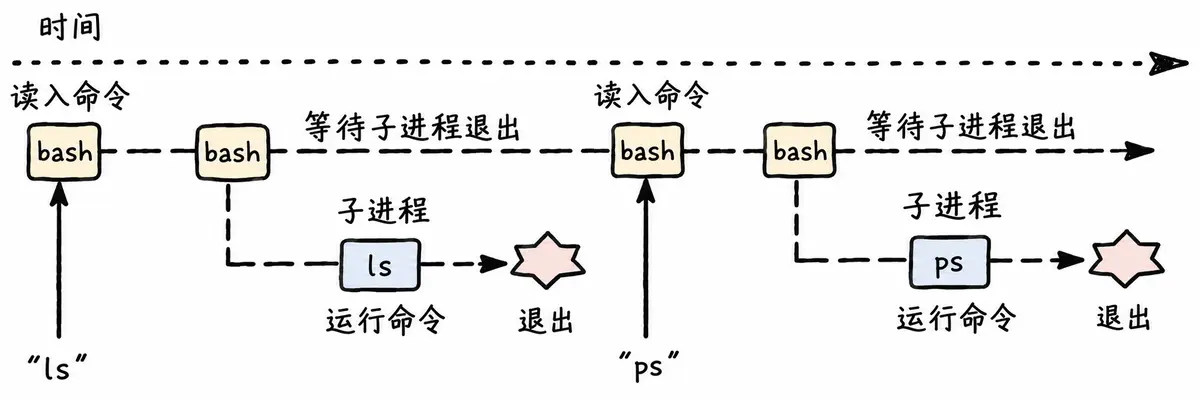
然后,Shell 读取新的一行输入,建立一个新进程,在这个进程中运行程序,并等待这个进程结束。
所以,要编写一个 Shell,需要循环执行以下过程:
根据这些思路和前面学过的技术,就可以自行实现一个 Shell。
5.3 源码
实现代码:
#include <iostream>
#include <cstdio>
#include <cstdlib>
#include <cstring>
#include <string>
#include <unistd.h>
#include <sys/types.h>
#include <sys/wait.h>
#include <ctype.h>
using namespace std;
const int basesize = 1024;
const int argvnum = 64;
const int envnum = 64;
// 全局的命令行参数表
char *gargv[argvnum];
int gargc = 0;
// 全局的变量
int lastcode = 0;
// 我的系统的环境变量
char *genv[envnum];
// 全局的当前 Shell 工作路径
char pwd[basesize];
char pwdenv[basesize];
// " "file.txt
#define TrimSpace(pos) \\
do { \\
while (isspace(*pos)) { \\
pos++; \\
} \\
} while (0)
string GetUserName()
{
string name = getenv("USER");
return name.empty() ? "None" : name;
}
string GetHostName()
{
string hostname = getenv("HOSTNAME");
return hostname.empty() ? "None" : hostname;
}
string GetPwd()
{
if (nullptr == getcwd(pwd, sizeof(pwd)))
return "None";
snprintf(pwdenv, sizeof(pwdenv), "PWD=%s", pwd);
putenv(pwdenv); // PWD=XXX
return pwd;
// string pwd = getenv("PWD");
// return pwd.empty() ? "None" : pwd;
}
string LastDir()
{
string curr = GetPwd();
if (curr == "/" || curr == "None")
return curr;
// /home/whb/XXX
size_t pos = curr.rfind("/");
if (pos == std::string::npos)
return curr;
return curr.substr(pos + 1);
}
string MakeCommandLine()
{
// [whb@bite-alicloud myshell]$
char command_line[basesize];
snprintf(command_line, basesize, "[%s@%s %s]# ",
GetUserName().c_str(), GetHostName().c_str(), LastDir().c_str());
return command_line;
}
void PrintCommandLine() // 1. 命令行提示符
{
printf("%s", MakeCommandLine().c_str());
fflush(stdout);
}
bool GetCommandLine(char command_buffer[], int size) // 2. 获取用户命令
{
// 我们认为:要将用户输入的命令行当作一个完整的字符串
// "ls -a -l -n"
char *result = fgets(command_buffer, size, stdin);
if (!result) {
return false;
}
command_buffer[strlen(command_buffer) – 1] = 0;
if (strlen(command_buffer) == 0)
return false;
return true;
}
void ParseCommandLine(char command_buffer[], int len) // 3. 分析命令
{
(void)len;
memset(gargv, 0, sizeof(gargv));
gargc = 0;
// "ls -a -l -n"
const char *sep = " ";
gargv[gargc++] = strtok(command_buffer, sep);
// = 是刻意写的
while ((bool)(gargv[gargc++] = strtok(nullptr, sep)))
;
gargc—;
}
void debug()
{
printf("argc: %d\\n", gargc);
for (int i = 0; gargv[i]; i++) {
printf("argv[%d]: %s\\n", i, gargv[i]);
}
}
// 在 Shell 中
// 有些命令必须由子进程执行
// 有些命令不能由子进程执行,要由 Shell 自己执行 — 内建命令 built command
bool ExecuteCommand() // 4. 执行命令
{
// 让子进程进行执行
pid_t id = fork();
if (id < 0)
return false;
if (id == 0) {
// 子进程
// 1. 执行命令
execvpe(gargv[0], gargv, genv);
// 2. 退出
exit(1);
}
int status = 0;
pid_t rid = waitpid(id, &status, 0);
if (rid > 0) {
if (WIFEXITED(status)) {
lastcode = WEXITSTATUS(status);
} else {
lastcode = 100;
}
return true;
}
return false;
}
void AddEnv(const char *item)
{
int index = 0;
while (genv[index]) {
index++;
}
genv[index] = (char *)malloc(strlen(item) + 1);
strncpy(genv[index], item, strlen(item) + 1);
genv[++index] = nullptr;
}
// Shell 自己执行命令,本质是 Shell 调用自己的函数
bool CheckAndExecBuiltCommand()
{
if (strcmp(gargv[0], "cd") == 0) {
// 内建命令
if (gargc == 2) {
chdir(gargv[1]);
lastcode = 0;
} else {
lastcode = 1;
}
return true;
} else if (strcmp(gargv[0], "export") == 0) {
// export 也是内建命令
if (gargc == 2) {
AddEnv(gargv[1]);
lastcode = 0;
} else {
lastcode = 2;
}
return true;
} else if (strcmp(gargv[0], "env") == 0) {
for (int i = 0; genv[i]; i++) {
printf("%s\\n", genv[i]);
}
lastcode = 0;
return true;
} else if (strcmp(gargv[0], "echo") == 0) {
if (gargc == 2) {
// echo $?
// echo $PATH
// echo hello
if (gargv[1][0] == '$') {
if (gargv[1][1] == '?') {
printf("%d\\n", lastcode);
lastcode = 0;
}
} else {
printf("%s\\n", gargv[1]);
lastcode = 0;
}
} else {
lastcode = 3;
}
return true;
}
return false;
}
// 作为一个 Shell,获取环境变量应该从系统配置中读取
// 这里直接从父 Shell 中获取环境变量
void InitEnv()
{
extern char **environ;
int index = 0;
while (environ[index]) {
genv[index] = (char *)malloc(strlen(environ[index]) + 1);
strncpy(genv[index], environ[index], strlen(environ[index]) + 1);
index++;
}
genv[index] = nullptr;
}
int main()
{
InitEnv();
char command_buffer[basesize];
while (true) {
PrintCommandLine(); // 1. 命令行提示符
// command_buffer -> output
if (!GetCommandLine(command_buffer, basesize)) { // 2. 获取用户命令
continue;
}
// printf("%s\\n", command_buffer);
ParseCommandLine(command_buffer, strlen(command_buffer)); // 3. 分析命令
if (CheckAndExecBuiltCommand()) {
continue;
}
ExecuteCommand(); // 4. 执行命令
}
return 0;
}
5.4 总结
在继续学习新知识前,思考函数和进程之间的相似性。
exec / exit 就像 call / return。
一个 C 程序由很多函数组成。一个函数可以调用另一个函数,同时传递一些参数;被调用的函数执行一定的操作,然后返回一个值。每个函数都有自己的局部变量,不同函数通过 call / return 机制进行通信。
这种通过参数和返回值在拥有私有数据的函数之间通信的模式,是结构化程序设计的基础。Linux 鼓励将这种应用于程序内部的模式扩展到程序之间,如下图所示。
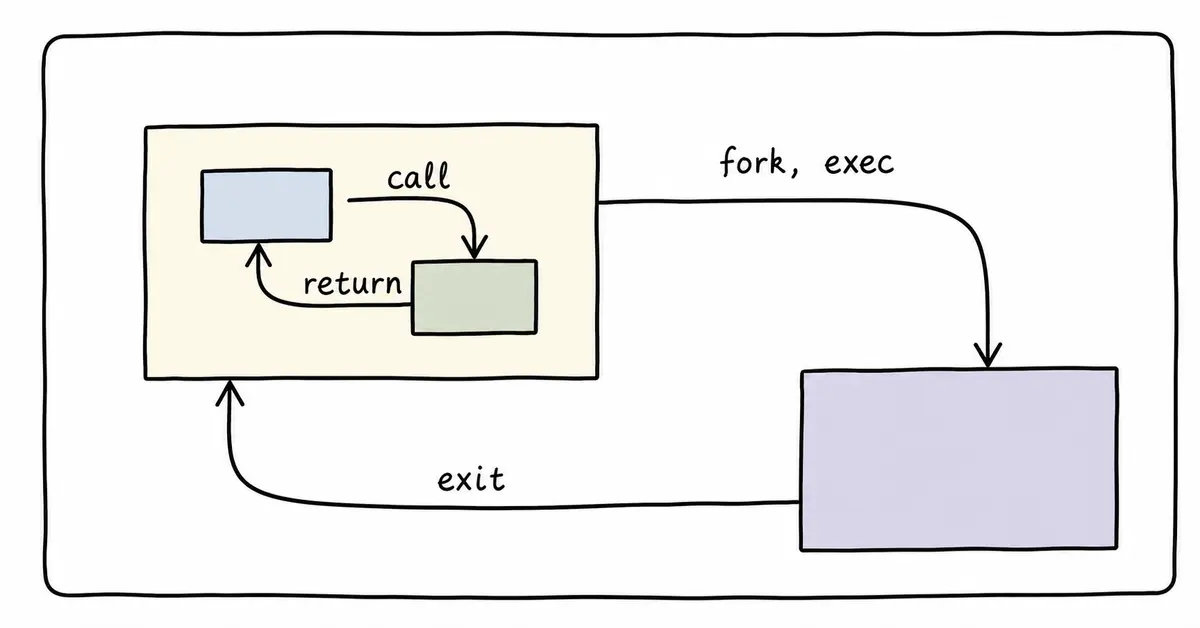
一个 C 程序可以通过 fork / exec 调用另一个程序,并向它传递一些参数。被调用的程序执行一定的操作,然后通过 exit(n) 返回值;调用它的进程可以通过 wait(&ret) 获取 exit 的返回值。