文章目录
- 【FSMC】LCD液晶显示实验系列文章
- 前言
- 一、硬件设计
- 二、软件设计
-
- 1.编程要点
- 2.代码分析
-
- bsp_nt35510_lcd.h
- bsp_nt35510_lcd.c(部分)
- bsp_nt35510_lcd.c(全部)
- 基本液晶显示例程的 main 函数
- 液晶坐标方向演示的 main 函数
【FSMC】LCD液晶显示实验系列文章
【FSMC】LCD液晶显示实验(1)
【FSMC】LCD液晶显示实验(2)
【FSMC】LCD液晶显示实验(3)
前言
前面几篇已经讲解了显示屏的分类以及控制原理,还完成了一个《如何使用 FSMC 外设控制实验板配套的 4.5 寸 ILI9806G 液晶屏》实验,本文和上节课差不多,不过本文讲解《如何使用 FSMC 外设控制实验板配套的 4.3 寸 ILI9806G 液晶屏》,通过移植对比,加深对屏幕驱动底层代码的理解。
一、硬件设计
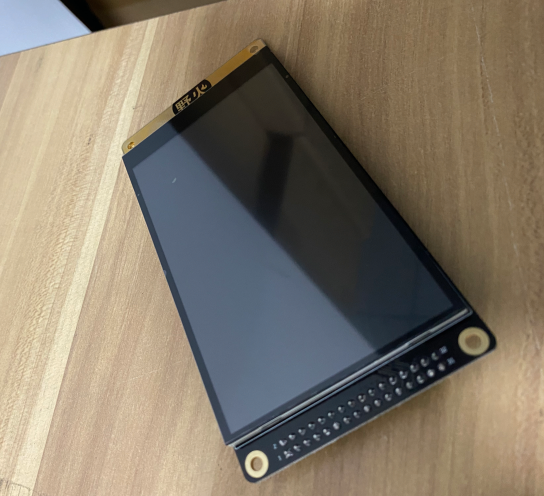 分辨率为 800*480 的 4.3 寸电阻触摸液晶屏,见图实验板标配的4_3 寸电阻触摸屏。
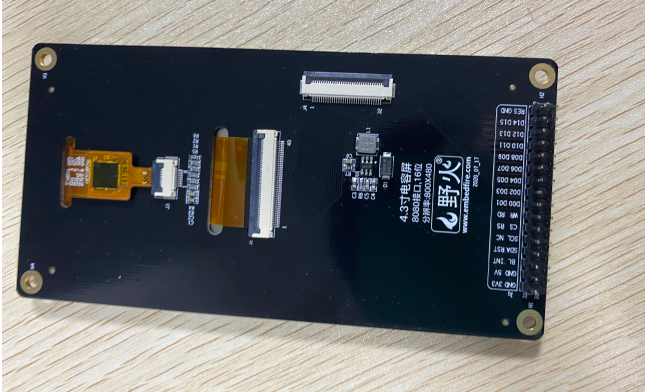
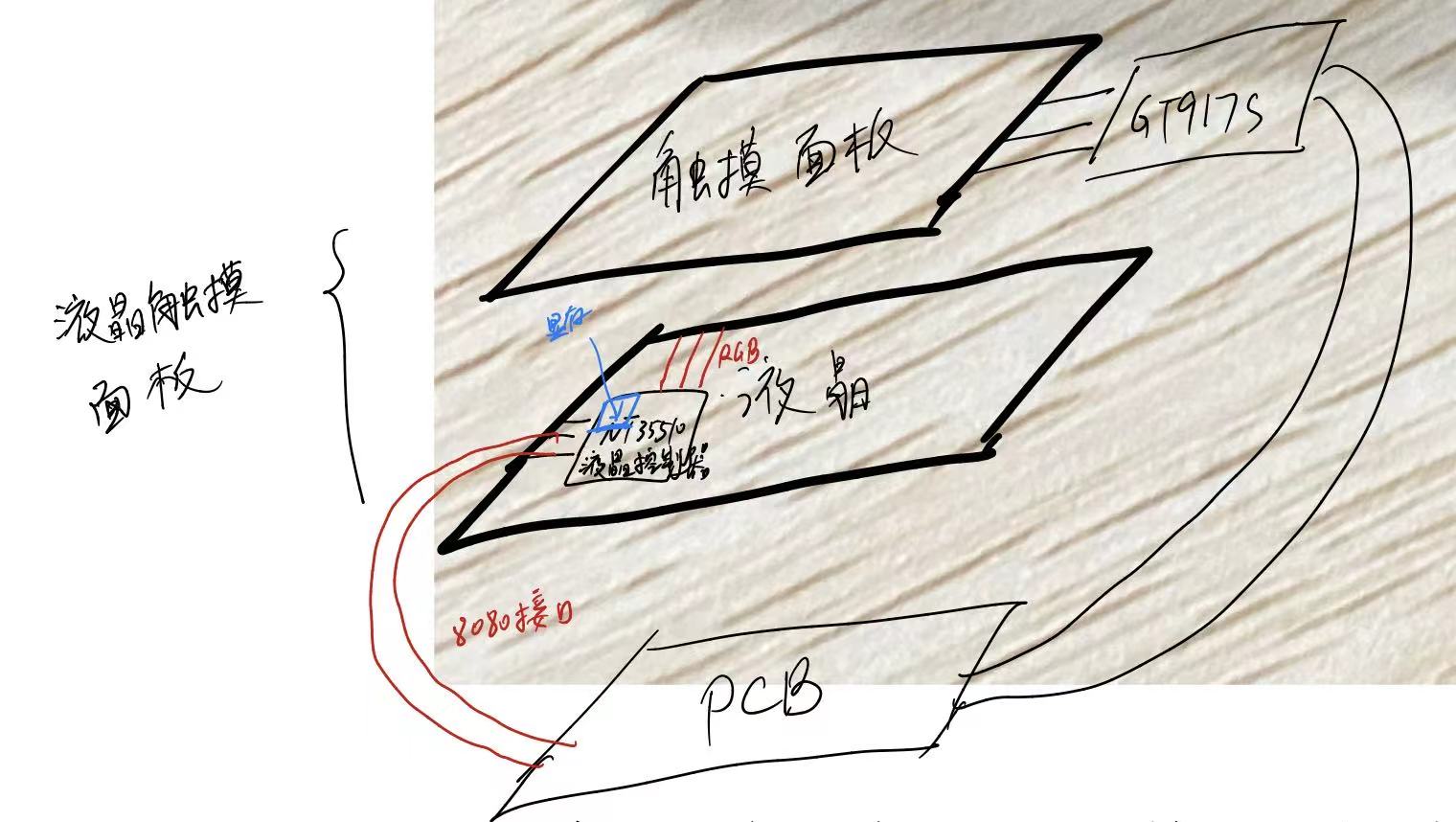 该屏幕主要由三部分构成: 触摸面板:触摸面板与GT917S直接相连,这个芯片的作用主要是把采集触摸信号并把简化信号通过IIC传输给PCB主板上的MCU进行处理 液晶控制器:液晶板上有液晶控制器NT35510,里面含有显存,显存通过8080接口与PCB主板进行相连,MCU把想要在屏幕上显示的数据发送给液晶控制器,液晶控制器会把数据存储在显存中,通过不断刷新数据显示在屏幕上。液晶控制器与液晶连接的接口是RGB接口。 PCB主板:主要有一些简单的电源电路,还有就是与液晶和触摸面板进行相连
  液晶控制器NT35510可以通过IM[3:0]设置液晶控制器与PCB主板之间的通讯方式,可以设置为SPI或者8080接口,由于厂家已经设置为8080接口,RGB接口与液晶进行连接。背光引脚不与NT25510进行连接,而是直接引出连接到外部电路。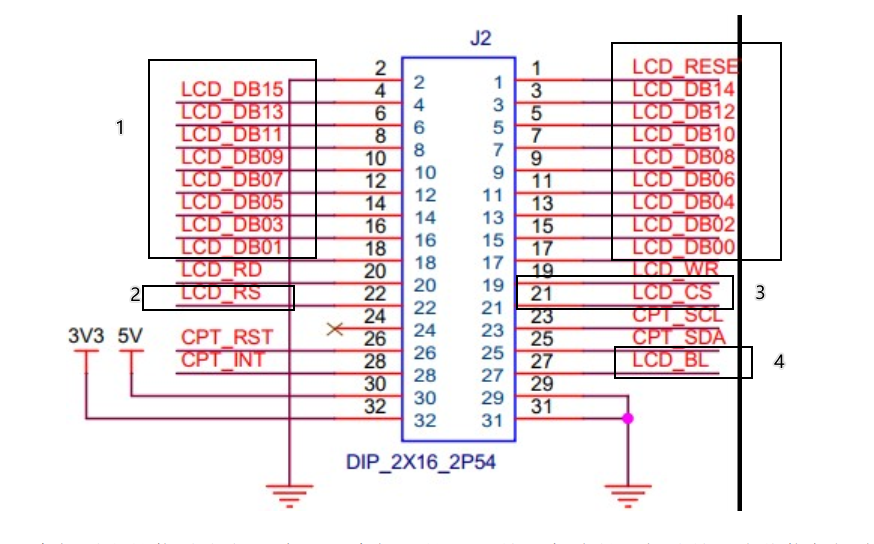
剩余引脚通过FPC排线,经由PCB主板引出排针与MCU进行连接,如图所示为原理图。如图:
- 1数据引脚:传输数据
- 2液晶控制线:高电平表示数据,低电平表示命令
- 3片选线:可以选中使能
- 4背光引脚:低电平有效
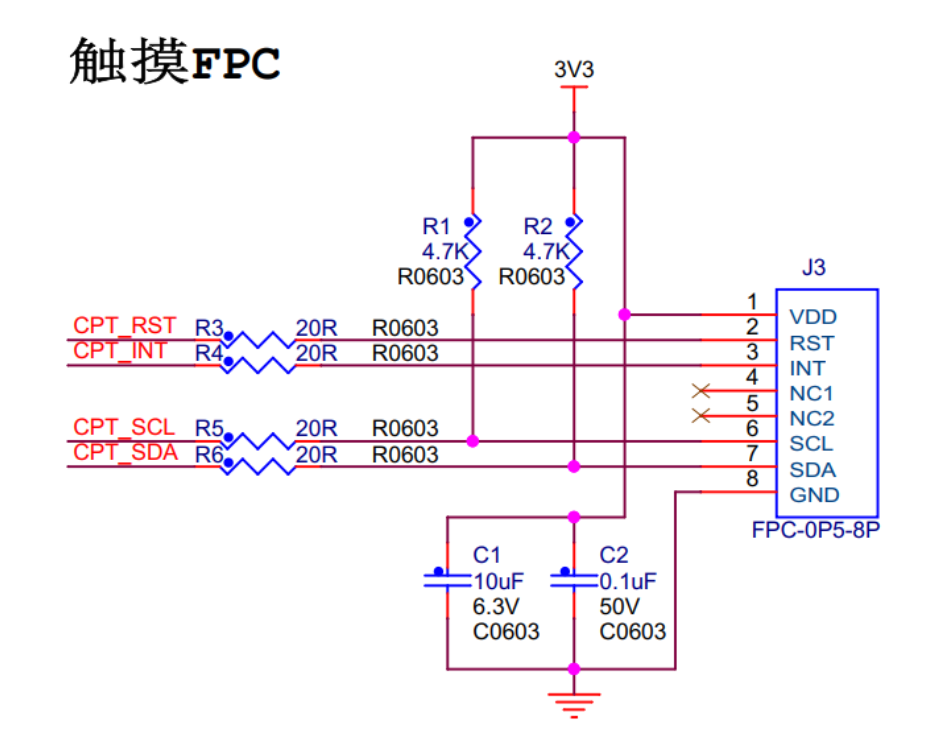 触摸检测的主体是型号为 GT917S 的芯片,它接收触摸屏的信号进行处理,把触摸信息使用 I2C接口输出到 STM32 等控制器,后面专门我会写篇文章讲解。
 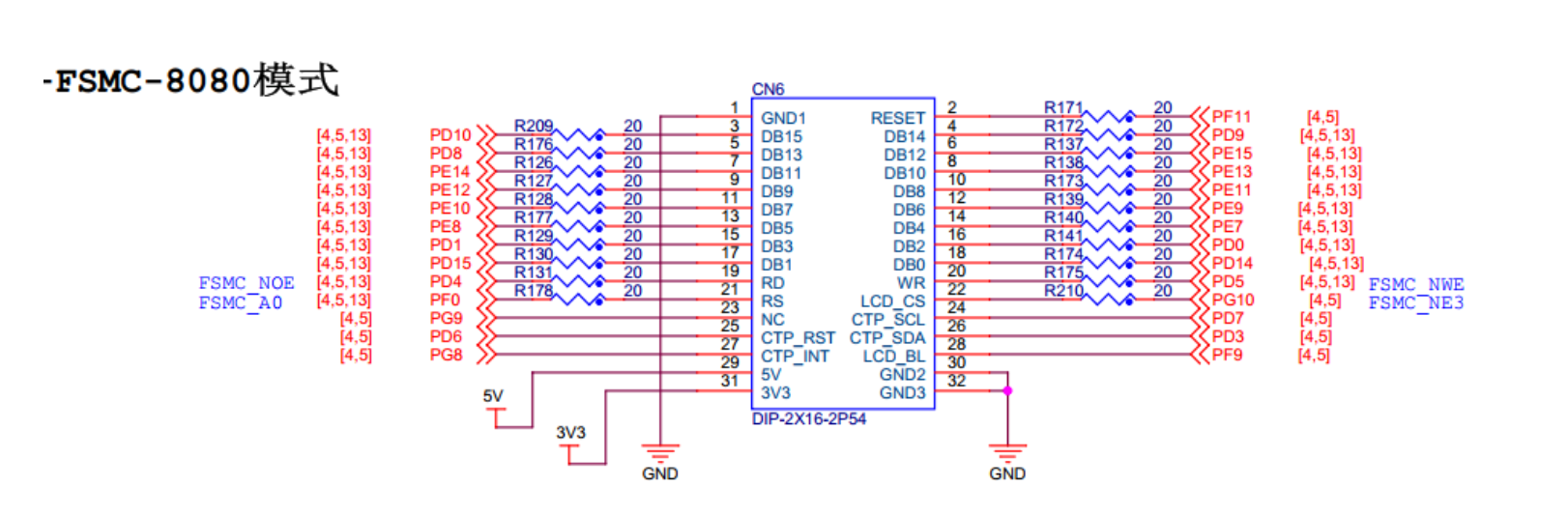 该图是野火 F407 开发板上的液晶排母接口原理图,它说明了配套的 4.3 寸屏幕接入到开发板上时的信号连接关系。 它决定了开发板以什么样的通讯方式在哪一个内存地址内部进行控制通讯。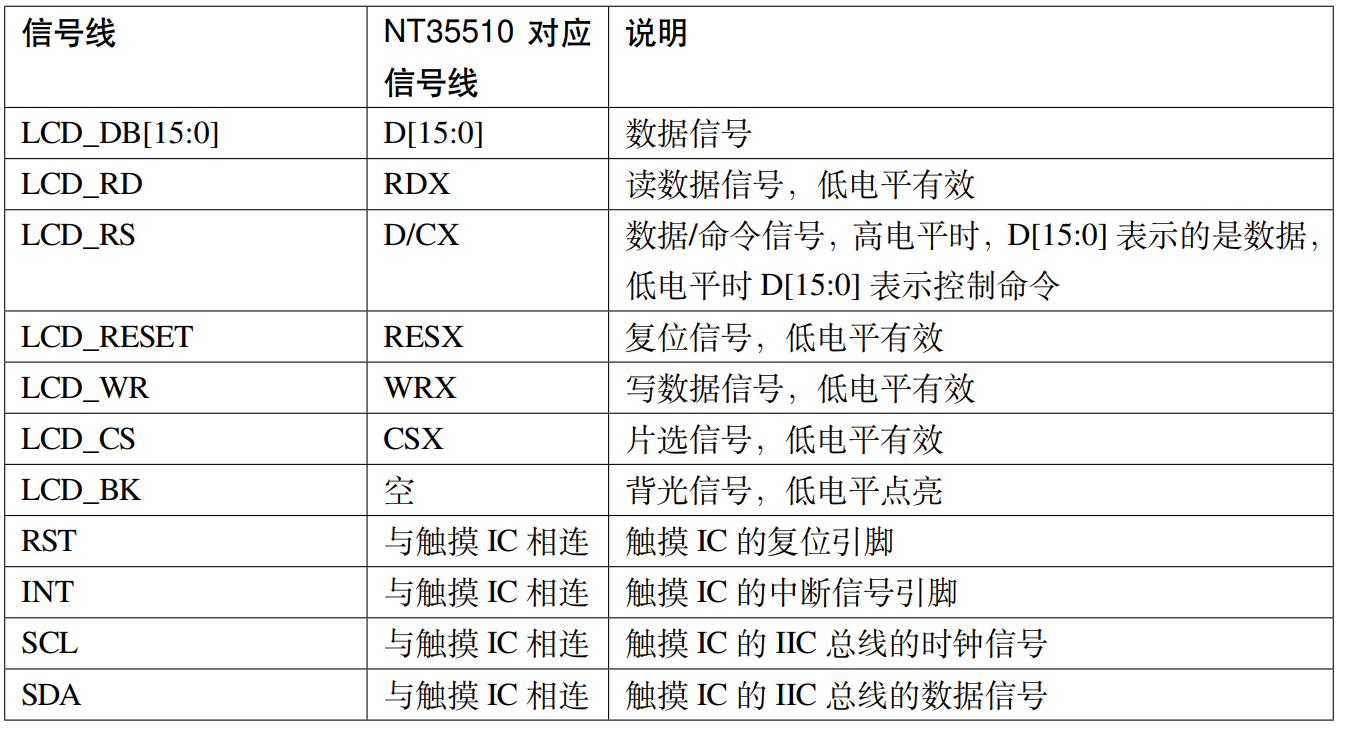
二、软件设计
建立bsp_nt35510_lcd.c和bsp_nt35510_lcd.h
1.编程要点
- 初始化通讯时使用的目标引脚和端口时钟
- 使能FSMC外设的时钟
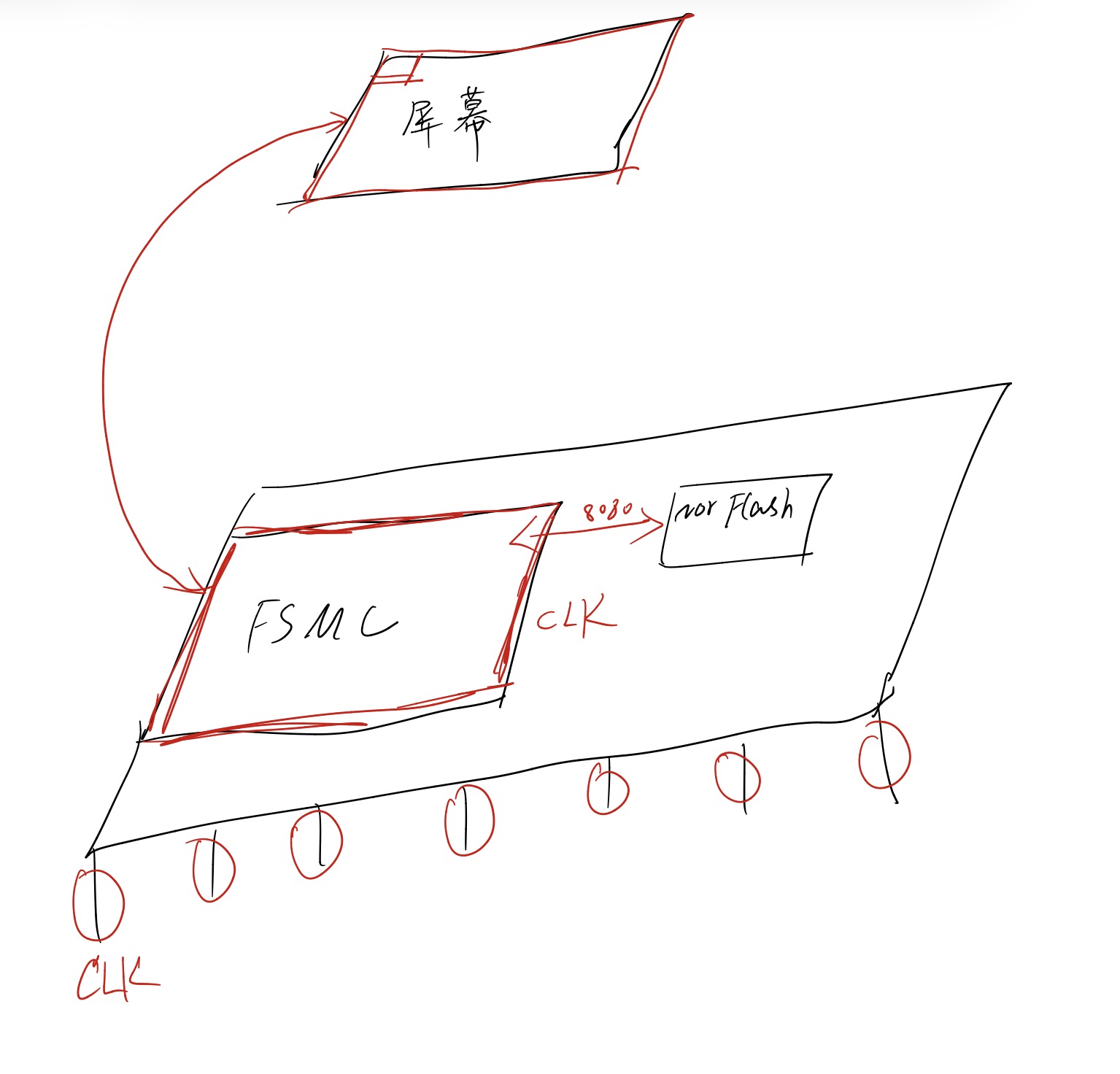
- 配置FSMC外设为NOR Flash模式用来仿真8080时序
- 建立机制FSMC可以发送命令和数据到屏幕进行初始化配置
- 撰写函数可以操作单个像素点的显示
- 根据多个像素点可以进行组合形成新的图像
2.代码分析
bsp_nt35510_lcd.h
1.宏定义了FSMC的命令,数据的地址和Bank 2.宏定义NT35510 显示屏8080通讯引脚定义 3.宏定义显示的一些参数,颜色和命令 4.声明函数
#ifndef __BSP_NT35510_LCD_H
#define __BSP_NT35510_LCD_H
#include "stm32f4xx.h"
#include "./font/fonts.h"
/***************************************************************************************
2^26 =0X0400 0000 = 64MB,每个 BANK 有4*64MB = 256MB
64MB:FSMC_Bank1_NORSRAM1:0X6000 0000 ~ 0X63FF FFFF
64MB:FSMC_Bank1_NORSRAM2:0X6400 0000 ~ 0X67FF FFFF
64MB:FSMC_Bank1_NORSRAM3:0X6800 0000 ~ 0X6BFF FFFF
64MB:FSMC_Bank1_NORSRAM4:0X6C00 0000 ~ 0X6FFF FFFF
选择BANK1-BORSRAM3 连接 TFT,地址范围为0X6800 0000 ~ 0X6BFF FFFF
FSMC_A0 接LCD的DC(寄存器/数据选择)脚
寄存器基地址 = 0X6C00 0000
RAM基地址 = 0X6D00 0000 = 0X6C00 0000+2^0*2 = 0X6800 0000 + 0X2 = 0X6800 0002
当选择不同的地址线时,地址要重新计算
****************************************************************************************/
/******************************* NT35510 显示屏的 FSMC 参数定义 ***************************/
//FSMC_Bank1_NORSRAM用于LCD命令操作的地址
#define FSMC_Addr_NT35510_CMD ( ( uint32_t ) 0x68000000 )
//FSMC_Bank1_NORSRAM用于LCD数据操作的地址
#define FSMC_Addr_NT35510_DATA ( ( uint32_t ) 0x68000002 )
//由片选引脚决定的NOR/SRAM块
#define FSMC_Bank1_NORSRAMx FSMC_Bank1_NORSRAM3
/******************************* NT35510 显示屏8080通讯引脚定义 ***************************/
/******控制信号线******/
#define FSMC_AF GPIO_AF_FSMC
//片选,选择NOR/SRAM块
#define NT35510_CS_CLK RCC_AHB1Periph_GPIOG
#define NT35510_CS_PORT GPIOG
#define NT35510_CS_PIN GPIO_Pin_10
#define NT35510_CS_PinSource GPIO_PinSource10
//DC引脚,使用FSMC的地址信号控制,本引脚决定了访问LCD时使用的地址
//PF0为FSMC_A0
#define NT35510_DC_CLK RCC_AHB1Periph_GPIOF
#define NT35510_DC_PORT GPIOF
#define NT35510_DC_PIN GPIO_Pin_0
#define NT35510_DC_PinSource GPIO_PinSource0
//写使能
#define NT35510_WR_CLK RCC_AHB1Periph_GPIOD
#define NT35510_WR_PORT GPIOD
#define NT35510_WR_PIN GPIO_Pin_5
#define NT35510_WR_PinSource GPIO_PinSource5
//读使能
#define NT35510_RD_CLK RCC_AHB1Periph_GPIOD
#define NT35510_RD_PORT GPIOD
#define NT35510_RD_PIN GPIO_Pin_4
#define NT35510_RD_PinSource GPIO_PinSource4
//复位引脚
#define NT35510_RST_CLK RCC_AHB1Periph_GPIOF
#define NT35510_RST_PORT GPIOF
#define NT35510_RST_PIN GPIO_Pin_11
//背光引脚
#define NT35510_BK_CLK RCC_AHB1Periph_GPIOF
#define NT35510_BK_PORT GPIOF
#define NT35510_BK_PIN GPIO_Pin_9
/********数据信号线***************/
#define NT35510_D0_CLK RCC_AHB1Periph_GPIOD
#define NT35510_D0_PORT GPIOD
#define NT35510_D0_PIN GPIO_Pin_14
#define NT35510_D0_PinSource GPIO_PinSource14
#define NT35510_D1_CLK RCC_AHB1Periph_GPIOD
#define NT35510_D1_PORT GPIOD
#define NT35510_D1_PIN GPIO_Pin_15
#define NT35510_D1_PinSource GPIO_PinSource15
#define NT35510_D2_CLK RCC_AHB1Periph_GPIOD
#define NT35510_D2_PORT GPIOD
#define NT35510_D2_PIN GPIO_Pin_0
#define NT35510_D2_PinSource GPIO_PinSource0
#define NT35510_D3_CLK RCC_AHB1Periph_GPIOD
#define NT35510_D3_PORT GPIOD
#define NT35510_D3_PIN GPIO_Pin_1
#define NT35510_D3_PinSource GPIO_PinSource1
#define NT35510_D4_CLK RCC_AHB1Periph_GPIOE
#define NT35510_D4_PORT GPIOE
#define NT35510_D4_PIN GPIO_Pin_7
#define NT35510_D4_PinSource GPIO_PinSource7
#define NT35510_D5_CLK RCC_AHB1Periph_GPIOE
#define NT35510_D5_PORT GPIOE
#define NT35510_D5_PIN GPIO_Pin_8
#define NT35510_D5_PinSource GPIO_PinSource8
#define NT35510_D6_CLK RCC_AHB1Periph_GPIOE
#define NT35510_D6_PORT GPIOE
#define NT35510_D6_PIN GPIO_Pin_9
#define NT35510_D6_PinSource GPIO_PinSource9
#define NT35510_D7_CLK RCC_AHB1Periph_GPIOE
#define NT35510_D7_PORT GPIOE
#define NT35510_D7_PIN GPIO_Pin_10
#define NT35510_D7_PinSource GPIO_PinSource10
#define NT35510_D8_CLK RCC_AHB1Periph_GPIOE
#define NT35510_D8_PORT GPIOE
#define NT35510_D8_PIN GPIO_Pin_11
#define NT35510_D8_PinSource GPIO_PinSource11
#define NT35510_D9_CLK RCC_AHB1Periph_GPIOE
#define NT35510_D9_PORT GPIOE
#define NT35510_D9_PIN GPIO_Pin_12
#define NT35510_D9_PinSource GPIO_PinSource12
#define NT35510_D10_CLK RCC_AHB1Periph_GPIOE
#define NT35510_D10_PORT GPIOE
#define NT35510_D10_PIN GPIO_Pin_13
#define NT35510_D10_PinSource GPIO_PinSource13
#define NT35510_D11_CLK RCC_AHB1Periph_GPIOE
#define NT35510_D11_PORT GPIOE
#define NT35510_D11_PIN GPIO_Pin_14
#define NT35510_D11_PinSource GPIO_PinSource14
#define NT35510_D12_CLK RCC_AHB1Periph_GPIOE
#define NT35510_D12_PORT GPIOE
#define NT35510_D12_PIN GPIO_Pin_15
#define NT35510_D12_PinSource GPIO_PinSource15
#define NT35510_D13_CLK RCC_AHB1Periph_GPIOD
#define NT35510_D13_PORT GPIOD
#define NT35510_D13_PIN GPIO_Pin_8
#define NT35510_D13_PinSource GPIO_PinSource8
#define NT35510_D14_CLK RCC_AHB1Periph_GPIOD
#define NT35510_D14_PORT GPIOD
#define NT35510_D14_PIN GPIO_Pin_9
#define NT35510_D14_PinSource GPIO_PinSource9
#define NT35510_D15_CLK RCC_AHB1Periph_GPIOD
#define NT35510_D15_PORT GPIOD
#define NT35510_D15_PIN GPIO_Pin_10
#define NT35510_D15_PinSource GPIO_PinSource10
/*************************************** 调试预用 ******************************************/
#define DEBUG_DELAY() Delay(0x5000)
/***************************** ILI934 显示区域的起始坐标和总行列数 ***************************/
#define NT35510_DispWindow_X_Star 0 //起始点的X坐标
#define NT35510_DispWindow_Y_Star 0 //起始点的Y坐标
#define NT35510_LESS_PIXEL 480//液晶屏较短方向的像素宽度
#define NT35510_MORE_PIXEL 800//液晶屏较长方向的像素宽度
//根据液晶扫描方向而变化的XY像素宽度
//调用NT35510_GramScan函数设置方向时会自动更改
extern uint16_t LCD_X_LENGTH,LCD_Y_LENGTH;
//液晶屏扫描模式
//参数可选值为0-7
extern uint8_t LCD_SCAN_MODE;
/******************************* 定义 ILI934 显示屏常用颜色 ********************************/
#define BACKGROUND BLACK //默认背景颜色
#define WHITE 0xFFFF //白色
#define BLACK 0x0000 //黑色
#define GREY 0xF7DE //灰色
#define BLUE 0x001F //蓝色
#define BLUE2 0x051F //浅蓝色
#define RED 0xF800 //红色
#define MAGENTA 0xF81F //红紫色,洋红色
#define GREEN 0x07E0 //绿色
#define CYAN 0x7FFF //蓝绿色,青色
#define YELLOW 0xFFE0 //黄色
#define BRED 0xF81F
#define GRED 0xFFE0
#define GBLUE 0x07FF
/******************************* 定义 ILI934 常用命令 ********************************/
#define CMD_SetCoordinateX 0x2A00 //设置X坐标
#define CMD_SetCoordinateY 0x2B00 //设置Y坐标
#define CMD_SetPixel 0x2C00 //填充像素
/********************************** 声明 ILI934 函数 ***************************************/
void NT35510_Init ( void );
void NT35510_Rst ( void );
void NT35510_BackLed_Control ( FunctionalState enumState );
void NT35510_GramScan ( uint8_t ucOtion );
void NT35510_OpenWindow ( uint16_t usX, uint16_t usY, uint16_t usWidth, uint16_t usHeight );
void NT35510_Clear ( uint16_t usX, uint16_t usY, uint16_t usWidth, uint16_t usHeight );
void NT35510_SetPointPixel ( uint16_t usX, uint16_t usY );
uint16_t NT35510_GetPointPixel ( uint16_t usX , uint16_t usY );
void NT35510_DrawLine ( uint16_t usX1, uint16_t usY1, uint16_t usX2, uint16_t usY2 );
void NT35510_DrawRectangle ( uint16_t usX_Start, uint16_t usY_Start, uint16_t usWidth, uint16_t usHeight,uint8_t ucFilled );
void NT35510_DrawCircle ( uint16_t usX_Center, uint16_t usY_Center, uint16_t usRadius, uint8_t ucFilled );
void NT35510_DispChar_EN ( uint16_t usX, uint16_t usY, const char cChar );
void NT35510_DispStringLine_EN ( uint16_t line, char * pStr );
void NT35510_DispString_EN ( uint16_t usX, uint16_t usY, char * pStr );
void NT35510_DispString_EN_YDir ( uint16_t usX,uint16_t usY , char * pStr );
void NT35510_DispChar_CH ( uint16_t usX, uint16_t usY, uint16_t usChar );
void NT35510_DispString_CH ( uint16_t usX, uint16_t usY, char * pStr );
void NT35510_DispString_EN_CH (uint16_t usX, uint16_t usY, char * pStr );
void NT35510_DispStringLine_EN_CH ( uint16_t line, char * pStr );
void NT35510_DispString_EN_YDir ( uint16_t usX,uint16_t usY , char * pStr );
void NT35510_DispString_EN_CH_YDir ( uint16_t usX,uint16_t usY , char * pStr );
void LCD_SetFont(sFONT *fonts);
sFONT *LCD_GetFont(void);
void NT35510_ClearLine(uint16_t Line);
void LCD_SetBackColor(uint16_t Color);
void LCD_SetTextColor(uint16_t Color);
void LCD_SetColors(uint16_t TextColor, uint16_t BackColor);
void LCD_GetColors(uint16_t *TextColor, uint16_t *BackColor);
#define LCD_ClearLine NT35510_ClearLine
void NT35510_DisplayStringEx(uint16_t x, //字符显示位置x
uint16_t y, //字符显示位置y
uint16_t Font_width,//要显示的字体宽度,英文字符在此基础上/2。注意为偶数
uint16_t Font_Height,//要显示的字体高度,注意为偶数
uint8_t *ptr,//显示的字符内容
uint16_t DrawModel); //是否反色显示
void NT35510_DisplayStringEx_YDir(uint16_t x, //字符显示位置x
uint16_t y, //字符显示位置y
uint16_t Font_width,//要显示的字体宽度,英文字符在此基础上/2。注意为偶数
uint16_t Font_Height,//要显示的字体高度,注意为偶数
uint8_t *ptr,//显示的字符内容
uint16_t DrawModel); //是否反色显示
#endif /* __BSP_NT35510_NT35510_H */
bsp_nt35510_lcd.c(部分)
初始化 FSMC 的 GPIO: 1.定义一个GPIO结构体 2.使能对应引脚时钟 3.配置十六根数据线(复用推挽输出) 4.RST/BL(普通推挽输出)
/**
* @brief 初始化NT35510的IO引脚
* @param 无
* @retval 无
*/
static void NT35510_GPIO_Config ( void )
{
GPIO_InitTypeDef GPIO_InitStructure;
/* 使能FSMC对应相应管脚时钟*/
RCC_AHB1PeriphClockCmd (
/*控制信号*/
NT35510_CS_CLK|NT35510_DC_CLK|NT35510_WR_CLK|
NT35510_RD_CLK|NT35510_BK_CLK|NT35510_RST_CLK|
/*数据信号*/
NT35510_D0_CLK|NT35510_D1_CLK|NT35510_D2_CLK |
NT35510_D3_CLK | NT35510_D4_CLK|NT35510_D5_CLK|
NT35510_D6_CLK | NT35510_D7_CLK|NT35510_D8_CLK|
NT35510_D9_CLK | NT35510_D10_CLK|NT35510_D11_CLK|
NT35510_D12_CLK | NT35510_D13_CLK|NT35510_D14_CLK|
NT35510_D15_CLK, ENABLE );
/* 配置FSMC相对应的数据线,FSMC-D0~D15 */
GPIO_InitStructure.GPIO_OType = GPIO_OType_PP;
GPIO_InitStructure.GPIO_PuPd = GPIO_PuPd_UP;
GPIO_InitStructure.GPIO_Mode = GPIO_Mode_AF;
GPIO_InitStructure.GPIO_Speed = GPIO_Speed_100MHz;
GPIO_InitStructure.GPIO_Pin = NT35510_D0_PIN;
GPIO_Init(NT35510_D0_PORT, &GPIO_InitStructure);
GPIO_PinAFConfig(NT35510_D0_PORT,NT35510_D0_PinSource,FSMC_AF);
GPIO_InitStructure.GPIO_Pin = NT35510_D1_PIN;
GPIO_Init(NT35510_D1_PORT, &GPIO_InitStructure);
GPIO_PinAFConfig(NT35510_D1_PORT,NT35510_D1_PinSource,FSMC_AF);
GPIO_InitStructure.GPIO_Pin = NT35510_D2_PIN;
GPIO_Init(NT35510_D2_PORT, &GPIO_InitStructure);
GPIO_PinAFConfig(NT35510_D2_PORT,NT35510_D2_PinSource,FSMC_AF);
GPIO_InitStructure.GPIO_Pin = NT35510_D3_PIN;
GPIO_Init(NT35510_D3_PORT, &GPIO_InitStructure);
GPIO_PinAFConfig(NT35510_D3_PORT,NT35510_D3_PinSource,FSMC_AF);
GPIO_InitStructure.GPIO_Pin = NT35510_D4_PIN;
GPIO_Init(NT35510_D4_PORT, &GPIO_InitStructure);
GPIO_PinAFConfig(NT35510_D4_PORT,NT35510_D4_PinSource,FSMC_AF);
GPIO_InitStructure.GPIO_Pin = NT35510_D5_PIN;
GPIO_Init(NT35510_D5_PORT, &GPIO_InitStructure);
GPIO_PinAFConfig(NT35510_D5_PORT,NT35510_D5_PinSource,FSMC_AF);
GPIO_InitStructure.GPIO_Pin = NT35510_D6_PIN;
GPIO_Init(NT35510_D6_PORT, &GPIO_InitStructure);
GPIO_PinAFConfig(NT35510_D6_PORT,NT35510_D6_PinSource,FSMC_AF);
GPIO_InitStructure.GPIO_Pin = NT35510_D7_PIN;
GPIO_Init(NT35510_D7_PORT, &GPIO_InitStructure);
GPIO_PinAFConfig(NT35510_D7_PORT,NT35510_D7_PinSource,FSMC_AF);
GPIO_InitStructure.GPIO_Pin = NT35510_D8_PIN;
GPIO_Init(NT35510_D8_PORT, &GPIO_InitStructure);
GPIO_PinAFConfig(NT35510_D8_PORT,NT35510_D8_PinSource,FSMC_AF);
GPIO_InitStructure.GPIO_Pin = NT35510_D9_PIN;
GPIO_Init(NT35510_D9_PORT, &GPIO_InitStructure);
GPIO_PinAFConfig(NT35510_D9_PORT,NT35510_D9_PinSource,FSMC_AF);
GPIO_InitStructure.GPIO_Pin = NT35510_D10_PIN;
GPIO_Init(NT35510_D10_PORT, &GPIO_InitStructure);
GPIO_PinAFConfig(NT35510_D10_PORT,NT35510_D10_PinSource,FSMC_AF);
GPIO_InitStructure.GPIO_Pin = NT35510_D11_PIN;
GPIO_Init(NT35510_D11_PORT, &GPIO_InitStructure);
GPIO_PinAFConfig(NT35510_D11_PORT,NT35510_D11_PinSource,FSMC_AF);
GPIO_InitStructure.GPIO_Pin = NT35510_D12_PIN;
GPIO_Init(NT35510_D12_PORT, &GPIO_InitStructure);
GPIO_PinAFConfig(NT35510_D12_PORT,NT35510_D12_PinSource,FSMC_AF);
GPIO_InitStructure.GPIO_Pin = NT35510_D13_PIN;
GPIO_Init(NT35510_D13_PORT, &GPIO_InitStructure);
GPIO_PinAFConfig(NT35510_D13_PORT,NT35510_D13_PinSource,FSMC_AF);
GPIO_InitStructure.GPIO_Pin = NT35510_D14_PIN;
GPIO_Init(NT35510_D14_PORT, &GPIO_InitStructure);
GPIO_PinAFConfig(NT35510_D14_PORT,NT35510_D14_PinSource,FSMC_AF);
GPIO_InitStructure.GPIO_Pin = NT35510_D15_PIN;
GPIO_Init(NT35510_D15_PORT, &GPIO_InitStructure);
GPIO_PinAFConfig(NT35510_D15_PORT,NT35510_D15_PinSource,FSMC_AF);
/* 配置FSMC相对应的控制线
* FSMC_NOE :LCD-RD
* FSMC_NWE :LCD-WR
* FSMC_NE1 :LCD-CS
* FSMC_A0 :LCD-DC
*/
GPIO_InitStructure.GPIO_Pin = NT35510_RD_PIN;
GPIO_Init(NT35510_RD_PORT, &GPIO_InitStructure);
GPIO_PinAFConfig(NT35510_RD_PORT,NT35510_RD_PinSource,FSMC_AF);
GPIO_InitStructure.GPIO_Pin = NT35510_WR_PIN;
GPIO_Init(NT35510_WR_PORT, &GPIO_InitStructure);
GPIO_PinAFConfig(NT35510_WR_PORT,NT35510_WR_PinSource,FSMC_AF);
GPIO_InitStructure.GPIO_Pin = NT35510_CS_PIN;
GPIO_Init(NT35510_CS_PORT, &GPIO_InitStructure);
GPIO_PinAFConfig(NT35510_CS_PORT,NT35510_CS_PinSource,FSMC_AF);
GPIO_InitStructure.GPIO_Pin = NT35510_DC_PIN;
GPIO_Init(NT35510_DC_PORT, &GPIO_InitStructure);
GPIO_PinAFConfig(NT35510_DC_PORT,NT35510_DC_PinSource,FSMC_AF);
/* 配置LCD复位RST控制管脚*/
GPIO_InitStructure.GPIO_Mode = GPIO_Mode_OUT;
GPIO_InitStructure.GPIO_OType = GPIO_OType_PP;
GPIO_InitStructure.GPIO_PuPd = GPIO_PuPd_UP;
GPIO_InitStructure.GPIO_Speed = GPIO_Speed_50MHz;
GPIO_InitStructure.GPIO_Pin = NT35510_RST_PIN;
GPIO_Init ( NT35510_RST_PORT, & GPIO_InitStructure );
/* 配置LCD背光控制管脚BK*/
GPIO_InitStructure.GPIO_Pin = NT35510_BK_PIN;
GPIO_Init ( NT35510_BK_PORT, & GPIO_InitStructure );
}
配置 FSMC 的模式: 1.定义FSMC_NORSRAM的结构体和FSMC_NORSRAMTimingInitTypeDef(设置时序)结构体 2.使能FSMC对应时钟 3.配置时序结构体(设置ADDSET和DATAST和模式B,一些同步时钟相关设置用不到) 4.配置FSMC_NORSRAM的结构体(设置bank,数据地址是否复用,存储器类型,数据宽度等等) 5.使能 FSMC_Bank1_NORSRAM3
/**
* @brief LCD FSMC 模式配置
* @param 无
* @retval 无
*/
static void NT35510_FSMC_Config ( void )
{
#if 1
FSMC_NORSRAMInitTypeDef FSMC_NORSRAMInitStructure;
FSMC_NORSRAMTimingInitTypeDef readWriteTiming;
/* 使能FSMC时钟*/
RCC_AHB3PeriphClockCmd(RCC_AHB3Periph_FSMC,ENABLE);
//地址建立时间(ADDSET)为1个HCLK 5/168M=30ns
readWriteTiming.FSMC_AddressSetupTime = 0x04; //地址建立时间
//数据保持时间(DATAST)+ 1个HCLK = 12/168M=72ns
readWriteTiming.FSMC_DataSetupTime = 0x0f; //数据建立时间
//选择控制的模式
//模式B,异步NOR FLASH模式,与NT35510的8080时序匹配
readWriteTiming.FSMC_AccessMode = FSMC_AccessMode_B;
/*以下配置与模式B无关*/
//地址保持时间(ADDHLD)模式A未用到
readWriteTiming.FSMC_AddressHoldTime = 0x00; //地址保持时间
//设置总线转换周期,仅用于复用模式的NOR操作
readWriteTiming.FSMC_BusTurnAroundDuration = 0x00;
//设置时钟分频,仅用于同步类型的存储器
readWriteTiming.FSMC_CLKDivision = 0x00;
//数据保持时间,仅用于同步型的NOR
readWriteTiming.FSMC_DataLatency = 0x00;
FSMC_NORSRAMInitStructure.FSMC_Bank = FSMC_Bank1_NORSRAMx;
FSMC_NORSRAMInitStructure.FSMC_DataAddressMux = FSMC_DataAddressMux_Disable;
FSMC_NORSRAMInitStructure.FSMC_MemoryType = FSMC_MemoryType_NOR;
FSMC_NORSRAMInitStructure.FSMC_MemoryDataWidth = FSMC_MemoryDataWidth_16b;
FSMC_NORSRAMInitStructure.FSMC_BurstAccessMode = FSMC_BurstAccessMode_Disable;
FSMC_NORSRAMInitStructure.FSMC_WaitSignalPolarity = FSMC_WaitSignalPolarity_Low;
FSMC_NORSRAMInitStructure.FSMC_WrapMode = FSMC_WrapMode_Disable;
FSMC_NORSRAMInitStructure.FSMC_WaitSignalActive = FSMC_WaitSignalActive_BeforeWaitState;
FSMC_NORSRAMInitStructure.FSMC_WriteOperation = FSMC_WriteOperation_Enable;
FSMC_NORSRAMInitStructure.FSMC_WaitSignal = FSMC_WaitSignal_Disable;
FSMC_NORSRAMInitStructure.FSMC_ExtendedMode = FSMC_ExtendedMode_Disable;
FSMC_NORSRAMInitStructure.FSMC_WriteBurst = FSMC_WriteBurst_Disable;
FSMC_NORSRAMInitStructure.FSMC_ReadWriteTimingStruct = &readWriteTiming;
FSMC_NORSRAMInitStructure.FSMC_WriteTimingStruct = &readWriteTiming;
FSMC_NORSRAMInit ( & FSMC_NORSRAMInitStructure );
/* 使能 FSMC_Bank1_NORSRAM3 */
FSMC_NORSRAMCmd ( FSMC_Bank1_NORSRAMx, ENABLE );
#else
FSMC_NORSRAMInitTypeDef FSMC_NORSRAMInitStructure;
FSMC_NORSRAMTimingInitTypeDef readWriteTiming;
FSMC_NORSRAMTimingInitTypeDef writeTiming;
/* 使能FSMC时钟*/
RCC_AHB3PeriphClockCmd(RCC_AHB3Periph_FSMC,ENABLE);
readWriteTiming.FSMC_AddressSetupTime = 0x00; //地址建立时间(ADDSET)为2个HCLK 1/36M=27ns
readWriteTiming.FSMC_AddressHoldTime = 0x00; //地址保持时间(ADDHLD)模式A未用到
readWriteTiming.FSMC_DataSetupTime = 0x0f; // 数据保存时间为16个HCLK,因为液晶驱动IC的读数据的时候,速度不能太快,尤其对1289这个IC。
readWriteTiming.FSMC_BusTurnAroundDuration = 0x00;
readWriteTiming.FSMC_CLKDivision = 0x00;
readWriteTiming.FSMC_DataLatency = 0x00;
readWriteTiming.FSMC_AccessMode = FSMC_AccessMode_A; //模式A
writeTiming.FSMC_AddressSetupTime = 0x01; //地址建立时间(ADDSET)为1个HCLK
writeTiming.FSMC_AddressHoldTime = 0x00; //地址保持时间(A
writeTiming.FSMC_DataSetupTime = 0x04; ////数据保存时间为4个HCLK
writeTiming.FSMC_BusTurnAroundDuration = 0x00;
writeTiming.FSMC_CLKDivision = 0x00;
writeTiming.FSMC_DataLatency = 0x00;
writeTiming.FSMC_AccessMode = FSMC_AccessMode_A; //模式A
FSMC_NORSRAMInitStructure.FSMC_Bank = FSMC_Bank1_NORSRAMx;// FSMC_Bank1_NORSRAM4;// 这里使用NE1 ,也就对应BTCR[6],[7]。
FSMC_NORSRAMInitStructure.FSMC_DataAddressMux = FSMC_DataAddressMux_Disable; // 不复用数据地址
FSMC_NORSRAMInitStructure.FSMC_MemoryType =FSMC_MemoryType_SRAM;// FSMC_MemoryType_SRAM; //SRAM
FSMC_NORSRAMInitStructure.FSMC_MemoryDataWidth = FSMC_MemoryDataWidth_16b; //存储器数据宽度为16bit
FSMC_NORSRAMInitStructure.FSMC_BurstAccessMode = FSMC_BurstAccessMode_Disable;// FSMC_BurstAccessMode_Disable;
FSMC_NORSRAMInitStructure.FSMC_WaitSignalPolarity = FSMC_WaitSignalPolarity_Low;
FSMC_NORSRAMInitStructure.FSMC_AsynchronousWait = FSMC_AsynchronousWait_Disable;
FSMC_NORSRAMInitStructure.FSMC_WrapMode = FSMC_WrapMode_Disable;
FSMC_NORSRAMInitStructure.FSMC_WaitSignalActive = FSMC_WaitSignalActive_BeforeWaitState;
FSMC_NORSRAMInitStructure.FSMC_WriteOperation = FSMC_WriteOperation_Enable;// 存储器写使能
FSMC_NORSRAMInitStructure.FSMC_WaitSignal = FSMC_WaitSignal_Disable;
FSMC_NORSRAMInitStructure.FSMC_ExtendedMode = FSMC_ExtendedMode_Enable; // 读写使用不同的时序
FSMC_NORSRAMInitStructure.FSMC_WriteBurst = FSMC_WriteBurst_Disable;
FSMC_NORSRAMInitStructure.FSMC_ReadWriteTimingStruct = &readWriteTiming; //读写时序
FSMC_NORSRAMInitStructure.FSMC_WriteTimingStruct = &writeTiming; //写时序
FSMC_NORSRAMInit(&FSMC_NORSRAMInitStructure); //初始化FSMC配置
FSMC_NORSRAMCmd(FSMC_Bank1_NORSRAMx, ENABLE); // 使能BANK1
#endif
}
向液晶屏发送命令及发送数据的操作: 首先需要知道由命令地址和数据地址 1.发送命令地址后紧接着发送一些数据可以完成一些操作 2.发送数据就是在那个数据地址进行写入数据 3.读取数据就是在返回该地址的数据
/**
* @brief 向NT35510写入命令
* @param usCmd :要写入的命令(表寄存器地址)
* @retval 无
*/
__inline void NT35510_Write_Cmd ( uint16_t usCmd )
{
* ( __IO uint16_t * ) ( FSMC_Addr_NT35510_CMD ) = usCmd;
}
/**
* @brief 向NT35510写入数据
* @param usData :要写入的数据
* @retval 无
*/
__inline void NT35510_Write_Data ( uint16_t usData )
{
* ( __IO uint16_t * ) ( FSMC_Addr_NT35510_DATA ) = usData;
}
/**
* @brief 从NT35510读取数据
* @param 无
* @retval 读取到的数据
*/
__inline uint16_t NT35510_Read_Data ( void )
{
return ( * ( __IO uint16_t * ) ( FSMC_Addr_NT35510_DATA ) );
}
设置液晶显示窗口 确定起点坐标和终点坐标即可开启一个窗口
/**
* @brief 在NT35510显示器上开辟一个窗口
* @param usX :在特定扫描方向下窗口的起点X坐标
* @param usY :在特定扫描方向下窗口的起点Y坐标
* @param usWidth :窗口的宽度
* @param usHeight :窗口的高度
* @retval 无
*/
void NT35510_OpenWindow ( uint16_t usX, uint16_t usY, uint16_t usWidth, uint16_t usHeight )
{
NT35510_Write_Cmd ( CMD_SetCoordinateX ); /* 设置X坐标 */
NT35510_Write_Data ( usX >> 8 ); /* 先高8位,然后低8位 */
NT35510_Write_Cmd ( CMD_SetCoordinateX + 1 );
NT35510_Write_Data ( usX & 0xff ); /* 设置起始点和结束点*/
NT35510_Write_Cmd ( CMD_SetCoordinateX + 2 );
NT35510_Write_Data ( ( usX + usWidth – 1 ) >> 8 );
NT35510_Write_Cmd ( CMD_SetCoordinateX + 3 );
NT35510_Write_Data ( ( usX + usWidth – 1 ) & 0xff );
NT35510_Write_Cmd ( CMD_SetCoordinateY ); /* 设置Y坐标*/
NT35510_Write_Data ( usY >> 8 );
NT35510_Write_Cmd ( CMD_SetCoordinateY + 1);
NT35510_Write_Data ( usY & 0xff );
NT35510_Write_Cmd ( CMD_SetCoordinateY + 2);
NT35510_Write_Data ( ( usY + usHeight – 1 ) >> 8 );
NT35510_Write_Cmd ( CMD_SetCoordinateY + 3);
NT35510_Write_Data ( ( usY + usHeight – 1) & 0xff );
}
发送像素数据 这些颜色值会按顺序填充到前面使用 NT35510_OpenWindow 函数设置的显示窗口中 例如,若设置了一个 usX=10, usY=30, usWidth=50, usHeight=20 的窗口,然后再连续填充 50*20 个颜色值为 0XFFFF 的像素数据, 即可在 (10,30) 的起始坐标处显示一个宽 50 像素高 20 像素的白色矩形
/**
* @brief 在NT35510显示器上以某一颜色填充像素点
* @param ulAmout_Point :要填充颜色的像素点的总数目
* @param usColor :颜色
* @retval 无
*/
static __inline void NT35510_FillColor ( uint32_t ulAmout_Point, uint16_t usColor )
{
uint32_t i = 0;
/* memory write */
NT35510_Write_Cmd ( CMD_SetPixel );
for ( i = 0; i < ulAmout_Point; i ++ )
NT35510_Write_Data ( usColor );
}
绘制单个像素点 1.实际上就是只开了一个像素的窗口 2.然后在这个窗口内进行填充颜色就相当于可以控制单个像素点的显示
/**
* @brief 对NT35510显示器的某一点以某种颜色进行填充
* @param usX :在特定扫描方向下该点的X坐标
* @param usY :在特定扫描方向下该点的Y坐标
* @note 可使用LCD_SetBackColor、LCD_SetTextColor、LCD_SetColors函数设置颜色
* @retval 无
*/
void NT35510_SetPointPixel ( uint16_t usX, uint16_t usY )
{
if ( ( usX < LCD_X_LENGTH ) && ( usY < LCD_Y_LENGTH ) )
{
NT35510_SetCursor ( usX, usY );
NT35510_FillColor ( 1, CurrentTextColor );
}
}
绘制矩形 1.如果是实心矩形,就是调用函数开启一个窗口,然后在窗口内进行填充数据 2.如果是空心矩形,就要利用画线函数进行画线
/**
* @brief 在 NT35510 显示器上画一个矩形
* @param usX_Start :在特定扫描方向下矩形的起始点X坐标
* @param usY_Start :在特定扫描方向下矩形的起始点Y坐标
* @param usWidth:矩形的宽度(单位:像素)
* @param usHeight:矩形的高度(单位:像素)
* @param ucFilled :选择是否填充该矩形
* 该参数为以下值之一:
* @arg 0 :空心矩形
* @arg 1 :实心矩形
* @note 可使用LCD_SetBackColor、LCD_SetTextColor、LCD_SetColors函数设置颜色
* @retval 无
*/
void NT35510_DrawRectangle ( uint16_t usX_Start, uint16_t usY_Start, uint16_t usWidth, uint16_t usHeight, uint8_t ucFilled )
{
if ( ucFilled )
{
NT35510_OpenWindow ( usX_Start, usY_Start, usWidth, usHeight );
NT35510_FillColor ( usWidth * usHeight ,CurrentTextColor);
}
else
{
NT35510_DrawLine ( usX_Start, usY_Start, usX_Start + usWidth – 1, usY_Start );
NT35510_DrawLine ( usX_Start, usY_Start + usHeight – 1, usX_Start + usWidth – 1, usY_Start + usHeight – 1 );
NT35510_DrawLine ( usX_Start, usY_Start, usX_Start, usY_Start + usHeight – 1 );
NT35510_DrawLine ( usX_Start + usWidth – 1, usY_Start, usX_Start + usWidth – 1, usY_Start + usHeight – 1 );
}
}
设置液晶的扫描方向 1.根据设置可以选择横屏或者竖屏 2.通过发送对应命令和数据就可以将其设置为7种模式
/**
* @brief 设置NT35510的GRAM的扫描方向
* @param ucOption :选择GRAM的扫描方向
* @arg 0-7 :参数可选值为0-7这八个方向
*
*!!!其中0、3、5、6 模式适合从左至右显示文字,
*不推荐使用其它模式显示文字其它模式显示文字会有镜像效果
*
*其中0、2、4、6 模式的X方向像素为480,Y方向像素为854
*其中1、3、5、7 模式下X方向像素为854,Y方向像素为480
*
*其中 6 模式为大部分液晶例程的默认显示方向
*其中 3 模式为摄像头例程使用的方向
*其中 0 模式为BMP图片显示例程使用的方向
*
* @retval 无
* @note 坐标图例:A表示向上,V表示向下,<表示向左,>表示向右
X表示X轴,Y表示Y轴
————————————————————
模式0:.模式1:.模式2:.模式3:
A.A.A.A
|.|.|.|
Y.X.Y.X
0.1.2.3
<— X0 o.<—-Y1o.o 2X—> .o 3Y—>
————————————————————
模式4:.模式5:.模式6:.模式7:
<— X4 o.<— Y5 o.o 6X—> .o 7Y—>
4.5.6.7
Y.X.Y.X
|.|.|.|
V.V.V.V
———————————————————
LCD屏示例
|—————–|
|野火Logo|
||
||
||
||
||
||
||
||
|—————–|
屏幕正面(宽480,高854)
*******************************************************/
void NT35510_GramScan ( uint8_t ucOption )
{
//参数检查,只可输入0-7
if(ucOption >7 )
return;
//根据模式更新LCD_SCAN_MODE的值,主要用于触摸屏选择计算参数
LCD_SCAN_MODE = ucOption;
//根据模式更新XY方向的像素宽度
if(ucOption%2 == 0)
{
//0 2 4 6模式下X方向像素宽度为480,Y方向为854
LCD_X_LENGTH = NT35510_LESS_PIXEL;
LCD_Y_LENGTH =NT35510_MORE_PIXEL;
}
else
{
//1 3 5 7模式下X方向像素宽度为854,Y方向为480
LCD_X_LENGTH = NT35510_MORE_PIXEL;
LCD_Y_LENGTH =NT35510_LESS_PIXEL;
}
//0x36命令参数的高3位可用于设置GRAM扫描方向
NT35510_Write_Cmd ( 0x3600 );
NT35510_Write_Data (0x00 | (ucOption<<5));//根据ucOption的值设置LCD参数,共0-7种模式
NT35510_Write_Cmd ( CMD_SetCoordinateX );
NT35510_Write_Data ( 0x00 );/* x 起始坐标高8位 */
NT35510_Write_Cmd ( CMD_SetCoordinateX + 1 );
NT35510_Write_Data ( 0x00 );/* x 起始坐标低8位 */
NT35510_Write_Cmd ( CMD_SetCoordinateX + 2 );
NT35510_Write_Data ( ((LCD_X_LENGTH–1)>>8)&0xFF ); /* x 结束坐标高8位 */
NT35510_Write_Cmd ( CMD_SetCoordinateX + 3 );
NT35510_Write_Data ( (LCD_X_LENGTH–1)&0xFF );/* x 结束坐标低8位 */
NT35510_Write_Cmd ( CMD_SetCoordinateY );
NT35510_Write_Data ( 0x00 );/* y 起始坐标高8位 */
NT35510_Write_Cmd ( CMD_SetCoordinateY + 1 );
NT35510_Write_Data ( 0x00 );/* y 起始坐标低8位 */
NT35510_Write_Cmd ( CMD_SetCoordinateY + 2 );
NT35510_Write_Data ( ((LCD_Y_LENGTH–1)>>8)&0xFF );/* y 结束坐标高8位 */
NT35510_Write_Cmd ( CMD_SetCoordinateY + 3 );
NT35510_Write_Data ( (LCD_Y_LENGTH–1)&0xFF );/* y 结束坐标低8位 */
/* write gram start */
NT35510_Write_Cmd ( CMD_SetPixel );
}
液晶屏全局初始化函数 1.先调用我们已经写好的GPIO初始化 2.配置FSMC完成配置 3.复位液晶 4.初始化液晶控制器的寄存器(里面包含发送命令和数据) 5.设置扫描方式 6.清屏 7.打开背光
/**
* @brief 初始化NT35510寄存器
* @param 无
* @retval 无
*/
/**
* @brief 初始化NT35510寄存器
* @param 无
* @retval 无
*/
static void NT35510_REG_Config ( void )
{
///NT35510-HSD43
//PAGE1
NT35510_Write_Cmd(0xF000); NT35510_Write_Data(0x0055);
NT35510_Write_Cmd(0xF001); NT35510_Write_Data(0x00AA);
NT35510_Write_Cmd(0xF002); NT35510_Write_Data(0x0052);
NT35510_Write_Cmd(0xF003); NT35510_Write_Data(0x0008);
NT35510_Write_Cmd(0xF004); NT35510_Write_Data(0x0001);
//Set AVDD 5.2V
NT35510_Write_Cmd(0xB000); NT35510_Write_Data(0x000D);
NT35510_Write_Cmd(0xB001); NT35510_Write_Data(0x000D);
NT35510_Write_Cmd(0xB002); NT35510_Write_Data(0x000D);
//Set AVEE 5.2V
NT35510_Write_Cmd(0xB100); NT35510_Write_Data(0x000D);
NT35510_Write_Cmd(0xB101); NT35510_Write_Data(0x000D);
NT35510_Write_Cmd(0xB102); NT35510_Write_Data(0x000D);
//Set VCL -2.5V
NT35510_Write_Cmd(0xB200); NT35510_Write_Data(0x0000);
NT35510_Write_Cmd(0xB201); NT35510_Write_Data(0x0000);
NT35510_Write_Cmd(0xB202); NT35510_Write_Data(0x0000);
//Set AVDD Ratio
NT35510_Write_Cmd(0xB600); NT35510_Write_Data(0x0044);
NT35510_Write_Cmd(0xB601); NT35510_Write_Data(0x0044);
NT35510_Write_Cmd(0xB602); NT35510_Write_Data(0x0044);
//Set AVEE Ratio
NT35510_Write_Cmd(0xB700); NT35510_Write_Data(0x0034);
NT35510_Write_Cmd(0xB701); NT35510_Write_Data(0x0034);
NT35510_Write_Cmd(0xB702); NT35510_Write_Data(0x0034);
//Set VCL -2.5V
NT35510_Write_Cmd(0xB800); NT35510_Write_Data(0x0034);
NT35510_Write_Cmd(0xB801); NT35510_Write_Data(0x0034);
NT35510_Write_Cmd(0xB802); NT35510_Write_Data(0x0034);
//Control VGH booster voltage rang
NT35510_Write_Cmd(0xBF00); NT35510_Write_Data(0x0001); //VGH:7~18V
//VGH=15V(1V/step)Free pump
NT35510_Write_Cmd(0xB300); NT35510_Write_Data(0x000f);//08
NT35510_Write_Cmd(0xB301); NT35510_Write_Data(0x000f);//08
NT35510_Write_Cmd(0xB302); NT35510_Write_Data(0x000f);//08
//VGH Ratio
NT35510_Write_Cmd(0xB900); NT35510_Write_Data(0x0034);
NT35510_Write_Cmd(0xB901); NT35510_Write_Data(0x0034);
NT35510_Write_Cmd(0xB902); NT35510_Write_Data(0x0034);
//VGL_REG=-10(1V/step)
NT35510_Write_Cmd(0xB500); NT35510_Write_Data(0x0008);
NT35510_Write_Cmd(0xB501); NT35510_Write_Data(0x0008);
NT35510_Write_Cmd(0xB502); NT35510_Write_Data(0x0008);
NT35510_Write_Cmd(0xC200); NT35510_Write_Data(0x0003);
//VGLX Ratio
NT35510_Write_Cmd(0xBA00); NT35510_Write_Data(0x0034);
NT35510_Write_Cmd(0xBA01); NT35510_Write_Data(0x0034);
NT35510_Write_Cmd(0xBA02); NT35510_Write_Data(0x0034);
//VGMP/VGSP=4.5V/0V
NT35510_Write_Cmd(0xBC00); NT35510_Write_Data(0x0000);//00
NT35510_Write_Cmd(0xBC01); NT35510_Write_Data(0x0078);//C8 =5.5V/90=4.8V
NT35510_Write_Cmd(0xBC02); NT35510_Write_Data(0x0000);//01
//VGMN/VGSN=-4.5V/0V
NT35510_Write_Cmd(0xBD00); NT35510_Write_Data(0x0000); //00
NT35510_Write_Cmd(0xBD01); NT35510_Write_Data(0x0078); //90
NT35510_Write_Cmd(0xBD02); NT35510_Write_Data(0x0000);
//Vcom=-1.4V(12.5mV/step)
NT35510_Write_Cmd(0xBE00); NT35510_Write_Data(0x0000);
NT35510_Write_Cmd(0xBE01); NT35510_Write_Data(0x0064); //HSD:64;Novatek:50=-1.0V, 80 5f
//Gamma (R+)
NT35510_Write_Cmd(0xD100); NT35510_Write_Data(0x0000);
NT35510_Write_Cmd(0xD101); NT35510_Write_Data(0x0033);
NT35510_Write_Cmd(0xD102); NT35510_Write_Data(0x0000);
NT35510_Write_Cmd(0xD103); NT35510_Write_Data(0x0034);
NT35510_Write_Cmd(0xD104); NT35510_Write_Data(0x0000);
NT35510_Write_Cmd(0xD105); NT35510_Write_Data(0x003A);
NT35510_Write_Cmd(0xD106); NT35510_Write_Data(0x0000);
NT35510_Write_Cmd(0xD107); NT35510_Write_Data(0x004A);
NT35510_Write_Cmd(0xD108); NT35510_Write_Data(0x0000);
NT35510_Write_Cmd(0xD109); NT35510_Write_Data(0x005C);
NT35510_Write_Cmd(0xD10A); NT35510_Write_Data(0x0000);
NT35510_Write_Cmd(0xD10B); NT35510_Write_Data(0x0081);
NT35510_Write_Cmd(0xD10C); NT35510_Write_Data(0x0000);
NT35510_Write_Cmd(0xD10D); NT35510_Write_Data(0x00A6);
NT35510_Write_Cmd(0xD10E); NT35510_Write_Data(0x0000);
NT35510_Write_Cmd(0xD10F); NT35510_Write_Data(0x00E5);
NT35510_Write_Cmd(0xD110); NT35510_Write_Data(0x0001);
NT35510_Write_Cmd(0xD111); NT35510_Write_Data(0x0013);
NT35510_Write_Cmd(0xD112); NT35510_Write_Data(0x0001);
NT35510_Write_Cmd(0xD113); NT35510_Write_Data(0x0054);
NT35510_Write_Cmd(0xD114); NT35510_Write_Data(0x0001);
NT35510_Write_Cmd(0xD115); NT35510_Write_Data(0x0082);
NT35510_Write_Cmd(0xD116); NT35510_Write_Data(0x0001);
NT35510_Write_Cmd(0xD117); NT35510_Write_Data(0x00CA);
NT35510_Write_Cmd(0xD118); NT35510_Write_Data(0x0002);
NT35510_Write_Cmd(0xD119); NT35510_Write_Data(0x0000);
NT35510_Write_Cmd(0xD11A); NT35510_Write_Data(0x0002);
NT35510_Write_Cmd(0xD11B); NT35510_Write_Data(0x0001);
NT35510_Write_Cmd(0xD11C); NT35510_Write_Data(0x0002);
NT35510_Write_Cmd(0xD11D); NT35510_Write_Data(0x0034);
NT35510_Write_Cmd(0xD11E); NT35510_Write_Data(0x0002);
NT35510_Write_Cmd(0xD11F); NT35510_Write_Data(0x0067);
NT35510_Write_Cmd(0xD120); NT35510_Write_Data(0x0002);
NT35510_Write_Cmd(0xD121); NT35510_Write_Data(0x0084);
NT35510_Write_Cmd(0xD122); NT35510_Write_Data(0x0002);
NT35510_Write_Cmd(0xD123); NT35510_Write_Data(0x00A4);
NT35510_Write_Cmd(0xD124); NT35510_Write_Data(0x0002);
NT35510_Write_Cmd(0xD125); NT35510_Write_Data(0x00B7);
NT35510_Write_Cmd(0xD126); NT35510_Write_Data(0x0002);
NT35510_Write_Cmd(0xD127); NT35510_Write_Data(0x00CF);
NT35510_Write_Cmd(0xD128); NT35510_Write_Data(0x0002);
NT35510_Write_Cmd(0xD129); NT35510_Write_Data(0x00DE);
NT35510_Write_Cmd(0xD12A); NT35510_Write_Data(0x0002);
NT35510_Write_Cmd(0xD12B); NT35510_Write_Data(0x00F2);
NT35510_Write_Cmd(0xD12C); NT35510_Write_Data(0x0002);
NT35510_Write_Cmd(0xD12D); NT35510_Write_Data(0x00FE);
NT35510_Write_Cmd(0xD12E); NT35510_Write_Data(0x0003);
NT35510_Write_Cmd(0xD12F); NT35510_Write_Data(0x0010);
NT35510_Write_Cmd(0xD130); NT35510_Write_Data(0x0003);
NT35510_Write_Cmd(0xD131); NT35510_Write_Data(0x0033);
NT35510_Write_Cmd(0xD132); NT35510_Write_Data(0x0003);
NT35510_Write_Cmd(0xD133); NT35510_Write_Data(0x006D);
//Gamma (G+)
NT35510_Write_Cmd(0xD200); NT35510_Write_Data(0x0000);
NT35510_Write_Cmd(0xD201); NT35510_Write_Data(0x0033);
NT35510_Write_Cmd(0xD202); NT35510_Write_Data(0x0000);
NT35510_Write_Cmd(0xD203); NT35510_Write_Data(0x0034);
NT35510_Write_Cmd(0xD204); NT35510_Write_Data(0x0000);
NT35510_Write_Cmd(0xD205); NT35510_Write_Data(0x003A);
NT35510_Write_Cmd(0xD206); NT35510_Write_Data(0x0000);
NT35510_Write_Cmd(0xD207); NT35510_Write_Data(0x004A);
NT35510_Write_Cmd(0xD208); NT35510_Write_Data(0x0000);
NT35510_Write_Cmd(0xD209); NT35510_Write_Data(0x005C);
NT35510_Write_Cmd(0xD20A); NT35510_Write_Data(0x0000);
NT35510_Write_Cmd(0xD20B); NT35510_Write_Data(0x0081);
NT35510_Write_Cmd(0xD20C); NT35510_Write_Data(0x0000);
NT35510_Write_Cmd(0xD20D); NT35510_Write_Data(0x00A6);
NT35510_Write_Cmd(0xD20E); NT35510_Write_Data(0x0000);
NT35510_Write_Cmd(0xD20F); NT35510_Write_Data(0x00E5);
NT35510_Write_Cmd(0xD210); NT35510_Write_Data(0x0001);
NT35510_Write_Cmd(0xD211); NT35510_Write_Data(0x0013);
NT35510_Write_Cmd(0xD212); NT35510_Write_Data(0x0001);
NT35510_Write_Cmd(0xD213); NT35510_Write_Data(0x0054);
NT35510_Write_Cmd(0xD214); NT35510_Write_Data(0x0001);
NT35510_Write_Cmd(0xD215); NT35510_Write_Data(0x0082);
NT35510_Write_Cmd(0xD216); NT35510_Write_Data(0x0001);
NT35510_Write_Cmd(0xD217); NT35510_Write_Data(0x00CA);
NT35510_Write_Cmd(0xD218); NT35510_Write_Data(0x0002);
NT35510_Write_Cmd(0xD219); NT35510_Write_Data(0x0000);
NT35510_Write_Cmd(0xD21A); NT35510_Write_Data(0x0002);
NT35510_Write_Cmd(0xD21B); NT35510_Write_Data(0x0001);
NT35510_Write_Cmd(0xD21C); NT35510_Write_Data(0x0002);
NT35510_Write_Cmd(0xD21D); NT35510_Write_Data(0x0034);
NT35510_Write_Cmd(0xD21E); NT35510_Write_Data(0x0002);
NT35510_Write_Cmd(0xD21F); NT35510_Write_Data(0x0067);
NT35510_Write_Cmd(0xD220); NT35510_Write_Data(0x0002);
NT35510_Write_Cmd(0xD221); NT35510_Write_Data(0x0084);
NT35510_Write_Cmd(0xD222); NT35510_Write_Data(0x0002);
NT35510_Write_Cmd(0xD223); NT35510_Write_Data(0x00A4);
NT35510_Write_Cmd(0xD224); NT35510_Write_Data(0x0002);
NT35510_Write_Cmd(0xD225); NT35510_Write_Data(0x00B7);
NT35510_Write_Cmd(0xD226); NT35510_Write_Data(0x0002);
NT35510_Write_Cmd(0xD227); NT35510_Write_Data(0x00CF);
NT35510_Write_Cmd(0xD228); NT35510_Write_Data(0x0002);
NT35510_Write_Cmd(0xD229); NT35510_Write_Data(0x00DE);
NT35510_Write_Cmd(0xD22A); NT35510_Write_Data(0x0002);
NT35510_Write_Cmd(0xD22B); NT35510_Write_Data(0x00F2);
NT35510_Write_Cmd(0xD22C); NT35510_Write_Data(0x0002);
NT35510_Write_Cmd(0xD22D); NT35510_Write_Data(0x00FE);
NT35510_Write_Cmd(0xD22E); NT35510_Write_Data(0x0003);
NT35510_Write_Cmd(0xD22F); NT35510_Write_Data(0x0010);
NT35510_Write_Cmd(0xD230); NT35510_Write_Data(0x0003);
NT35510_Write_Cmd(0xD231); NT35510_Write_Data(0x0033);
NT35510_Write_Cmd(0xD232); NT35510_Write_Data(0x0003);
NT35510_Write_Cmd(0xD233); NT35510_Write_Data(0x006D);
//Gamma (B+)
NT35510_Write_Cmd(0xD300); NT35510_Write_Data(0x0000);
NT35510_Write_Cmd(0xD301); NT35510_Write_Data(0x0033);
NT35510_Write_Cmd(0xD302); NT35510_Write_Data(0x0000);
NT35510_Write_Cmd(0xD303); NT35510_Write_Data(0x0034);
NT35510_Write_Cmd(0xD304); NT35510_Write_Data(0x0000);
NT35510_Write_Cmd(0xD305); NT35510_Write_Data(0x003A);
NT35510_Write_Cmd(0xD306); NT35510_Write_Data(0x0000);
NT35510_Write_Cmd(0xD307); NT35510_Write_Data(0x004A);
NT35510_Write_Cmd(0xD308); NT35510_Write_Data(0x0000);
NT35510_Write_Cmd(0xD309); NT35510_Write_Data(0x005C);
NT35510_Write_Cmd(0xD30A); NT35510_Write_Data(0x0000);
NT35510_Write_Cmd(0xD30B); NT35510_Write_Data(0x0081);
NT35510_Write_Cmd(0xD30C); NT35510_Write_Data(0x0000);
NT35510_Write_Cmd(0xD30D); NT35510_Write_Data(0x00A6);
NT35510_Write_Cmd(0xD30E); NT35510_Write_Data(0x0000);
NT35510_Write_Cmd(0xD30F); NT35510_Write_Data(0x00E5);
NT35510_Write_Cmd(0xD310); NT35510_Write_Data(0x0001);
NT35510_Write_Cmd(0xD311); NT35510_Write_Data(0x0013);
NT35510_Write_Cmd(0xD312); NT35510_Write_Data(0x0001);
NT35510_Write_Cmd(0xD313); NT35510_Write_Data(0x0054);
NT35510_Write_Cmd(0xD314); NT35510_Write_Data(0x0001);
NT35510_Write_Cmd(0xD315); NT35510_Write_Data(0x0082);
NT35510_Write_Cmd(0xD316); NT35510_Write_Data(0x0001);
NT35510_Write_Cmd(0xD317); NT35510_Write_Data(0x00CA);
NT35510_Write_Cmd(0xD318); NT35510_Write_Data(0x0002);
NT35510_Write_Cmd(0xD319); NT35510_Write_Data(0x0000);
NT35510_Write_Cmd(0xD31A); NT35510_Write_Data(0x0002);
NT35510_Write_Cmd(0xD31B); NT35510_Write_Data(0x0001);
NT35510_Write_Cmd(0xD31C); NT35510_Write_Data(0x0002);
NT35510_Write_Cmd(0xD31D); NT35510_Write_Data(0x0034);
NT35510_Write_Cmd(0xD31E); NT35510_Write_Data(0x0002);
NT35510_Write_Cmd(0xD31F); NT35510_Write_Data(0x0067);
NT35510_Write_Cmd(0xD320); NT35510_Write_Data(0x0002);
NT35510_Write_Cmd(0xD321); NT35510_Write_Data(0x0084);
NT35510_Write_Cmd(0xD322); NT35510_Write_Data(0x0002);
NT35510_Write_Cmd(0xD323); NT35510_Write_Data(0x00A4);
NT35510_Write_Cmd(0xD324); NT35510_Write_Data(0x0002);
NT35510_Write_Cmd(0xD325); NT35510_Write_Data(0x00B7);
NT35510_Write_Cmd(0xD326); NT35510_Write_Data(0x0002);
NT35510_Write_Cmd(0xD327); NT35510_Write_Data(0x00CF);
NT35510_Write_Cmd(0xD328); NT35510_Write_Data(0x0002);
NT35510_Write_Cmd(0xD329); NT35510_Write_Data(0x00DE);
NT35510_Write_Cmd(0xD32A); NT35510_Write_Data(0x0002);
NT35510_Write_Cmd(0xD32B); NT35510_Write_Data(0x00F2);
NT35510_Write_Cmd(0xD32C); NT35510_Write_Data(0x0002);
NT35510_Write_Cmd(0xD32D); NT35510_Write_Data(0x00FE);
NT35510_Write_Cmd(0xD32E); NT35510_Write_Data(0x0003);
NT35510_Write_Cmd(0xD32F); NT35510_Write_Data(0x0010);
NT35510_Write_Cmd(0xD330); NT35510_Write_Data(0x0003);
NT35510_Write_Cmd(0xD331); NT35510_Write_Data(0x0033);
NT35510_Write_Cmd(0xD332); NT35510_Write_Data(0x0003);
NT35510_Write_Cmd(0xD333); NT35510_Write_Data(0x006D);
//Gamma (R-)
NT35510_Write_Cmd(0xD400); NT35510_Write_Data(0x0000);
NT35510_Write_Cmd(0xD401); NT35510_Write_Data(0x0033);
NT35510_Write_Cmd(0xD402); NT35510_Write_Data(0x0000);
NT35510_Write_Cmd(0xD403); NT35510_Write_Data(0x0034);
NT35510_Write_Cmd(0xD404); NT35510_Write_Data(0x0000);
NT35510_Write_Cmd(0xD405); NT35510_Write_Data(0x003A);
NT35510_Write_Cmd(0xD406); NT35510_Write_Data(0x0000);
NT35510_Write_Cmd(0xD407); NT35510_Write_Data(0x004A);
NT35510_Write_Cmd(0xD408); NT35510_Write_Data(0x0000);
NT35510_Write_Cmd(0xD409); NT35510_Write_Data(0x005C);
NT35510_Write_Cmd(0xD40A); NT35510_Write_Data(0x0000);
NT35510_Write_Cmd(0xD40B); NT35510_Write_Data(0x0081);
NT35510_Write_Cmd(0xD40C); NT35510_Write_Data(0x0000);
NT35510_Write_Cmd(0xD40D); NT35510_Write_Data(0x00A6);
NT35510_Write_Cmd(0xD40E); NT35510_Write_Data(0x0000);
NT35510_Write_Cmd(0xD40F); NT35510_Write_Data(0x00E5);
NT35510_Write_Cmd(0xD410); NT35510_Write_Data(0x0001);
NT35510_Write_Cmd(0xD411); NT35510_Write_Data(0x0013);
NT35510_Write_Cmd(0xD412); NT35510_Write_Data(0x0001);
NT35510_Write_Cmd(0xD413); NT35510_Write_Data(0x0054);
NT35510_Write_Cmd(0xD414); NT35510_Write_Data(0x0001);
NT35510_Write_Cmd(0xD415); NT35510_Write_Data(0x0082);
NT35510_Write_Cmd(0xD416); NT35510_Write_Data(0x0001);
NT35510_Write_Cmd(0xD417); NT35510_Write_Data(0x00CA);
NT35510_Write_Cmd(0xD418); NT35510_Write_Data(0x0002);
NT35510_Write_Cmd(0xD419); NT35510_Write_Data(0x0000);
NT35510_Write_Cmd(0xD41A); NT35510_Write_Data(0x0002);
NT35510_Write_Cmd(0xD41B); NT35510_Write_Data(0x0001);
NT35510_Write_Cmd(0xD41C); NT35510_Write_Data(0x0002);
NT35510_Write_Cmd(0xD41D); NT35510_Write_Data(0x0034);
NT35510_Write_Cmd(0xD41E); NT35510_Write_Data(0x0002);
NT35510_Write_Cmd(0xD41F); NT35510_Write_Data(0x0067);
NT35510_Write_Cmd(0xD420); NT35510_Write_Data(0x0002);
NT35510_Write_Cmd(0xD421); NT35510_Write_Data(0x0084);
NT35510_Write_Cmd(0xD422); NT35510_Write_Data(0x0002);
NT35510_Write_Cmd(0xD423); NT35510_Write_Data(0x00A4);
NT35510_Write_Cmd(0xD424); NT35510_Write_Data(0x0002);
NT35510_Write_Cmd(0xD425); NT35510_Write_Data(0x00B7);
NT35510_Write_Cmd(0xD426); NT35510_Write_Data(0x0002);
NT35510_Write_Cmd(0xD427); NT35510_Write_Data(0x00CF);
NT35510_Write_Cmd(0xD428); NT35510_Write_Data(0x0002);
NT35510_Write_Cmd(0xD429); NT35510_Write_Data(0x00DE);
NT35510_Write_Cmd(0xD42A); NT35510_Write_Data(0x0002);
NT35510_Write_Cmd(0xD42B); NT35510_Write_Data(0x00F2);
NT35510_Write_Cmd(0xD42C); NT35510_Write_Data(0x0002);
NT35510_Write_Cmd(0xD42D); NT35510_Write_Data(0x00FE);
NT35510_Write_Cmd(0xD42E); NT35510_Write_Data(0x0003);
NT35510_Write_Cmd(0xD42F); NT35510_Write_Data(0x0010);
NT35510_Write_Cmd(0xD430); NT35510_Write_Data(0x0003);
NT35510_Write_Cmd(0xD431); NT35510_Write_Data(0x0033);
NT35510_Write_Cmd(0xD432); NT35510_Write_Data(0x0003);
NT35510_Write_Cmd(0xD433); NT35510_Write_Data(0x006D);
//Gamma (G-)
NT35510_Write_Cmd(0xD500); NT35510_Write_Data(0x0000);
NT35510_Write_Cmd(0xD501); NT35510_Write_Data(0x0033);
NT35510_Write_Cmd(0xD502); NT35510_Write_Data(0x0000);
NT35510_Write_Cmd(0xD503); NT35510_Write_Data(0x0034);
NT35510_Write_Cmd(0xD504); NT35510_Write_Data(0x0000);
NT35510_Write_Cmd(0xD505); NT35510_Write_Data(0x003A);
NT35510_Write_Cmd(0xD506); NT35510_Write_Data(0x0000);
NT35510_Write_Cmd(0xD507); NT35510_Write_Data(0x004A);
NT35510_Write_Cmd(0xD508); NT35510_Write_Data(0x0000);
NT35510_Write_Cmd(0xD509); NT35510_Write_Data(0x005C);
NT35510_Write_Cmd(0xD50A); NT35510_Write_Data(0x0000);
NT35510_Write_Cmd(0xD50B); NT35510_Write_Data(0x0081);
NT35510_Write_Cmd(0xD50C); NT35510_Write_Data(0x0000);
NT35510_Write_Cmd(0xD50D); NT35510_Write_Data(0x00A6);
NT35510_Write_Cmd(0xD50E); NT35510_Write_Data(0x0000);
NT35510_Write_Cmd(0xD50F); NT35510_Write_Data(0x00E5);
NT35510_Write_Cmd(0xD510); NT35510_Write_Data(0x0001);
NT35510_Write_Cmd(0xD511); NT35510_Write_Data(0x0013);
NT35510_Write_Cmd(0xD512); NT35510_Write_Data(0x0001);
NT35510_Write_Cmd(0xD513); NT35510_Write_Data(0x0054);
NT35510_Write_Cmd(0xD514); NT35510_Write_Data(0x0001);
NT35510_Write_Cmd(0xD515); NT35510_Write_Data(0x0082);
NT35510_Write_Cmd(0xD516); NT35510_Write_Data(0x0001);
NT35510_Write_Cmd(0xD517); NT35510_Write_Data(0x00CA);
NT35510_Write_Cmd(0xD518); NT35510_Write_Data(0x0002);
NT35510_Write_Cmd(0xD519); NT35510_Write_Data(0x0000);
NT35510_Write_Cmd(0xD51A); NT35510_Write_Data(0x0002);
NT35510_Write_Cmd(0xD51B); NT35510_Write_Data(0x0001);
NT35510_Write_Cmd(0xD51C); NT35510_Write_Data(0x0002);
NT35510_Write_Cmd(0xD51D); NT35510_Write_Data(0x0034);
NT35510_Write_Cmd(0xD51E); NT35510_Write_Data(0x0002);
NT35510_Write_Cmd(0xD51F); NT35510_Write_Data(0x0067);
NT35510_Write_Cmd(0xD520); NT35510_Write_Data(0x0002);
NT35510_Write_Cmd(0xD521); NT35510_Write_Data(0x0084);
NT35510_Write_Cmd(0xD522); NT35510_Write_Data(0x0002);
NT35510_Write_Cmd(0xD523); NT35510_Write_Data(0x00A4);
NT35510_Write_Cmd(0xD524); NT35510_Write_Data(0x0002);
NT35510_Write_Cmd(0xD525); NT35510_Write_Data(0x00B7);
NT35510_Write_Cmd(0xD526); NT35510_Write_Data(0x0002);
NT35510_Write_Cmd(0xD527); NT35510_Write_Data(0x00CF);
NT35510_Write_Cmd(0xD528); NT35510_Write_Data(0x0002);
NT35510_Write_Cmd(0xD529); NT35510_Write_Data(0x00DE);
NT35510_Write_Cmd(0xD52A); NT35510_Write_Data(0x0002);
NT35510_Write_Cmd(0xD52B); NT35510_Write_Data(0x00F2);
NT35510_Write_Cmd(0xD52C); NT35510_Write_Data(0x0002);
NT35510_Write_Cmd(0xD52D); NT35510_Write_Data(0x00FE);
NT35510_Write_Cmd(0xD52E); NT35510_Write_Data(0x0003);
NT35510_Write_Cmd(0xD52F); NT35510_Write_Data(0x0010);
NT35510_Write_Cmd(0xD530); NT35510_Write_Data(0x0003);
NT35510_Write_Cmd(0xD531); NT35510_Write_Data(0x0033);
NT35510_Write_Cmd(0xD532); NT35510_Write_Data(0x0003);
NT35510_Write_Cmd(0xD533); NT35510_Write_Data(0x006D);
//Gamma (B-)
NT35510_Write_Cmd(0xD600); NT35510_Write_Data(0x0000);
NT35510_Write_Cmd(0xD601); NT35510_Write_Data(0x0033);
NT35510_Write_Cmd(0xD602); NT35510_Write_Data(0x0000);
NT35510_Write_Cmd(0xD603); NT35510_Write_Data(0x0034);
NT35510_Write_Cmd(0xD604); NT35510_Write_Data(0x0000);
NT35510_Write_Cmd(0xD605); NT35510_Write_Data(0x003A);
NT35510_Write_Cmd(0xD606); NT35510_Write_Data(0x0000);
NT35510_Write_Cmd(0xD607); NT35510_Write_Data(0x004A);
NT35510_Write_Cmd(0xD608); NT35510_Write_Data(0x0000);
NT35510_Write_Cmd(0xD609); NT35510_Write_Data(0x005C);
NT35510_Write_Cmd(0xD60A); NT35510_Write_Data(0x0000);
NT35510_Write_Cmd(0xD60B); NT35510_Write_Data(0x0081);
NT35510_Write_Cmd(0xD60C); NT35510_Write_Data(0x0000);
NT35510_Write_Cmd(0xD60D); NT35510_Write_Data(0x00A6);
NT35510_Write_Cmd(0xD60E); NT35510_Write_Data(0x0000);
NT35510_Write_Cmd(0xD60F); NT35510_Write_Data(0x00E5);
NT35510_Write_Cmd(0xD610); NT35510_Write_Data(0x0001);
NT35510_Write_Cmd(0xD611); NT35510_Write_Data(0x0013);
NT35510_Write_Cmd(0xD612); NT35510_Write_Data(0x0001);
NT35510_Write_Cmd(0xD613); NT35510_Write_Data(0x0054);
NT35510_Write_Cmd(0xD614); NT35510_Write_Data(0x0001);
NT35510_Write_Cmd(0xD615); NT35510_Write_Data(0x0082);
NT35510_Write_Cmd(0xD616); NT35510_Write_Data(0x0001);
NT35510_Write_Cmd(0xD617); NT35510_Write_Data(0x00CA);
NT35510_Write_Cmd(0xD618); NT35510_Write_Data(0x0002);
NT35510_Write_Cmd(0xD619); NT35510_Write_Data(0x0000);
NT35510_Write_Cmd(0xD61A); NT35510_Write_Data(0x0002);
NT35510_Write_Cmd(0xD61B); NT35510_Write_Data(0x0001);
NT35510_Write_Cmd(0xD61C); NT35510_Write_Data(0x0002);
NT35510_Write_Cmd(0xD61D); NT35510_Write_Data(0x0034);
NT35510_Write_Cmd(0xD61E); NT35510_Write_Data(0x0002);
NT35510_Write_Cmd(0xD61F); NT35510_Write_Data(0x0067);
NT35510_Write_Cmd(0xD620); NT35510_Write_Data(0x0002);
NT35510_Write_Cmd(0xD621); NT35510_Write_Data(0x0084);
NT35510_Write_Cmd(0xD622); NT35510_Write_Data(0x0002);
NT35510_Write_Cmd(0xD623); NT35510_Write_Data(0x00A4);
NT35510_Write_Cmd(0xD624); NT35510_Write_Data(0x0002);
NT35510_Write_Cmd(0xD625); NT35510_Write_Data(0x00B7);
NT35510_Write_Cmd(0xD626); NT35510_Write_Data(0x0002);
NT35510_Write_Cmd(0xD627); NT35510_Write_Data(0x00CF);
NT35510_Write_Cmd(0xD628); NT35510_Write_Data(0x0002);
NT35510_Write_Cmd(0xD629); NT35510_Write_Data(0x00DE);
NT35510_Write_Cmd(0xD62A); NT35510_Write_Data(0x0002);
NT35510_Write_Cmd(0xD62B); NT35510_Write_Data(0x00F2);
NT35510_Write_Cmd(0xD62C); NT35510_Write_Data(0x0002);
NT35510_Write_Cmd(0xD62D); NT35510_Write_Data(0x00FE);
NT35510_Write_Cmd(0xD62E); NT35510_Write_Data(0x0003);
NT35510_Write_Cmd(0xD62F); NT35510_Write_Data(0x0010);
NT35510_Write_Cmd(0xD630); NT35510_Write_Data(0x0003);
NT35510_Write_Cmd(0xD631); NT35510_Write_Data(0x0033);
NT35510_Write_Cmd(0xD632); NT35510_Write_Data(0x0003);
NT35510_Write_Cmd(0xD633); NT35510_Write_Data(0x006D);
//PAGE0
NT35510_Write_Cmd(0xF000); NT35510_Write_Data(0x0055);
NT35510_Write_Cmd(0xF001); NT35510_Write_Data(0x00AA);
NT35510_Write_Cmd(0xF002); NT35510_Write_Data(0x0052);
NT35510_Write_Cmd(0xF003); NT35510_Write_Data(0x0008);
NT35510_Write_Cmd(0xF004); NT35510_Write_Data(0x0000);
//480×800
NT35510_Write_Cmd(0xB500); NT35510_Write_Data(0x0050);
//NT35510_Write_Cmd(0x2C00); NT35510_Write_Data(0x0006); //8BIT 6-6-6?
//Dispay control
NT35510_Write_Cmd(0xB100); NT35510_Write_Data(0x00CC);
NT35510_Write_Cmd(0xB101); NT35510_Write_Data(0x0000); // S1->S1440:00;S1440->S1:02
//Source hold time (Nova non-used)
NT35510_Write_Cmd(0xB600); NT35510_Write_Data(0x0005);
//Gate EQ control (Nova non-used)
NT35510_Write_Cmd(0xB700); NT35510_Write_Data(0x0077); //HSD:70;Nova:77
NT35510_Write_Cmd(0xB701); NT35510_Write_Data(0x0077);//HSD:70;Nova:77
//Source EQ control (Nova non-used)
NT35510_Write_Cmd(0xB800); NT35510_Write_Data(0x0001);
NT35510_Write_Cmd(0xB801); NT35510_Write_Data(0x0003);//HSD:05;Nova:07
NT35510_Write_Cmd(0xB802); NT35510_Write_Data(0x0003);//HSD:05;Nova:07
NT35510_Write_Cmd(0xB803); NT35510_Write_Data(0x0003);//HSD:05;Nova:07
//Inversion mode: column
NT35510_Write_Cmd(0xBC00); NT35510_Write_Data(0x0002);//00: column
NT35510_Write_Cmd(0xBC01); NT35510_Write_Data(0x0000);//01:1dot
NT35510_Write_Cmd(0xBC02); NT35510_Write_Data(0x0000);
//Frame rate(Nova non-used)
NT35510_Write_Cmd(0xBD00); NT35510_Write_Data(0x0001);
NT35510_Write_Cmd(0xBD01); NT35510_Write_Data(0x0084);
NT35510_Write_Cmd(0xBD02); NT35510_Write_Data(0x001c); //HSD:06;Nova:1C
NT35510_Write_Cmd(0xBD03); NT35510_Write_Data(0x001c); //HSD:04;Nova:1C
NT35510_Write_Cmd(0xBD04); NT35510_Write_Data(0x0000);
//LGD timing control(4H/4-delay_ms)
NT35510_Write_Cmd(0xC900); NT35510_Write_Data(0x00D0);//3H:0x50;4H:0xD0 //D
NT35510_Write_Cmd(0xC901); NT35510_Write_Data(0x0002); //HSD:05;Nova:02
NT35510_Write_Cmd(0xC902); NT35510_Write_Data(0x0050);//HSD:05;Nova:50
NT35510_Write_Cmd(0xC903); NT35510_Write_Data(0x0050);//HSD:05;Nova:50;STV delay_ms time
NT35510_Write_Cmd(0xC904); NT35510_Write_Data(0x0050);//HSD:05;Nova:50;CLK delay_ms time
NT35510_Write_Cmd(0x3600); NT35510_Write_Data(0x0000);
NT35510_Write_Cmd(0x3500); NT35510_Write_Data(0x0000);
NT35510_Write_Cmd(0xFF00); NT35510_Write_Data(0x00AA);
NT35510_Write_Cmd(0xFF01); NT35510_Write_Data(0x0055);
NT35510_Write_Cmd(0xFF02); NT35510_Write_Data(0x0025);
NT35510_Write_Cmd(0xFF03); NT35510_Write_Data(0x0001);
NT35510_Write_Cmd(0xFC00); NT35510_Write_Data(0x0016);
NT35510_Write_Cmd(0xFC01); NT35510_Write_Data(0x00A2);
NT35510_Write_Cmd(0xFC02); NT35510_Write_Data(0x0026);
NT35510_Write_Cmd(0x3A00); NT35510_Write_Data(0x0006);
NT35510_Write_Cmd(0x3A00); NT35510_Write_Data(0x0055);
//Sleep out
NT35510_Write_Cmd(0x1100); //?
Delay(0xFFFFFF);
//Display on
NT35510_Write_Cmd(0x2900);
}
/**
* @brief NT35510初始化函数,如果要用到lcd,一定要调用这个函数
* @param 无
* @retval 无
*/
void NT35510_Init ( void )
{
NT35510_GPIO_Config ();
NT35510_FSMC_Config ();
NT35510_Rst ();
NT35510_REG_Config ();
//设置默认扫描方向,其中 6 模式为大部分液晶例程的默认显示方向
NT35510_GramScan(LCD_SCAN_MODE);
NT35510_Clear(0,0,LCD_X_LENGTH,LCD_Y_LENGTH);/* 清屏,显示全黑 */
NT35510_BackLed_Control ( ENABLE ); //点亮LCD背光灯
}
bsp_nt35510_lcd.c(全部)
以下是.c文件所有内容
/**
******************************************************************************
* @file bsp_NT35510_lcd.c
* @version V1.0
* @date 2013-xx-xx
* @brief NT35510液晶屏驱动
******************************************************************************
* @attention
*
* 实验平台:野火 STM32 F407 开发板
* 论坛 :http://www.firebbs.cn
* 淘宝 :https://fire-stm32.taobao.com
*
******************************************************************************
*/
#include "./lcd/bsp_nt35510_lcd.h"
#include "./font/fonts.h"
//根据液晶扫描方向而变化的XY像素宽度
//调用NT35510_GramScan函数设置方向时会自动更改
uint16_t LCD_X_LENGTH = NT35510_MORE_PIXEL;
uint16_t LCD_Y_LENGTH = NT35510_LESS_PIXEL;
//液晶屏扫描模式,本变量主要用于方便选择触摸屏的计算参数
//参数可选值为0-7
//调用NT35510_GramScan函数设置方向时会自动更改
//LCD刚初始化完成时会使用本默认值
uint8_t LCD_SCAN_MODE =6;
static sFONT *LCD_Currentfonts = &Font16x32; //英文字体
static uint16_t CurrentTextColor = WHITE;//前景色
static uint16_t CurrentBackColor = BLACK;//背景色
//缓存读取回来的字模数据
static uint8_t ucBuffer [ WIDTH_CH_CHAR*HEIGHT_CH_CHAR/8 ];
__inline void NT35510_Write_Cmd ( uint16_t usCmd );
__inline void NT35510_Write_Data ( uint16_t usData );
__inline uint16_t NT35510_Read_Data ( void );
static void NT35510_Delay ( __IO uint32_t nCount );
static void NT35510_GPIO_Config ( void );
static void NT35510_FSMC_Config ( void );
static void NT35510_REG_Config ( void );
static void NT35510_SetCursor ( uint16_t usX, uint16_t usY );
static __inline void NT35510_FillColor ( uint32_t ulAmout_Point, uint16_t usColor );
static uint16_t NT35510_Read_PixelData ( void );
/**
* @brief 简单延时函数
* @param nCount :延时计数值
* @retval 无
*/
static void Delay ( __IO uint32_t nCount )
{
for ( ; nCount != 0; nCount — );
}
/**
* @brief 向NT35510写入命令
* @param usCmd :要写入的命令(表寄存器地址)
* @retval 无
*/
__inline void NT35510_Write_Cmd ( uint16_t usCmd )
{
* ( __IO uint16_t * ) ( FSMC_Addr_NT35510_CMD ) = usCmd;
}
/**
* @brief 向NT35510写入数据
* @param usData :要写入的数据
* @retval 无
*/
__inline void NT35510_Write_Data ( uint16_t usData )
{
* ( __IO uint16_t * ) ( FSMC_Addr_NT35510_DATA ) = usData;
}
/**
* @brief 从NT35510读取数据
* @param 无
* @retval 读取到的数据
*/
__inline uint16_t NT35510_Read_Data ( void )
{
return ( * ( __IO uint16_t * ) ( FSMC_Addr_NT35510_DATA ) );
}
/**
* @brief 用于 NT35510 简单延时函数
* @param nCount :延时计数值
* @retval 无
*/
static void NT35510_Delay ( __IO uint32_t nCount )
{
for ( ; nCount != 0; nCount — );
}
/**
* @brief 初始化NT35510的IO引脚
* @param 无
* @retval 无
*/
static void NT35510_GPIO_Config ( void )
{
GPIO_InitTypeDef GPIO_InitStructure;
/* 使能FSMC对应相应管脚时钟*/
RCC_AHB1PeriphClockCmd (
/*控制信号*/
NT35510_CS_CLK|NT35510_DC_CLK|NT35510_WR_CLK|
NT35510_RD_CLK|NT35510_BK_CLK|NT35510_RST_CLK|
/*数据信号*/
NT35510_D0_CLK|NT35510_D1_CLK|NT35510_D2_CLK |
NT35510_D3_CLK | NT35510_D4_CLK|NT35510_D5_CLK|
NT35510_D6_CLK | NT35510_D7_CLK|NT35510_D8_CLK|
NT35510_D9_CLK | NT35510_D10_CLK|NT35510_D11_CLK|
NT35510_D12_CLK | NT35510_D13_CLK|NT35510_D14_CLK|
NT35510_D15_CLK, ENABLE );
/* 配置FSMC相对应的数据线,FSMC-D0~D15 */
GPIO_InitStructure.GPIO_OType = GPIO_OType_PP;
GPIO_InitStructure.GPIO_PuPd = GPIO_PuPd_UP;
GPIO_InitStructure.GPIO_Mode = GPIO_Mode_AF;
GPIO_InitStructure.GPIO_Speed = GPIO_Speed_100MHz;
GPIO_InitStructure.GPIO_Pin = NT35510_D0_PIN;
GPIO_Init(NT35510_D0_PORT, &GPIO_InitStructure);
GPIO_PinAFConfig(NT35510_D0_PORT,NT35510_D0_PinSource,FSMC_AF);
GPIO_InitStructure.GPIO_Pin = NT35510_D1_PIN;
GPIO_Init(NT35510_D1_PORT, &GPIO_InitStructure);
GPIO_PinAFConfig(NT35510_D1_PORT,NT35510_D1_PinSource,FSMC_AF);
GPIO_InitStructure.GPIO_Pin = NT35510_D2_PIN;
GPIO_Init(NT35510_D2_PORT, &GPIO_InitStructure);
GPIO_PinAFConfig(NT35510_D2_PORT,NT35510_D2_PinSource,FSMC_AF);
GPIO_InitStructure.GPIO_Pin = NT35510_D3_PIN;
GPIO_Init(NT35510_D3_PORT, &GPIO_InitStructure);
GPIO_PinAFConfig(NT35510_D3_PORT,NT35510_D3_PinSource,FSMC_AF);
GPIO_InitStructure.GPIO_Pin = NT35510_D4_PIN;
GPIO_Init(NT35510_D4_PORT, &GPIO_InitStructure);
GPIO_PinAFConfig(NT35510_D4_PORT,NT35510_D4_PinSource,FSMC_AF);
GPIO_InitStructure.GPIO_Pin = NT35510_D5_PIN;
GPIO_Init(NT35510_D5_PORT, &GPIO_InitStructure);
GPIO_PinAFConfig(NT35510_D5_PORT,NT35510_D5_PinSource,FSMC_AF);
GPIO_InitStructure.GPIO_Pin = NT35510_D6_PIN;
GPIO_Init(NT35510_D6_PORT, &GPIO_InitStructure);
GPIO_PinAFConfig(NT35510_D6_PORT,NT35510_D6_PinSource,FSMC_AF);
GPIO_InitStructure.GPIO_Pin = NT35510_D7_PIN;
GPIO_Init(NT35510_D7_PORT, &GPIO_InitStructure);
GPIO_PinAFConfig(NT35510_D7_PORT,NT35510_D7_PinSource,FSMC_AF);
GPIO_InitStructure.GPIO_Pin = NT35510_D8_PIN;
GPIO_Init(NT35510_D8_PORT, &GPIO_InitStructure);
GPIO_PinAFConfig(NT35510_D8_PORT,NT35510_D8_PinSource,FSMC_AF);
GPIO_InitStructure.GPIO_Pin = NT35510_D9_PIN;
GPIO_Init(NT35510_D9_PORT, &GPIO_InitStructure);
GPIO_PinAFConfig(NT35510_D9_PORT,NT35510_D9_PinSource,FSMC_AF);
GPIO_InitStructure.GPIO_Pin = NT35510_D10_PIN;
GPIO_Init(NT35510_D10_PORT, &GPIO_InitStructure);
GPIO_PinAFConfig(NT35510_D10_PORT,NT35510_D10_PinSource,FSMC_AF);
GPIO_InitStructure.GPIO_Pin = NT35510_D11_PIN;
GPIO_Init(NT35510_D11_PORT, &GPIO_InitStructure);
GPIO_PinAFConfig(NT35510_D11_PORT,NT35510_D11_PinSource,FSMC_AF);
GPIO_InitStructure.GPIO_Pin = NT35510_D12_PIN;
GPIO_Init(NT35510_D12_PORT, &GPIO_InitStructure);
GPIO_PinAFConfig(NT35510_D12_PORT,NT35510_D12_PinSource,FSMC_AF);
GPIO_InitStructure.GPIO_Pin = NT35510_D13_PIN;
GPIO_Init(NT35510_D13_PORT, &GPIO_InitStructure);
GPIO_PinAFConfig(NT35510_D13_PORT,NT35510_D13_PinSource,FSMC_AF);
GPIO_InitStructure.GPIO_Pin = NT35510_D14_PIN;
GPIO_Init(NT35510_D14_PORT, &GPIO_InitStructure);
GPIO_PinAFConfig(NT35510_D14_PORT,NT35510_D14_PinSource,FSMC_AF);
GPIO_InitStructure.GPIO_Pin = NT35510_D15_PIN;
GPIO_Init(NT35510_D15_PORT, &GPIO_InitStructure);
GPIO_PinAFConfig(NT35510_D15_PORT,NT35510_D15_PinSource,FSMC_AF);
/* 配置FSMC相对应的控制线
* FSMC_NOE :LCD-RD
* FSMC_NWE :LCD-WR
* FSMC_NE1 :LCD-CS
* FSMC_A0 :LCD-DC
*/
GPIO_InitStructure.GPIO_Pin = NT35510_RD_PIN;
GPIO_Init(NT35510_RD_PORT, &GPIO_InitStructure);
GPIO_PinAFConfig(NT35510_RD_PORT,NT35510_RD_PinSource,FSMC_AF);
GPIO_InitStructure.GPIO_Pin = NT35510_WR_PIN;
GPIO_Init(NT35510_WR_PORT, &GPIO_InitStructure);
GPIO_PinAFConfig(NT35510_WR_PORT,NT35510_WR_PinSource,FSMC_AF);
GPIO_InitStructure.GPIO_Pin = NT35510_CS_PIN;
GPIO_Init(NT35510_CS_PORT, &GPIO_InitStructure);
GPIO_PinAFConfig(NT35510_CS_PORT,NT35510_CS_PinSource,FSMC_AF);
GPIO_InitStructure.GPIO_Pin = NT35510_DC_PIN;
GPIO_Init(NT35510_DC_PORT, &GPIO_InitStructure);
GPIO_PinAFConfig(NT35510_DC_PORT,NT35510_DC_PinSource,FSMC_AF);
/* 配置LCD复位RST控制管脚*/
GPIO_InitStructure.GPIO_Mode = GPIO_Mode_OUT;
GPIO_InitStructure.GPIO_OType = GPIO_OType_PP;
GPIO_InitStructure.GPIO_PuPd = GPIO_PuPd_UP;
GPIO_InitStructure.GPIO_Speed = GPIO_Speed_50MHz;
GPIO_InitStructure.GPIO_Pin = NT35510_RST_PIN;
GPIO_Init ( NT35510_RST_PORT, & GPIO_InitStructure );
/* 配置LCD背光控制管脚BK*/
GPIO_InitStructure.GPIO_Pin = NT35510_BK_PIN;
GPIO_Init ( NT35510_BK_PORT, & GPIO_InitStructure );
}
/**
* @brief LCD FSMC 模式配置
* @param 无
* @retval 无
*/
static void NT35510_FSMC_Config ( void )
{
#if 1
FSMC_NORSRAMInitTypeDef FSMC_NORSRAMInitStructure;
FSMC_NORSRAMTimingInitTypeDef readWriteTiming;
/* 使能FSMC时钟*/
RCC_AHB3PeriphClockCmd(RCC_AHB3Periph_FSMC,ENABLE);
//地址建立时间(ADDSET)为1个HCLK 5/168M=30ns
readWriteTiming.FSMC_AddressSetupTime = 0x04; //地址建立时间
//数据保持时间(DATAST)+ 1个HCLK = 12/168M=72ns
readWriteTiming.FSMC_DataSetupTime = 0x0f; //数据建立时间
//选择控制的模式
//模式B,异步NOR FLASH模式,与NT35510的8080时序匹配
readWriteTiming.FSMC_AccessMode = FSMC_AccessMode_B;
/*以下配置与模式B无关*/
//地址保持时间(ADDHLD)模式A未用到
readWriteTiming.FSMC_AddressHoldTime = 0x00; //地址保持时间
//设置总线转换周期,仅用于复用模式的NOR操作
readWriteTiming.FSMC_BusTurnAroundDuration = 0x00;
//设置时钟分频,仅用于同步类型的存储器
readWriteTiming.FSMC_CLKDivision = 0x00;
//数据保持时间,仅用于同步型的NOR
readWriteTiming.FSMC_DataLatency = 0x00;
FSMC_NORSRAMInitStructure.FSMC_Bank = FSMC_Bank1_NORSRAMx;
FSMC_NORSRAMInitStructure.FSMC_DataAddressMux = FSMC_DataAddressMux_Disable;
FSMC_NORSRAMInitStructure.FSMC_MemoryType = FSMC_MemoryType_NOR;
FSMC_NORSRAMInitStructure.FSMC_MemoryDataWidth = FSMC_MemoryDataWidth_16b;
FSMC_NORSRAMInitStructure.FSMC_BurstAccessMode = FSMC_BurstAccessMode_Disable;
FSMC_NORSRAMInitStructure.FSMC_WaitSignalPolarity = FSMC_WaitSignalPolarity_Low;
FSMC_NORSRAMInitStructure.FSMC_WrapMode = FSMC_WrapMode_Disable;
FSMC_NORSRAMInitStructure.FSMC_WaitSignalActive = FSMC_WaitSignalActive_BeforeWaitState;
FSMC_NORSRAMInitStructure.FSMC_WriteOperation = FSMC_WriteOperation_Enable;
FSMC_NORSRAMInitStructure.FSMC_WaitSignal = FSMC_WaitSignal_Disable;
FSMC_NORSRAMInitStructure.FSMC_ExtendedMode = FSMC_ExtendedMode_Disable;
FSMC_NORSRAMInitStructure.FSMC_WriteBurst = FSMC_WriteBurst_Disable;
FSMC_NORSRAMInitStructure.FSMC_ReadWriteTimingStruct = &readWriteTiming;
FSMC_NORSRAMInitStructure.FSMC_WriteTimingStruct = &readWriteTiming;
FSMC_NORSRAMInit ( & FSMC_NORSRAMInitStructure );
/* 使能 FSMC_Bank1_NORSRAM3 */
FSMC_NORSRAMCmd ( FSMC_Bank1_NORSRAMx, ENABLE );
#else
FSMC_NORSRAMInitTypeDef FSMC_NORSRAMInitStructure;
FSMC_NORSRAMTimingInitTypeDef readWriteTiming;
FSMC_NORSRAMTimingInitTypeDef writeTiming;
/* 使能FSMC时钟*/
RCC_AHB3PeriphClockCmd(RCC_AHB3Periph_FSMC,ENABLE);
readWriteTiming.FSMC_AddressSetupTime = 0x00; //地址建立时间(ADDSET)为2个HCLK 1/36M=27ns
readWriteTiming.FSMC_AddressHoldTime = 0x00; //地址保持时间(ADDHLD)模式A未用到
readWriteTiming.FSMC_DataSetupTime = 0x0f; // 数据保存时间为16个HCLK,因为液晶驱动IC的读数据的时候,速度不能太快,尤其对1289这个IC。
readWriteTiming.FSMC_BusTurnAroundDuration = 0x00;
readWriteTiming.FSMC_CLKDivision = 0x00;
readWriteTiming.FSMC_DataLatency = 0x00;
readWriteTiming.FSMC_AccessMode = FSMC_AccessMode_A; //模式A
writeTiming.FSMC_AddressSetupTime = 0x01; //地址建立时间(ADDSET)为1个HCLK
writeTiming.FSMC_AddressHoldTime = 0x00; //地址保持时间(A
writeTiming.FSMC_DataSetupTime = 0x04; ////数据保存时间为4个HCLK
writeTiming.FSMC_BusTurnAroundDuration = 0x00;
writeTiming.FSMC_CLKDivision = 0x00;
writeTiming.FSMC_DataLatency = 0x00;
writeTiming.FSMC_AccessMode = FSMC_AccessMode_A; //模式A
FSMC_NORSRAMInitStructure.FSMC_Bank = FSMC_Bank1_NORSRAMx;// FSMC_Bank1_NORSRAM4;// 这里使用NE1 ,也就对应BTCR[6],[7]。
FSMC_NORSRAMInitStructure.FSMC_DataAddressMux = FSMC_DataAddressMux_Disable; // 不复用数据地址
FSMC_NORSRAMInitStructure.FSMC_MemoryType =FSMC_MemoryType_SRAM;// FSMC_MemoryType_SRAM; //SRAM
FSMC_NORSRAMInitStructure.FSMC_MemoryDataWidth = FSMC_MemoryDataWidth_16b; //存储器数据宽度为16bit
FSMC_NORSRAMInitStructure.FSMC_BurstAccessMode = FSMC_BurstAccessMode_Disable;// FSMC_BurstAccessMode_Disable;
FSMC_NORSRAMInitStructure.FSMC_WaitSignalPolarity = FSMC_WaitSignalPolarity_Low;
FSMC_NORSRAMInitStructure.FSMC_AsynchronousWait = FSMC_AsynchronousWait_Disable;
FSMC_NORSRAMInitStructure.FSMC_WrapMode = FSMC_WrapMode_Disable;
FSMC_NORSRAMInitStructure.FSMC_WaitSignalActive = FSMC_WaitSignalActive_BeforeWaitState;
FSMC_NORSRAMInitStructure.FSMC_WriteOperation = FSMC_WriteOperation_Enable;// 存储器写使能
FSMC_NORSRAMInitStructure.FSMC_WaitSignal = FSMC_WaitSignal_Disable;
FSMC_NORSRAMInitStructure.FSMC_ExtendedMode = FSMC_ExtendedMode_Enable; // 读写使用不同的时序
FSMC_NORSRAMInitStructure.FSMC_WriteBurst = FSMC_WriteBurst_Disable;
FSMC_NORSRAMInitStructure.FSMC_ReadWriteTimingStruct = &readWriteTiming; //读写时序
FSMC_NORSRAMInitStructure.FSMC_WriteTimingStruct = &writeTiming; //写时序
FSMC_NORSRAMInit(&FSMC_NORSRAMInitStructure); //初始化FSMC配置
FSMC_NORSRAMCmd(FSMC_Bank1_NORSRAMx, ENABLE); // 使能BANK1
#endif
}
/**
* @brief 初始化NT35510寄存器
* @param 无
* @retval 无
*/
/**
* @brief 初始化NT35510寄存器
* @param 无
* @retval 无
*/
static void NT35510_REG_Config ( void )
{
///NT35510-HSD43
//PAGE1
NT35510_Write_Cmd(0xF000); NT35510_Write_Data(0x0055);
NT35510_Write_Cmd(0xF001); NT35510_Write_Data(0x00AA);
NT35510_Write_Cmd(0xF002); NT35510_Write_Data(0x0052);
NT35510_Write_Cmd(0xF003); NT35510_Write_Data(0x0008);
NT35510_Write_Cmd(0xF004); NT35510_Write_Data(0x0001);
//Set AVDD 5.2V
NT35510_Write_Cmd(0xB000); NT35510_Write_Data(0x000D);
NT35510_Write_Cmd(0xB001); NT35510_Write_Data(0x000D);
NT35510_Write_Cmd(0xB002); NT35510_Write_Data(0x000D);
//Set AVEE 5.2V
NT35510_Write_Cmd(0xB100); NT35510_Write_Data(0x000D);
NT35510_Write_Cmd(0xB101); NT35510_Write_Data(0x000D);
NT35510_Write_Cmd(0xB102); NT35510_Write_Data(0x000D);
//Set VCL -2.5V
NT35510_Write_Cmd(0xB200); NT35510_Write_Data(0x0000);
NT35510_Write_Cmd(0xB201); NT35510_Write_Data(0x0000);
NT35510_Write_Cmd(0xB202); NT35510_Write_Data(0x0000);
//Set AVDD Ratio
NT35510_Write_Cmd(0xB600); NT35510_Write_Data(0x0044);
NT35510_Write_Cmd(0xB601); NT35510_Write_Data(0x0044);
NT35510_Write_Cmd(0xB602); NT35510_Write_Data(0x0044);
//Set AVEE Ratio
NT35510_Write_Cmd(0xB700); NT35510_Write_Data(0x0034);
NT35510_Write_Cmd(0xB701); NT35510_Write_Data(0x0034);
NT35510_Write_Cmd(0xB702); NT35510_Write_Data(0x0034);
//Set VCL -2.5V
NT35510_Write_Cmd(0xB800); NT35510_Write_Data(0x0034);
NT35510_Write_Cmd(0xB801); NT35510_Write_Data(0x0034);
NT35510_Write_Cmd(0xB802); NT35510_Write_Data(0x0034);
//Control VGH booster voltage rang
NT35510_Write_Cmd(0xBF00); NT35510_Write_Data(0x0001); //VGH:7~18V
//VGH=15V(1V/step)Free pump
NT35510_Write_Cmd(0xB300); NT35510_Write_Data(0x000f);//08
NT35510_Write_Cmd(0xB301); NT35510_Write_Data(0x000f);//08
NT35510_Write_Cmd(0xB302); NT35510_Write_Data(0x000f);//08
//VGH Ratio
NT35510_Write_Cmd(0xB900); NT35510_Write_Data(0x0034);
NT35510_Write_Cmd(0xB901); NT35510_Write_Data(0x0034);
NT35510_Write_Cmd(0xB902); NT35510_Write_Data(0x0034);
//VGL_REG=-10(1V/step)
NT35510_Write_Cmd(0xB500); NT35510_Write_Data(0x0008);
NT35510_Write_Cmd(0xB501); NT35510_Write_Data(0x0008);
NT35510_Write_Cmd(0xB502); NT35510_Write_Data(0x0008);
NT35510_Write_Cmd(0xC200); NT35510_Write_Data(0x0003);
//VGLX Ratio
NT35510_Write_Cmd(0xBA00); NT35510_Write_Data(0x0034);
NT35510_Write_Cmd(0xBA01); NT35510_Write_Data(0x0034);
NT35510_Write_Cmd(0xBA02); NT35510_Write_Data(0x0034);
//VGMP/VGSP=4.5V/0V
NT35510_Write_Cmd(0xBC00); NT35510_Write_Data(0x0000);//00
NT35510_Write_Cmd(0xBC01); NT35510_Write_Data(0x0078);//C8 =5.5V/90=4.8V
NT35510_Write_Cmd(0xBC02); NT35510_Write_Data(0x0000);//01
//VGMN/VGSN=-4.5V/0V
NT35510_Write_Cmd(0xBD00); NT35510_Write_Data(0x0000); //00
NT35510_Write_Cmd(0xBD01); NT35510_Write_Data(0x0078); //90
NT35510_Write_Cmd(0xBD02); NT35510_Write_Data(0x0000);
//Vcom=-1.4V(12.5mV/step)
NT35510_Write_Cmd(0xBE00); NT35510_Write_Data(0x0000);
NT35510_Write_Cmd(0xBE01); NT35510_Write_Data(0x0064); //HSD:64;Novatek:50=-1.0V, 80 5f
//Gamma (R+)
NT35510_Write_Cmd(0xD100); NT35510_Write_Data(0x0000);
NT35510_Write_Cmd(0xD101); NT35510_Write_Data(0x0033);
NT35510_Write_Cmd(0xD102); NT35510_Write_Data(0x0000);
NT35510_Write_Cmd(0xD103); NT35510_Write_Data(0x0034);
NT35510_Write_Cmd(0xD104); NT35510_Write_Data(0x0000);
NT35510_Write_Cmd(0xD105); NT35510_Write_Data(0x003A);
NT35510_Write_Cmd(0xD106); NT35510_Write_Data(0x0000);
NT35510_Write_Cmd(0xD107); NT35510_Write_Data(0x004A);
NT35510_Write_Cmd(0xD108); NT35510_Write_Data(0x0000);
NT35510_Write_Cmd(0xD109); NT35510_Write_Data(0x005C);
NT35510_Write_Cmd(0xD10A); NT35510_Write_Data(0x0000);
NT35510_Write_Cmd(0xD10B); NT35510_Write_Data(0x0081);
NT35510_Write_Cmd(0xD10C); NT35510_Write_Data(0x0000);
NT35510_Write_Cmd(0xD10D); NT35510_Write_Data(0x00A6);
NT35510_Write_Cmd(0xD10E); NT35510_Write_Data(0x0000);
NT35510_Write_Cmd(0xD10F); NT35510_Write_Data(0x00E5);
NT35510_Write_Cmd(0xD110); NT35510_Write_Data(0x0001);
NT35510_Write_Cmd(0xD111); NT35510_Write_Data(0x0013);
NT35510_Write_Cmd(0xD112); NT35510_Write_Data(0x0001);
NT35510_Write_Cmd(0xD113); NT35510_Write_Data(0x0054);
NT35510_Write_Cmd(0xD114); NT35510_Write_Data(0x0001);
NT35510_Write_Cmd(0xD115); NT35510_Write_Data(0x0082);
NT35510_Write_Cmd(0xD116); NT35510_Write_Data(0x0001);
NT35510_Write_Cmd(0xD117); NT35510_Write_Data(0x00CA);
NT35510_Write_Cmd(0xD118); NT35510_Write_Data(0x0002);
NT35510_Write_Cmd(0xD119); NT35510_Write_Data(0x0000);
NT35510_Write_Cmd(0xD11A); NT35510_Write_Data(0x0002);
NT35510_Write_Cmd(0xD11B); NT35510_Write_Data(0x0001);
NT35510_Write_Cmd(0xD11C); NT35510_Write_Data(0x0002);
NT35510_Write_Cmd(0xD11D); NT35510_Write_Data(0x0034);
NT35510_Write_Cmd(0xD11E); NT35510_Write_Data(0x0002);
NT35510_Write_Cmd(0xD11F); NT35510_Write_Data(0x0067);
NT35510_Write_Cmd(0xD120); NT35510_Write_Data(0x0002);
NT35510_Write_Cmd(0xD121); NT35510_Write_Data(0x0084);
NT35510_Write_Cmd(0xD122); NT35510_Write_Data(0x0002);
NT35510_Write_Cmd(0xD123); NT35510_Write_Data(0x00A4);
NT35510_Write_Cmd(0xD124); NT35510_Write_Data(0x0002);
NT35510_Write_Cmd(0xD125); NT35510_Write_Data(0x00B7);
NT35510_Write_Cmd(0xD126); NT35510_Write_Data(0x0002);
NT35510_Write_Cmd(0xD127); NT35510_Write_Data(0x00CF);
NT35510_Write_Cmd(0xD128); NT35510_Write_Data(0x0002);
NT35510_Write_Cmd(0xD129); NT35510_Write_Data(0x00DE);
NT35510_Write_Cmd(0xD12A); NT35510_Write_Data(0x0002);
NT35510_Write_Cmd(0xD12B); NT35510_Write_Data(0x00F2);
NT35510_Write_Cmd(0xD12C); NT35510_Write_Data(0x0002);
NT35510_Write_Cmd(0xD12D); NT35510_Write_Data(0x00FE);
NT35510_Write_Cmd(0xD12E); NT35510_Write_Data(0x0003);
NT35510_Write_Cmd(0xD12F); NT35510_Write_Data(0x0010);
NT35510_Write_Cmd(0xD130); NT35510_Write_Data(0x0003);
NT35510_Write_Cmd(0xD131); NT35510_Write_Data(0x0033);
NT35510_Write_Cmd(0xD132); NT35510_Write_Data(0x0003);
NT35510_Write_Cmd(0xD133); NT35510_Write_Data(0x006D);
//Gamma (G+)
NT35510_Write_Cmd(0xD200); NT35510_Write_Data(0x0000);
NT35510_Write_Cmd(0xD201); NT35510_Write_Data(0x0033);
NT35510_Write_Cmd(0xD202); NT35510_Write_Data(0x0000);
NT35510_Write_Cmd(0xD203); NT35510_Write_Data(0x0034);
NT35510_Write_Cmd(0xD204); NT35510_Write_Data(0x0000);
NT35510_Write_Cmd(0xD205); NT35510_Write_Data(0x003A);
NT35510_Write_Cmd(0xD206); NT35510_Write_Data(0x0000);
NT35510_Write_Cmd(0xD207); NT35510_Write_Data(0x004A);
NT35510_Write_Cmd(0xD208); NT35510_Write_Data(0x0000);
NT35510_Write_Cmd(0xD209); NT35510_Write_Data(0x005C);
NT35510_Write_Cmd(0xD20A); NT35510_Write_Data(0x0000);
NT35510_Write_Cmd(0xD20B); NT35510_Write_Data(0x0081);
NT35510_Write_Cmd(0xD20C); NT35510_Write_Data(0x0000);
NT35510_Write_Cmd(0xD20D); NT35510_Write_Data(0x00A6);
NT35510_Write_Cmd(0xD20E); NT35510_Write_Data(0x0000);
NT35510_Write_Cmd(0xD20F); NT35510_Write_Data(0x00E5);
NT35510_Write_Cmd(0xD210); NT35510_Write_Data(0x0001);
NT35510_Write_Cmd(0xD211); NT35510_Write_Data(0x0013);
NT35510_Write_Cmd(0xD212); NT35510_Write_Data(0x0001);
NT35510_Write_Cmd(0xD213); NT35510_Write_Data(0x0054);
NT35510_Write_Cmd(0xD214); NT35510_Write_Data(0x0001);
NT35510_Write_Cmd(0xD215); NT35510_Write_Data(0x0082);
NT35510_Write_Cmd(0xD216); NT35510_Write_Data(0x0001);
NT35510_Write_Cmd(0xD217); NT35510_Write_Data(0x00CA);
NT35510_Write_Cmd(0xD218); NT35510_Write_Data(0x0002);
NT35510_Write_Cmd(0xD219); NT35510_Write_Data(0x0000);
NT35510_Write_Cmd(0xD21A); NT35510_Write_Data(0x0002);
NT35510_Write_Cmd(0xD21B); NT35510_Write_Data(0x0001);
NT35510_Write_Cmd(0xD21C); NT35510_Write_Data(0x0002);
NT35510_Write_Cmd(0xD21D); NT35510_Write_Data(0x0034);
NT35510_Write_Cmd(0xD21E); NT35510_Write_Data(0x0002);
NT35510_Write_Cmd(0xD21F); NT35510_Write_Data(0x0067);
NT35510_Write_Cmd(0xD220); NT35510_Write_Data(0x0002);
NT35510_Write_Cmd(0xD221); NT35510_Write_Data(0x0084);
NT35510_Write_Cmd(0xD222); NT35510_Write_Data(0x0002);
NT35510_Write_Cmd(0xD223); NT35510_Write_Data(0x00A4);
NT35510_Write_Cmd(0xD224); NT35510_Write_Data(0x0002);
NT35510_Write_Cmd(0xD225); NT35510_Write_Data(0x00B7);
NT35510_Write_Cmd(0xD226); NT35510_Write_Data(0x0002);
NT35510_Write_Cmd(0xD227); NT35510_Write_Data(0x00CF);
NT35510_Write_Cmd(0xD228); NT35510_Write_Data(0x0002);
NT35510_Write_Cmd(0xD229); NT35510_Write_Data(0x00DE);
NT35510_Write_Cmd(0xD22A); NT35510_Write_Data(0x0002);
NT35510_Write_Cmd(0xD22B); NT35510_Write_Data(0x00F2);
NT35510_Write_Cmd(0xD22C); NT35510_Write_Data(0x0002);
NT35510_Write_Cmd(0xD22D); NT35510_Write_Data(0x00FE);
NT35510_Write_Cmd(0xD22E); NT35510_Write_Data(0x0003);
NT35510_Write_Cmd(0xD22F); NT35510_Write_Data(0x0010);
NT35510_Write_Cmd(0xD230); NT35510_Write_Data(0x0003);
NT35510_Write_Cmd(0xD231); NT35510_Write_Data(0x0033);
NT35510_Write_Cmd(0xD232); NT35510_Write_Data(0x0003);
NT35510_Write_Cmd(0xD233); NT35510_Write_Data(0x006D);
//Gamma (B+)
NT35510_Write_Cmd(0xD300); NT35510_Write_Data(0x0000);
NT35510_Write_Cmd(0xD301); NT35510_Write_Data(0x0033);
NT35510_Write_Cmd(0xD302); NT35510_Write_Data(0x0000);
NT35510_Write_Cmd(0xD303); NT35510_Write_Data(0x0034);
NT35510_Write_Cmd(0xD304); NT35510_Write_Data(0x0000);
NT35510_Write_Cmd(0xD305); NT35510_Write_Data(0x003A);
NT35510_Write_Cmd(0xD306); NT35510_Write_Data(0x0000);
NT35510_Write_Cmd(0xD307); NT35510_Write_Data(0x004A);
NT35510_Write_Cmd(0xD308); NT35510_Write_Data(0x0000);
NT35510_Write_Cmd(0xD309); NT35510_Write_Data(0x005C);
NT35510_Write_Cmd(0xD30A); NT35510_Write_Data(0x0000);
NT35510_Write_Cmd(0xD30B); NT35510_Write_Data(0x0081);
NT35510_Write_Cmd(0xD30C); NT35510_Write_Data(0x0000);
NT35510_Write_Cmd(0xD30D); NT35510_Write_Data(0x00A6);
NT35510_Write_Cmd(0xD30E); NT35510_Write_Data(0x0000);
NT35510_Write_Cmd(0xD30F); NT35510_Write_Data(0x00E5);
NT35510_Write_Cmd(0xD310); NT35510_Write_Data(0x0001);
NT35510_Write_Cmd(0xD311); NT35510_Write_Data(0x0013);
NT35510_Write_Cmd(0xD312); NT35510_Write_Data(0x0001);
NT35510_Write_Cmd(0xD313); NT35510_Write_Data(0x0054);
NT35510_Write_Cmd(0xD314); NT35510_Write_Data(0x0001);
NT35510_Write_Cmd(0xD315); NT35510_Write_Data(0x0082);
NT35510_Write_Cmd(0xD316); NT35510_Write_Data(0x0001);
NT35510_Write_Cmd(0xD317); NT35510_Write_Data(0x00CA);
NT35510_Write_Cmd(0xD318); NT35510_Write_Data(0x0002);
NT35510_Write_Cmd(0xD319); NT35510_Write_Data(0x0000);
NT35510_Write_Cmd(0xD31A); NT35510_Write_Data(0x0002);
NT35510_Write_Cmd(0xD31B); NT35510_Write_Data(0x0001);
NT35510_Write_Cmd(0xD31C); NT35510_Write_Data(0x0002);
NT35510_Write_Cmd(0xD31D); NT35510_Write_Data(0x0034);
NT35510_Write_Cmd(0xD31E); NT35510_Write_Data(0x0002);
NT35510_Write_Cmd(0xD31F); NT35510_Write_Data(0x0067);
NT35510_Write_Cmd(0xD320); NT35510_Write_Data(0x0002);
NT35510_Write_Cmd(0xD321); NT35510_Write_Data(0x0084);
NT35510_Write_Cmd(0xD322); NT35510_Write_Data(0x0002);
NT35510_Write_Cmd(0xD323); NT35510_Write_Data(0x00A4);
NT35510_Write_Cmd(0xD324); NT35510_Write_Data(0x0002);
NT35510_Write_Cmd(0xD325); NT35510_Write_Data(0x00B7);
NT35510_Write_Cmd(0xD326); NT35510_Write_Data(0x0002);
NT35510_Write_Cmd(0xD327); NT35510_Write_Data(0x00CF);
NT35510_Write_Cmd(0xD328); NT35510_Write_Data(0x0002);
NT35510_Write_Cmd(0xD329); NT35510_Write_Data(0x00DE);
NT35510_Write_Cmd(0xD32A); NT35510_Write_Data(0x0002);
NT35510_Write_Cmd(0xD32B); NT35510_Write_Data(0x00F2);
NT35510_Write_Cmd(0xD32C); NT35510_Write_Data(0x0002);
NT35510_Write_Cmd(0xD32D); NT35510_Write_Data(0x00FE);
NT35510_Write_Cmd(0xD32E); NT35510_Write_Data(0x0003);
NT35510_Write_Cmd(0xD32F); NT35510_Write_Data(0x0010);
NT35510_Write_Cmd(0xD330); NT35510_Write_Data(0x0003);
NT35510_Write_Cmd(0xD331); NT35510_Write_Data(0x0033);
NT35510_Write_Cmd(0xD332); NT35510_Write_Data(0x0003);
NT35510_Write_Cmd(0xD333); NT35510_Write_Data(0x006D);
//Gamma (R-)
NT35510_Write_Cmd(0xD400); NT35510_Write_Data(0x0000);
NT35510_Write_Cmd(0xD401); NT35510_Write_Data(0x0033);
NT35510_Write_Cmd(0xD402); NT35510_Write_Data(0x0000);
NT35510_Write_Cmd(0xD403); NT35510_Write_Data(0x0034);
NT35510_Write_Cmd(0xD404); NT35510_Write_Data(0x0000);
NT35510_Write_Cmd(0xD405); NT35510_Write_Data(0x003A);
NT35510_Write_Cmd(0xD406); NT35510_Write_Data(0x0000);
NT35510_Write_Cmd(0xD407); NT35510_Write_Data(0x004A);
NT35510_Write_Cmd(0xD408); NT35510_Write_Data(0x0000);
NT35510_Write_Cmd(0xD409); NT35510_Write_Data(0x005C);
NT35510_Write_Cmd(0xD40A); NT35510_Write_Data(0x0000);
NT35510_Write_Cmd(0xD40B); NT35510_Write_Data(0x0081);
NT35510_Write_Cmd(0xD40C); NT35510_Write_Data(0x0000);
NT35510_Write_Cmd(0xD40D); NT35510_Write_Data(0x00A6);
NT35510_Write_Cmd(0xD40E); NT35510_Write_Data(0x0000);
NT35510_Write_Cmd(0xD40F); NT35510_Write_Data(0x00E5);
NT35510_Write_Cmd(0xD410); NT35510_Write_Data(0x0001);
NT35510_Write_Cmd(0xD411); NT35510_Write_Data(0x0013);
NT35510_Write_Cmd(0xD412); NT35510_Write_Data(0x0001);
NT35510_Write_Cmd(0xD413); NT35510_Write_Data(0x0054);
NT35510_Write_Cmd(0xD414); NT35510_Write_Data(0x0001);
NT35510_Write_Cmd(0xD415); NT35510_Write_Data(0x0082);
NT35510_Write_Cmd(0xD416); NT35510_Write_Data(0x0001);
NT35510_Write_Cmd(0xD417); NT35510_Write_Data(0x00CA);
NT35510_Write_Cmd(0xD418); NT35510_Write_Data(0x0002);
NT35510_Write_Cmd(0xD419); NT35510_Write_Data(0x0000);
NT35510_Write_Cmd(0xD41A); NT35510_Write_Data(0x0002);
NT35510_Write_Cmd(0xD41B); NT35510_Write_Data(0x0001);
NT35510_Write_Cmd(0xD41C); NT35510_Write_Data(0x0002);
NT35510_Write_Cmd(0xD41D); NT35510_Write_Data(0x0034);
NT35510_Write_Cmd(0xD41E); NT35510_Write_Data(0x0002);
NT35510_Write_Cmd(0xD41F); NT35510_Write_Data(0x0067);
NT35510_Write_Cmd(0xD420); NT35510_Write_Data(0x0002);
NT35510_Write_Cmd(0xD421); NT35510_Write_Data(0x0084);
NT35510_Write_Cmd(0xD422); NT35510_Write_Data(0x0002);
NT35510_Write_Cmd(0xD423); NT35510_Write_Data(0x00A4);
NT35510_Write_Cmd(0xD424); NT35510_Write_Data(0x0002);
NT35510_Write_Cmd(0xD425); NT35510_Write_Data(0x00B7);
NT35510_Write_Cmd(0xD426); NT35510_Write_Data(0x0002);
NT35510_Write_Cmd(0xD427); NT35510_Write_Data(0x00CF);
NT35510_Write_Cmd(0xD428); NT35510_Write_Data(0x0002);
NT35510_Write_Cmd(0xD429); NT35510_Write_Data(0x00DE);
NT35510_Write_Cmd(0xD42A); NT35510_Write_Data(0x0002);
NT35510_Write_Cmd(0xD42B); NT35510_Write_Data(0x00F2);
NT35510_Write_Cmd(0xD42C); NT35510_Write_Data(0x0002);
NT35510_Write_Cmd(0xD42D); NT35510_Write_Data(0x00FE);
NT35510_Write_Cmd(0xD42E); NT35510_Write_Data(0x0003);
NT35510_Write_Cmd(0xD42F); NT35510_Write_Data(0x0010);
NT35510_Write_Cmd(0xD430); NT35510_Write_Data(0x0003);
NT35510_Write_Cmd(0xD431); NT35510_Write_Data(0x0033);
NT35510_Write_Cmd(0xD432); NT35510_Write_Data(0x0003);
NT35510_Write_Cmd(0xD433); NT35510_Write_Data(0x006D);
//Gamma (G-)
NT35510_Write_Cmd(0xD500); NT35510_Write_Data(0x0000);
NT35510_Write_Cmd(0xD501); NT35510_Write_Data(0x0033);
NT35510_Write_Cmd(0xD502); NT35510_Write_Data(0x0000);
NT35510_Write_Cmd(0xD503); NT35510_Write_Data(0x0034);
NT35510_Write_Cmd(0xD504); NT35510_Write_Data(0x0000);
NT35510_Write_Cmd(0xD505); NT35510_Write_Data(0x003A);
NT35510_Write_Cmd(0xD506); NT35510_Write_Data(0x0000);
NT35510_Write_Cmd(0xD507); NT35510_Write_Data(0x004A);
NT35510_Write_Cmd(0xD508); NT35510_Write_Data(0x0000);
NT35510_Write_Cmd(0xD509); NT35510_Write_Data(0x005C);
NT35510_Write_Cmd(0xD50A); NT35510_Write_Data(0x0000);
NT35510_Write_Cmd(0xD50B); NT35510_Write_Data(0x0081);
NT35510_Write_Cmd(0xD50C); NT35510_Write_Data(0x0000);
NT35510_Write_Cmd(0xD50D); NT35510_Write_Data(0x00A6);
NT35510_Write_Cmd(0xD50E); NT35510_Write_Data(0x0000);
NT35510_Write_Cmd(0xD50F); NT35510_Write_Data(0x00E5);
NT35510_Write_Cmd(0xD510); NT35510_Write_Data(0x0001);
NT35510_Write_Cmd(0xD511); NT35510_Write_Data(0x0013);
NT35510_Write_Cmd(0xD512); NT35510_Write_Data(0x0001);
NT35510_Write_Cmd(0xD513); NT35510_Write_Data(0x0054);
NT35510_Write_Cmd(0xD514); NT35510_Write_Data(0x0001);
NT35510_Write_Cmd(0xD515); NT35510_Write_Data(0x0082);
NT35510_Write_Cmd(0xD516); NT35510_Write_Data(0x0001);
NT35510_Write_Cmd(0xD517); NT35510_Write_Data(0x00CA);
NT35510_Write_Cmd(0xD518); NT35510_Write_Data(0x0002);
NT35510_Write_Cmd(0xD519); NT35510_Write_Data(0x0000);
NT35510_Write_Cmd(0xD51A); NT35510_Write_Data(0x0002);
NT35510_Write_Cmd(0xD51B); NT35510_Write_Data(0x0001);
NT35510_Write_Cmd(0xD51C); NT35510_Write_Data(0x0002);
NT35510_Write_Cmd(0xD51D); NT35510_Write_Data(0x0034);
NT35510_Write_Cmd(0xD51E); NT35510_Write_Data(0x0002);
NT35510_Write_Cmd(0xD51F); NT35510_Write_Data(0x0067);
NT35510_Write_Cmd(0xD520); NT35510_Write_Data(0x0002);
NT35510_Write_Cmd(0xD521); NT35510_Write_Data(0x0084);
NT35510_Write_Cmd(0xD522); NT35510_Write_Data(0x0002);
NT35510_Write_Cmd(0xD523); NT35510_Write_Data(0x00A4);
NT35510_Write_Cmd(0xD524); NT35510_Write_Data(0x0002);
NT35510_Write_Cmd(0xD525); NT35510_Write_Data(0x00B7);
NT35510_Write_Cmd(0xD526); NT35510_Write_Data(0x0002);
NT35510_Write_Cmd(0xD527); NT35510_Write_Data(0x00CF);
NT35510_Write_Cmd(0xD528); NT35510_Write_Data(0x0002);
NT35510_Write_Cmd(0xD529); NT35510_Write_Data(0x00DE);
NT35510_Write_Cmd(0xD52A); NT35510_Write_Data(0x0002);
NT35510_Write_Cmd(0xD52B); NT35510_Write_Data(0x00F2);
NT35510_Write_Cmd(0xD52C); NT35510_Write_Data(0x0002);
NT35510_Write_Cmd(0xD52D); NT35510_Write_Data(0x00FE);
NT35510_Write_Cmd(0xD52E); NT35510_Write_Data(0x0003);
NT35510_Write_Cmd(0xD52F); NT35510_Write_Data(0x0010);
NT35510_Write_Cmd(0xD530); NT35510_Write_Data(0x0003);
NT35510_Write_Cmd(0xD531); NT35510_Write_Data(0x0033);
NT35510_Write_Cmd(0xD532); NT35510_Write_Data(0x0003);
NT35510_Write_Cmd(0xD533); NT35510_Write_Data(0x006D);
//Gamma (B-)
NT35510_Write_Cmd(0xD600); NT35510_Write_Data(0x0000);
NT35510_Write_Cmd(0xD601); NT35510_Write_Data(0x0033);
NT35510_Write_Cmd(0xD602); NT35510_Write_Data(0x0000);
NT35510_Write_Cmd(0xD603); NT35510_Write_Data(0x0034);
NT35510_Write_Cmd(0xD604); NT35510_Write_Data(0x0000);
NT35510_Write_Cmd(0xD605); NT35510_Write_Data(0x003A);
NT35510_Write_Cmd(0xD606); NT35510_Write_Data(0x0000);
NT35510_Write_Cmd(0xD607); NT35510_Write_Data(0x004A);
NT35510_Write_Cmd(0xD608); NT35510_Write_Data(0x0000);
NT35510_Write_Cmd(0xD609); NT35510_Write_Data(0x005C);
NT35510_Write_Cmd(0xD60A); NT35510_Write_Data(0x0000);
NT35510_Write_Cmd(0xD60B); NT35510_Write_Data(0x0081);
NT35510_Write_Cmd(0xD60C); NT35510_Write_Data(0x0000);
NT35510_Write_Cmd(0xD60D); NT35510_Write_Data(0x00A6);
NT35510_Write_Cmd(0xD60E); NT35510_Write_Data(0x0000);
NT35510_Write_Cmd(0xD60F); NT35510_Write_Data(0x00E5);
NT35510_Write_Cmd(0xD610); NT35510_Write_Data(0x0001);
NT35510_Write_Cmd(0xD611); NT35510_Write_Data(0x0013);
NT35510_Write_Cmd(0xD612); NT35510_Write_Data(0x0001);
NT35510_Write_Cmd(0xD613); NT35510_Write_Data(0x0054);
NT35510_Write_Cmd(0xD614); NT35510_Write_Data(0x0001);
NT35510_Write_Cmd(0xD615); NT35510_Write_Data(0x0082);
NT35510_Write_Cmd(0xD616); NT35510_Write_Data(0x0001);
NT35510_Write_Cmd(0xD617); NT35510_Write_Data(0x00CA);
NT35510_Write_Cmd(0xD618); NT35510_Write_Data(0x0002);
NT35510_Write_Cmd(0xD619); NT35510_Write_Data(0x0000);
NT35510_Write_Cmd(0xD61A); NT35510_Write_Data(0x0002);
NT35510_Write_Cmd(0xD61B); NT35510_Write_Data(0x0001);
NT35510_Write_Cmd(0xD61C); NT35510_Write_Data(0x0002);
NT35510_Write_Cmd(0xD61D); NT35510_Write_Data(0x0034);
NT35510_Write_Cmd(0xD61E); NT35510_Write_Data(0x0002);
NT35510_Write_Cmd(0xD61F); NT35510_Write_Data(0x0067);
NT35510_Write_Cmd(0xD620); NT35510_Write_Data(0x0002);
NT35510_Write_Cmd(0xD621); NT35510_Write_Data(0x0084);
NT35510_Write_Cmd(0xD622); NT35510_Write_Data(0x0002);
NT35510_Write_Cmd(0xD623); NT35510_Write_Data(0x00A4);
NT35510_Write_Cmd(0xD624); NT35510_Write_Data(0x0002);
NT35510_Write_Cmd(0xD625); NT35510_Write_Data(0x00B7);
NT35510_Write_Cmd(0xD626); NT35510_Write_Data(0x0002);
NT35510_Write_Cmd(0xD627); NT35510_Write_Data(0x00CF);
NT35510_Write_Cmd(0xD628); NT35510_Write_Data(0x0002);
NT35510_Write_Cmd(0xD629); NT35510_Write_Data(0x00DE);
NT35510_Write_Cmd(0xD62A); NT35510_Write_Data(0x0002);
NT35510_Write_Cmd(0xD62B); NT35510_Write_Data(0x00F2);
NT35510_Write_Cmd(0xD62C); NT35510_Write_Data(0x0002);
NT35510_Write_Cmd(0xD62D); NT35510_Write_Data(0x00FE);
NT35510_Write_Cmd(0xD62E); NT35510_Write_Data(0x0003);
NT35510_Write_Cmd(0xD62F); NT35510_Write_Data(0x0010);
NT35510_Write_Cmd(0xD630); NT35510_Write_Data(0x0003);
NT35510_Write_Cmd(0xD631); NT35510_Write_Data(0x0033);
NT35510_Write_Cmd(0xD632); NT35510_Write_Data(0x0003);
NT35510_Write_Cmd(0xD633); NT35510_Write_Data(0x006D);
//PAGE0
NT35510_Write_Cmd(0xF000); NT35510_Write_Data(0x0055);
NT35510_Write_Cmd(0xF001); NT35510_Write_Data(0x00AA);
NT35510_Write_Cmd(0xF002); NT35510_Write_Data(0x0052);
NT35510_Write_Cmd(0xF003); NT35510_Write_Data(0x0008);
NT35510_Write_Cmd(0xF004); NT35510_Write_Data(0x0000);
//480×800
NT35510_Write_Cmd(0xB500); NT35510_Write_Data(0x0050);
//NT35510_Write_Cmd(0x2C00); NT35510_Write_Data(0x0006); //8BIT 6-6-6?
//Dispay control
NT35510_Write_Cmd(0xB100); NT35510_Write_Data(0x00CC);
NT35510_Write_Cmd(0xB101); NT35510_Write_Data(0x0000); // S1->S1440:00;S1440->S1:02
//Source hold time (Nova non-used)
NT35510_Write_Cmd(0xB600); NT35510_Write_Data(0x0005);
//Gate EQ control (Nova non-used)
NT35510_Write_Cmd(0xB700); NT35510_Write_Data(0x0077); //HSD:70;Nova:77
NT35510_Write_Cmd(0xB701); NT35510_Write_Data(0x0077);//HSD:70;Nova:77
//Source EQ control (Nova non-used)
NT35510_Write_Cmd(0xB800); NT35510_Write_Data(0x0001);
NT35510_Write_Cmd(0xB801); NT35510_Write_Data(0x0003);//HSD:05;Nova:07
NT35510_Write_Cmd(0xB802); NT35510_Write_Data(0x0003);//HSD:05;Nova:07
NT35510_Write_Cmd(0xB803); NT35510_Write_Data(0x0003);//HSD:05;Nova:07
//Inversion mode: column
NT35510_Write_Cmd(0xBC00); NT35510_Write_Data(0x0002);//00: column
NT35510_Write_Cmd(0xBC01); NT35510_Write_Data(0x0000);//01:1dot
NT35510_Write_Cmd(0xBC02); NT35510_Write_Data(0x0000);
//Frame rate(Nova non-used)
NT35510_Write_Cmd(0xBD00); NT35510_Write_Data(0x0001);
NT35510_Write_Cmd(0xBD01); NT35510_Write_Data(0x0084);
NT35510_Write_Cmd(0xBD02); NT35510_Write_Data(0x001c); //HSD:06;Nova:1C
NT35510_Write_Cmd(0xBD03); NT35510_Write_Data(0x001c); //HSD:04;Nova:1C
NT35510_Write_Cmd(0xBD04); NT35510_Write_Data(0x0000);
//LGD timing control(4H/4-delay_ms)
NT35510_Write_Cmd(0xC900); NT35510_Write_Data(0x00D0);//3H:0x50;4H:0xD0 //D
NT35510_Write_Cmd(0xC901); NT35510_Write_Data(0x0002); //HSD:05;Nova:02
NT35510_Write_Cmd(0xC902); NT35510_Write_Data(0x0050);//HSD:05;Nova:50
NT35510_Write_Cmd(0xC903); NT35510_Write_Data(0x0050);//HSD:05;Nova:50;STV delay_ms time
NT35510_Write_Cmd(0xC904); NT35510_Write_Data(0x0050);//HSD:05;Nova:50;CLK delay_ms time
NT35510_Write_Cmd(0x3600); NT35510_Write_Data(0x0000);
NT35510_Write_Cmd(0x3500); NT35510_Write_Data(0x0000);
NT35510_Write_Cmd(0xFF00); NT35510_Write_Data(0x00AA);
NT35510_Write_Cmd(0xFF01); NT35510_Write_Data(0x0055);
NT35510_Write_Cmd(0xFF02); NT35510_Write_Data(0x0025);
NT35510_Write_Cmd(0xFF03); NT35510_Write_Data(0x0001);
NT35510_Write_Cmd(0xFC00); NT35510_Write_Data(0x0016);
NT35510_Write_Cmd(0xFC01); NT35510_Write_Data(0x00A2);
NT35510_Write_Cmd(0xFC02); NT35510_Write_Data(0x0026);
NT35510_Write_Cmd(0x3A00); NT35510_Write_Data(0x0006);
NT35510_Write_Cmd(0x3A00); NT35510_Write_Data(0x0055);
//Sleep out
NT35510_Write_Cmd(0x1100); //?
Delay(0xFFFFFF);
//Display on
NT35510_Write_Cmd(0x2900);
}
/**
* @brief NT35510初始化函数,如果要用到lcd,一定要调用这个函数
* @param 无
* @retval 无
*/
void NT35510_Init ( void )
{
NT35510_GPIO_Config ();
NT35510_FSMC_Config ();
NT35510_Rst ();
NT35510_REG_Config ();
//设置默认扫描方向,其中 6 模式为大部分液晶例程的默认显示方向
NT35510_GramScan(LCD_SCAN_MODE);
NT35510_Clear(0,0,LCD_X_LENGTH,LCD_Y_LENGTH);/* 清屏,显示全黑 */
NT35510_BackLed_Control ( ENABLE ); //点亮LCD背光灯
}
/**
* @brief NT35510背光LED控制
* @param enumState :决定是否使能背光LED
* 该参数为以下值之一:
* @arg ENABLE :使能背光LED
* @arg DISABLE :禁用背光LED
* @retval 无
*/
void NT35510_BackLed_Control ( FunctionalState enumState )
{
if ( enumState )
GPIO_SetBits( NT35510_BK_PORT, NT35510_BK_PIN );
else
GPIO_ResetBits( NT35510_BK_PORT, NT35510_BK_PIN );
}
/**
* @brief NT35510 软件复位
* @param 无
* @retval 无
*/
void NT35510_Rst ( void )
{
/*注意复位时序低高电平后的延时不能过短*/
GPIO_ResetBits ( NT35510_RST_PORT, NT35510_RST_PIN ); //低电平复位
NT35510_Delay ( 0xFFFFF );
GPIO_SetBits ( NT35510_RST_PORT, NT35510_RST_PIN );
NT35510_Delay ( 0x1FFFFF );
}
/**
* @brief 设置NT35510的GRAM的扫描方向
* @param ucOption :选择GRAM的扫描方向
* @arg 0-7 :参数可选值为0-7这八个方向
*
*!!!其中0、3、5、6 模式适合从左至右显示文字,
*不推荐使用其它模式显示文字其它模式显示文字会有镜像效果
*
*其中0、2、4、6 模式的X方向像素为480,Y方向像素为854
*其中1、3、5、7 模式下X方向像素为854,Y方向像素为480
*
*其中 6 模式为大部分液晶例程的默认显示方向
*其中 3 模式为摄像头例程使用的方向
*其中 0 模式为BMP图片显示例程使用的方向
*
* @retval 无
* @note 坐标图例:A表示向上,V表示向下,<表示向左,>表示向右
X表示X轴,Y表示Y轴
————————————————————
模式0:.模式1:.模式2:.模式3:
A.A.A.A
|.|.|.|
Y.X.Y.X
0.1.2.3
<— X0 o.<—-Y1o.o 2X—> .o 3Y—>
————————————————————
模式4:.模式5:.模式6:.模式7:
<— X4 o.<— Y5 o.o 6X—> .o 7Y—>
4.5.6.7
Y.X.Y.X
|.|.|.|
V.V.V.V
———————————————————
LCD屏示例
|—————–|
|野火Logo|
||
||
||
||
||
||
||
||
|—————–|
屏幕正面(宽480,高854)
*******************************************************/
void NT35510_GramScan ( uint8_t ucOption )
{
//参数检查,只可输入0-7
if(ucOption >7 )
return;
//根据模式更新LCD_SCAN_MODE的值,主要用于触摸屏选择计算参数
LCD_SCAN_MODE = ucOption;
//根据模式更新XY方向的像素宽度
if(ucOption%2 == 0)
{
//0 2 4 6模式下X方向像素宽度为480,Y方向为854
LCD_X_LENGTH = NT35510_LESS_PIXEL;
LCD_Y_LENGTH =NT35510_MORE_PIXEL;
}
else
{
//1 3 5 7模式下X方向像素宽度为854,Y方向为480
LCD_X_LENGTH = NT35510_MORE_PIXEL;
LCD_Y_LENGTH =NT35510_LESS_PIXEL;
}
//0x36命令参数的高3位可用于设置GRAM扫描方向
NT35510_Write_Cmd ( 0x3600 );
NT35510_Write_Data (0x00 | (ucOption<<5));//根据ucOption的值设置LCD参数,共0-7种模式
NT35510_Write_Cmd ( CMD_SetCoordinateX );
NT35510_Write_Data ( 0x00 );/* x 起始坐标高8位 */
NT35510_Write_Cmd ( CMD_SetCoordinateX + 1 );
NT35510_Write_Data ( 0x00 );/* x 起始坐标低8位 */
NT35510_Write_Cmd ( CMD_SetCoordinateX + 2 );
NT35510_Write_Data ( ((LCD_X_LENGTH–1)>>8)&0xFF ); /* x 结束坐标高8位 */
NT35510_Write_Cmd ( CMD_SetCoordinateX + 3 );
NT35510_Write_Data ( (LCD_X_LENGTH–1)&0xFF );/* x 结束坐标低8位 */
NT35510_Write_Cmd ( CMD_SetCoordinateY );
NT35510_Write_Data ( 0x00 );/* y 起始坐标高8位 */
NT35510_Write_Cmd ( CMD_SetCoordinateY + 1 );
NT35510_Write_Data ( 0x00 );/* y 起始坐标低8位 */
NT35510_Write_Cmd ( CMD_SetCoordinateY + 2 );
NT35510_Write_Data ( ((LCD_Y_LENGTH–1)>>8)&0xFF );/* y 结束坐标高8位 */
NT35510_Write_Cmd ( CMD_SetCoordinateY + 3 );
NT35510_Write_Data ( (LCD_Y_LENGTH–1)&0xFF );/* y 结束坐标低8位 */
/* write gram start */
NT35510_Write_Cmd ( CMD_SetPixel );
}
/**
* @brief 在NT35510显示器上开辟一个窗口
* @param usX :在特定扫描方向下窗口的起点X坐标
* @param usY :在特定扫描方向下窗口的起点Y坐标
* @param usWidth :窗口的宽度
* @param usHeight :窗口的高度
* @retval 无
*/
void NT35510_OpenWindow ( uint16_t usX, uint16_t usY, uint16_t usWidth, uint16_t usHeight )
{
NT35510_Write_Cmd ( CMD_SetCoordinateX ); /* 设置X坐标 */
NT35510_Write_Data ( usX >> 8 ); /* 先高8位,然后低8位 */
NT35510_Write_Cmd ( CMD_SetCoordinateX + 1 );
NT35510_Write_Data ( usX & 0xff ); /* 设置起始点和结束点*/
NT35510_Write_Cmd ( CMD_SetCoordinateX + 2 );
NT35510_Write_Data ( ( usX + usWidth – 1 ) >> 8 );
NT35510_Write_Cmd ( CMD_SetCoordinateX + 3 );
NT35510_Write_Data ( ( usX + usWidth – 1 ) & 0xff );
NT35510_Write_Cmd ( CMD_SetCoordinateY ); /* 设置Y坐标*/
NT35510_Write_Data ( usY >> 8 );
NT35510_Write_Cmd ( CMD_SetCoordinateY + 1);
NT35510_Write_Data ( usY & 0xff );
NT35510_Write_Cmd ( CMD_SetCoordinateY + 2);
NT35510_Write_Data ( ( usY + usHeight – 1 ) >> 8 );
NT35510_Write_Cmd ( CMD_SetCoordinateY + 3);
NT35510_Write_Data ( ( usY + usHeight – 1) & 0xff );
}
/**
* @brief 设定NT35510的光标坐标
* @param usX :在特定扫描方向下光标的X坐标
* @param usY :在特定扫描方向下光标的Y坐标
* @retval 无
*/
static void NT35510_SetCursor ( uint16_t usX, uint16_t usY )
{
NT35510_OpenWindow ( usX, usY, 1, 1 );
}
/**
* @brief 在NT35510显示器上以某一颜色填充像素点
* @param ulAmout_Point :要填充颜色的像素点的总数目
* @param usColor :颜色
* @retval 无
*/
static __inline void NT35510_FillColor ( uint32_t ulAmout_Point, uint16_t usColor )
{
uint32_t i = 0;
/* memory write */
NT35510_Write_Cmd ( CMD_SetPixel );
for ( i = 0; i < ulAmout_Point; i ++ )
NT35510_Write_Data ( usColor );
}
/**
* @brief 对NT35510显示器的某一窗口以某种颜色进行清屏
* @param usX :在特定扫描方向下窗口的起点X坐标
* @param usY :在特定扫描方向下窗口的起点Y坐标
* @param usWidth :窗口的宽度
* @param usHeight :窗口的高度
* @note 可使用LCD_SetBackColor、LCD_SetTextColor、LCD_SetColors函数设置颜色
* @retval 无
*/
void NT35510_Clear ( uint16_t usX, uint16_t usY, uint16_t usWidth, uint16_t usHeight )
{
NT35510_OpenWindow ( usX, usY, usWidth, usHeight );
NT35510_FillColor ( usWidth * usHeight, CurrentBackColor );
}
/**
* @brief 对NT35510显示器的某一点以某种颜色进行填充
* @param usX :在特定扫描方向下该点的X坐标
* @param usY :在特定扫描方向下该点的Y坐标
* @note 可使用LCD_SetBackColor、LCD_SetTextColor、LCD_SetColors函数设置颜色
* @retval 无
*/
void NT35510_SetPointPixel ( uint16_t usX, uint16_t usY )
{
if ( ( usX < LCD_X_LENGTH ) && ( usY < LCD_Y_LENGTH ) )
{
NT35510_SetCursor ( usX, usY );
NT35510_FillColor ( 1, CurrentTextColor );
}
}
/**
* @brief 读取NT35510 GRAN 的一个像素数据
* @param 无
* @retval 像素数据
*/
static uint16_t NT35510_Read_PixelData ( void )
{
uint16_t us_RG=0, usB=0 ;
NT35510_Write_Cmd ( 0x2E00 ); /* 读数据 */
//前读取三次结果去掉
us_RG = NT35510_Read_Data (); /*FIRST READ OUT DUMMY DATA*/
us_RG = NT35510_Read_Data (); /*FIRST READ OUT DUMMY DATA*/
us_RG = NT35510_Read_Data (); /*FIRST READ OUT DUMMY DATA*/
us_RG = NT35510_Read_Data (); /*READ OUT RED AND GREEN DATA */
usB = NT35510_Read_Data (); /*READ OUT BLUE DATA*/
return (us_RG&0xF800)| ((us_RG<<3)&0x7E0) | (usB>>11) ;
}
/**
* @brief 获取 NT35510 显示器上某一个坐标点的像素数据
* @param usX :在特定扫描方向下该点的X坐标
* @param usY :在特定扫描方向下该点的Y坐标
* @retval 像素数据
*/
uint16_t NT35510_GetPointPixel ( uint16_t usX, uint16_t usY )
{
uint16_t usPixelData;
NT35510_SetCursor ( usX, usY );
usPixelData = NT35510_Read_PixelData ();
return usPixelData;
}
/**
* @brief 在 NT35510 显示器上使用 Bresenham 算法画线段
* @param usX1 :在特定扫描方向下线段的一个端点X坐标
* @param usY1 :在特定扫描方向下线段的一个端点Y坐标
* @param usX2 :在特定扫描方向下线段的另一个端点X坐标
* @param usY2 :在特定扫描方向下线段的另一个端点Y坐标
* @note 可使用LCD_SetBackColor、LCD_SetTextColor、LCD_SetColors函数设置颜色
* @retval 无
*/
void NT35510_DrawLine ( uint16_t usX1, uint16_t usY1, uint16_t usX2, uint16_t usY2 )
{
uint16_t us;
uint16_t usX_Current, usY_Current;
int32_t lError_X = 0, lError_Y = 0, lDelta_X, lDelta_Y, lDistance;
int32_t lIncrease_X, lIncrease_Y;
lDelta_X = usX2 – usX1; //计算坐标增量
lDelta_Y = usY2 – usY1;
usX_Current = usX1;
usY_Current = usY1;
if ( lDelta_X > 0 )
lIncrease_X = 1; //设置单步方向
else if ( lDelta_X == 0 )
lIncrease_X = 0;//垂直线
else
{
lIncrease_X = –1;
lDelta_X = – lDelta_X;
}
if ( lDelta_Y > 0 )
lIncrease_Y = 1;
else if ( lDelta_Y == 0 )
lIncrease_Y = 0;//水平线
else
{
lIncrease_Y = –1;
lDelta_Y = – lDelta_Y;
}
if ( lDelta_X > lDelta_Y )
lDistance = lDelta_X; //选取基本增量坐标轴
else
lDistance = lDelta_Y;
for ( us = 0; us <= lDistance + 1; us ++ )//画线输出
{
NT35510_SetPointPixel ( usX_Current, usY_Current );//画点
lError_X += lDelta_X ;
lError_Y += lDelta_Y ;
if ( lError_X > lDistance )
{
lError_X -= lDistance;
usX_Current += lIncrease_X;
}
if ( lError_Y > lDistance )
{
lError_Y -= lDistance;
usY_Current += lIncrease_Y;
}
}
}
/**
* @brief 在 NT35510 显示器上画一个矩形
* @param usX_Start :在特定扫描方向下矩形的起始点X坐标
* @param usY_Start :在特定扫描方向下矩形的起始点Y坐标
* @param usWidth:矩形的宽度(单位:像素)
* @param usHeight:矩形的高度(单位:像素)
* @param ucFilled :选择是否填充该矩形
* 该参数为以下值之一:
* @arg 0 :空心矩形
* @arg 1 :实心矩形
* @note 可使用LCD_SetBackColor、LCD_SetTextColor、LCD_SetColors函数设置颜色
* @retval 无
*/
void NT35510_DrawRectangle ( uint16_t usX_Start, uint16_t usY_Start, uint16_t usWidth, uint16_t usHeight, uint8_t ucFilled )
{
if ( ucFilled )
{
NT35510_OpenWindow ( usX_Start, usY_Start, usWidth, usHeight );
NT35510_FillColor ( usWidth * usHeight ,CurrentTextColor);
}
else
{
NT35510_DrawLine ( usX_Start, usY_Start, usX_Start + usWidth – 1, usY_Start );
NT35510_DrawLine ( usX_Start, usY_Start + usHeight – 1, usX_Start + usWidth – 1, usY_Start + usHeight – 1 );
NT35510_DrawLine ( usX_Start, usY_Start, usX_Start, usY_Start + usHeight – 1 );
NT35510_DrawLine ( usX_Start + usWidth – 1, usY_Start, usX_Start + usWidth – 1, usY_Start + usHeight – 1 );
}
}
/**
* @brief 在 NT35510 显示器上使用 Bresenham 算法画圆
* @param usX_Center :在特定扫描方向下圆心的X坐标
* @param usY_Center :在特定扫描方向下圆心的Y坐标
* @param usRadius:圆的半径(单位:像素)
* @param ucFilled :选择是否填充该圆
* 该参数为以下值之一:
* @arg 0 :空心圆
* @arg 1 :实心圆
* @note 可使用LCD_SetBackColor、LCD_SetTextColor、LCD_SetColors函数设置颜色
* @retval 无
*/
void NT35510_DrawCircle ( uint16_t usX_Center, uint16_t usY_Center, uint16_t usRadius, uint8_t ucFilled )
{
int16_t sCurrentX, sCurrentY;
int16_t sError;
sCurrentX = 0; sCurrentY = usRadius;
sError = 3 – ( usRadius << 1 ); //判断下个点位置的标志
while ( sCurrentX <= sCurrentY )
{
int16_t sCountY;
if ( ucFilled )
for ( sCountY = sCurrentX; sCountY <= sCurrentY; sCountY ++ )
{
NT35510_SetPointPixel ( usX_Center + sCurrentX, usY_Center + sCountY ); //1,研究对象
NT35510_SetPointPixel ( usX_Center – sCurrentX, usY_Center + sCountY ); //2
NT35510_SetPointPixel ( usX_Center – sCountY, usY_Center + sCurrentX ); //3
NT35510_SetPointPixel ( usX_Center – sCountY, usY_Center – sCurrentX ); //4
NT35510_SetPointPixel ( usX_Center – sCurrentX, usY_Center – sCountY ); //5
NT35510_SetPointPixel ( usX_Center + sCurrentX, usY_Center – sCountY ); //6
NT35510_SetPointPixel ( usX_Center + sCountY, usY_Center – sCurrentX ); //7
NT35510_SetPointPixel ( usX_Center + sCountY, usY_Center + sCurrentX ); //0
}
else
{
NT35510_SetPointPixel ( usX_Center + sCurrentX, usY_Center + sCurrentY ); //1,研究对象
NT35510_SetPointPixel ( usX_Center – sCurrentX, usY_Center + sCurrentY ); //2
NT35510_SetPointPixel ( usX_Center – sCurrentY, usY_Center + sCurrentX ); //3
NT35510_SetPointPixel ( usX_Center – sCurrentY, usY_Center – sCurrentX ); //4
NT35510_SetPointPixel ( usX_Center – sCurrentX, usY_Center – sCurrentY ); //5
NT35510_SetPointPixel ( usX_Center + sCurrentX, usY_Center – sCurrentY ); //6
NT35510_SetPointPixel ( usX_Center + sCurrentY, usY_Center – sCurrentX ); //7
NT35510_SetPointPixel ( usX_Center + sCurrentY, usY_Center + sCurrentX ); //0
}
sCurrentX ++;
if ( sError < 0 )
sError += 4 * sCurrentX + 6;
else
{
sError += 10 + 4 * ( sCurrentX – sCurrentY );
sCurrentY —;
}
}
}
/**
* @brief 在 NT35510 显示器上显示一个英文字符
* @param usX :在特定扫描方向下字符的起始X坐标
* @param usY :在特定扫描方向下该点的起始Y坐标
* @param cChar :要显示的英文字符
* @note 可使用LCD_SetBackColor、LCD_SetTextColor、LCD_SetColors函数设置颜色
* @retval 无
*/
void NT35510_DispChar_EN ( uint16_t usX, uint16_t usY, const char cChar )
{
uint8_t byteCount, bitCount,fontLength;
uint16_t ucRelativePositon;
uint8_t *Pfont;
//对ascii码表偏移(字模表不包含ASCII表的前32个非图形符号)
ucRelativePositon = cChar – ' ';
//每个字模的字节数
fontLength = (LCD_Currentfonts->Width*LCD_Currentfonts->Height)/8;
//字模首地址
/*ascii码表偏移值乘以每个字模的字节数,求出字模的偏移位置*/
Pfont = (uint8_t *)&LCD_Currentfonts->table[ucRelativePositon * fontLength];
//设置显示窗口
NT35510_OpenWindow ( usX, usY, LCD_Currentfonts->Width, LCD_Currentfonts->Height);
NT35510_Write_Cmd ( CMD_SetPixel );
//按字节读取字模数据
//由于前面直接设置了显示窗口,显示数据会自动换行
for ( byteCount = 0; byteCount < fontLength; byteCount++ )
{
//一位一位处理要显示的颜色
for ( bitCount = 0; bitCount < 8; bitCount++ )
{
if ( Pfont[byteCount] & (0x80>>bitCount) )
NT35510_Write_Data ( CurrentTextColor );
else
NT35510_Write_Data ( CurrentBackColor );
}
}
}
/**
* @brief 在 NT35510 显示器上显示英文字符串
* @param line :在特定扫描方向下字符串的起始Y坐标
* 本参数可使用宏LINE(0)、LINE(1)等方式指定文字坐标,
* 宏LINE(x)会根据当前选择的字体来计算Y坐标值。
*显示中文且使用LINE宏时,需要把英文字体设置成Font8x16
* @param pStr :要显示的英文字符串的首地址
* @note 可使用LCD_SetBackColor、LCD_SetTextColor、LCD_SetColors函数设置颜色
* @retval 无
*/
void NT35510_DispStringLine_EN ( uint16_t line, char * pStr )
{
uint16_t usX = 0;
while ( * pStr != '\\0' )
{
if ( ( usX – NT35510_DispWindow_X_Star + LCD_Currentfonts->Width ) > LCD_X_LENGTH )
{
usX = NT35510_DispWindow_X_Star;
line += LCD_Currentfonts->Height;
}
if ( ( line – NT35510_DispWindow_Y_Star + LCD_Currentfonts->Height ) > LCD_Y_LENGTH )
{
usX = NT35510_DispWindow_X_Star;
line = NT35510_DispWindow_Y_Star;
}
NT35510_DispChar_EN ( usX, line, * pStr);
pStr ++;
usX += LCD_Currentfonts->Width;
}
}
/**
* @brief 在 NT35510 显示器上显示英文字符串
* @param usX :在特定扫描方向下字符的起始X坐标
* @param usY :在特定扫描方向下字符的起始Y坐标
* @param pStr :要显示的英文字符串的首地址
* @note 可使用LCD_SetBackColor、LCD_SetTextColor、LCD_SetColors函数设置颜色
* @retval 无
*/
void NT35510_DispString_EN ( uint16_t usX ,uint16_t usY, char * pStr )
{
while ( * pStr != '\\0' )
{
if ( ( usX – NT35510_DispWindow_X_Star + LCD_Currentfonts->Width ) > LCD_X_LENGTH )
{
usX = NT35510_DispWindow_X_Star;
usY += LCD_Currentfonts->Height;
}
if ( ( usY – NT35510_DispWindow_Y_Star + LCD_Currentfonts->Height ) > LCD_Y_LENGTH )
{
usX = NT35510_DispWindow_X_Star;
usY = NT35510_DispWindow_Y_Star;
}
NT35510_DispChar_EN ( usX, usY, * pStr);
pStr ++;
usX += LCD_Currentfonts->Width;
}
}
/**
* @brief 在 NT35510 显示器上显示英文字符串(沿Y轴方向)
* @param usX :在特定扫描方向下字符的起始X坐标
* @param usY :在特定扫描方向下字符的起始Y坐标
* @param pStr :要显示的英文字符串的首地址
* @note 可使用LCD_SetBackColor、LCD_SetTextColor、LCD_SetColors函数设置颜色
* @retval 无
*/
void NT35510_DispString_EN_YDir ( uint16_t usX,uint16_t usY , char * pStr )
{
while ( * pStr != '\\0' )
{
if ( ( usY – NT35510_DispWindow_Y_Star + LCD_Currentfonts->Height ) >LCD_Y_LENGTH )
{
usY = NT35510_DispWindow_Y_Star;
usX += LCD_Currentfonts->Width;
}
if ( ( usX – NT35510_DispWindow_X_Star + LCD_Currentfonts->Width ) > LCD_X_LENGTH)
{
usX = NT35510_DispWindow_X_Star;
usY = NT35510_DispWindow_Y_Star;
}
NT35510_DispChar_EN ( usX, usY, * pStr);
pStr ++;
usY += LCD_Currentfonts->Height;
}
}
/**
* @brief 在 NT35510 显示器上显示一个中文字符
* @param usX :在特定扫描方向下字符的起始X坐标
* @param usY :在特定扫描方向下字符的起始Y坐标
* @param usChar :要显示的中文字符(国标码)
* @note 可使用LCD_SetBackColor、LCD_SetTextColor、LCD_SetColors函数设置颜色
* @retval 无
*/
void NT35510_DispChar_CH ( uint16_t usX, uint16_t usY, uint16_t usChar )
{
uint8_t rowCount, bitCount;
uint32_t usTemp;
//占用空间太大,改成全局变量
//uint8_t ucBuffer [ WIDTH_CH_CHAR*HEIGHT_CH_CHAR/8 ];
//设置显示窗口
NT35510_OpenWindow ( usX, usY, WIDTH_CH_CHAR, HEIGHT_CH_CHAR );
NT35510_Write_Cmd ( CMD_SetPixel );
//取字模数据
GetGBKCode ( ucBuffer, usChar );
for ( rowCount = 0; rowCount < HEIGHT_CH_CHAR; rowCount++ )
{
/* 取出四个字节的数据,在lcd上即是一个汉字的一行 */
usTemp = ucBuffer [ rowCount * 4 ];
usTemp = ( usTemp << 8 );
usTemp |= ucBuffer [ rowCount * 4 + 1 ];
usTemp = ( usTemp << 8 );
usTemp |= ucBuffer [ rowCount * 4 + 2 ];
usTemp = ( usTemp << 8 );
usTemp |= ucBuffer [ rowCount * 4 + 3 ];
for ( bitCount = 0; bitCount < WIDTH_CH_CHAR; bitCount ++ )
{
if ( usTemp & ( 0x80000000 >> bitCount ) ) //高位在前
NT35510_Write_Data ( CurrentTextColor );
else
NT35510_Write_Data ( CurrentBackColor );
}
}
}
/**
* @brief 在 NT35510 显示器上显示中文字符串
* @param line :在特定扫描方向下字符串的起始Y坐标
* 本参数可使用宏LINE(0)、LINE(1)等方式指定文字坐标,
* 宏LINE(x)会根据当前选择的字体来计算Y坐标值。
*显示中文且使用LINE宏时,需要把英文字体设置成Font8x16
* @param pStr :要显示的英文字符串的首地址
* @note 可使用LCD_SetBackColor、LCD_SetTextColor、LCD_SetColors函数设置颜色
* @retval 无
*/
void NT35510_DispString_CH ( uint16_t usX , uint16_t usY, char * pStr )
{
uint16_t usCh;
while( * pStr != '\\0' )
{
if ( ( usX – NT35510_DispWindow_X_Star + WIDTH_CH_CHAR ) > LCD_X_LENGTH )
{
usX = NT35510_DispWindow_X_Star;
usY += HEIGHT_CH_CHAR;
}
if ( ( usY – NT35510_DispWindow_Y_Star + HEIGHT_CH_CHAR ) > LCD_Y_LENGTH )
{
usX = NT35510_DispWindow_X_Star;
usY = NT35510_DispWindow_Y_Star;
}
usCh = * ( uint16_t * ) pStr;
usCh = ( usCh << 8 ) + ( usCh >> 8 );
NT35510_DispChar_CH ( usX, usY, usCh );
usX += WIDTH_CH_CHAR;
pStr += 2; //一个汉字两个字节
}
}
/**
* @brief 在 NT35510 显示器上显示中英文字符串
* @param line :在特定扫描方向下字符串的起始Y坐标
* 本参数可使用宏LINE(0)、LINE(1)等方式指定文字坐标,
* 宏LINE(x)会根据当前选择的字体来计算Y坐标值。
*显示中文且使用LINE宏时,需要把英文字体设置成Font8x16
* @param pStr :要显示的字符串的首地址
* @note 可使用LCD_SetBackColor、LCD_SetTextColor、LCD_SetColors函数设置颜色
* @retval 无
*/
void NT35510_DispStringLine_EN_CH ( uint16_t line, char * pStr )
{
uint16_t usCh;
uint16_t usX = 0;
while( * pStr != '\\0' )
{
if ( * pStr <= 126 ) //英文字符
{
if ( ( usX – NT35510_DispWindow_X_Star + LCD_Currentfonts->Width ) > LCD_X_LENGTH )
{
usX = NT35510_DispWindow_X_Star;
line += LCD_Currentfonts->Height;
}
if ( ( line – NT35510_DispWindow_Y_Star + LCD_Currentfonts->Height ) > LCD_Y_LENGTH )
{
usX = NT35510_DispWindow_X_Star;
line = NT35510_DispWindow_Y_Star;
}
NT35510_DispChar_EN ( usX, line, * pStr );
usX += LCD_Currentfonts->Width;
pStr ++;
}
else //汉字字符
{
if ( ( usX – NT35510_DispWindow_X_Star + WIDTH_CH_CHAR ) > LCD_X_LENGTH )
{
usX = NT35510_DispWindow_X_Star;
line += HEIGHT_CH_CHAR;
}
if ( ( line – NT35510_DispWindow_Y_Star + HEIGHT_CH_CHAR ) > LCD_Y_LENGTH )
{
usX = NT35510_DispWindow_X_Star;
line = NT35510_DispWindow_Y_Star;
}
usCh = * ( uint16_t * ) pStr;
usCh = ( usCh << 8 ) + ( usCh >> 8 );
NT35510_DispChar_CH ( usX, line, usCh );
usX += WIDTH_CH_CHAR;
pStr += 2; //一个汉字两个字节
}
}
}
/**
* @brief 在 NT35510 显示器上显示中英文字符串
* @param usX :在特定扫描方向下字符的起始X坐标
* @param usY :在特定扫描方向下字符的起始Y坐标
* @param pStr :要显示的字符串的首地址
* @note 可使用LCD_SetBackColor、LCD_SetTextColor、LCD_SetColors函数设置颜色
* @retval 无
*/
void NT35510_DispString_EN_CH ( uint16_t usX , uint16_t usY, char * pStr )
{
uint16_t usCh;
while( * pStr != '\\0' )
{
if ( * pStr <= 126 ) //英文字符
{
if ( ( usX – NT35510_DispWindow_X_Star + LCD_Currentfonts->Width ) > LCD_X_LENGTH )
{
usX = NT35510_DispWindow_X_Star;
usY += LCD_Currentfonts->Height;
}
if ( ( usY – NT35510_DispWindow_Y_Star + LCD_Currentfonts->Height ) > LCD_Y_LENGTH )
{
usX = NT35510_DispWindow_X_Star;
usY = NT35510_DispWindow_Y_Star;
}
NT35510_DispChar_EN ( usX, usY, * pStr );
usX += LCD_Currentfonts->Width;
pStr ++;
}
else //汉字字符
{
if ( ( usX – NT35510_DispWindow_X_Star + WIDTH_CH_CHAR ) > LCD_X_LENGTH )
{
usX = NT35510_DispWindow_X_Star;
usY += HEIGHT_CH_CHAR;
}
if ( ( usY – NT35510_DispWindow_Y_Star + HEIGHT_CH_CHAR ) > LCD_Y_LENGTH )
{
usX = NT35510_DispWindow_X_Star;
usY = NT35510_DispWindow_Y_Star;
}
usCh = * ( uint16_t * ) pStr;
usCh = ( usCh << 8 ) + ( usCh >> 8 );
NT35510_DispChar_CH ( usX, usY, usCh );
usX += WIDTH_CH_CHAR;
pStr += 2; //一个汉字两个字节
}
}
}
/**
* @brief 在 NT35510 显示器上显示中英文字符串(沿Y轴方向)
* @param usX :在特定扫描方向下字符的起始X坐标
* @param usY :在特定扫描方向下字符的起始Y坐标
* @param pStr :要显示的中英文字符串的首地址
* @note 可使用LCD_SetBackColor、LCD_SetTextColor、LCD_SetColors函数设置颜色
* @retval 无
*/
void NT35510_DispString_EN_CH_YDir ( uint16_t usX,uint16_t usY , char * pStr )
{
uint16_t usCh;
while( * pStr != '\\0' )
{
//统一使用汉字的宽高来计算换行
if ( ( usY – NT35510_DispWindow_Y_Star + HEIGHT_CH_CHAR ) >LCD_Y_LENGTH )
{
usY = NT35510_DispWindow_Y_Star;
usX += WIDTH_CH_CHAR;
}
if ( ( usX – NT35510_DispWindow_X_Star + WIDTH_CH_CHAR ) > LCD_X_LENGTH)
{
usX = NT35510_DispWindow_X_Star;
usY = NT35510_DispWindow_Y_Star;
}
//显示
if ( * pStr <= 126 ) //英文字符
{
NT35510_DispChar_EN ( usX, usY, * pStr);
pStr ++;
usY += HEIGHT_CH_CHAR;
}
else //汉字字符
{
usCh = * ( uint16_t * ) pStr;
usCh = ( usCh << 8 ) + ( usCh >> 8 );
NT35510_DispChar_CH ( usX,usY , usCh );
usY += HEIGHT_CH_CHAR;
pStr += 2; //一个汉字两个字节
}
}
}
/***********************缩放字体****************************/
#define ZOOMMAXBUFF 16384
uint8_t zoomBuff[ZOOMMAXBUFF] = {0};//用于缩放的缓存,最大支持到128*128
uint8_t zoomTempBuff[1024] = {0};
/**
* @brief 缩放字模,缩放后的字模由1个像素点由8个数据位来表示
0x01表示笔迹,0x00表示空白区
* @param in_width :原始字符宽度
* @param in_heig :原始字符高度
* @param out_width :缩放后的字符宽度
* @param out_heig:缩放后的字符高度
* @param in_ptr :字库输入指针注意:1pixel 1bit
* @param out_ptr :缩放后的字符输出指针 注意: 1pixel 8bit
*out_ptr实际上没有正常输出,改成了直接输出到全局指针zoomBuff中
* @param en_cn :0为英文,1为中文
* @retval 无
*/
void NT35510_zoomChar(uint16_t in_width,//原始字符宽度
uint16_t in_heig,//原始字符高度
uint16_t out_width,//缩放后的字符宽度
uint16_t out_heig,//缩放后的字符高度
uint8_t *in_ptr,//字库输入指针注意:1pixel 1bit
uint8_t *out_ptr, //缩放后的字符输出指针 注意: 1pixel 8bit
uint8_t en_cn)//0为英文,1为中文
{
uint8_t *pts,*ots;
//根据源字模及目标字模大小,设定运算比例因子,左移16是为了把浮点运算转成定点运算
unsigned int xrIntFloat_16=(in_width<<16)/out_width+1;
unsigned int yrIntFloat_16=(in_heig<<16)/out_heig+1;
unsigned int srcy_16=0;
unsigned int y,x;
uint8_t *pSrcLine;
uint16_t byteCount,bitCount;
//检查参数是否合法
if(in_width > 48) return;//字库不允许超过48像素
if(in_width * in_heig == 0) return;
if(in_width * in_heig > 48*48 ) return; //限制输入最大 48*48
if(out_width * out_heig == 0) return;
if(out_width * out_heig >= ZOOMMAXBUFF ) return; //限制最大缩放 128*128
pts = (uint8_t*)&zoomTempBuff;
//为方便运算,字库的数据由1 pixel/1bit 映射到1pixel/8bit
//0x01表示笔迹,0x00表示空白区
if(en_cn == 0x00)//英文
{
//英文和中文字库上下边界不对,可在此处调整。需要注意tempBuff防止溢出
for(byteCount=0;byteCount<in_heig*in_width/8;byteCount++)
{
for(bitCount=0;bitCount<8;bitCount++)
{
//把源字模数据由位映射到字节
//in_ptr里bitX为1,则pts里整个字节值为1
//in_ptr里bitX为0,则pts里整个字节值为0
*pts++ = (in_ptr[byteCount] & (0x80>>bitCount))?1:0;
}
}
}
else //中文
{
for(byteCount=0;byteCount<in_heig*in_width/8;byteCount++)
{
for(bitCount=0;bitCount<8;bitCount++)
{
//把源字模数据由位映射到字节
//in_ptr里bitX为1,则pts里整个字节值为1
//in_ptr里bitX为0,则pts里整个字节值为0
*pts++ = (in_ptr[byteCount] & (0x80>>bitCount))?1:0;
}
}
}
//zoom过程
pts = (uint8_t*)&zoomTempBuff;//映射后的源数据指针
ots = (uint8_t*)&zoomBuff;//输出数据的指针
for (y=0;y<out_heig;y++)/*行遍历*/
{
unsigned int srcx_16=0;
pSrcLine=pts+in_width*(srcy_16>>16);
for (x=0;x<out_width;x++) /*行内像素遍历*/
{
ots[x]=pSrcLine[srcx_16>>16]; //把源字模数据复制到目标指针中
srcx_16+=xrIntFloat_16;//按比例偏移源像素点
}
srcy_16+=yrIntFloat_16; //按比例偏移源像素点
ots+=out_width;
}
/*!!!缩放后的字模数据直接存储到全局指针zoomBuff里了*/
out_ptr = (uint8_t*)&zoomBuff;//out_ptr没有正确传出,后面调用直接改成了全局变量指针!
/*实际中如果使用out_ptr不需要下面这一句!!!
只是因为out_ptr没有使用,会导致warning。强迫症*/
out_ptr++;
}
/**
* @brief 利用缩放后的字模显示字符
* @param Xpos :字符显示位置x
* @param Ypos :字符显示位置y
* @param Font_width :字符宽度
* @param Font_Heig:字符高度
* @param c :要显示的字模数据
* @param DrawModel :是否反色显示
* @retval 无
*/
void NT35510_DrawChar_Ex(uint16_t usX, //字符显示位置x
uint16_t usY, //字符显示位置y
uint16_t Font_width, //字符宽度
uint16_t Font_Height, //字符高度
uint8_t *c,//字模数据
uint16_t DrawModel)//是否反色显示
{
uint32_t index = 0, counter = 0;
//设置显示窗口
NT35510_OpenWindow ( usX, usY, Font_width, Font_Height);
NT35510_Write_Cmd ( CMD_SetPixel );
//按字节读取字模数据
//由于前面直接设置了显示窗口,显示数据会自动换行
for ( index = 0; index < Font_Height; index++ )
{
//一位一位处理要显示的颜色
for ( counter = 0; counter < Font_width; counter++ )
{
//缩放后的字模数据,以一个字节表示一个像素位
//整个字节值为1表示该像素为笔迹
//整个字节值为0表示该像素为背景
if ( *c++ == DrawModel )
NT35510_Write_Data ( CurrentBackColor );
else
NT35510_Write_Data ( CurrentTextColor );
}
}
}
/**
* @brief 利用缩放后的字模显示字符串
* @param Xpos :字符显示位置x
* @param Ypos :字符显示位置y
* @param Font_width :字符宽度,英文字符在此基础上/2。注意为偶数
* @param Font_Heig:字符高度,注意为偶数
* @param c :要显示的字符串
* @param DrawModel :是否反色显示
* @retval 无
*/
void NT35510_DisplayStringEx(uint16_t x, //字符显示位置x
uint16_t y, //字符显示位置y
uint16_t Font_width,//要显示的字体宽度,英文字符在此基础上/2。注意为偶数
uint16_t Font_Height,//要显示的字体高度,注意为偶数
uint8_t *ptr,//显示的字符内容
uint16_t DrawModel) //是否反色显示
{
uint16_t Charwidth = Font_width; //默认为Font_width,英文宽度为中文宽度的一半
uint8_t *psr;
uint8_t Ascii;//英文
uint16_t usCh; //中文
//占用空间太大,改成全局变量
//uint8_t ucBuffer [ WIDTH_CH_CHAR*HEIGHT_CH_CHAR/8 ];
while ( *ptr != '\\0')
{
/****处理换行*****/
if ( ( x – NT35510_DispWindow_X_Star + Charwidth ) > LCD_X_LENGTH )
{
x = NT35510_DispWindow_X_Star;
y += Font_Height;
}
if ( ( y – NT35510_DispWindow_Y_Star + Font_Height ) > LCD_Y_LENGTH )
{
x = NT35510_DispWindow_X_Star;
y = NT35510_DispWindow_Y_Star;
}
if(*ptr > 0x80) //如果是中文
{
Charwidth = Font_width;
usCh = * ( uint16_t * ) ptr;
usCh = ( usCh << 8 ) + ( usCh >> 8 );
GetGBKCode ( ucBuffer, usCh );//取字模数据
//缩放字模数据,源字模为32*32
NT35510_zoomChar(WIDTH_CH_CHAR,HEIGHT_CH_CHAR,Charwidth,Font_Height,(uint8_t *)&ucBuffer,psr,1);
//显示单个字符
NT35510_DrawChar_Ex(x,y,Charwidth,Font_Height,(uint8_t*)&zoomBuff,DrawModel);
x+=Charwidth;
ptr+=2;
}
else
{
Charwidth = Font_width / 2;
Ascii = *ptr – 32;
//使用16*32字体缩放字模数据
NT35510_zoomChar(16,32,Charwidth,Font_Height,(uint8_t *)&Font16x32.table[Ascii * Font16x32.Height*Font16x32.Width/8],psr,0);
//显示单个字符
NT35510_DrawChar_Ex(x,y,Charwidth,Font_Height,(uint8_t*)&zoomBuff,DrawModel);
x+=Charwidth;
ptr++;
}
}
}
/**
* @brief 利用缩放后的字模显示字符串(沿Y轴方向)
* @param Xpos :字符显示位置x
* @param Ypos :字符显示位置y
* @param Font_width :字符宽度,英文字符在此基础上/2。注意为偶数
* @param Font_Heig:字符高度,注意为偶数
* @param c :要显示的字符串
* @param DrawModel :是否反色显示
* @retval 无
*/
void NT35510_DisplayStringEx_YDir(uint16_t x, //字符显示位置x
uint16_t y, //字符显示位置y
uint16_t Font_width,//要显示的字体宽度,英文字符在此基础上/2。注意为偶数
uint16_t Font_Height,//要显示的字体高度,注意为偶数
uint8_t *ptr,//显示的字符内容
uint16_t DrawModel) //是否反色显示
{
uint16_t Charwidth = Font_width; //默认为Font_width,英文宽度为中文宽度的一半
uint8_t *psr;
uint8_t Ascii;//英文
uint16_t usCh; //中文
uint8_t ucBuffer [ WIDTH_CH_CHAR*HEIGHT_CH_CHAR/8 ];
while ( *ptr != '\\0')
{
//统一使用汉字的宽高来计算换行
if ( ( y – NT35510_DispWindow_X_Star + Font_width ) > LCD_X_LENGTH )
{
y = NT35510_DispWindow_X_Star;
x += Font_width;
}
if ( ( x – NT35510_DispWindow_Y_Star + Font_Height ) > LCD_Y_LENGTH )
{
y = NT35510_DispWindow_X_Star;
x = NT35510_DispWindow_Y_Star;
}
if(*ptr > 0x80) //如果是中文
{
Charwidth = Font_width;
usCh = * ( uint16_t * ) ptr;
usCh = ( usCh << 8 ) + ( usCh >> 8 );
GetGBKCode ( ucBuffer, usCh );//取字模数据
//缩放字模数据,源字模为16*16
NT35510_zoomChar(WIDTH_CH_CHAR,HEIGHT_CH_CHAR,Charwidth,Font_Height,(uint8_t *)&ucBuffer,psr,1);
//显示单个字符
NT35510_DrawChar_Ex(x,y,Charwidth,Font_Height,(uint8_t*)&zoomBuff,DrawModel);
y+=Font_Height;
ptr+=2;
}
else
{
Charwidth = Font_width / 2;
Ascii = *ptr – 32;
//使用16*24字体缩放字模数据
NT35510_zoomChar(16,24,Charwidth,Font_Height,(uint8_t *)&Font16x32.table[Ascii * Font16x32.Height*Font16x32.Width/8],psr,0);
//显示单个字符
NT35510_DrawChar_Ex(x,y,Charwidth,Font_Height,(uint8_t*)&zoomBuff,DrawModel);
y+=Font_Height;
ptr++;
}
}
}
/**
* @brief 设置英文字体类型
* @param fonts: 指定要选择的字体
*参数为以下值之一
* @arg:Font24x32;
* @arg:Font16x24;
* @arg:Font8x16;
* @retval None
*/
void LCD_SetFont(sFONT *fonts)
{
LCD_Currentfonts = fonts;
}
/**
* @brief 获取当前字体类型
* @param None.
* @retval 返回当前字体类型
*/
sFONT *LCD_GetFont(void)
{
return LCD_Currentfonts;
}
/**
* @brief 设置LCD的前景(字体)及背景颜色,RGB565
* @param TextColor: 指定前景(字体)颜色
* @param BackColor: 指定背景颜色
* @retval None
*/
void LCD_SetColors(uint16_t TextColor, uint16_t BackColor)
{
CurrentTextColor = TextColor;
CurrentBackColor = BackColor;
}
/**
* @brief 获取LCD的前景(字体)及背景颜色,RGB565
* @param TextColor: 用来存储前景(字体)颜色的指针变量
* @param BackColor: 用来存储背景颜色的指针变量
* @retval None
*/
void LCD_GetColors(uint16_t *TextColor, uint16_t *BackColor)
{
*TextColor = CurrentTextColor;
*BackColor = CurrentBackColor;
}
/**
* @brief 设置LCD的前景(字体)颜色,RGB565
* @param Color: 指定前景(字体)颜色
* @retval None
*/
void LCD_SetTextColor(uint16_t Color)
{
CurrentTextColor = Color;
}
/**
* @brief 设置LCD的背景颜色,RGB565
* @param Color: 指定背景颜色
* @retval None
*/
void LCD_SetBackColor(uint16_t Color)
{
CurrentBackColor = Color;
}
/**
* @brief 清除某行文字
* @param Line: 指定要删除的行
* 本参数可使用宏LINE(0)、LINE(1)等方式指定要删除的行,
* 宏LINE(x)会根据当前选择的字体来计算Y坐标值,并删除当前字体高度的第x行。
* @retval None
*/
void NT35510_ClearLine(uint16_t Line)
{
NT35510_Clear(0,Line,LCD_X_LENGTH,((sFONT *)LCD_GetFont())->Height);/* 清屏,显示全黑 */
}
/*********************end of file*************************/
基本液晶显示例程的 main 函数
1.了解测试函数主要内容: ——显示字符串,变量,直线,矩形,圆 2.在主函数中进行调用测试函数
#include "stm32f4xx.h"
#include "./usart/bsp_debug_usart.h"
#include "./led/bsp_led.h"
#include "./lcd/bsp_nt35510_lcd.h"
static void LCD_Test(void);
static void Delay ( __IO uint32_t nCount );
void Printf_Charater(void) ;
/**
* @brief 主函数
* @param 无
* @retval 无
*/
int main ( void )
{
LED_GPIO_Config();
NT35510_Init (); //LCD 初始化
Debug_USART_Config();
printf("\\r\\n ********** 液晶屏英文显示程序*********** \\r\\n");
printf("\\r\\n 本程序不支持中文,显示中文的程序请学习下一章 \\r\\n");
//其中0、3、5、6 模式适合从左至右显示文字,
//不推荐使用其它模式显示文字其它模式显示文字会有镜像效果
//其中 6 模式为大部分液晶例程的默认显示方向
NT35510_GramScan ( 6 );
while ( 1 )
{
LCD_Test();
}
}
/*用于测试各种液晶的函数*/
void LCD_Test(void)
{
/*演示显示变量*/
static uint8_t testCNT = 0;
char dispBuff[100];
testCNT++;
LCD_SetFont(&Font16x32);
LCD_SetColors(RED,BLACK);
NT35510_Clear(0,0,LCD_X_LENGTH,LCD_Y_LENGTH);/* 清屏,显示全黑 */
/********显示字符串示例*******/
NT35510_DispStringLine_EN(LINE(0),"YH 4.3 inch LCD");
NT35510_DispStringLine_EN(LINE(2),"resolution:480x800px");
NT35510_DispStringLine_EN(LINE(3),"LCD driver:NT35510");
NT35510_DispStringLine_EN(LINE(4),"Touch driver:GT911");
/********显示变量示例*******/
LCD_SetTextColor(GREEN);
/*使用c标准库把变量转化成字符串*/
sprintf(dispBuff,"Count : %d ",testCNT);
NT35510_ClearLine(LINE(7));/* 清除单行文字 */
/*然后显示该字符串即可,其它变量也是这样处理*/
NT35510_DispStringLine_EN(LINE(7),dispBuff);
/*******显示图形示例******/
/* 画直线 */
NT35510_ClearLine(LINE(7));/* 清除单行文字 */
LCD_SetTextColor(BLUE);
NT35510_DispStringLine_EN(LINE(7),"Draw line:");
LCD_SetTextColor(RED);
NT35510_DrawLine(50,270,420,275);
NT35510_DrawLine(50,300,420,375);
LCD_SetTextColor(GREEN);
NT35510_DrawLine(50,370,420,475);
NT35510_DrawLine(50,400,420,475);
LCD_SetTextColor(BLUE);
NT35510_DrawLine(50,420,420,325);
NT35510_DrawLine(50,450,420,395);
Delay(0x2FFFFFF);
NT35510_Clear(0,32*7,LCD_X_LENGTH,LCD_Y_LENGTH–32*7);/* 清屏,显示全黑 */
/*画矩形*/
NT35510_ClearLine(LINE(7));/* 清除单行文字 */
LCD_SetTextColor(BLUE);
NT35510_DispStringLine_EN(LINE(7),"Draw Rect:");
LCD_SetTextColor(RED);
NT35510_DrawRectangle(50,300,200,100,1);
LCD_SetTextColor(GREEN);
NT35510_DrawRectangle(100,300,200,120,0);
LCD_SetTextColor(BLUE);
NT35510_DrawRectangle(250,300,200,150,1);
Delay(0x2FFFFFF);
NT35510_Clear(0,32*7,LCD_X_LENGTH,LCD_Y_LENGTH–32*7);/* 清屏,显示全黑 */
/* 画圆 */
NT35510_ClearLine(LINE(7));/* 清除单行文字 */
LCD_SetTextColor(BLUE);
NT35510_DispStringLine_EN(LINE(7),"Draw Cir:");
LCD_SetTextColor(RED);
NT35510_DrawCircle(150,400,60,1);
LCD_SetTextColor(GREEN);
NT35510_DrawCircle(250,400,60,0);
LCD_SetTextColor(BLUE);
NT35510_DrawCircle(350,400,60,1);
Delay(0x2FFFFFF);
NT35510_Clear(0,32*7,LCD_X_LENGTH,LCD_Y_LENGTH–32*7);/* 清屏,显示全黑 */
}
/**
* @brief 简单延时函数
* @param nCount :延时计数值
* @retval 无
*/
static void Delay ( __IO uint32_t nCount )
{
for ( ; nCount != 0; nCount — );
}
/*********************************************END OF FILE**********************/
液晶坐标方向演示的 main 函数
1.了解测试函数主要内容: ——不断变化不同模式进行显示 2.在主函数中进行调用测试函数
#include "stm32f4xx.h"
#include "./usart/bsp_debug_usart.h"
#include "./led/bsp_led.h"
#include "./lcd/bsp_nt35510_lcd.h"
static void LCD_Test(void);
static void LCD_Direction_Show(void);
static void Delay ( __IO uint32_t nCount );
void Printf_Charater(void) ;
/**
* @brief 主函数
* @param 无
* @retval 无
*/
int main ( void )
{
LED_GPIO_Config();
NT35510_Init (); //LCD 初始化
Debug_USART_Config();
printf("\\r\\n ********** 液晶屏英文显示程序*********** \\r\\n");
printf("\\r\\n 本程序不支持中文,显示中文的程序请学习下一章 \\r\\n");
//其中0、3、5、6 模式适合从左至右显示文字,
//不推荐使用其它模式显示文字其它模式显示文字会有镜像效果
//其中 6 模式为大部分液晶例程的默认显示方向
NT35510_GramScan ( 6 );
while ( 1 )
{
LCD_Direction_Show();
}
}
/*用于展示LCD的八种方向模式*/
void LCD_Direction_Show(void)
{
uint8_t i = 0;
char dispBuff[100];
//轮流展示各个方向模式
for(i=0;i<8;i++)
{
LCD_SetFont(&Font16x32);
LCD_SetColors(RED,BLACK);
NT35510_Clear(0,0,LCD_X_LENGTH,LCD_Y_LENGTH);/* 清屏,显示全黑 */
//其中0、3、5、6 模式适合从左至右显示文字,
//不推荐使用其它模式显示文字其它模式显示文字会有镜像效果
//其中 6 模式为大部分液晶例程的默认显示方向
NT35510_GramScan ( i );
sprintf(dispBuff,"o%d. X —>",i);
NT35510_DispStringLine_EN(LINE(0),dispBuff);//沿X方向显示文字
sprintf(dispBuff,"o%d.Y|V",i);
NT35510_DispString_EN_YDir(0,0,dispBuff);//沿Y方向显示文字
Delay(0x2FFFFFF);
//显示测试
// *!!!其中0、3、5、6 模式适合从左至右显示文字,不推荐使用其它模式显示文字
//其它模式显示文字会有镜像效果
LCD_Test();
}
}
/*用于测试各种液晶的函数*/
void LCD_Test(void)
{
/*演示显示变量*/
static uint8_t testCNT = 0;
char dispBuff[100];
testCNT++;
LCD_SetFont(&Font16x32);
LCD_SetColors(RED,BLACK);
NT35510_Clear(0,0,LCD_X_LENGTH,LCD_Y_LENGTH);/* 清屏,显示全黑 */
/********显示字符串示例*******/
NT35510_DispStringLine_EN(LINE(0),"YH 4.3 inch LCD");
NT35510_DispStringLine_EN(LINE(2),"resolution:480x800px");
NT35510_DispStringLine_EN(LINE(3),"LCD driver:NT35510");
NT35510_DispStringLine_EN(LINE(4),"Touch driver:GT911");
/********显示变量示例*******/
LCD_SetTextColor(GREEN);
/*使用c标准库把变量转化成字符串*/
sprintf(dispBuff,"Count : %d ",testCNT);
NT35510_ClearLine(LINE(7));/* 清除单行文字 */
/*然后显示该字符串即可,其它变量也是这样处理*/
NT35510_DispStringLine_EN(LINE(7),dispBuff);
/*******显示图形示例******/
/* 画直线 */
NT35510_ClearLine(LINE(7));/* 清除单行文字 */
LCD_SetTextColor(BLUE);
NT35510_DispStringLine_EN(LINE(7),"Draw line:");
LCD_SetTextColor(RED);
NT35510_DrawLine(50,270,420,275);
NT35510_DrawLine(50,300,420,375);
LCD_SetTextColor(GREEN);
NT35510_DrawLine(50,370,420,475);
NT35510_DrawLine(50,400,420,475);
LCD_SetTextColor(BLUE);
NT35510_DrawLine(50,420,420,325);
NT35510_DrawLine(50,450,420,395);
Delay(0x2FFFFFF);
NT35510_Clear(0,32*7,LCD_X_LENGTH,LCD_Y_LENGTH–32*7);/* 清屏,显示全黑 */
/*画矩形*/
NT35510_ClearLine(LINE(7));/* 清除单行文字 */
LCD_SetTextColor(BLUE);
NT35510_DispStringLine_EN(LINE(7),"Draw Rect:");
LCD_SetTextColor(RED);
NT35510_DrawRectangle(50,300,200,100,1);
LCD_SetTextColor(GREEN);
NT35510_DrawRectangle(100,300,200,120,0);
LCD_SetTextColor(BLUE);
NT35510_DrawRectangle(250,300,200,150,1);
Delay(0x2FFFFFF);
NT35510_Clear(0,32*7,LCD_X_LENGTH,LCD_Y_LENGTH–32*7);/* 清屏,显示全黑 */
/* 画圆 */
NT35510_ClearLine(LINE(7));/* 清除单行文字 */
LCD_SetTextColor(BLUE);
NT35510_DispStringLine_EN(LINE(7),"Draw Cir:");
LCD_SetTextColor(RED);
NT35510_DrawCircle(150,400,60,1);
LCD_SetTextColor(GREEN);
NT35510_DrawCircle(250,400,60,0);
LCD_SetTextColor(BLUE);
NT35510_DrawCircle(350,400,60,1);
Delay(0x2FFFFFF);
NT35510_Clear(0,32*7,LCD_X_LENGTH,LCD_Y_LENGTH–32*7);/* 清屏,显示全黑 */
}
/**
* @brief 简单延时函数
* @param nCount :延时计数值
* @retval 无
*/
static void Delay ( __IO uint32_t nCount )
{
for ( ; nCount != 0; nCount — );
}
/*********************************************END OF FILE**********************/
![[开源]基于STM32单片机WiFi智能停车场系统 Onene车位管理设计 云平台停车场车位检测 APP智慧停车场HK-010-171主机测评](https://www.171host.com/wp-content/uploads/2026/09/20260921150408-6ab1476821e49-220x150.jpg)