1.指令修饰符
所谓指令修饰符就是通过“.”指明一些指令后缀 不同的后缀封装了不同的处理操作 —> 简化代码
①按键修饰符
@keyup.enter →键盘回车监听
②v-model修饰符
v-model.trim →去除首尾空格
v-model.number →转数字
③事件修饰符
@事件名.stop →阻止冒泡
@事件名.prevent →阻止默认行为
所以,修饰符就是在运行时对代码进行封装简化代码
2.v-bind操作class
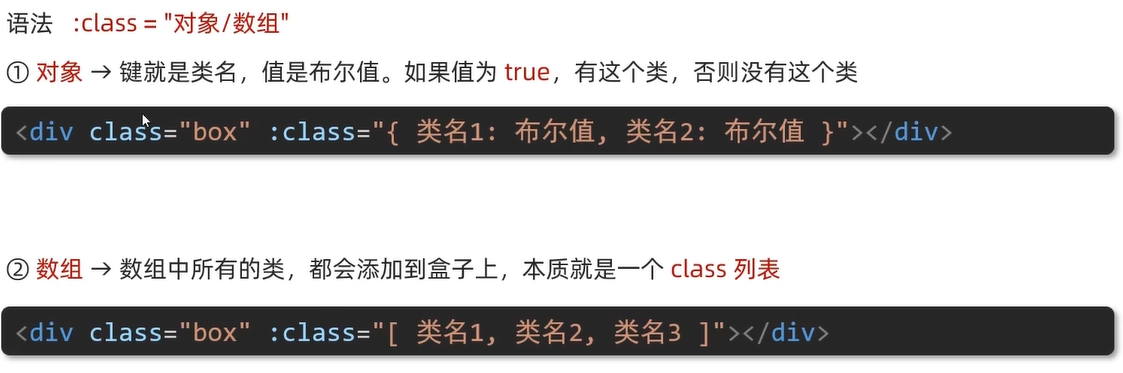
示例①对象,适用于一个类名来回切换
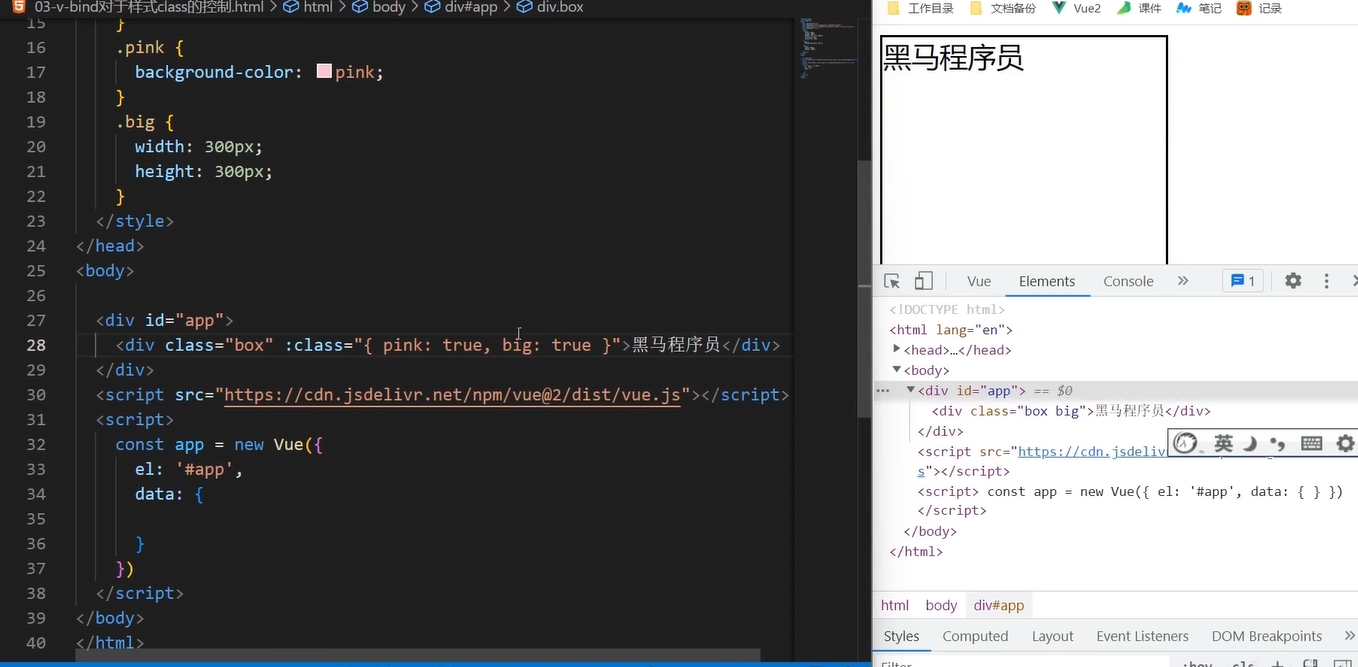
示例②数组,适用于批量添加或删除类
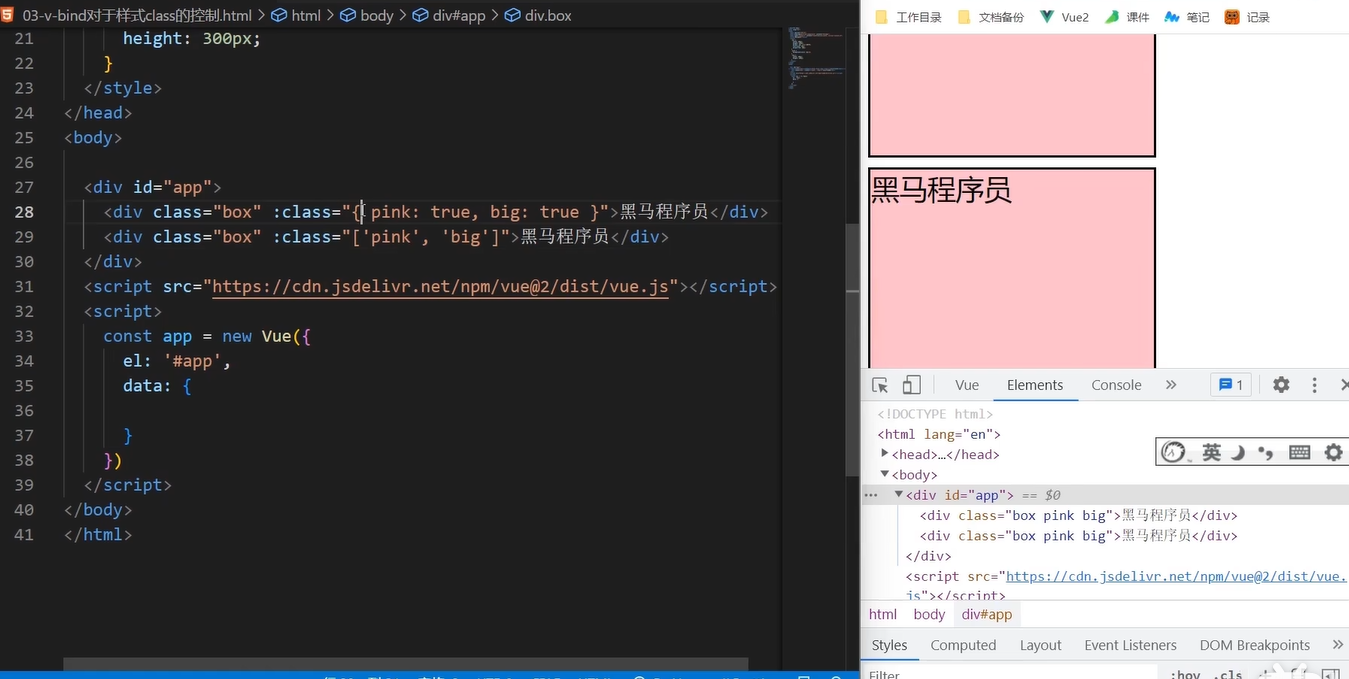
案例——京东导航高亮
鼠标挪动到对应位置导航高亮
<!DOCTYPE html>
<html lang="en">
<head>
<meta charset="UTF-8">
<meta http-equiv="X-UA-Compatible" content="IE=edge">
<meta name="viewport" content="width=device-width, initial-scale=1.0">
<title>Document</title>
<style>
* {
margin: 0;
padding: 0;
}
ul {
display: flex;
border-bottom: 2px solid #e01222;
padding: 0 10px;
}
li {
width: 100px;
height: 50px;
line-height: 50px;
list-style: none;
text-align: center;
}
li a {
display: block;
text-decoration: none;
font-weight: bold;
color: #333333;
}
li a.active {
background-color: #e01222;
color: #fff;
}
</style>
</head>
<body>
<div id="app">
<ul>
<li v-for="(item, index) in list" :key="item.id" @click="activeIndex = index">
<a :class="{ active: index === activeIndex }" href="#">{{ item.name }}</a>
</li>
</ul>
</div>
<script src="https://cdn.jsdelivr.net/npm/vue@2.7.16/dist/vue.js"></script>
<script>
const app = new Vue({
el: '#app',
data: {
activeIndex: 0, // 记录高亮
list: [
{ id: 1, name: '京东秒杀' },
{ id: 2, name: '每日特价' },
{ id: 3, name: '品类秒杀' }
]
}
})
</script>
</body>
</html>

v-bind对于样式控制的增强-操作style
用于动态设置行内样式,可以单独对某一项进行修改

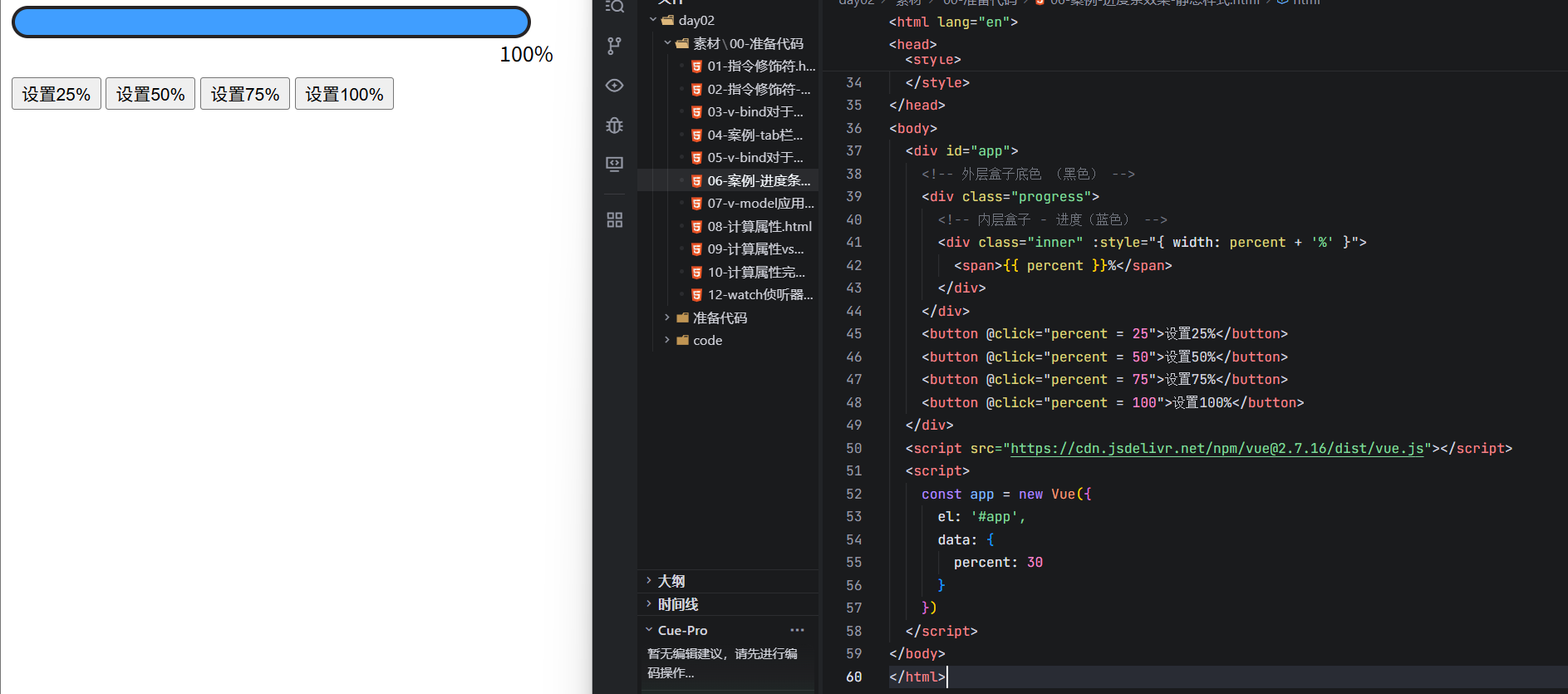
案例——进度条
<!DOCTYPE html>
<html lang="en">
<head>
<meta charset="UTF-8">
<meta http-equiv="X-UA-Compatible" content="IE=edge">
<meta name="viewport" content="width=device-width, initial-scale=1.0">
<title>Document</title>
<style>
.progress {
height: 25px;
width: 400px;
border-radius: 15px;
background-color: #272425;
border: 3px solid #272425;
box-sizing: border-box;
margin-bottom: 30px;
}
.inner {
width: 50%;
height: 20px;
border-radius: 10px;
text-align: right;
position: relative;
background-color: #409eff;
background-size: 20px 20px;
box-sizing: border-box;
transition: all 1s;
}
.inner span {
position: absolute;
right: -20px;
bottom: -25px;
}
</style>
</head>
<body>
<div id="app">
<!– 外层盒子底色 (黑色) –>
<div class="progress">
<!– 内层盒子 – 进度(蓝色) –>
<div class="inner" :style="{ width: percent + '%' }">
<span>{{ percent }}%</span>
</div>
</div>
<button @click="percent = 25">设置25%</button>
<button @click="percent = 50">设置50%</button>
<button @click="percent = 75">设置75%</button>
<button @click="percent = 100">设置100%</button>
</div>
<script src="https://cdn.jsdelivr.net/npm/vue@2.7.16/dist/vue.js"></script>
<script>
const app = new Vue({
el: '#app',
data: {
percent: 30
}
})
</script>
</body>
</html>
3.v-model应用于其他表单元素
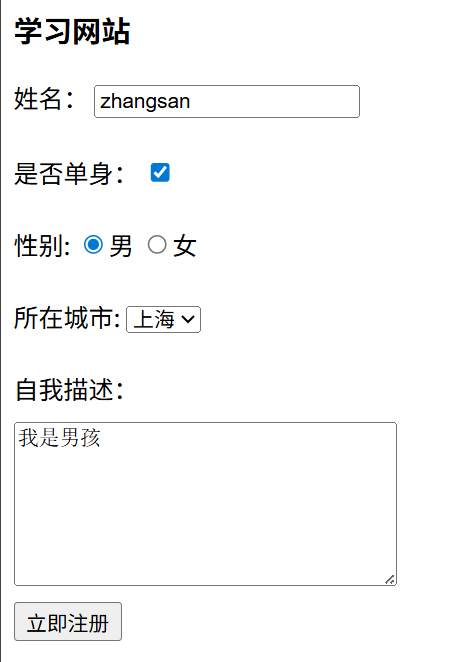
常见的表单元素都可以用v-model绑定关联→快速获取或设置表单元素的值
输入框input:text
文本域textarea
复选框input:checkbox
单选框input:radio
下拉菜单select
案例——学习网站
<!DOCTYPE html>
<html lang="en">
<head>
<meta charset="UTF-8">
<meta http-equiv="X-UA-Compatible" content="IE=edge">
<meta name="viewport" content="width=device-width, initial-scale=1.0">
<title>Document</title>
<style>
textarea {
display: block;
width: 240px;
height: 100px;
margin: 10px 0;
}
</style>
</head>
<body>
<div id="app">
<h3>学习网站</h3>
姓名:
<input type="text" v-model="username">
<br><br>
是否单身:
<input type="checkbox" v-model="isSingle">
<br><br>
<!–
前置理解:
1. name: 给单选框加上 name 属性 可以分组 → 同一组互相会互斥
2. value: 给单选框加上 value 属性,用于提交给后台的数据
结合 Vue 使用 → v-model
–>
性别:
<input v-model="gender" type="radio" name="gender" value="1">男
<input v-model="gender" type="radio" name="gender" value="0">女
<br><br>
<!–
前置理解:
1. option 需要设置 value 值,提交给后台
2. select 的 value 值,关联了选中的 option 的 value 值
结合 Vue 使用 → v-model
–>
所在城市:
<select v-model="city">
<option value="beijing">北京</option>
<option value="shanghai">上海</option>
<option value="chengdu">成都</option>
<option value="nanjing">南京</option>
</select>
<br><br>
自我描述:
<textarea v-model="desc"></textarea>
<button>立即注册</button>
</div>
<script src="https://cdn.jsdelivr.net/npm/vue@2.7.16/dist/vue.js"></script>
<script>
const app = new Vue({
el: '#app',
data: {
username: 'zhangsan',
gender: '1',
isSingle: true,
city: 'shanghai',
desc: '我是男孩'
}
})
</script>
</body>
</html>
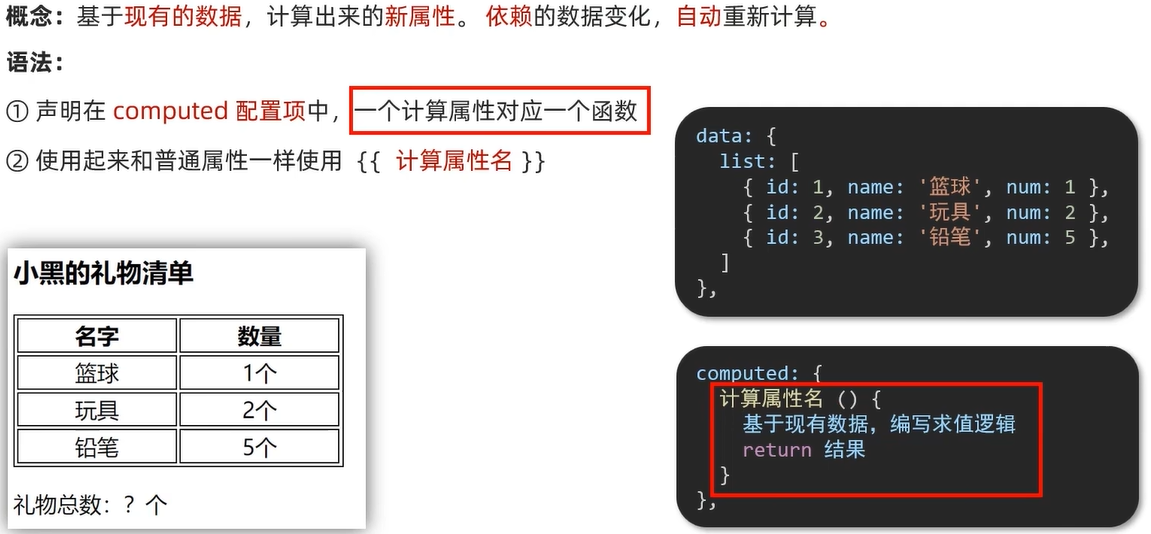
4.计算属性
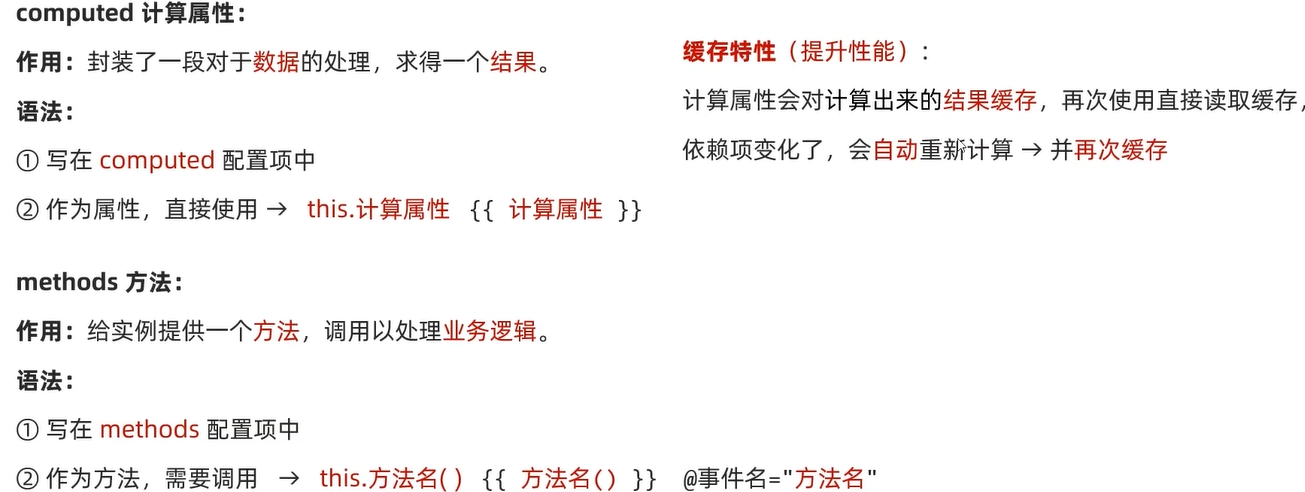
computed计算属性与methods方法比较
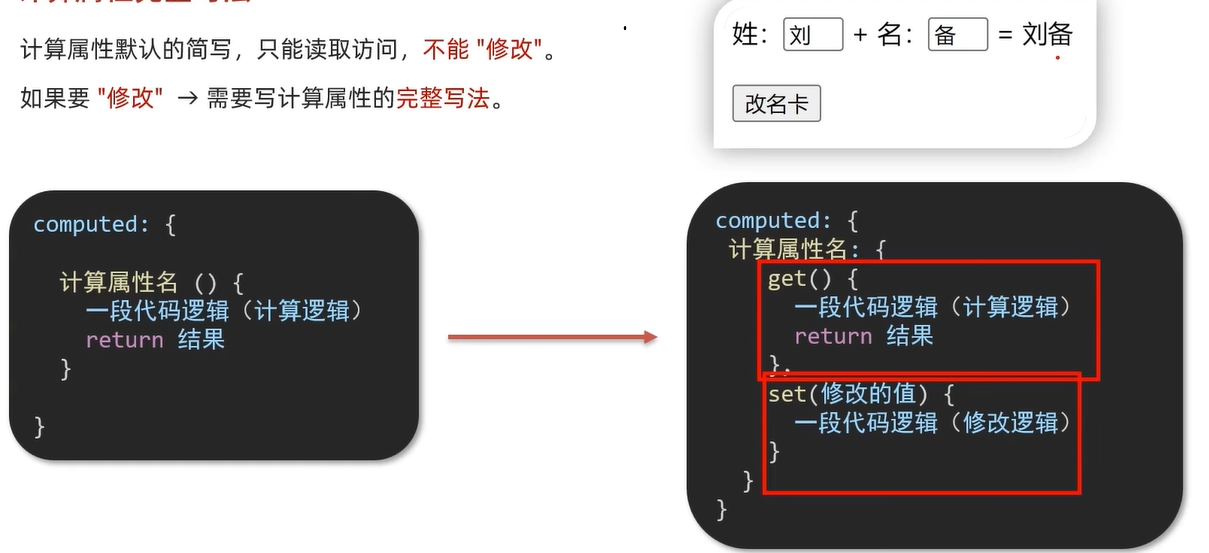
计算属性完整写法
<!DOCTYPE html>
<html lang="en">
<head>
<meta charset="UTF-8">
<meta http-equiv="X-UA-Compatible" content="IE=edge">
<meta name="viewport" content="width=device-width, initial-scale=1.0">
<title>Document</title>
<style>
input {
width: 30px;
}
</style>
</head>
<body>
<div id="app">
姓:<input type="text" v-model="firstName"> +
名:<input type="text" v-model="lastName"> =
<span>{{ fullName }}</span><br><br>
<button @click="changeName">改名卡</button>
</div>
<script src="https://cdn.jsdelivr.net/npm/vue@2.7.16/dist/vue.js"></script>
<script>
const app = new Vue({
el: '#app',
data: {
firstName: '刘',
lastName: '备',
},
methods: {
changeName () {
this.fullName = '黄忠'
}
},
computed: {
// 简写 → 获取,没有配置设置的逻辑
// fullName () {
// return this.firstName + this.lastName
// }
// 完整写法 → 获取 + 设置
fullName: {
// (1) 当fullName计算属性,被获取求值时,执行get(有缓存,优先读缓存)
// 会将返回值作为,求值的结果
get () {
return this.firstName + this.lastName
},
// (2) 当fullName计算属性,被修改赋值时,执行set
// 修改的值,传递给set方法的形参
set (value) {
// console.log(value.slice(0, 1))
// console.log(value.slice(1))
this.firstName = value.slice(0, 1)
this.lastName = value.slice(1)
}
}
}
})
</script>
</body>
</html>
案例——成绩单
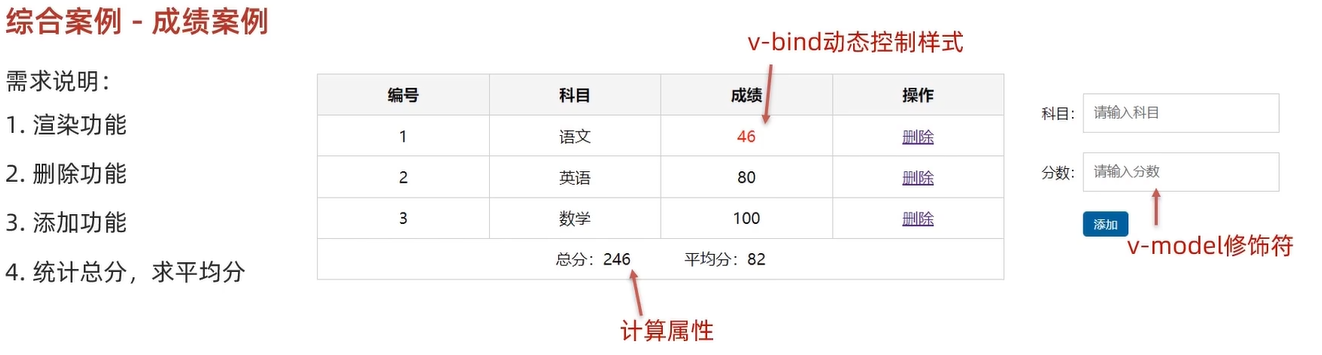
<!DOCTYPE html>
<html lang="en">
<head>
<meta charset="UTF-8" />
<meta http-equiv="X-UA-Compatible" content="IE=edge" />
<meta name="viewport" content="width=device-width, initial-scale=1.0" />
<link rel="stylesheet" href="./styles/index.css" />
<title>Document</title>
</head>
<body>
<div id="app" class="score-case">
<div class="table">
<table>
<thead>
<tr>
<th>编号</th>
<th>科目</th>
<th>成绩</th>
<th>操作</th>
</tr>
</thead>
<tbody v-if="list.length > 0">
<tr v-for="(item, index) in list" :key="item.id">
<td>{{ index + 1 }}</td>
<td>{{ item.subject }}</td>
<!– 需求:不及格的标红, < 60 分, 加上 red 类 –>
<td :class="{ red: item.score < 60 }">{{ item.score }}</td>
<td><a @click.prevent="del(item.id)" href="http://www.baidu.com">删除</a></td>
</tr>
</tbody>
<tbody v-else>
<tr>
<td colspan="5">
<span class="none">暂无数据</span>
</td>
</tr>
</tbody>
<tfoot>
<tr>
<td colspan="5">
<span>总分:{{ totalScore }}</span>
<span style="margin-left: 50px">平均分:{{ averageScore }}</span>
</td>
</tr>
</tfoot>
</table>
</div>
<div class="form">
<div class="form-item">
<div class="label">科目:</div>
<div class="input">
<input
type="text"
placeholder="请输入科目"
v-model.trim="subject"
/>
</div>
</div>
<div class="form-item">
<div class="label">分数:</div>
<div class="input">
<input
type="text"
placeholder="请输入分数"
v-model.number="score"
/>
</div>
</div>
<div class="form-item">
<div class="label"></div>
<div class="input">
<button @click="add" class="submit" >添加</button>
</div>
</div>
</div>
</div>
<script src="https://cdn.jsdelivr.net/npm/vue@2.7.16/dist/vue.js"></script>
<script>
const app = new Vue({
el: '#app',
data: {
list: [
{ id: 1, subject: '语文', score: 62 },
{ id: 7, subject: '数学', score: 89 },
{ id: 12, subject: '英语', score: 70 },
],
subject: '',
score: ''
},
computed: {
totalScore() {
return this.list.reduce((sum, item) => sum + item.score, 0)
},
averageScore () {
if (this.list.length === 0) {
return 0
}
return (this.totalScore / this.list.length).toFixed(2)
}
},
methods: {
del (id) {
// console.log(id)
this.list = this.list.filter(item => item.id !== id)
},
add () {
if (!this.subject) {
alert('请输入科目')
return
}
if (typeof this.score !== 'number') {
alert('请输入正确的成绩')
return
}
this.list.unshift({
id: +new Date(),
subject: this.subject,
score: this.score
})
this.subject = ''
this.score = ''
}
}
})
</script>
</body>
</html>
5.watch监视器
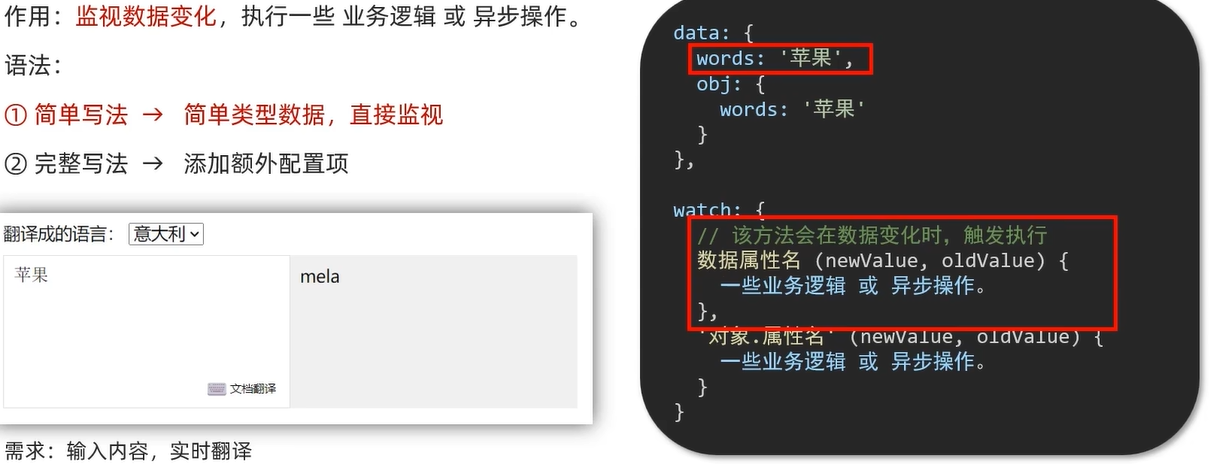
<!DOCTYPE html>
<html lang="en">
<head>
<meta charset="UTF-8" />
<meta http-equiv="X-UA-Compatible" content="IE=edge" />
<meta name="viewport" content="width=device-width, initial-scale=1.0" />
<title>Document</title>
<style>
* {
margin: 0;
padding: 0;
box-sizing: border-box;
font-size: 18px;
}
#app {
padding: 10px 20px;
}
.query {
margin: 10px 0;
}
.box {
display: flex;
}
textarea {
width: 300px;
height: 160px;
font-size: 18px;
border: 1px solid #dedede;
outline: none;
resize: none;
padding: 10px;
}
textarea:hover {
border: 1px solid #1589f5;
}
.transbox {
width: 300px;
height: 160px;
background-color: #f0f0f0;
padding: 10px;
border: none;
}
.tip-box {
width: 300px;
height: 25px;
line-height: 25px;
display: flex;
}
.tip-box span {
flex: 1;
text-align: center;
}
.query span {
font-size: 18px;
}
.input-wrap {
position: relative;
}
.input-wrap span {
position: absolute;
right: 15px;
bottom: 15px;
font-size: 12px;
}
.input-wrap i {
font-size: 20px;
font-style: normal;
}
</style>
</head>
<body>
<div id="app">
<!– 条件选择框 –>
<div class="query">
<span>翻译成的语言:</span>
<select>
<option value="italy">意大利</option>
<option value="english">英语</option>
<option value="german">德语</option>
</select>
</div>
<!– 翻译框 –>
<div class="box">
<div class="input-wrap">
<textarea v-model="obj.words"></textarea>
<span><i>⌨️</i>文档翻译</span>
</div>
<div class="output-wrap">
<div class="transbox">{{ result }}</div>
</div>
</div>
</div>
<script src="https://cdn.jsdelivr.net/npm/vue@2.7.16/dist/vue.js"></script>
<script src="https://cdn.jsdelivr.net/npm/axios/dist/axios.min.js"></script>
<script>
// 接口地址:https://applet-base-api-t.itheima.net/api/translate
// 请求方式:get
// 请求参数:
// (1)words:需要被翻译的文本(必传)
// (2)lang: 需要被翻译成的语言(可选)默认值-意大利
// ———————————————–
const app = new Vue({
el: '#app',
data: {
// words: ''
obj: {
words: ''
},
result: '', // 翻译结果
// timer: null // 延时器id
},
// 具体讲解:(1) watch语法 (2) 具体业务实现
watch: {
// 该方法会在数据变化时调用执行
// newValue新值, oldValue老值(一般不用)
// words (newValue) {
// console.log('变化了', newValue)
// }
'obj.words' (newValue) {
// console.log('变化了', newValue)
// 防抖: 延迟执行 → 干啥事先等一等,延迟一会,一段时间内没有再次触发,才执行
clearTimeout(this.timer)
this.timer = setTimeout(async () => {
const res = await axios({
url: 'https://applet-base-api-t.itheima.net/api/translate',
params: {
words: newValue
}
})
this.result = res.data.data
console.log(res.data.data)
}, 300)
}
}
})
</script>
</body>
</html>
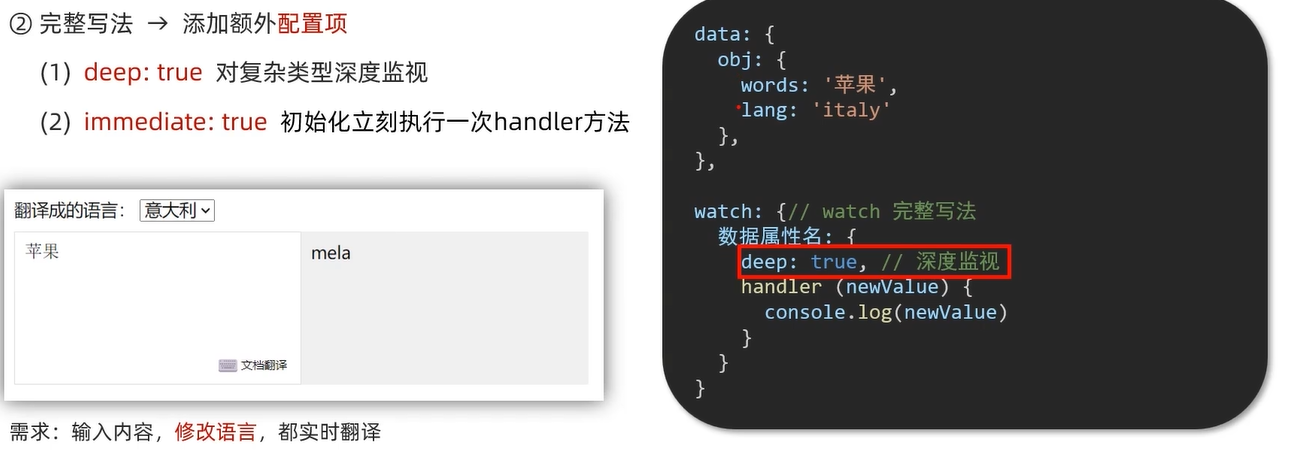
<script>
// 接口地址:https://applet-base-api-t.itheima.net/api/translate
// 请求方式:get
// 请求参数:
// (1)words:需要被翻译的文本(必传)
// (2)lang: 需要被翻译成的语言(可选)默认值-意大利
// ———————————————–
const app = new Vue({
el: '#app',
data: {
// words: ''
obj: {
words: ''
},
result: '', // 翻译结果
// timer: null // 延时器id
},
// 具体讲解:(1) watch语法 (2) 具体业务实现
watch: {
// 该方法会在数据变化时调用执行
// newValue新值, oldValue老值(一般不用)
// words (newValue) {
// console.log('变化了', newValue)
// }
'obj.words' (newValue) {
// console.log('变化了', newValue)
// 防抖: 延迟执行 → 干啥事先等一等,延迟一会,一段时间内没有再次触发,才执行
clearTimeout(this.timer)
this.timer = setTimeout(async () => {
const res = await axios({
url: 'https://applet-base-api-t.itheima.net/api/translate',
params: {
words: newValue
}
})
this.result = res.data.data
console.log(res.data.data)
}, 300)
}
}
})
</script>