🌹欢迎来到《小5讲堂》🌹 🌹这是《小程序》系列文章,每篇文章将以博主理解的角度展开讲解。🌹 🌹温馨提示:博主能力有限,理解水平有限,若有不对之处望指正!🌹 👨💻 作者简介
🏆 荣誉头衔:2024博客之星Top14 | CSDN博客专家 | 阿里云专家博主
🎤 经历:曾多次进行线下演讲,亦是 CSDN内容合伙人 以及 新星优秀导师
💡 信念:“帮助别人,成长自己!”
🚀 技术领域:深耕全栈,精通 .NET Core (C#)、Python、Java,熟悉主流数据库
🤝 欢迎交流:无论是基础概念还是进阶实战,都欢迎与我探讨!

目录
- 前言
- 解决过程
-
- 一、错误场景还原
-
- 1.1 错误发生的位置
- 1.2 常见的触发场景
- 二、深入理解 Vue Prop 验证
-
- 2.1 为什么需要 Prop 验证?
- 2.2 Prop 验证的完整示例
- 三、枚举值验证的最佳实践
-
- 3.1 使用常量管理枚举值
- 3.2 TypeScript 中的枚举类型
- 3.3 通用验证函数封装
- 四、常见的 Prop 验证错误及解决方案
-
- 4.1 类型错误
- 4.2 必填属性缺失
- 4.3 枚举值拼写错误
- 五、Prop 验证的高级应用
-
- 5.1 对象和数组的验证
- 5.2 自定义验证器的高级用法
- 六、调试和监控 Prop 验证错误
-
- 6.1 开发环境错误处理
- 6.2 单元测试验证
- 七、总结与建议
-
- 7.1 最佳实践清单
- 7.2 常见陷阱
- 结语
- 文章推荐
前言
有时候可能强迫症原因,看到这一堆黄色警告不好看,况且在查看控制台的时候被这些黄色警告也影响博主调试查看内容,因此写篇文章记录下遇到这次警告情况如何解决。
解决过程
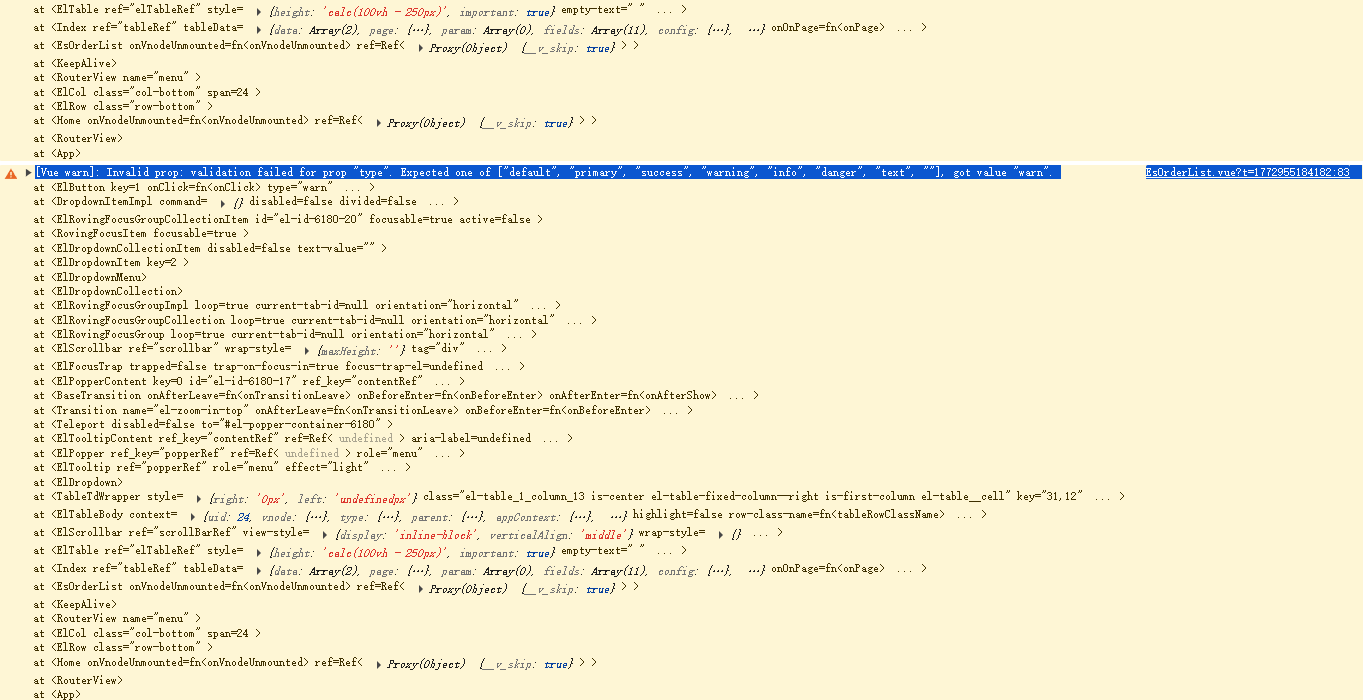 在 Vue 开发过程中,我们经常会遇到这样的警告信息:
[Vue warn]: Invalid prop: validation failed for prop "type".
Expected one of ["default", "primary", "success", "warning", "info", "danger", "text", ""],
got value "warn".
这个警告看似简单,但背后涉及了 Vue 组件设计的核心概念——Prop 验证机制。本文将从这个具体的错误出发,深入探讨 Vue 组件开发中的属性验证最佳实践。
一、错误场景还原
1.1 错误发生的位置
EsOrderList.vue:114 [Vue warn]: Invalid prop: validation failed for prop "type".
Expected one of ["default", "primary", "success", "warning", "info", "danger", "text", ""],
got value "warn".
这个警告提示我们:
- 文件位置:EsOrderList.vue 的第 114 行
- 问题属性:type
- 期望值:8 种预设值(default/primary/success/warning/info/danger/text/空字符串)
- 实际值:"warn"
1.2 常见的触发场景
<!– 错误用法:在 Element UI 按钮组件中使用 –>
<el-button type="warn">确认提交</el-button>
<el-tag type="warn">待处理</el-tag>
<el-badge type="warn">3</el-badge>
<!– 正确用法 –>
<el-button type="warning">确认提交</el-button>
<el-tag type="warning">待处理</el-tag>
<el-badge type="warning">3</el-badge>
二、深入理解 Vue Prop 验证
2.1 为什么需要 Prop 验证?
Prop 验证是 Vue 组件设计中的重要机制,主要有以下几个作用:
2.2 Prop 验证的完整示例
export default {
name: 'CustomButton',
props: {
// 基础类型检查
type: {
type: String,
required: true,
validator: function(value) {
// 枚举值验证
return ['default', 'primary', 'success', 'warning', 'info', 'danger', 'text'].includes(value)
}
},
// 带默认值的属性
size: {
type: String,
default: 'medium',
validator: value => ['large', 'medium', 'small'].includes(value)
},
// 复杂验证
status: {
type: [String, Number],
validator: value => {
if (typeof value === 'string') {
return ['active', 'inactive'].includes(value)
}
return [0, 1].includes(value)
}
}
}
}
三、枚举值验证的最佳实践
3.1 使用常量管理枚举值
// constants/buttonTypes.js
export const BUTTON_TYPES = {
DEFAULT: 'default',
PRIMARY: 'primary',
SUCCESS: 'success',
WARNING: 'warning',
INFO: 'info',
DANGER: 'danger',
TEXT: 'text'
}
export const VALID_BUTTON_TYPES = Object.values(BUTTON_TYPES)
// 在组件中使用
import { VALID_BUTTON_TYPES } from '@/constants/buttonTypes'
props: {
type: {
type: String,
default: BUTTON_TYPES.DEFAULT,
validator: value => VALID_BUTTON_TYPES.includes(value)
}
}
3.2 TypeScript 中的枚举类型
// 使用 TypeScript 枚举
enum ButtonType {
Default = 'default',
Primary = 'primary',
Success = 'success',
Warning = 'warning',
Info = 'info',
Danger = 'danger',
Text = 'text'
}
// 在 Vue 组件中使用
interface Props {
type?: ButtonType
size?: 'large' | 'medium' | 'small'
}
const props = withDefaults(defineProps<Props>(), {
type: ButtonType.Default
})
3.3 通用验证函数封装
// utils/propValidators.js
export const createEnumValidator = (enumValues) => {
return (value) => {
if (value === undefined || value === null) return true
return enumValues.includes(value)
}
}
export const createTypeValidator = (types) => {
return (value) => {
const valueType = typeof value
return types.includes(valueType)
}
}
// 使用示例
props: {
status: {
validator: createEnumValidator(['success', 'error', 'warning'])
}
}
四、常见的 Prop 验证错误及解决方案
4.1 类型错误
// 错误:传入数字,期望字符串
<my–component :count="123" />
// 解决方案:确保类型一致
props: {
count: {
type: [String, Number] // 允许多种类型
}
}
4.2 必填属性缺失
// 错误:未传入必填属性
<my–component />
// 解决方案:确保传入必填属性,或设置默认值
props: {
title: {
type: String,
required: true
}
}
4.3 枚举值拼写错误
// 错误:拼写不完整
<el–button type="warn" />
// 错误:大小写错误
<el–button type="Warning" />
// 正确:使用完整、正确的大小写
<el–button type="warning" />
五、Prop 验证的高级应用
5.1 对象和数组的验证
props: {
// 对象验证
user: {
type: Object,
default: () => ({ name: '', age: 0 }),
validator: value => {
return value.name && typeof value.name === 'string' &&
value.age && typeof value.age === 'number'
}
},
// 数组验证
tags: {
type: Array,
default: () => [],
validator: value => {
return value.every(tag => typeof tag === 'string')
}
}
}
5.2 自定义验证器的高级用法
props: {
// 依赖其他属性的验证
password: String,
confirmPassword: {
type: String,
validator: function(value) {
// 注意:这里不能直接访问 this
// 需要通过组件实例的 proxy
return value === this.$props.password
}
},
// 异步验证(注意:validator 不支持异步)
email: {
type: String,
validator: value => {
return /^[^\\s@]+@[^\\s@]+\\.[^\\s@]+$/.test(value)
}
}
}
六、调试和监控 Prop 验证错误
6.1 开发环境错误处理
// 全局捕获 Vue 警告
Vue.config.warnHandler = function(msg, vm, trace) {
console.group('Vue Warning')
console.log('Message:', msg)
console.log('Component:', vm.$options.name || 'anonymous')
console.log('Trace:', trace)
console.groupEnd()
// 发送到错误监控服务
sendToErrorTracking({ msg, component: vm.$options.name, trace })
}
6.2 单元测试验证
// Button.spec.js
import { mount } from '@vue/test-utils'
import CustomButton from '@/components/CustomButton.vue'
describe('CustomButton', () => {
it('验证所有有效的 type 值', () => {
const types = ['default', 'primary', 'success', 'warning']
types.forEach(type => {
const wrapper = mount(CustomButton, {
props: { type }
})
expect(wrapper.exists()).toBe(true)
})
})
it('无效的 type 值应该产生警告', () => {
const spy = jest.spyOn(console, 'warn').mockImplementation()
mount(CustomButton, {
props: { type: 'invalid' }
})
expect(spy).toHaveBeenCalled()
spy.mockRestore()
})
})
七、总结与建议
7.1 最佳实践清单
7.2 常见陷阱
结语
回到最初的问题:为什么 "warn" 是无效值而 "warning" 是有效的?这其实是 UI 库设计者的一致性原则——为了与其他属性命名保持一致(如 success/danger 都是完整的单词)。通过这个小小的错误,我们深入了解了 Vue 的 prop 验证机制,并学习了一系列组件设计的最佳实践。
文章推荐
【前端】Vue 组件开发中的枚举值验证:从一个Type属性错误说起
【前端】Vue 3 + TypeScript 中 var 与 let 的区别,面试可能会问到,你知道怎么回答吗
【前端】使用Vue3过程中遇到加载无效设置点击方法提示不存在的情况,原来是少加了一个属性
【前端】Vue3+elementui+ts,TypeScript Promise转string错误解析,习惯性请出DeepSeek来解答
【前端】Vue3+elementui+ts,给标签设置样式属性style时,提示type check failed for prop,再次请出DeepSeek来解答
【前端】layui table表格勾选事件,以及常见模块
【前端】Layui的表格常用功能,表单提交事件,表格下拉按钮点击事件,表格外的按钮点击事件
【Echarts】曲线图上方显示数字以及自定义值,标题和副标题居中,鼠标上显示信息以及自定义信息
【Echarts】柱状图上方显示数字以及自定义值,标题和副标题居中,鼠标上显示信息以及自定义信息
【随笔】程序员如何选择职业赛道,目前各个赛道的现状如何,那个赛道前景巨大
【随笔】程序员的金三银四求职宝典,每个人都有最合适自己的求职宝典