🚀 效果展示
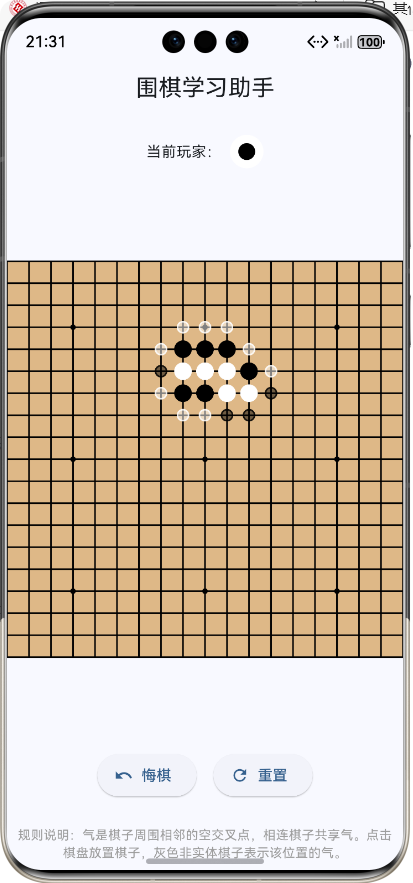
前言介绍
1. 项目背景
Flutter作为Google推出的UI工具包,具有"一次开发,多端运行"的优势,能够帮助开发者快速构建高性能、高保真的移动应用。而鸿蒙操作系统作为华为自主研发的分布式操作系统,具有强大的设备协同能力和安全性能,正逐渐成为移动生态的重要组成部分。
围棋 作为中国传统国粹,拥有悠久的历史和深厚的文化底蕴。然而,对于初学者来说,围棋的规则较为复杂,尤其是"气"和"吃子"的概念难以理解。因此,开发一款直观、易用的围棋辅助教学APP,对于推广围棋文化、帮助初学者快速入门具有重要意义。
2. 技术栈选择
| Flutter | 3.0.0+ | 跨平台UI框架 |
| Dart | 2.17.0+ | 开发语言 |
| HarmonyOS SDK | API Version 9+ | 鸿蒙系统支持 |
| Canvas API | – | 棋盘绘制 |
| BFS算法 | – | 连通块检测 |
游戏设计及介绍
1. 功能设计
1.1 核心功能
| 棋盘绘制 | 绘制19×19标准围棋棋盘,包括网格线和星位点 |
| 棋子放置 | 支持黑白棋子交替放置 |
| 气的显示 | 根据棋子颜色显示不同颜色的气 |
| 吃子逻辑 | 自动提掉没有气的棋子 |
| 禁着点检测 | 禁止在禁着点落子 |
| 打劫规则 | 实现打劫规则,防止棋局无限循环 |
| 悔棋功能 | 支持悔棋,恢复上一步状态 |
| 重置功能 | 重置棋盘,重新开始游戏 |
1.2 系统架构
#mermaid-svg-vFNF9tl8140jeSmF{font-family:\”trebuchet ms\”,verdana,arial,sans-serif;font-size:16px;fill:#333;}@keyframes edge-animation-frame{from{stroke-dashoffset:0;}}@keyframes dash{to{stroke-dashoffset:0;}}#mermaid-svg-vFNF9tl8140jeSmF .edge-animation-slow{stroke-dasharray:9,5!important;stroke-dashoffset:900;animation:dash 50s linear infinite;stroke-linecap:round;}#mermaid-svg-vFNF9tl8140jeSmF .edge-animation-fast{stroke-dasharray:9,5!important;stroke-dashoffset:900;animation:dash 20s linear infinite;stroke-linecap:round;}#mermaid-svg-vFNF9tl8140jeSmF .error-icon{fill:#552222;}#mermaid-svg-vFNF9tl8140jeSmF .error-text{fill:#552222;stroke:#552222;}#mermaid-svg-vFNF9tl8140jeSmF .edge-thickness-normal{stroke-width:1px;}#mermaid-svg-vFNF9tl8140jeSmF .edge-thickness-thick{stroke-width:3.5px;}#mermaid-svg-vFNF9tl8140jeSmF .edge-pattern-solid{stroke-dasharray:0;}#mermaid-svg-vFNF9tl8140jeSmF .edge-thickness-invisible{stroke-width:0;fill:none;}#mermaid-svg-vFNF9tl8140jeSmF .edge-pattern-dashed{stroke-dasharray:3;}#mermaid-svg-vFNF9tl8140jeSmF .edge-pattern-dotted{stroke-dasharray:2;}#mermaid-svg-vFNF9tl8140jeSmF .marker{fill:#333333;stroke:#333333;}#mermaid-svg-vFNF9tl8140jeSmF .marker.cross{stroke:#333333;}#mermaid-svg-vFNF9tl8140jeSmF svg{font-family:\”trebuchet ms\”,verdana,arial,sans-serif;font-size:16px;}#mermaid-svg-vFNF9tl8140jeSmF p{margin:0;}#mermaid-svg-vFNF9tl8140jeSmF .label{font-family:\”trebuchet ms\”,verdana,arial,sans-serif;color:#333;}#mermaid-svg-vFNF9tl8140jeSmF .cluster-label text{fill:#333;}#mermaid-svg-vFNF9tl8140jeSmF .cluster-label span{color:#333;}#mermaid-svg-vFNF9tl8140jeSmF .cluster-label span p{background-color:transparent;}#mermaid-svg-vFNF9tl8140jeSmF .label text,#mermaid-svg-vFNF9tl8140jeSmF span{fill:#333;color:#333;}#mermaid-svg-vFNF9tl8140jeSmF .node rect,#mermaid-svg-vFNF9tl8140jeSmF .node circle,#mermaid-svg-vFNF9tl8140jeSmF .node ellipse,#mermaid-svg-vFNF9tl8140jeSmF .node polygon,#mermaid-svg-vFNF9tl8140jeSmF .node path{fill:#ECECFF;stroke:#9370DB;stroke-width:1px;}#mermaid-svg-vFNF9tl8140jeSmF .rough-node .label text,#mermaid-svg-vFNF9tl8140jeSmF .node .label text,#mermaid-svg-vFNF9tl8140jeSmF .image-shape .label,#mermaid-svg-vFNF9tl8140jeSmF .icon-shape .label{text-anchor:middle;}#mermaid-svg-vFNF9tl8140jeSmF .node .katex path{fill:#000;stroke:#000;stroke-width:1px;}#mermaid-svg-vFNF9tl8140jeSmF .rough-node .label,#mermaid-svg-vFNF9tl8140jeSmF .node .label,#mermaid-svg-vFNF9tl8140jeSmF .image-shape .label,#mermaid-svg-vFNF9tl8140jeSmF .icon-shape .label{text-align:center;}#mermaid-svg-vFNF9tl8140jeSmF .node.clickable{cursor:pointer;}#mermaid-svg-vFNF9tl8140jeSmF .root .anchor path{fill:#333333!important;stroke-width:0;stroke:#333333;}#mermaid-svg-vFNF9tl8140jeSmF .arrowheadPath{fill:#333333;}#mermaid-svg-vFNF9tl8140jeSmF .edgePath .path{stroke:#333333;stroke-width:2.0px;}#mermaid-svg-vFNF9tl8140jeSmF .flowchart-link{stroke:#333333;fill:none;}#mermaid-svg-vFNF9tl8140jeSmF .edgeLabel{background-color:rgba(232,232,232, 0.8);text-align:center;}#mermaid-svg-vFNF9tl8140jeSmF .edgeLabel p{background-color:rgba(232,232,232, 0.8);}#mermaid-svg-vFNF9tl8140jeSmF .edgeLabel rect{opacity:0.5;background-color:rgba(232,232,232, 0.8);fill:rgba(232,232,232, 0.8);}#mermaid-svg-vFNF9tl8140jeSmF .labelBkg{background-color:rgba(232, 232, 232, 0.5);}#mermaid-svg-vFNF9tl8140jeSmF .cluster rect{fill:#ffffde;stroke:#aaaa33;stroke-width:1px;}#mermaid-svg-vFNF9tl8140jeSmF .cluster text{fill:#333;}#mermaid-svg-vFNF9tl8140jeSmF .cluster span{color:#333;}#mermaid-svg-vFNF9tl8140jeSmF div.mermaidTooltip{position:absolute;text-align:center;max-width:200px;padding:2px;font-family:\”trebuchet ms\”,verdana,arial,sans-serif;font-size:12px;background:hsl(80, 100%, 96.2745098039%);border:1px solid #aaaa33;border-radius:2px;pointer-events:none;z-index:100;}#mermaid-svg-vFNF9tl8140jeSmF .flowchartTitleText{text-anchor:middle;font-size:18px;fill:#333;}#mermaid-svg-vFNF9tl8140jeSmF rect.text{fill:none;stroke-width:0;}#mermaid-svg-vFNF9tl8140jeSmF .icon-shape,#mermaid-svg-vFNF9tl8140jeSmF .image-shape{background-color:rgba(232,232,232, 0.8);text-align:center;}#mermaid-svg-vFNF9tl8140jeSmF .icon-shape p,#mermaid-svg-vFNF9tl8140jeSmF .image-shape p{background-color:rgba(232,232,232, 0.8);padding:2px;}#mermaid-svg-vFNF9tl8140jeSmF .icon-shape rect,#mermaid-svg-vFNF9tl8140jeSmF .image-shape rect{opacity:0.5;background-color:rgba(232,232,232, 0.8);fill:rgba(232,232,232, 0.8);}#mermaid-svg-vFNF9tl8140jeSmF .label-icon{display:inline-block;height:1em;overflow:visible;vertical-align:-0.125em;}#mermaid-svg-vFNF9tl8140jeSmF .node .label-icon path{fill:currentColor;stroke:revert;stroke-width:revert;}#mermaid-svg-vFNF9tl8140jeSmF :root{–mermaid-font-family:\”trebuchet ms\”,verdana,arial,sans-serif;}
用户界面层
业务逻辑层
数据模型层
算法层
棋盘状态
历史记录
玩家状态
气的计算
连通块检测
吃子算法
禁着点检测
打劫规则
2. 界面设计
2.1 主界面布局
#mermaid-svg-vtfsFJQ99IiXLeY4{font-family:\”trebuchet ms\”,verdana,arial,sans-serif;font-size:16px;fill:#333;}@keyframes edge-animation-frame{from{stroke-dashoffset:0;}}@keyframes dash{to{stroke-dashoffset:0;}}#mermaid-svg-vtfsFJQ99IiXLeY4 .edge-animation-slow{stroke-dasharray:9,5!important;stroke-dashoffset:900;animation:dash 50s linear infinite;stroke-linecap:round;}#mermaid-svg-vtfsFJQ99IiXLeY4 .edge-animation-fast{stroke-dasharray:9,5!important;stroke-dashoffset:900;animation:dash 20s linear infinite;stroke-linecap:round;}#mermaid-svg-vtfsFJQ99IiXLeY4 .error-icon{fill:#552222;}#mermaid-svg-vtfsFJQ99IiXLeY4 .error-text{fill:#552222;stroke:#552222;}#mermaid-svg-vtfsFJQ99IiXLeY4 .edge-thickness-normal{stroke-width:1px;}#mermaid-svg-vtfsFJQ99IiXLeY4 .edge-thickness-thick{stroke-width:3.5px;}#mermaid-svg-vtfsFJQ99IiXLeY4 .edge-pattern-solid{stroke-dasharray:0;}#mermaid-svg-vtfsFJQ99IiXLeY4 .edge-thickness-invisible{stroke-width:0;fill:none;}#mermaid-svg-vtfsFJQ99IiXLeY4 .edge-pattern-dashed{stroke-dasharray:3;}#mermaid-svg-vtfsFJQ99IiXLeY4 .edge-pattern-dotted{stroke-dasharray:2;}#mermaid-svg-vtfsFJQ99IiXLeY4 .marker{fill:#333333;stroke:#333333;}#mermaid-svg-vtfsFJQ99IiXLeY4 .marker.cross{stroke:#333333;}#mermaid-svg-vtfsFJQ99IiXLeY4 svg{font-family:\”trebuchet ms\”,verdana,arial,sans-serif;font-size:16px;}#mermaid-svg-vtfsFJQ99IiXLeY4 p{margin:0;}#mermaid-svg-vtfsFJQ99IiXLeY4 .label{font-family:\”trebuchet ms\”,verdana,arial,sans-serif;color:#333;}#mermaid-svg-vtfsFJQ99IiXLeY4 .cluster-label text{fill:#333;}#mermaid-svg-vtfsFJQ99IiXLeY4 .cluster-label span{color:#333;}#mermaid-svg-vtfsFJQ99IiXLeY4 .cluster-label span p{background-color:transparent;}#mermaid-svg-vtfsFJQ99IiXLeY4 .label text,#mermaid-svg-vtfsFJQ99IiXLeY4 span{fill:#333;color:#333;}#mermaid-svg-vtfsFJQ99IiXLeY4 .node rect,#mermaid-svg-vtfsFJQ99IiXLeY4 .node circle,#mermaid-svg-vtfsFJQ99IiXLeY4 .node ellipse,#mermaid-svg-vtfsFJQ99IiXLeY4 .node polygon,#mermaid-svg-vtfsFJQ99IiXLeY4 .node path{fill:#ECECFF;stroke:#9370DB;stroke-width:1px;}#mermaid-svg-vtfsFJQ99IiXLeY4 .rough-node .label text,#mermaid-svg-vtfsFJQ99IiXLeY4 .node .label text,#mermaid-svg-vtfsFJQ99IiXLeY4 .image-shape .label,#mermaid-svg-vtfsFJQ99IiXLeY4 .icon-shape .label{text-anchor:middle;}#mermaid-svg-vtfsFJQ99IiXLeY4 .node .katex path{fill:#000;stroke:#000;stroke-width:1px;}#mermaid-svg-vtfsFJQ99IiXLeY4 .rough-node .label,#mermaid-svg-vtfsFJQ99IiXLeY4 .node .label,#mermaid-svg-vtfsFJQ99IiXLeY4 .image-shape .label,#mermaid-svg-vtfsFJQ99IiXLeY4 .icon-shape .label{text-align:center;}#mermaid-svg-vtfsFJQ99IiXLeY4 .node.clickable{cursor:pointer;}#mermaid-svg-vtfsFJQ99IiXLeY4 .root .anchor path{fill:#333333!important;stroke-width:0;stroke:#333333;}#mermaid-svg-vtfsFJQ99IiXLeY4 .arrowheadPath{fill:#333333;}#mermaid-svg-vtfsFJQ99IiXLeY4 .edgePath .path{stroke:#333333;stroke-width:2.0px;}#mermaid-svg-vtfsFJQ99IiXLeY4 .flowchart-link{stroke:#333333;fill:none;}#mermaid-svg-vtfsFJQ99IiXLeY4 .edgeLabel{background-color:rgba(232,232,232, 0.8);text-align:center;}#mermaid-svg-vtfsFJQ99IiXLeY4 .edgeLabel p{background-color:rgba(232,232,232, 0.8);}#mermaid-svg-vtfsFJQ99IiXLeY4 .edgeLabel rect{opacity:0.5;background-color:rgba(232,232,232, 0.8);fill:rgba(232,232,232, 0.8);}#mermaid-svg-vtfsFJQ99IiXLeY4 .labelBkg{background-color:rgba(232, 232, 232, 0.5);}#mermaid-svg-vtfsFJQ99IiXLeY4 .cluster rect{fill:#ffffde;stroke:#aaaa33;stroke-width:1px;}#mermaid-svg-vtfsFJQ99IiXLeY4 .cluster text{fill:#333;}#mermaid-svg-vtfsFJQ99IiXLeY4 .cluster span{color:#333;}#mermaid-svg-vtfsFJQ99IiXLeY4 div.mermaidTooltip{position:absolute;text-align:center;max-width:200px;padding:2px;font-family:\”trebuchet ms\”,verdana,arial,sans-serif;font-size:12px;background:hsl(80, 100%, 96.2745098039%);border:1px solid #aaaa33;border-radius:2px;pointer-events:none;z-index:100;}#mermaid-svg-vtfsFJQ99IiXLeY4 .flowchartTitleText{text-anchor:middle;font-size:18px;fill:#333;}#mermaid-svg-vtfsFJQ99IiXLeY4 rect.text{fill:none;stroke-width:0;}#mermaid-svg-vtfsFJQ99IiXLeY4 .icon-shape,#mermaid-svg-vtfsFJQ99IiXLeY4 .image-shape{background-color:rgba(232,232,232, 0.8);text-align:center;}#mermaid-svg-vtfsFJQ99IiXLeY4 .icon-shape p,#mermaid-svg-vtfsFJQ99IiXLeY4 .image-shape p{background-color:rgba(232,232,232, 0.8);padding:2px;}#mermaid-svg-vtfsFJQ99IiXLeY4 .icon-shape rect,#mermaid-svg-vtfsFJQ99IiXLeY4 .image-shape rect{opacity:0.5;background-color:rgba(232,232,232, 0.8);fill:rgba(232,232,232, 0.8);}#mermaid-svg-vtfsFJQ99IiXLeY4 .label-icon{display:inline-block;height:1em;overflow:visible;vertical-align:-0.125em;}#mermaid-svg-vtfsFJQ99IiXLeY4 .node .label-icon path{fill:currentColor;stroke:revert;stroke-width:revert;}#mermaid-svg-vtfsFJQ99IiXLeY4 :root{–mermaid-font-family:\”trebuchet ms\”,verdana,arial,sans-serif;}
主界面
顶部导航栏
当前玩家提示
围棋棋盘
操作按钮区
规则说明
悔棋按钮
重置按钮
2.2 棋子与气的显示设计
| 黑棋 | 纯黑色 | 半透明白色 |
| 白棋 | 纯白色 | 半透明黑色 |
3. 游戏规则设计
3.1 基本规则
3.2 棋子放置及提子流程
#mermaid-svg-vSTi2zI2fYwN64vG{font-family:\”trebuchet ms\”,verdana,arial,sans-serif;font-size:16px;fill:#333;}@keyframes edge-animation-frame{from{stroke-dashoffset:0;}}@keyframes dash{to{stroke-dashoffset:0;}}#mermaid-svg-vSTi2zI2fYwN64vG .edge-animation-slow{stroke-dasharray:9,5!important;stroke-dashoffset:900;animation:dash 50s linear infinite;stroke-linecap:round;}#mermaid-svg-vSTi2zI2fYwN64vG .edge-animation-fast{stroke-dasharray:9,5!important;stroke-dashoffset:900;animation:dash 20s linear infinite;stroke-linecap:round;}#mermaid-svg-vSTi2zI2fYwN64vG .error-icon{fill:#552222;}#mermaid-svg-vSTi2zI2fYwN64vG .error-text{fill:#552222;stroke:#552222;}#mermaid-svg-vSTi2zI2fYwN64vG .edge-thickness-normal{stroke-width:1px;}#mermaid-svg-vSTi2zI2fYwN64vG .edge-thickness-thick{stroke-width:3.5px;}#mermaid-svg-vSTi2zI2fYwN64vG .edge-pattern-solid{stroke-dasharray:0;}#mermaid-svg-vSTi2zI2fYwN64vG .edge-thickness-invisible{stroke-width:0;fill:none;}#mermaid-svg-vSTi2zI2fYwN64vG .edge-pattern-dashed{stroke-dasharray:3;}#mermaid-svg-vSTi2zI2fYwN64vG .edge-pattern-dotted{stroke-dasharray:2;}#mermaid-svg-vSTi2zI2fYwN64vG .marker{fill:#333333;stroke:#333333;}#mermaid-svg-vSTi2zI2fYwN64vG .marker.cross{stroke:#333333;}#mermaid-svg-vSTi2zI2fYwN64vG svg{font-family:\”trebuchet ms\”,verdana,arial,sans-serif;font-size:16px;}#mermaid-svg-vSTi2zI2fYwN64vG p{margin:0;}#mermaid-svg-vSTi2zI2fYwN64vG .label{font-family:\”trebuchet ms\”,verdana,arial,sans-serif;color:#333;}#mermaid-svg-vSTi2zI2fYwN64vG .cluster-label text{fill:#333;}#mermaid-svg-vSTi2zI2fYwN64vG .cluster-label span{color:#333;}#mermaid-svg-vSTi2zI2fYwN64vG .cluster-label span p{background-color:transparent;}#mermaid-svg-vSTi2zI2fYwN64vG .label text,#mermaid-svg-vSTi2zI2fYwN64vG span{fill:#333;color:#333;}#mermaid-svg-vSTi2zI2fYwN64vG .node rect,#mermaid-svg-vSTi2zI2fYwN64vG .node circle,#mermaid-svg-vSTi2zI2fYwN64vG .node ellipse,#mermaid-svg-vSTi2zI2fYwN64vG .node polygon,#mermaid-svg-vSTi2zI2fYwN64vG .node path{fill:#ECECFF;stroke:#9370DB;stroke-width:1px;}#mermaid-svg-vSTi2zI2fYwN64vG .rough-node .label text,#mermaid-svg-vSTi2zI2fYwN64vG .node .label text,#mermaid-svg-vSTi2zI2fYwN64vG .image-shape .label,#mermaid-svg-vSTi2zI2fYwN64vG .icon-shape .label{text-anchor:middle;}#mermaid-svg-vSTi2zI2fYwN64vG .node .katex path{fill:#000;stroke:#000;stroke-width:1px;}#mermaid-svg-vSTi2zI2fYwN64vG .rough-node .label,#mermaid-svg-vSTi2zI2fYwN64vG .node .label,#mermaid-svg-vSTi2zI2fYwN64vG .image-shape .label,#mermaid-svg-vSTi2zI2fYwN64vG .icon-shape .label{text-align:center;}#mermaid-svg-vSTi2zI2fYwN64vG .node.clickable{cursor:pointer;}#mermaid-svg-vSTi2zI2fYwN64vG .root .anchor path{fill:#333333!important;stroke-width:0;stroke:#333333;}#mermaid-svg-vSTi2zI2fYwN64vG .arrowheadPath{fill:#333333;}#mermaid-svg-vSTi2zI2fYwN64vG .edgePath .path{stroke:#333333;stroke-width:2.0px;}#mermaid-svg-vSTi2zI2fYwN64vG .flowchart-link{stroke:#333333;fill:none;}#mermaid-svg-vSTi2zI2fYwN64vG .edgeLabel{background-color:rgba(232,232,232, 0.8);text-align:center;}#mermaid-svg-vSTi2zI2fYwN64vG .edgeLabel p{background-color:rgba(232,232,232, 0.8);}#mermaid-svg-vSTi2zI2fYwN64vG .edgeLabel rect{opacity:0.5;background-color:rgba(232,232,232, 0.8);fill:rgba(232,232,232, 0.8);}#mermaid-svg-vSTi2zI2fYwN64vG .labelBkg{background-color:rgba(232, 232, 232, 0.5);}#mermaid-svg-vSTi2zI2fYwN64vG .cluster rect{fill:#ffffde;stroke:#aaaa33;stroke-width:1px;}#mermaid-svg-vSTi2zI2fYwN64vG .cluster text{fill:#333;}#mermaid-svg-vSTi2zI2fYwN64vG .cluster span{color:#333;}#mermaid-svg-vSTi2zI2fYwN64vG div.mermaidTooltip{position:absolute;text-align:center;max-width:200px;padding:2px;font-family:\”trebuchet ms\”,verdana,arial,sans-serif;font-size:12px;background:hsl(80, 100%, 96.2745098039%);border:1px solid #aaaa33;border-radius:2px;pointer-events:none;z-index:100;}#mermaid-svg-vSTi2zI2fYwN64vG .flowchartTitleText{text-anchor:middle;font-size:18px;fill:#333;}#mermaid-svg-vSTi2zI2fYwN64vG rect.text{fill:none;stroke-width:0;}#mermaid-svg-vSTi2zI2fYwN64vG .icon-shape,#mermaid-svg-vSTi2zI2fYwN64vG .image-shape{background-color:rgba(232,232,232, 0.8);text-align:center;}#mermaid-svg-vSTi2zI2fYwN64vG .icon-shape p,#mermaid-svg-vSTi2zI2fYwN64vG .image-shape p{background-color:rgba(232,232,232, 0.8);padding:2px;}#mermaid-svg-vSTi2zI2fYwN64vG .icon-shape rect,#mermaid-svg-vSTi2zI2fYwN64vG .image-shape rect{opacity:0.5;background-color:rgba(232,232,232, 0.8);fill:rgba(232,232,232, 0.8);}#mermaid-svg-vSTi2zI2fYwN64vG .label-icon{display:inline-block;height:1em;overflow:visible;vertical-align:-0.125em;}#mermaid-svg-vSTi2zI2fYwN64vG .node .label-icon path{fill:currentColor;stroke:revert;stroke-width:revert;}#mermaid-svg-vSTi2zI2fYwN64vG :root{–mermaid-font-family:\”trebuchet ms\”,verdana,arial,sans-serif;}
否
是
是
否
是
否
是
否
用户点击棋盘
位置是否为空
无效操作
是否为禁着点
无效操作
是否为打劫位置
无效操作
放置当前玩家棋子
检查并移除没有气的棋子
检查是否形成打劫
记录打劫状态
清除打劫状态
保存历史记录
更新气的显示
切换玩家
核心代码实现
1. 棋盘初始化与绘制
1.1 棋盘初始化
/// 初始化棋盘
void _initializeBoard() {
// 创建19×19的空棋盘
_board = List.generate(
boardSize,
(_) => List.filled(boardSize, null),
);
// 初始化气的数量,所有位置初始气为4
_liberties = List.generate(
boardSize,
(_) => List.filled(boardSize, defaultLiberties),
);
// 更新边界位置的气(边界位置气较少)
_updateBorderLiberties();
// 保存初始状态到历史记录
_saveHistory();
}
1.2 棋盘绘制
/// 棋盘绘制画家
class BoardPainter extends CustomPainter {
final int boardSize;
// 星位点位置
static const List<int> starPoints = [3, 9, 15];
// 星位点半径比例
static const double starRadiusRatio = 8;
// 线条宽度
static const double lineWidth = 1.5;
void paint(Canvas canvas, Size size) {
final paint = Paint()
..color = Colors.black
..strokeWidth = lineWidth;
final cellSize = size.width / boardSize;
// 绘制横线
for (int i = 0; i < boardSize; i++) {
canvas.drawLine(
Offset(0, i * cellSize),
Offset(size.width, i * cellSize),
paint,
);
}
// 绘制竖线
for (int i = 0; i < boardSize; i++) {
canvas.drawLine(
Offset(i * cellSize, 0),
Offset(i * cellSize, size.height),
paint,
);
}
// 绘制星位点
final starPaint = Paint()
..color = Colors.black
..style = PaintingStyle.fill;
for (int x in starPoints) {
for (int y in starPoints) {
canvas.drawCircle(
Offset(x * cellSize, y * cellSize),
cellSize / starRadiusRatio,
starPaint,
);
}
}
}
bool shouldRepaint(covariant CustomPainter oldDelegate) => false;
}
2. 棋子放置与提子
2.1 棋子放置
/// 放置棋子
void _placeStone(int x, int y) {
// 如果该位置已有棋子,不处理
if (_board[x][y] != null) return;
// 检查是否为禁着点
if (_isForbiddenPoint(x, y, _currentPlayer)) {
return;
}
// 检查是否为打劫位置
final (int, int) pos = (x, y);
if (_koPosition == pos && _koColor == _currentPlayer) {
return;
}
setState(() {
// 放置当前玩家的棋子
_board[x][y] = _currentPlayer;
// 检查并移除没有气的棋子
_checkAndRemoveCapturedStones();
// 保存历史记录
_saveHistory();
// 更新相邻位置的气
_recalculateAllLiberties();
// 切换玩家
_currentPlayer = !_currentPlayer;
});
}
2.2 提子逻辑
/// 检查并移除没有气的棋子
void _checkAndRemoveCapturedStones() {
// 记录需要移除的棋子位置
final Set<(int, int)> stonesToRemove = {};
// 检查所有棋子
for (int i = 0; i < boardSize; i++) {
for (int j = 0; j < boardSize; j++) {
if (_board[i][j] != null && !stonesToRemove.contains((i, j))) {
// 检查该棋子所在的连通块是否有气
final result = _getGroupAndLiberties(i, j);
final group = result[0] as Set<(int, int)>;
final liberties = result[1] as int;
if (liberties == 0) {
// 没有气,添加到移除列表
stonesToRemove.addAll(group);
}
}
}
}
// 先移除所有没有气的棋子
for (final (x, y) in stonesToRemove) {
_board[x][y] = null;
}
// 检查是否形成打劫(只提掉一个棋子时)
if (stonesToRemove.length == 1) {
final capturedStone = stonesToRemove.first;
final capturedColor = !_currentPlayer; // 被提掉的是对方颜色
// 检查当前玩家的棋子是否只形成一个子的连通块,且只有一个气(即打劫)
for (int i = 0; i < boardSize; i++) {
for (int j = 0; j < boardSize; j++) {
if (_board[i][j] == _currentPlayer) {
final result = _getGroupAndLiberties(i, j);
final group = result[0] as Set<(int, int)>;
final liberties = result[1] as int;
if (group.length == 1 && liberties == 1) {
// 形成打劫,记录打劫位置
_koPosition = capturedStone;
_koColor = capturedColor;
_koStep = _history.length;
return;
}
}
}
}
}
// 不是打劫或不符合打劫条件,清除打劫状态
_koPosition = null;
_koColor = null;
}
3. 气的计算与显示
3.1 气的计算流程图
#mermaid-svg-lAKTSwXsALk9ndAJ{font-family:\”trebuchet ms\”,verdana,arial,sans-serif;font-size:16px;fill:#333;}@keyframes edge-animation-frame{from{stroke-dashoffset:0;}}@keyframes dash{to{stroke-dashoffset:0;}}#mermaid-svg-lAKTSwXsALk9ndAJ .edge-animation-slow{stroke-dasharray:9,5!important;stroke-dashoffset:900;animation:dash 50s linear infinite;stroke-linecap:round;}#mermaid-svg-lAKTSwXsALk9ndAJ .edge-animation-fast{stroke-dasharray:9,5!important;stroke-dashoffset:900;animation:dash 20s linear infinite;stroke-linecap:round;}#mermaid-svg-lAKTSwXsALk9ndAJ .error-icon{fill:#552222;}#mermaid-svg-lAKTSwXsALk9ndAJ .error-text{fill:#552222;stroke:#552222;}#mermaid-svg-lAKTSwXsALk9ndAJ .edge-thickness-normal{stroke-width:1px;}#mermaid-svg-lAKTSwXsALk9ndAJ .edge-thickness-thick{stroke-width:3.5px;}#mermaid-svg-lAKTSwXsALk9ndAJ .edge-pattern-solid{stroke-dasharray:0;}#mermaid-svg-lAKTSwXsALk9ndAJ .edge-thickness-invisible{stroke-width:0;fill:none;}#mermaid-svg-lAKTSwXsALk9ndAJ .edge-pattern-dashed{stroke-dasharray:3;}#mermaid-svg-lAKTSwXsALk9ndAJ .edge-pattern-dotted{stroke-dasharray:2;}#mermaid-svg-lAKTSwXsALk9ndAJ .marker{fill:#333333;stroke:#333333;}#mermaid-svg-lAKTSwXsALk9ndAJ .marker.cross{stroke:#333333;}#mermaid-svg-lAKTSwXsALk9ndAJ svg{font-family:\”trebuchet ms\”,verdana,arial,sans-serif;font-size:16px;}#mermaid-svg-lAKTSwXsALk9ndAJ p{margin:0;}#mermaid-svg-lAKTSwXsALk9ndAJ .label{font-family:\”trebuchet ms\”,verdana,arial,sans-serif;color:#333;}#mermaid-svg-lAKTSwXsALk9ndAJ .cluster-label text{fill:#333;}#mermaid-svg-lAKTSwXsALk9ndAJ .cluster-label span{color:#333;}#mermaid-svg-lAKTSwXsALk9ndAJ .cluster-label span p{background-color:transparent;}#mermaid-svg-lAKTSwXsALk9ndAJ .label text,#mermaid-svg-lAKTSwXsALk9ndAJ span{fill:#333;color:#333;}#mermaid-svg-lAKTSwXsALk9ndAJ .node rect,#mermaid-svg-lAKTSwXsALk9ndAJ .node circle,#mermaid-svg-lAKTSwXsALk9ndAJ .node ellipse,#mermaid-svg-lAKTSwXsALk9ndAJ .node polygon,#mermaid-svg-lAKTSwXsALk9ndAJ .node path{fill:#ECECFF;stroke:#9370DB;stroke-width:1px;}#mermaid-svg-lAKTSwXsALk9ndAJ .rough-node .label text,#mermaid-svg-lAKTSwXsALk9ndAJ .node .label text,#mermaid-svg-lAKTSwXsALk9ndAJ .image-shape .label,#mermaid-svg-lAKTSwXsALk9ndAJ .icon-shape .label{text-anchor:middle;}#mermaid-svg-lAKTSwXsALk9ndAJ .node .katex path{fill:#000;stroke:#000;stroke-width:1px;}#mermaid-svg-lAKTSwXsALk9ndAJ .rough-node .label,#mermaid-svg-lAKTSwXsALk9ndAJ .node .label,#mermaid-svg-lAKTSwXsALk9ndAJ .image-shape .label,#mermaid-svg-lAKTSwXsALk9ndAJ .icon-shape .label{text-align:center;}#mermaid-svg-lAKTSwXsALk9ndAJ .node.clickable{cursor:pointer;}#mermaid-svg-lAKTSwXsALk9ndAJ .root .anchor path{fill:#333333!important;stroke-width:0;stroke:#333333;}#mermaid-svg-lAKTSwXsALk9ndAJ .arrowheadPath{fill:#333333;}#mermaid-svg-lAKTSwXsALk9ndAJ .edgePath .path{stroke:#333333;stroke-width:2.0px;}#mermaid-svg-lAKTSwXsALk9ndAJ .flowchart-link{stroke:#333333;fill:none;}#mermaid-svg-lAKTSwXsALk9ndAJ .edgeLabel{background-color:rgba(232,232,232, 0.8);text-align:center;}#mermaid-svg-lAKTSwXsALk9ndAJ .edgeLabel p{background-color:rgba(232,232,232, 0.8);}#mermaid-svg-lAKTSwXsALk9ndAJ .edgeLabel rect{opacity:0.5;background-color:rgba(232,232,232, 0.8);fill:rgba(232,232,232, 0.8);}#mermaid-svg-lAKTSwXsALk9ndAJ .labelBkg{background-color:rgba(232, 232, 232, 0.5);}#mermaid-svg-lAKTSwXsALk9ndAJ .cluster rect{fill:#ffffde;stroke:#aaaa33;stroke-width:1px;}#mermaid-svg-lAKTSwXsALk9ndAJ .cluster text{fill:#333;}#mermaid-svg-lAKTSwXsALk9ndAJ .cluster span{color:#333;}#mermaid-svg-lAKTSwXsALk9ndAJ div.mermaidTooltip{position:absolute;text-align:center;max-width:200px;padding:2px;font-family:\”trebuchet ms\”,verdana,arial,sans-serif;font-size:12px;background:hsl(80, 100%, 96.2745098039%);border:1px solid #aaaa33;border-radius:2px;pointer-events:none;z-index:100;}#mermaid-svg-lAKTSwXsALk9ndAJ .flowchartTitleText{text-anchor:middle;font-size:18px;fill:#333;}#mermaid-svg-lAKTSwXsALk9ndAJ rect.text{fill:none;stroke-width:0;}#mermaid-svg-lAKTSwXsALk9ndAJ .icon-shape,#mermaid-svg-lAKTSwXsALk9ndAJ .image-shape{background-color:rgba(232,232,232, 0.8);text-align:center;}#mermaid-svg-lAKTSwXsALk9ndAJ .icon-shape p,#mermaid-svg-lAKTSwXsALk9ndAJ .image-shape p{background-color:rgba(232,232,232, 0.8);padding:2px;}#mermaid-svg-lAKTSwXsALk9ndAJ .icon-shape rect,#mermaid-svg-lAKTSwXsALk9ndAJ .image-shape rect{opacity:0.5;background-color:rgba(232,232,232, 0.8);fill:rgba(232,232,232, 0.8);}#mermaid-svg-lAKTSwXsALk9ndAJ .label-icon{display:inline-block;height:1em;overflow:visible;vertical-align:-0.125em;}#mermaid-svg-lAKTSwXsALk9ndAJ .node .label-icon path{fill:currentColor;stroke:revert;stroke-width:revert;}#mermaid-svg-lAKTSwXsALk9ndAJ :root{–mermaid-font-family:\”trebuchet ms\”,verdana,arial,sans-serif;}
是
否
开始
输入棋子位置
位置是否有棋子
返回0
初始化气计数为0
检查上下左右四个方向
统计相邻空位置数量
返回气计数
结束
3.2 气的计算实现
/// 计算单个位置的气
int _calculateLiberties(int x, int y) {
// 如果该位置已有棋子,返回0
if (_board[x][y] != null) return 0;
int count = 0;
// 检查上下左右四个方向
final directions = [
[–1, 0], [1, 0], [0, –1], [0, 1]
];
for (var dir in directions) {
int nx = x + dir[0];
int ny = y + dir[1];
// 检查边界
if (nx >= 0 && nx < boardSize && ny >= 0 && ny < boardSize) {
// 如果相邻位置为空,气+1
if (_board[nx][ny] == null) {
count++;
}
}
}
return count;
}
3.3 气的显示实现
// 绘制棋子的气
for (int i = 0; i < boardSize; i++) {
for (int j = 0; j < boardSize; j++) {
if (board[i][j] != null) {
final bool isBlack = board[i][j]!;
// 检查上下左右四个方向,绘制气
for (var dir in [
[–1, 0], [1, 0], [0, –1], [0, 1]
]) {
int nx = i + dir[0];
int ny = j + dir[1];
final (int, int) pos = (nx, ny);
// 检查边界、是否为空以及是否已经绘制过
if (nx >= 0 && nx < boardSize && ny >= 0 && ny < boardSize) {
if (board[nx][ny] == null && !libertyPositions.contains(pos)) {
libertyPositions.add(pos);
// 根据棋子颜色调整气的颜色
Color bgColor;
Color borderColor;
if (isBlack) {
// 黑棋的气偏白
bgColor = Color.fromRGBO(255, 255, 255, 0.5);
borderColor = Color.fromRGBO(255, 255, 255, 0.8);
} else {
// 白棋的气偏黑
bgColor = Color.fromRGBO(0, 0, 0, 0.5);
borderColor = Color.fromRGBO(0, 0, 0, 0.8);
}
// 绘制气棋子
widgets.add(Positioned(
left: nx * cellSize,
top: ny * cellSize,
width: cellSize,
height: cellSize,
child: Center(
child: CircleAvatar(
backgroundColor: bgColor,
radius: cellSize / 3.5,
child: Container(
decoration: BoxDecoration(
shape: BoxShape.circle,
border: Border.all(
color: borderColor,
width: 1.5,
),
),
),
),
),
));
}
}
}
}
}
}
4. 禁着点检测
/// 检查是否为禁着点
bool _isForbiddenPoint(int x, int y, bool color) {
// 临时放置棋子,检查是否合法
_board[x][y] = color;
// 检查该棋子所在连通块是否有气
final result = _getGroupAndLiberties(x, y);
final int playerLiberties = result[1] as int;
// 检查是否能提掉对方棋子
bool canCaptureOpponent = false;
for (int i = 0; i < boardSize; i++) {
for (int j = 0; j < boardSize; j++) {
if (_board[i][j] != null && _board[i][j] != color) {
final opponentResult = _getGroupAndLiberties(i, j);
final int opponentLiberties = opponentResult[1] as int;
if (opponentLiberties == 0) {
canCaptureOpponent = true;
break;
}
}
}
if (canCaptureOpponent) break;
}
// 恢复棋盘状态
_board[x][y] = null;
// 禁着点:自身无气且无法提掉对方棋子
return playerLiberties == 0 && !canCaptureOpponent;
}
5. 打劫规则实现
// 打劫相关状态
// 打劫位置,null表示无打劫
(int, int)? _koPosition;
// 打劫颜色,记录当前打劫的棋子颜色
bool? _koColor;
// 上次提劫的步数
int _koStep = 0;
// 检查是否为打劫位置
final (int, int) pos = (x, y);
if (_koPosition == pos && _koColor == _currentPlayer) {
// 打劫位置,被提劫方不能立即反提
return;
}
运行环境
1. 开发环境
| 操作系统 | Windows 11 |
| Flutter SDK | 3.0.0+ |
| Dart SDK | 2.17.0+ |
| IDE | Android Studio / Visual Studio Code |
| 鸿蒙SDK | API Version 9+ |
| 模拟器 | 鸿蒙模拟器 / Android模拟器 / iOS模拟器 |
2. 运行环境
| 鸿蒙 | HarmonyOS 2.0+ |
| Android | Android 6.0+ |
| iOS | iOS 14.0+ |
| Web | Chrome 88+ |
3. 安装与运行
3.1 安装依赖
flutter pub get
3.2 运行在鸿蒙设备
flutter run –device-id <harmonyos_device_id>
3.3 运行在Android设备
flutter run –device-id <android_device_id>
3.4 运行在iOS设备
flutter run –device-id <ios_device_id>
问题解决
1. 气的显示方式调整
问题描述:最初设计中,气的显示方式是在每个空位显示一个红色数字,表示该位置的气数。但这种方式不够直观,初学者难以理解。
解决方案:将气的显示方式改为在棋子周围的空位显示半透明的棋子,黑棋的气显示为半透明白色,白棋的气显示为半透明黑色。这样更直观,初学者可以直接看到棋子的气在哪里。
代码调整:
// 从数字显示改为半透明棋子显示
if (stoneColor == null && liberties > 0)
Positioned(
top: libertyPositionOffset,
right: libertyPositionOffset,
child: Container(
padding: EdgeInsets.all(libertyPadding),
decoration: BoxDecoration(
color: const Color.fromRGBO(255, 0, 0, 0.8),
borderRadius: BorderRadius.circular(libertyBorderRadius),
),
child: Text(
'$liberties',
style: TextStyle(
color: Colors.white,
fontSize: cellSize / libertyTextRatio,
fontWeight: FontWeight.bold,
),
),
),
),
// 改为半透明棋子显示
CircleAvatar(
backgroundColor: bgColor,
radius: cellSize / 3.5,
child: Container(
decoration: BoxDecoration(
shape: BoxShape.circle,
border: Border.all(
color: borderColor,
width: 1.5,
),
),
),
),
2. 吃子逻辑的完善
问题描述:最初的吃子逻辑只检查单个棋子的气,而没有考虑棋子的连通块。这导致有些情况下,虽然单个棋子有气,但整个连通块没有气时,棋子没有被正确提掉。
解决方案:实现了连通块检测算法,使用广度优先搜索(BFS)来查找棋子的连通块,并计算整个连通块的气。当整个连通块没有气时,将其从棋盘上移除。
代码调整:
// 从单个棋子气检查改为连通块气检查
// 检查该棋子所在的连通块是否有气
final result = _getGroupAndLiberties(i, j);
final group = result[0] as Set<(int, int)>;
final liberties = result[1] as int;
if (liberties == 0) {
// 没有气,添加到移除列表
stonesToRemove.addAll(group);
}
3. 打劫规则的实现难点
问题描述:打劫规则是围棋中比较复杂的规则,需要检测打劫状态,并防止玩家立即反提。
解决方案:通过记录打劫位置、颜色和步数,实现了打劫规则。当检测到打劫时,禁止被提劫方立即反提,必须先在棋盘其他地方走一步。
关键代码:
// 记录打劫状态
_koPosition = capturedStone;
_koColor = capturedColor;
_koStep = _history.length;
// 检查是否为打劫位置
if (_koPosition == pos && _koColor == _currentPlayer) {
return;
}
4. Flutter与鸿蒙的适配问题
问题描述:在将Flutter应用部署到鸿蒙设备上时,遇到了一些适配问题,比如屏幕尺寸、字体大小等。
解决方案:
- 使用MediaQuery获取设备屏幕尺寸,动态调整UI元素大小
- 使用AspectRatio确保棋盘保持正方形
- 适配鸿蒙系统的特殊要求,比如权限配置等
代码调整:
// 使用AspectRatio确保棋盘保持正方形
AspectRatio(
aspectRatio: 1,
child: GoBoardWidget(
board: _board,
liberties: _liberties,
onTap: _placeStone,
),
),
总结
1. 项目成果
本项目成功实现了一款基于Flutter和鸿蒙的围棋辅助教学APP,具有以下特点:
2. 未来展望
欢迎加入开源鸿蒙跨平台社区:https://openharmonycrossplatform.csdn.net