Kafka分层存储:冷热数据分离与云存储降本实践
1. Kafka分层存储概述
Kafka分层存储是Apache Kafka 2.8.0版本引入的一项重要功能,它允许将数据存储在不同的存储层级,将冷热数据分离存储,以降低存储成本。传统Kafka集群中,所有数据都存储在高性能的本地磁盘上,成本高昂且难以扩展。分层存储通过将较少访问的冷数据迁移到成本更低的存储介质,有效解决了这一问题。
分层存储机制基于时间阈值,当分区日志超过配置的保留时间后,可以自动将旧数据迁移到远程存储系统,如云存储或分布式文件系统。这种机制不仅降低了存储成本,还使得Kafka可以处理更长保留期的数据,满足合规性要求。
2. Kafka分层存储架构
Kafka分层存储架构主要包括两个关键组件:本地存储层和远程存储层。本地存储层通常使用高性能磁盘,存储频繁访问的热数据;远程存储层可以是云存储、HDFS等成本较低的存储系统,存储较少访问的冷数据。
分层存储的核心是TieredStorageManager和LogCompactor。当分区日志达到配置的保留时间后,TieredStorageManager会判断哪些数据可以迁移到远程存储,而LogCompactor则负责实际的数据迁移操作。
关键配置参数包括:
- log.segment.bytes: 控制日志段的大小
- log.retention.ms: 控制日志保留时间
- remote.storage.class: 指定远程存储实现类
- remote.storage.config: 远程存储配置参数
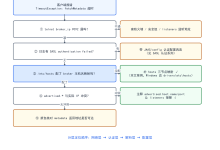
下面是Kafka分层存储的工作流程图:
#publish-mermaid-1788402619722-0{font-family:\”trebuchet ms\”,verdana,arial,sans-serif;font-size:16px;fill:#333;}@keyframes edge-animation-frame{from{stroke-dashoffset:0;}}@keyframes dash{to{stroke-dashoffset:0;}}#publish-mermaid-1788402619722-0 .edge-animation-slow{stroke-dasharray:9,5!important;stroke-dashoffset:900;animation:dash 50s linear infinite;stroke-linecap:round;}#publish-mermaid-1788402619722-0 .edge-animation-fast{stroke-dasharray:9,5!important;stroke-dashoffset:900;animation:dash 20s linear infinite;stroke-linecap:round;}#publish-mermaid-1788402619722-0 .error-icon{fill:#552222;}#publish-mermaid-1788402619722-0 .error-text{fill:#552222;stroke:#552222;}#publish-mermaid-1788402619722-0 .edge-thickness-normal{stroke-width:1px;}#publish-mermaid-1788402619722-0 .edge-thickness-thick{stroke-width:3.5px;}#publish-mermaid-1788402619722-0 .edge-pattern-solid{stroke-dasharray:0;}#publish-mermaid-1788402619722-0 .edge-thickness-invisible{stroke-width:0;fill:none;}#publish-mermaid-1788402619722-0 .edge-pattern-dashed{stroke-dasharray:3;}#publish-mermaid-1788402619722-0 .edge-pattern-dotted{stroke-dasharray:2;}#publish-mermaid-1788402619722-0 .marker{fill:#333333;stroke:#333333;}#publish-mermaid-1788402619722-0 .marker.cross{stroke:#333333;}#publish-mermaid-1788402619722-0 svg{font-family:\”trebuchet ms\”,verdana,arial,sans-serif;font-size:16px;}#publish-mermaid-1788402619722-0 p{margin:0;}#publish-mermaid-1788402619722-0 .label{font-family:\”trebuchet ms\”,verdana,arial,sans-serif;color:#333;}#publish-mermaid-1788402619722-0 .cluster-label text{fill:#333;}#publish-mermaid-1788402619722-0 .cluster-label span{color:#333;}#publish-mermaid-1788402619722-0 .cluster-label span p{background-color:transparent;}#publish-mermaid-1788402619722-0 .label text,#publish-mermaid-1788402619722-0 span{fill:#333;color:#333;}#publish-mermaid-1788402619722-0 .node rect,#publish-mermaid-1788402619722-0 .node circle,#publish-mermaid-1788402619722-0 .node ellipse,#publish-mermaid-1788402619722-0 .node polygon,#publish-mermaid-1788402619722-0 .node path{fill:#ECECFF;stroke:#9370DB;stroke-width:1px;}#publish-mermaid-1788402619722-0 .rough-node .label text,#publish-mermaid-1788402619722-0 .node .label text,#publish-mermaid-1788402619722-0 .image-shape .label,#publish-mermaid-1788402619722-0 .icon-shape .label{text-anchor:middle;}#publish-mermaid-1788402619722-0 .node .katex path{fill:#000;stroke:#000;stroke-width:1px;}#publish-mermaid-1788402619722-0 .rough-node .label,#publish-mermaid-1788402619722-0 .node .label,#publish-mermaid-1788402619722-0 .image-shape .label,#publish-mermaid-1788402619722-0 .icon-shape .label{text-align:center;}#publish-mermaid-1788402619722-0 .node.clickable{cursor:pointer;}#publish-mermaid-1788402619722-0 .root .anchor path{fill:#333333!important;stroke-width:0;stroke:#333333;}#publish-mermaid-1788402619722-0 .arrowheadPath{fill:#333333;}#publish-mermaid-1788402619722-0 .edgePath .path{stroke:#333333;stroke-width:1px;}#publish-mermaid-1788402619722-0 .flowchart-link{stroke:#333333;fill:none;}#publish-mermaid-1788402619722-0 .edgeLabel{background-color:rgba(232,232,232, 0.8);text-align:center;}#publish-mermaid-1788402619722-0 .edgeLabel p{background-color:rgba(232,232,232, 0.8);}#publish-mermaid-1788402619722-0 .edgeLabel rect{opacity:0.5;background-color:rgba(232,232,232, 0.8);fill:rgba(232,232,232, 0.8);}#publish-mermaid-1788402619722-0 .labelBkg{background-color:rgba(232, 232, 232, 0.5);}#publish-mermaid-1788402619722-0 .cluster rect{fill:#ffffde;stroke:#aaaa33;stroke-width:1px;}#publish-mermaid-1788402619722-0 .cluster text{fill:#333;}#publish-mermaid-1788402619722-0 .cluster span{color:#333;}#publish-mermaid-1788402619722-0 div.mermaidTooltip{position:absolute;text-align:center;max-width:200px;padding:2px;font-family:\”trebuchet ms\”,verdana,arial,sans-serif;font-size:12px;background:hsl(80, 100%, 96.2745098039%);border:1px solid #aaaa33;border-radius:2px;pointer-events:none;z-index:100;}#publish-mermaid-1788402619722-0 .flowchartTitleText{text-anchor:middle;font-size:18px;fill:#333;}#publish-mermaid-1788402619722-0 rect.text{fill:none;stroke-width:0;}#publish-mermaid-1788402619722-0 .icon-shape,#publish-mermaid-1788402619722-0 .image-shape{background-color:rgba(232,232,232, 0.8);text-align:center;}#publish-mermaid-1788402619722-0 .icon-shape p,#publish-mermaid-1788402619722-0 .image-shape p{background-color:rgba(232,232,232, 0.8);padding:2px;}#publish-mermaid-1788402619722-0 .icon-shape .label rect,#publish-mermaid-1788402619722-0 .image-shape .label rect{opacity:0.5;background-color:rgba(232,232,232, 0.8);fill:rgba(232,232,232, 0.8);}#publish-mermaid-1788402619722-0 .label-icon{display:inline-block;height:1em;overflow:visible;vertical-align:-0.125em;}#publish-mermaid-1788402619722-0 .node .label-icon path{fill:currentColor;stroke:revert;stroke-width:revert;}#publish-mermaid-1788402619722-0 .node .neo-node{stroke:#9370DB;}#publish-mermaid-1788402619722-0 [data-look=\”neo\”].node rect,#publish-mermaid-1788402619722-0 [data-look=\”neo\”].cluster rect,#publish-mermaid-1788402619722-0 [data-look=\”neo\”].node polygon{stroke:#9370DB;filter:drop-shadow(1px 2px 2px rgba(185, 185, 185, 1));}#publish-mermaid-1788402619722-0 [data-look=\”neo\”].swimlane.cluster rect{filter:none;}#publish-mermaid-1788402619722-0 [data-look=\”neo\”].node path{stroke:#9370DB;stroke-width:1px;}#publish-mermaid-1788402619722-0 [data-look=\”neo\”].node .outer-path{filter:drop-shadow(1px 2px 2px rgba(185, 185, 185, 1));}#publish-mermaid-1788402619722-0 [data-look=\”neo\”].node .neo-line path{stroke:#9370DB;filter:none;}#publish-mermaid-1788402619722-0 [data-look=\”neo\”].node circle{stroke:#9370DB;filter:drop-shadow(1px 2px 2px rgba(185, 185, 185, 1));}#publish-mermaid-1788402619722-0 [data-look=\”neo\”].node circle .state-start{fill:#000000;}#publish-mermaid-1788402619722-0 [data-look=\”neo\”].icon-shape .icon{fill:#9370DB;filter:drop-shadow(1px 2px 2px rgba(185, 185, 185, 1));}#publish-mermaid-1788402619722-0 [data-look=\”neo\”].icon-shape .icon-neo path{stroke:#9370DB;filter:drop-shadow(1px 2px 2px rgba(185, 185, 185, 1));}#publish-mermaid-1788402619722-0 :root{–mermaid-font-family:\”trebuchet ms\”,verdana,arial,sans-serif;}否是
生产者发送消息
Kafka Broker接收消息
消息写入本地存储
检查是否达到保留时间
继续保留在本地
数据迁移决策
确定冷热数据边界
热数据保留在本地
冷数据迁移到远程存储
验证数据完整性
更新元数据
客户端请求处理
热数据从本地读取
冷数据从远程读取
3. 冷热数据分离实践
冷热数据分离是Kafka分层存储的核心策略。热数据是最近被频繁访问的数据,通常保留在本地高速存储上;冷数据是较少被访问的历史数据,迁移到低成本存储。
实施冷热数据分离的步骤:
冷热数据分离的优势:
| 分离方式 | 优势 | 挑战 |
|———|——|——|
| 时间分离 | 实现简单,易于管理 | 无法反映实际访问模式 |
| 大小分离 | 资源分配灵活 | 热数据可能溢出 |
| 访问频率分离 | 精确匹配访问模式 | 实现复杂,开销大 |
| 混合分离 | 平衡各方面因素 | 配置复杂度高 |
4. 云存储降本实践
将冷数据迁移到云存储是降低Kafka存储成本的有效方法。云存储提供商如AWS S3、Azure Blob Storage、Google Cloud Storage等都提供了成本较低的长期存储选项。
云存储降本实践的关键步骤:
下面是一个典型的云存储分层配置示例:
Properties props = new Properties();
props.put("bootstrap.servers", "kafka-broker:9092");
props.put("key.serializer", "org.apache.kafka.common.serialization.StringSerializer");
props.put("value.serializer", "org.apache.kafka.common.serialization.StringSerializer");
// 配置远程存储类
props.put("remote.storage.class", "org.apache.kafka.server.log.remote.storage.CloudStorage");
props.put("remote.storage.config.cloud.provider", "AWS");
props.put("remote.storage.config.cloud.bucket", "my-kafka-backup");
props.put("remote.storage.config.cloud.region", "us-west-2");
props.put("remote.storage.config.storage.class", "Standard");
props.put("remote.storage.config.compression.type", "GZIP");
// 配置数据保留策略
props.put("log.retention.ms", "604800000"); // 7天
props.put("log.segment.bytes", "1073741824"); // 1GB
props.put("log.segment.ms", "86400000"); // 1天
5. 实施案例与注意事项
以下是一个实际应用案例,展示某电商公司如何通过Kafka分层存储降低成本:
案例背景:
- 某电商平台每天产生约2TB的点击流数据
- 原本所有数据存储在本地高性能SSD上,年存储成本约20万美元
- 需要保留18个月数据以满足业务分析和合规要求
实施方案:
实施结果:
- 存储成本降低65%,从20万美元降至7万美元/年
- 数据访问性能无明显下降
- 满足了18个月数据保留要求
实施Kafka分层存储时需要注意的要点:
最小示例代码:
// 创建Kafka分层存储消费者
Properties props = new Properties();
props.put("bootstrap.servers", "localhost:9092");
props.put("group.id", "tiered-storage-consumer");
props.put("key.deserializer", "org.apache.kafka.common.serialization.StringDeserializer");
props.put("value.deserializer", "org.apache.kafka.common.serialization.StringDeserializer");
// 配置远程存储读取
props.put("fetch.min.bytes", "1");
props.put("fetch.max.wait.ms", "5000");
props.put("enable.auto.commit", "false");
props.put("auto.offset.reset", "earliest");
KafkaConsumer<String, String> consumer = new KafkaConsumer<>(props);
consumer.subscribe(Arrays.asList("topic-with-tiered-storage"));
while (true) {
ConsumerRecords<String, String> records = consumer.poll(Duration.ofMillis(100));
for (ConsumerRecord<String, String> record : records) {
// 处理记录
System.out.printf("offset = %d, key = %s, value = %s%n", record.offset(), record.key(), record.value());
}
consumer.commitSync();
}
注意事项: