第 04 篇:Spring Boot 3 + WebClient 封装 OpenAI 客户端
系列:《Java 大模型应用开发入门》第 04 篇。
源码定位:com.example.llm.client.AiClient、WebClientAiClient、com.example.llm.config.WebClientConfig、AiProperties、JacksonConfig、com.example.llm.controller.ChatController。
一、背景
第 03 篇的 SimpleHttpAiClient 能跑,但我们已经列出了它的四个问题:
| chat(String prompt) 只支持一条消息 | 传不了 system,业务规则没法落地 |
| 请求体用 Map 拼 | 字段名写错编译器不报错,运行时才发现 |
| throw IOException, InterruptedException | 调用方拿到的是「IO 异常」,不知道该重试还是该报警 |
| 没有流式、没有向量化、超时写死 | 每加一个能力都要复制粘贴一遍 |
这篇把它升级成生产可用的客户端。核心不是「换个 HTTP 库」,而是把三件事一次做对:
二、目标
三、前置
- 第 03 篇的工程可编译、可启动;
- mock 服务或真实 Key 就绪。
四、核心概念
为什么是 WebClient,不是 RestTemplate
| 编程模型 | 同步阻塞 | 同步(.block())/ 异步(Mono/Flux) |
| 流式支持 | 需要手写 ResponseExtractor | bodyToFlux 天然支持 |
| 超时粒度 | 只有连接 + 读超时 | 连接 + 响应 + 流空闲超时 |
| 状态 | 维护模式 | 官方推荐 |
| 底层 | JDK HttpURLConnection 或 Apache HttpClient | Reactor Netty |
决定性因素是流式。第 06 篇要把上游的 SSE 流原样转发给前端,用 RestTemplate 得自己读 InputStream 解析 data: 行;用 WebClient,一行 .bodyToFlux(String.class) 就够了。
WebClient 的三个超时
这是本篇最容易踩坑的地方:
| 连接超时 | .option(ChannelOption.CONNECT_TIMEOUT_MILLIS, 3000) | 仅 TCP 建连 |
| 响应超时 | .responseTimeout(Duration.ofMillis(20000)) | 从发出请求到收到响应头 |
| 流空闲超时 | .timeout(Duration.ofMillis(60000)) 加在 Flux 上 | 两个 chunk 之间的最大间隔 |
注意 responseTimeout 和流式的空闲超时是两回事。
流式响应会在「响应头到达」时就算成功,之后是长时间的持续推送。如果只配 responseTimeout,一个正常的长回答反而会被误杀。
缓冲区:默认 256KB 是不够的
codecs.defaultCodecs().maxInMemorySize(16 * 1024 * 1024);
WebClient 默认只缓冲 256KB 响应体。第 09 篇做长文本摘要时,一次返回几万字符很正常,不调大会直接报:
org.springframework.core.io.buffer.DataBufferLimitException:
Exceeded limit on max bytes to buffer : 262144
这个报错很难往「缓冲区」上联想,很多人会以为是网络问题查半天。提前配好,省下这次排查。
DTO 的两个纪律
纪律一:下划线字段显式声明,不依赖全局命名策略。
@JsonProperty("max_tokens")
private Integer maxTokens;
@JsonProperty("response_format")
private ResponseFormat responseFormat;
用全局 SNAKE_CASE 策略看起来更省事,但一旦某个供应商的字段风格不一致(有的大驼峰、有的下划线),全局策略就会失效。显式声明最不容易出问题,而且 IDE 能跳转。
纪律二:请求体用 NON_NULL,响应体用 ignoreUnknown。
@JsonInclude(JsonInclude.Include.NON_NULL) // 请求:不把 null 字段发出去
@JsonIgnoreProperties(ignoreUnknown = true) // 响应:上游多返回字段不要报错
为什么要 NON_NULL?因为有些网关看到 "stream": null 会报参数错误,而不是当成「没传」。
为什么要 ignoreUnknown?因为上游经常悄悄加字段(system_fingerprint 就是这么来的)。上线后上游加了个字段,你的服务开始 500,这是最冤的故障。
五、代码实操
配置绑定
@ConfigurationProperties(prefix = "ai")
public class AiProperties {
private String baseUrl;
private String apiKey;
private String model;
private String embeddingModel;
private double temperature = 0.7;
private Integer maxTokens = 2048;
private int connectTimeoutMs = 3000;
private int responseTimeoutMs = 20000;
private int streamIdleTimeoutMs = 60000;
private boolean logToDb = true;
private BigDecimal pricePer1kPrompt = new BigDecimal("0.0015");
private BigDecimal pricePer1kCompletion = new BigDecimal("0.006");
private Resilience resilience = new Resilience();
private Summary summary = new Summary();
private Classify classify = new Classify();
// … getter / setter
}
对应配置:
ai:
base-url: ${AI_BASE_URL:http://localhost:8899/v1}
api-key: ${AI_API_KEY:mock–key–123456}
model: ${AI_MODEL:mock–gpt–4o–mini}
embedding-model: ${AI_EMBEDDING_MODEL:mock–embedding–3–small}
temperature: 0.7
max-tokens: 2048
connect-timeout-ms: 3000
response-timeout-ms: 20000
stream-idle-timeout-ms: 60000
log-to-db: true
price-per-1k-prompt: 0.0015
price-per-1k-completion: 0.006
summary:
max-input-chars: 4000
chunk-size: 1200
classify:
labels: [咨询, 投诉, 退款, 物流, 其他]
confidence-threshold: 0.6
resilience:
retry:
max-attempts: 3
backoff-ms: 500
rate-limiter:
limit-for-period: 20
refresh-period-ms: 1000
circuit-breaker:
failure-rate-threshold: 60
sliding-window-size: 10
wait-duration-in-open-state-ms: 10000
协议 DTO
消息体(第 02 篇讲的三种角色):
@Data
@JsonInclude(JsonInclude.Include.NON_NULL)
public class Message {
private String role;
private String content;
public static Message system(String content) { return new Message("system", content); }
public static Message user(String content) { return new Message("user", content); }
public static Message assistant(String c) { return new Message("assistant", c); }
}
请求体:
@Data
@JsonInclude(JsonInclude.Include.NON_NULL)
public class ChatCompletionRequest {
private String model;
private List<Message> messages = new ArrayList<>();
private Double temperature;
private Boolean stream;
@JsonProperty("max_tokens")
private Integer maxTokens;
@JsonProperty("response_format")
private ResponseFormat responseFormat; // 第 05 篇
private List<String> stop;
public static ChatCompletionRequest of(String model, List<Message> messages, double temperature) {
ChatCompletionRequest request = new ChatCompletionRequest();
request.setModel(model);
request.setMessages(messages);
request.setTemperature(temperature);
return request;
}
}
@JsonInclude(NON_NULL) 在这里的作用是:stream 和 response_format 在非流式、非 JSON 模式下是 null,加了它就不会被序列化进请求体。不要给它们填 false,有些兼容实现会把显式的 false 当成「不支持该参数」。
响应体:
@Data
@JsonIgnoreProperties(ignoreUnknown = true)
public class ChatCompletionResponse {
private String id;
private String object;
private Long created;
private String model;
private List<Choice> choices;
private Usage usage;
@JsonProperty("system_fingerprint")
private String systemFingerprint;
/** 安全地取出第一条回复的正文。 */
public String firstContent() {
if (choices == null || choices.isEmpty()) {
return null;
}
Choice first = choices.get(0);
return first.getMessage() == null ? null : first.getMessage().getContent();
}
public String firstFinishReason() {
return (choices == null || choices.isEmpty()) ? null : choices.get(0).getFinishReason();
}
}
firstContent() 和 firstFinishReason() 这两个方法很有价值:把防御性取值收口到 DTO 里,业务代码写 response.firstContent() 就够了,不用每次重复判空。
WebClient 配置类
@Configuration
public class WebClientConfig {
/** 单次响应允许缓冲的最大字节数,长文本场景给到 16MB。 */
private static final int MAX_IN_MEMORY_SIZE = 16 * 1024 * 1024;
@Bean
public WebClient aiWebClient(AiProperties aiProperties, ObjectMapper objectMapper) {
HttpClient httpClient = HttpClient.create()
.option(ChannelOption.CONNECT_TIMEOUT_MILLIS, aiProperties.getConnectTimeoutMs())
.responseTimeout(Duration.ofMillis(aiProperties.getResponseTimeoutMs()))
.keepAlive(true);
ExchangeStrategies strategies = ExchangeStrategies.builder()
.codecs(codecs -> {
codecs.defaultCodecs().maxInMemorySize(MAX_IN_MEMORY_SIZE);
codecs.defaultCodecs().jackson2JsonDecoder(
new Jackson2JsonDecoder(objectMapper, MediaType.APPLICATION_JSON));
})
.build();
WebClient.Builder builder = WebClient.builder()
.baseUrl(aiProperties.getBaseUrl())
.clientConnector(new ReactorClientHttpConnector(httpClient))
.defaultHeader(HttpHeaders.AUTHORIZATION, "Bearer " + aiProperties.getApiKey())
.defaultHeader(HttpHeaders.CONTENT_TYPE, MediaType.APPLICATION_JSON_VALUE)
.exchangeStrategies(strategies);
return builder.build();
}
}
三个要点:
客户端接口:为扩展留好位置
public interface AiClient {
/** 一次性对话补全。 */
ChatCompletionResponse chat(List<Message> messages, double temperature, boolean jsonMode);
/** 流式对话补全,返回增量分片流。 */
Flux<StreamChunk> chatStream(List<Message> messages, double temperature);
/** 文本向量化。 */
List<float[]> embed(List<String> inputs);
}
为什么先留接口?因为第 07 篇要加向量化、第 08 篇要给调用套容错、第 13 篇要支持多模型路由。如果一开始就写死具体类,后面每一步都要动业务代码。
接口加 @ConditionalOnProperty 还能实现可替换实现:
@Component
@ConditionalOnProperty(name = "ai.client-type", havingValue = "webclient", matchIfMissing = true)
public class WebClientAiClient implements AiClient { ... }
想换成别的实现,只改配置:
ai:
client-type: restclient
核心实现:chat()
@Override
public ChatCompletionResponse chat(List<Message> messages, double temperature, boolean jsonMode) {
ChatCompletionRequest request = ChatCompletionRequest.of(aiProperties.getModel(), messages, temperature);
request.setMaxTokens(aiProperties.getMaxTokens());
if (jsonMode) {
request.setResponseFormat(ResponseFormat.jsonObject());
}
long start = System.currentTimeMillis();
try {
ChatCompletionResponse response = aiWebClient.post()
.uri("/chat/completions")
.bodyValue(request)
.retrieve()
.onStatus(HttpStatusCode::isError, this::toAiException) // ← 错误归一
.bodyToMono(ChatCompletionResponse.class)
.block(Duration.ofMillis(aiProperties.getResponseTimeoutMs() + 3000L));
if (response == null) {
throw new AiBadResponseException("上游返回空响应", null);
}
log.info("ai.chat model={} jsonMode={} latency={}ms usage={}",
aiProperties.getModel(), jsonMode, System.currentTimeMillis() – start,
response.getUsage() == null ? "-" : response.getUsage().getTotalTokens());
return response;
} catch (AiException e) {
throw e;
} catch (Exception e) {
throw mapTransportException(e);
}
}
四个细节:
错误归一
这是本篇最有价值的一段代码:
private Mono<Throwable> toAiException(ClientResponse response) {
int status = response.statusCode().value();
return response.bodyToMono(String.class)
.defaultIfEmpty("")
.map(body -> {
if (status == 401 || status == 403) {
return new AiAuthException(status, body);
}
if (status == 429) {
return new AiRateLimitException(body);
}
if (response.statusCode().is5xxServerError()) {
return new AiUpstreamException(status, body);
}
return new AiBadResponseException("上游返回异常状态 " + status, body);
});
}
它把 HTTP 语义翻译成了业务语义。为什么必须做这一步?
因为第 08 篇的重试策略要这样写:
.retryExceptions(AiRateLimitException.class, AiTimeoutException.class, AiUpstreamException.class)
.ignoreExceptions(AiAuthException.class, AiBadResponseException.class)
如果异常还是「HTTP 401」这种字符串,重试组件根本没法判断哪些该重试。归一之后的异常类型,就是业务对故障的可操作认知。
传输层异常同样要归一:
private AiException mapTransportException(Throwable e) {
if (e instanceof AiException aiException) {
return aiException;
}
Throwable root = e;
while (root.getCause() != null && root.getCause() != root) {
root = root.getCause();
}
if (e instanceof WebClientRequestException || root instanceof java.net.ConnectException) {
return new AiTimeoutException("无法连接大模型服务:" + root.getMessage(), e);
}
if (e instanceof ReadTimeoutException || e instanceof TimeoutException
|| root instanceof ReadTimeoutException || root instanceof TimeoutException) {
return new AiTimeoutException("大模型响应超时:" + root.getMessage(), e);
}
if (e instanceof IllegalStateException && e.getMessage() != null && e.getMessage().contains("Timeout")) {
return new AiTimeoutException("阻塞等待大模型响应超时", e);
}
return new AiUpstreamException(–1, e.getClass().getSimpleName() + ": " + e.getMessage());
}
为什么要 while 循环剥到根因?因为 Reactor Netty 的异常经常包三四层:
WebClientRequestException
└─ io.netty.channel.ConnectTimeoutException
└─ java.net.ConnectException: Connection refused
只看最外层,你永远判断不出到底是「连不上」还是「读超时」。
对外接口
@RestController
@RequestMapping("/ai")
public class ChatController {
@PostMapping("/chat")
public ApiResponse<ChatResponse> chat(@RequestBody @Valid ChatRequest request) {
return ApiResponse.ok(chatService.chat(request));
}
@PostMapping("/chat/json")
public ApiResponse<ChatResponse> chatJson(@RequestBody @Valid ChatRequest request) {
return ApiResponse.ok(chatService.chatJson(request));
}
}
配套的请求 DTO 用 Bean Validation 做参数校验:
@Data
public class ChatRequest {
@NotBlank(message = "prompt 不能为空")
private String prompt;
private String system;
private String model;
@DecimalMin(value = "0.0", message = "temperature 不能小于 0")
@DecimalMax(value = "2.0", message = "temperature 不能大于 2")
private Double temperature;
}
参数校验失败会走 GlobalExceptionHandler(第 08 篇),返回统一的错误结构,而不是 Spring 默认的一大坨堆栈页。
六、验证
调用 /ai/chat
curl -X POST http://127.0.0.1:8080/ai/chat \\
-H "Content-Type: application/json" \\
-d '{"prompt":"用两句话说明:为什么大模型应用开发中,超时和重试必须成对出现?","temperature":0.7}'
实测输出:
{
"code": 0,
"message": "成功",
"traceId": "94a4332326ac4d77",
"data": {
"content": "【本地模拟回复】我收到了你的问题:「用两句话说明:为什么大模型应用开发中,超时和重试必须成对出现?」。当前运行的是 mock-llm-server,用规则引擎代替真实模型,因此回复内容是确定性的、可复现的。把 ai.base-url 换成真实服务地址与 Key,即可获得真实模型的回答。",
"model": "mock-gpt-4o-mini",
"finishReason": "stop",
"promptTokens": 62,
"completionTokens": 106,
"totalTokens": 168,
"latencyMs": 63
}
}
和第 03 篇放在一起对比(同一个问题,换条链路):
| 实现 | JDK HttpClient | WebClient |
| 消息 | 只有 user | system + user(所以 promptTokens 从 15 变成 62) |
| 请求体 | Map 手工拼 | ChatCompletionRequest 强类型 |
| 超时 | 代码里写死 | 配置驱动,三个超时分开 |
| 错误 | IOException + 字符串 | AiException 子类,可编程判断 |
| 返回值 | 自定义 ChatResult | 上游完整响应(含 finishReason) |
演示页上的效果
打开 http://localhost:8080/,点「普通对话」:
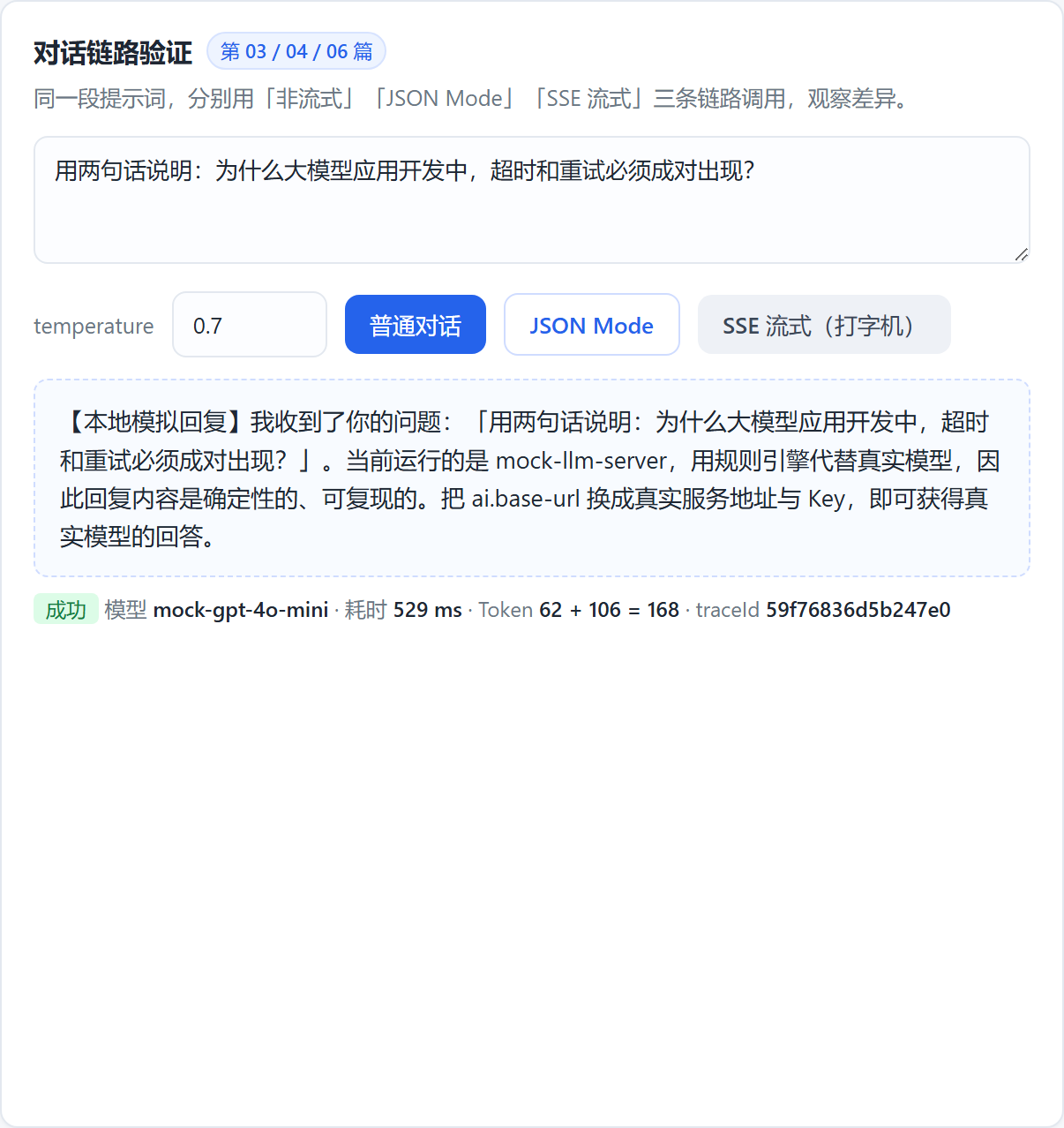
页面上的元信息一行就是本篇的成果:
成功 模型 mock-gpt-4o-mini · 耗时 605 ms · Token 62 + 106 = 168 · traceId 43b084f7863e4dc1
耗时、Token、traceId 三样东西同时可见,这是可观测性的起点,第 08 和 13 篇会把它落库。
日志验证
14:52:31.102 INFO [94a4332326ac4d77] c.e.llm.client.WebClientAiClient – ai.chat model=mock-gpt-4o-mini jsonMode=false latency=63ms usage=168
注意日志格式里的 %X{traceId},一次请求的所有日志都能被同一个 traceId 串起来。
参数校验验证
curl -X POST http://127.0.0.1:8080/ai/chat -H "Content-Type: application/json" -d '{"prompt":""}'
{
"code": 40001,
"message": "prompt: prompt 不能为空",
"traceId": "431945c1f88e40d9",
"data": null
}
HTTP 状态码是 400,响应体结构与业务错误完全一致,前端不用写两套解析。
七、常见坑
| 只配 responseTimeout,以为能覆盖流式 | 长回答中途被掐断 | 流式要单独加 .timeout() 作为空闲超时 |
| 不调 maxInMemorySize | 长文本报 Exceeded limit on max bytes to buffer | 提前调到 16MB |
| .block() 的超时比 responseTimeout 短 | 错误变成 IllegalStateException: Timeout on blocking read,语义丢失 | block 超时设成 responseTimeout 加一段缓冲 |
| block() 不带参数 | 上游挂住时线程永久阻塞 | 永远带超时 |
| 请求体发 null 字段 | 部分网关报参数错误 | @JsonInclude(NON_NULL) |
| 响应体不容未知字段 | 上游加字段后自己 500 | 关掉 FAIL_ON_UNKNOWN_PROPERTIES,DTO 上再加 @JsonIgnoreProperties |
| 依赖全局 SNAKE_CASE 策略 | 遇到字段风格不一致的供应商就崩 | 下划线字段显式 @JsonProperty |
| 自己 new ObjectMapper() | Web 层和 Client 层序列化策略不一致 | 注入 Spring 的全局 ObjectMapper |
| 日志打完整 prompt 或 Key | 隐私泄露、密钥泄露 | 只打模型名、耗时、Token 数,Key 走 MaskUtils 脱敏 |
| 在 MVC 里到处 .block() 而不设线程池 | 高并发下 Tomcat 线程被耗光 | 给 AI 调用单独配线程池,或改用 SseEmitter 异步返回(第 06 篇) |
八、小结与下一篇
这篇做完的事:
- 用 AiProperties 把模型接入配置收口到一个类,换供应商只改 application.yml;
- 用 WebClientConfig 把三个超时、鉴权头、16MB 缓冲区一次配好;
- 定义了完整的协议 DTO,并处理了下划线字段与未知字段两个经典问题;
- 抽出 AiClient 接口,为向量化和容错留出扩展点;
- 实现了错误归一,把 HTTP 语义翻译成 AiException 子类;
- 打通了 /ai/chat 和 /ai/chat/json,并在日志里看到了耗时与 Token。
现在客户端能稳定对话了,但你应该已经注意到一个问题:模型返回的是散文。
你在 content 里拿到的是「好的,我来帮你分析一下……」,而不是你想要的 {"label":"物流","confidence":0.9}。只要输出格式不稳定,它就没法接进业务代码 —— 你总不能对模型说「请务必只返回 JSON」然后祈祷。
下一篇解决这个问题。我们要让模型稳定地吐出可被 Jackson 反序列化的 JSON,并且在它「不听话」时能自动补救。
下一篇 → 第 05 篇:结构化输出 —— 让模型稳定返回 JSON
跟着敲的建议:上面那张两条链路的对比表,建议自己动手填一遍。
亲手把差异列出来,你对框架价值的理解会比读十篇文章都深。