摘要
理论说够了,开始写代码。本文面向有 Python 基础的开发者,用不到 50 行核心代码搭建一个能自主搜索互联网、筛选信息、总结输出的最小可用 AI Agent。文章从环境搭建到代码实现到运行效果展示,完整覆盖一个 Agent 的诞生过程。然后逐步加入错误处理、记忆管理和成本控制,展示从"能跑"到"能用"的工程化演进路径。读完本文,你将拥有自己的第一个 Agent,并理解它的每一行代码在做什么。
📌 版本声明:本文基于 Python 3.10+ 和 OpenAI Python SDK 1.x 编写。使用 OpenAI GPT-5-mini 模型,你也可以替换为 DeepSeek V4 或通义千问 Qwen-3.5 等兼容 API。
文章目录
-
- 摘要
- 一、我们要构建什么?
-
- 1.1 Agent 功能定义
- 1.2 技术栈选择
- 1.3 环境准备
- 二、50行核心代码:最小可用 Agent
-
- 2.1 完整代码
- 2.2 代码结构解析
- 2.3 运行效果
- 三、运行原理解析
-
- 3.1 Agent 循环的时序
- 3.2 模型在每一步的决策
- 四、从"能跑"到"能用"的工程化升级
-
- 4.1 问题诊断
- 4.2 升级一:加入错误处理
- 4.3 升级二:加入简单记忆
- 4.4 升级三:加入步骤日志
- 五、Agent 的状态分析
-
- 5.1 状态机视图
- 5.2 各状态的数据流
- 六、常见问题与排障
-
- 6.1 模型不调用工具
- 6.2 无限循环
- 6.3 Token 消耗过高
- 七、适用边界
-
- 7.1 这个 Agent 适合做什么
- 7.2 不适合做什么
- 7.3 下一步升级方向
- 八、总结
-
- 8.1 回顾
- 8.2 核心认知
- 8.3 第一阶段总结
- 8.4 下篇预告
- 参考资料
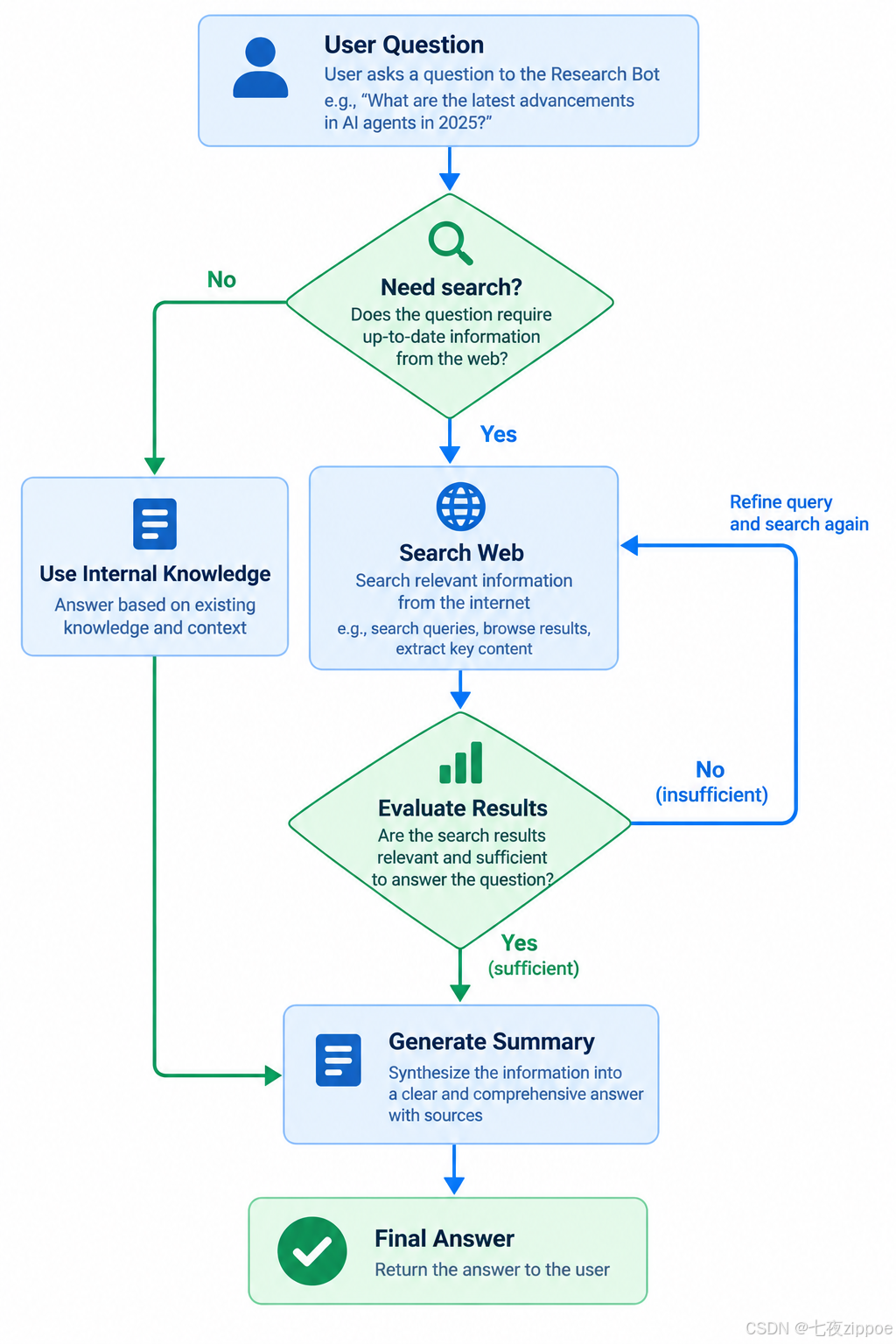
图:Research Bot的完整工作流程示意图
一、我们要构建什么?
1.1 Agent 功能定义
我们要搭建的 Agent 名叫"Research Bot",功能是:
这个 Agent 的核心特征是自主性——不是你告诉它"先搜索、再总结",而是它自己决定什么时候搜索、搜什么、搜几次、什么时候停止。
1.2 技术栈选择
| 语言 | Python 3.10+ | AI 生态最完善 |
| LLM | GPT-5-mini | 成本低、能力够用 |
| 搜索工具 | DuckDuckGo Search API | 免费、无需 API Key |
| 框架 | 裸 OpenAI SDK | 理解原理,不依赖框架 |
💡 提示:本文不用任何框架(LangChain、OpenClaw 等),目的是让你理解 Agent 的核心原理。理解原理后,再用框架会事半功倍。
1.3 环境准备
# Python 3.10+ 环境
python -m venv venv
source venv/bin/activate # Linux/Mac
# venv\\Scripts\\activate # Windows
# 安装依赖
pip install openai duckduckgo-search
# 设置 API Key
export OPENAI_API_KEY="your-api-key" # 请替换为实际值
验证环境:
import openai
import duckduckgo_search
print(f"OpenAI SDK: {openai.__version__}")
print("环境就绪!")
预期输出:
OpenAI SDK: 1.x.x
环境就绪!
二、50行核心代码:最小可用 Agent
2.1 完整代码
import json
import openai
client = openai.OpenAI() # 默认从环境变量读取 OPENAI_API_KEY
# === 第一步:定义工具 ===
TOOLS = [
{
"type": "function",
"function": {
"name": "search_web",
"description": "搜索互联网获取最新信息。当需要实时数据、新闻、技术文档等动态信息时使用。",
"parameters": {
"type": "object",
"properties": {
"query": {
"type": "string",
"description": "搜索关键词,建议10-30字"
},
"max_results": {
"type": "integer",
"description": "返回结果数量,默认5",
"default": 5
}
},
"required": ["query"]
}
}
}
]
def search_web(query: str, max_results: int = 5) –> str:
"""执行网页搜索"""
from duckduckgo_search import DDGS
with DDGS() as ddgs:
results = list(ddgs.text(query, max_results=max_results))
if not results:
return json.dumps({"success": False, "error": "未找到搜索结果"})
formatted = [
{"title": r["title"], "body": r["body"][:200]}
for r in results
]
return json.dumps({"success": True, "data": formatted})
# === 第二步:定义 Agent 循环 ===
SYSTEM_PROMPT = """你是一个研究助手。你的任务是回答用户的研究问题。
工作流程:
1. 分析问题,判断是否需要搜索互联网获取最新信息
2. 如果需要搜索,选择合适的关键词
3. 阅读搜索结果,判断信息是否充分
4. 如果不充分,调整关键词重新搜索
5. 信息充分后,生成结构化总结
输出格式:
– 使用 markdown 格式
– 关键信息用加粗标注
– 列出来源链接
"""
def run_agent(user_question: str, max_steps: int = 5) –> str:
"""运行 Agent 循环"""
messages = [
{"role": "system", "content": SYSTEM_PROMPT},
{"role": "user", "content": user_question}
]
for step in range(max_steps):
# 调用模型
response = client.chat.completions.create(
model="gpt-5-mini",
messages=messages,
tools=TOOLS,
temperature=0.1,
)
msg = response.choices[0].message
messages.append(msg)
# 如果模型没有调用工具,说明它准备好了最终回答
if not msg.tool_calls:
return msg.content
# 执行工具调用
for tool_call in msg.tool_calls:
if tool_call.function.name == "search_web":
args = json.loads(tool_call.function.arguments)
result = search_web(**args)
messages.append({
"role": "tool",
"tool_call_id": tool_call.id,
"content": result
})
return "Agent 达到最大步数限制,未能完成任务。"
# === 第三步:运行 Agent ===
if __name__ == "__main__":
answer = run_agent("2026年最热门的AI Agent开发框架有哪些?各有什么特点?")
print(answer)
2.2 代码结构解析
#mermaid-svg-tMzKUvqUW1TbmehI{font-family:\”trebuchet ms\”,verdana,arial,sans-serif;font-size:16px;fill:#333;}@keyframes edge-animation-frame{from{stroke-dashoffset:0;}}@keyframes dash{to{stroke-dashoffset:0;}}#mermaid-svg-tMzKUvqUW1TbmehI .edge-animation-slow{stroke-dasharray:9,5!important;stroke-dashoffset:900;animation:dash 50s linear infinite;stroke-linecap:round;}#mermaid-svg-tMzKUvqUW1TbmehI .edge-animation-fast{stroke-dasharray:9,5!important;stroke-dashoffset:900;animation:dash 20s linear infinite;stroke-linecap:round;}#mermaid-svg-tMzKUvqUW1TbmehI .error-icon{fill:#552222;}#mermaid-svg-tMzKUvqUW1TbmehI .error-text{fill:#552222;stroke:#552222;}#mermaid-svg-tMzKUvqUW1TbmehI .edge-thickness-normal{stroke-width:1px;}#mermaid-svg-tMzKUvqUW1TbmehI .edge-thickness-thick{stroke-width:3.5px;}#mermaid-svg-tMzKUvqUW1TbmehI .edge-pattern-solid{stroke-dasharray:0;}#mermaid-svg-tMzKUvqUW1TbmehI .edge-thickness-invisible{stroke-width:0;fill:none;}#mermaid-svg-tMzKUvqUW1TbmehI .edge-pattern-dashed{stroke-dasharray:3;}#mermaid-svg-tMzKUvqUW1TbmehI .edge-pattern-dotted{stroke-dasharray:2;}#mermaid-svg-tMzKUvqUW1TbmehI .marker{fill:#333333;stroke:#333333;}#mermaid-svg-tMzKUvqUW1TbmehI .marker.cross{stroke:#333333;}#mermaid-svg-tMzKUvqUW1TbmehI svg{font-family:\”trebuchet ms\”,verdana,arial,sans-serif;font-size:16px;}#mermaid-svg-tMzKUvqUW1TbmehI p{margin:0;}#mermaid-svg-tMzKUvqUW1TbmehI .label{font-family:\”trebuchet ms\”,verdana,arial,sans-serif;color:#333;}#mermaid-svg-tMzKUvqUW1TbmehI .cluster-label text{fill:#333;}#mermaid-svg-tMzKUvqUW1TbmehI .cluster-label span{color:#333;}#mermaid-svg-tMzKUvqUW1TbmehI .cluster-label span p{background-color:transparent;}#mermaid-svg-tMzKUvqUW1TbmehI .label text,#mermaid-svg-tMzKUvqUW1TbmehI span{fill:#333;color:#333;}#mermaid-svg-tMzKUvqUW1TbmehI .node rect,#mermaid-svg-tMzKUvqUW1TbmehI .node circle,#mermaid-svg-tMzKUvqUW1TbmehI .node ellipse,#mermaid-svg-tMzKUvqUW1TbmehI .node polygon,#mermaid-svg-tMzKUvqUW1TbmehI .node path{fill:#ECECFF;stroke:#9370DB;stroke-width:1px;}#mermaid-svg-tMzKUvqUW1TbmehI .rough-node .label text,#mermaid-svg-tMzKUvqUW1TbmehI .node .label text,#mermaid-svg-tMzKUvqUW1TbmehI .image-shape .label,#mermaid-svg-tMzKUvqUW1TbmehI .icon-shape .label{text-anchor:middle;}#mermaid-svg-tMzKUvqUW1TbmehI .node .katex path{fill:#000;stroke:#000;stroke-width:1px;}#mermaid-svg-tMzKUvqUW1TbmehI .rough-node .label,#mermaid-svg-tMzKUvqUW1TbmehI .node .label,#mermaid-svg-tMzKUvqUW1TbmehI .image-shape .label,#mermaid-svg-tMzKUvqUW1TbmehI .icon-shape .label{text-align:center;}#mermaid-svg-tMzKUvqUW1TbmehI .node.clickable{cursor:pointer;}#mermaid-svg-tMzKUvqUW1TbmehI .root .anchor path{fill:#333333!important;stroke-width:0;stroke:#333333;}#mermaid-svg-tMzKUvqUW1TbmehI .arrowheadPath{fill:#333333;}#mermaid-svg-tMzKUvqUW1TbmehI .edgePath .path{stroke:#333333;stroke-width:2.0px;}#mermaid-svg-tMzKUvqUW1TbmehI .flowchart-link{stroke:#333333;fill:none;}#mermaid-svg-tMzKUvqUW1TbmehI .edgeLabel{background-color:rgba(232,232,232, 0.8);text-align:center;}#mermaid-svg-tMzKUvqUW1TbmehI .edgeLabel p{background-color:rgba(232,232,232, 0.8);}#mermaid-svg-tMzKUvqUW1TbmehI .edgeLabel rect{opacity:0.5;background-color:rgba(232,232,232, 0.8);fill:rgba(232,232,232, 0.8);}#mermaid-svg-tMzKUvqUW1TbmehI .labelBkg{background-color:rgba(232, 232, 232, 0.5);}#mermaid-svg-tMzKUvqUW1TbmehI .cluster rect{fill:#ffffde;stroke:#aaaa33;stroke-width:1px;}#mermaid-svg-tMzKUvqUW1TbmehI .cluster text{fill:#333;}#mermaid-svg-tMzKUvqUW1TbmehI .cluster span{color:#333;}#mermaid-svg-tMzKUvqUW1TbmehI div.mermaidTooltip{position:absolute;text-align:center;max-width:200px;padding:2px;font-family:\”trebuchet ms\”,verdana,arial,sans-serif;font-size:12px;background:hsl(80, 100%, 96.2745098039%);border:1px solid #aaaa33;border-radius:2px;pointer-events:none;z-index:100;}#mermaid-svg-tMzKUvqUW1TbmehI .flowchartTitleText{text-anchor:middle;font-size:18px;fill:#333;}#mermaid-svg-tMzKUvqUW1TbmehI rect.text{fill:none;stroke-width:0;}#mermaid-svg-tMzKUvqUW1TbmehI .icon-shape,#mermaid-svg-tMzKUvqUW1TbmehI .image-shape{background-color:rgba(232,232,232, 0.8);text-align:center;}#mermaid-svg-tMzKUvqUW1TbmehI .icon-shape p,#mermaid-svg-tMzKUvqUW1TbmehI .image-shape p{background-color:rgba(232,232,232, 0.8);padding:2px;}#mermaid-svg-tMzKUvqUW1TbmehI .icon-shape .label rect,#mermaid-svg-tMzKUvqUW1TbmehI .image-shape .label rect{opacity:0.5;background-color:rgba(232,232,232, 0.8);fill:rgba(232,232,232, 0.8);}#mermaid-svg-tMzKUvqUW1TbmehI .label-icon{display:inline-block;height:1em;overflow:visible;vertical-align:-0.125em;}#mermaid-svg-tMzKUvqUW1TbmehI .node .label-icon path{fill:currentColor;stroke:revert;stroke-width:revert;}#mermaid-svg-tMzKUvqUW1TbmehI :root{–mermaid-font-family:\”trebuchet ms\”,verdana,arial,sans-serif;}
是
否
用户问题
System Prompt 设定角色
调用 LLM
模型返回工具调用?
解析工具名称和参数
执行工具函数
结果返回给 LLM
返回最终回答
输出结果
图:50行 Agent 的核心循环流程
代码分为三个部分:
第一部分:定义工具。我们用 OpenAI Function Calling 格式定义了一个 search_web 工具。description 字段是 Agent 选择工具的依据——模型通过这个描述判断"当前需不需要调用这个工具"。
第二部分:定义 Agent 循环。这是核心逻辑:调用模型→检查是否需要工具→执行工具→结果返回模型→继续循环。max_steps 限制最大循环次数,防止无限循环。
第三部分:运行 Agent。传入一个问题,Agent 自主完成搜索→筛选→总结的完整流程。
2.3 运行效果
answer = run_agent("2026年最热门的AI Agent开发框架有哪些?各有什么特点?")
print(answer)
预期输出(每次运行结果略有不同,因为 LLM 有随机性):
根据搜索结果,2026年最热门的 AI Agent 开发框架如下:
## 1. OpenClaw
**定位**:生产级 Agent 平台
**特点**:Skill 系统、MCP 原生支持、多渠道接入
**适用**:企业级生产部署
## 2. LangChain
**定位**:通用 LLM 应用框架
**特点**:生态丰富、社区活跃、组件丰富
**适用**:快速原型开发
## 3. Dify
**定位**:低代码 Agent 平台
**特点**:可视化编排、上手快
**适用**:非技术用户
## 4. CrewAI
**定位**:多 Agent 协作框架
**特点**:角色化设计、协作优雅
**适用**:多 Agent 场景
来源:
– https://openclaw.ai
– https://langchain.com
– https://dify.ai
– https://crewai.com
Agent 在这个过程中自主决定了搜索关键词(可能是"2026 AI Agent framework"或类似),自主判断了搜索结果是否充分,自主选择了最终输出的格式。
三、运行原理解析
3.1 Agent 循环的时序
DuckDuckGo
search_web工具
LLM (GPT-5-mini)
Agent循环
用户
DuckDuckGo
search_web工具
LLM (GPT-5-mini)
Agent循环
用户
#mermaid-svg-lSuzL6OSqXiEzP1r{font-family:\”trebuchet ms\”,verdana,arial,sans-serif;font-size:16px;fill:#333;}@keyframes edge-animation-frame{from{stroke-dashoffset:0;}}@keyframes dash{to{stroke-dashoffset:0;}}#mermaid-svg-lSuzL6OSqXiEzP1r .edge-animation-slow{stroke-dasharray:9,5!important;stroke-dashoffset:900;animation:dash 50s linear infinite;stroke-linecap:round;}#mermaid-svg-lSuzL6OSqXiEzP1r .edge-animation-fast{stroke-dasharray:9,5!important;stroke-dashoffset:900;animation:dash 20s linear infinite;stroke-linecap:round;}#mermaid-svg-lSuzL6OSqXiEzP1r .error-icon{fill:#552222;}#mermaid-svg-lSuzL6OSqXiEzP1r .error-text{fill:#552222;stroke:#552222;}#mermaid-svg-lSuzL6OSqXiEzP1r .edge-thickness-normal{stroke-width:1px;}#mermaid-svg-lSuzL6OSqXiEzP1r .edge-thickness-thick{stroke-width:3.5px;}#mermaid-svg-lSuzL6OSqXiEzP1r .edge-pattern-solid{stroke-dasharray:0;}#mermaid-svg-lSuzL6OSqXiEzP1r .edge-thickness-invisible{stroke-width:0;fill:none;}#mermaid-svg-lSuzL6OSqXiEzP1r .edge-pattern-dashed{stroke-dasharray:3;}#mermaid-svg-lSuzL6OSqXiEzP1r .edge-pattern-dotted{stroke-dasharray:2;}#mermaid-svg-lSuzL6OSqXiEzP1r .marker{fill:#333333;stroke:#333333;}#mermaid-svg-lSuzL6OSqXiEzP1r .marker.cross{stroke:#333333;}#mermaid-svg-lSuzL6OSqXiEzP1r svg{font-family:\”trebuchet ms\”,verdana,arial,sans-serif;font-size:16px;}#mermaid-svg-lSuzL6OSqXiEzP1r p{margin:0;}#mermaid-svg-lSuzL6OSqXiEzP1r .actor{stroke:hsl(259.6261682243, 59.7765363128%, 87.9019607843%);fill:#ECECFF;}#mermaid-svg-lSuzL6OSqXiEzP1r text.actor>tspan{fill:black;stroke:none;}#mermaid-svg-lSuzL6OSqXiEzP1r .actor-line{stroke:hsl(259.6261682243, 59.7765363128%, 87.9019607843%);}#mermaid-svg-lSuzL6OSqXiEzP1r .innerArc{stroke-width:1.5;stroke-dasharray:none;}#mermaid-svg-lSuzL6OSqXiEzP1r .messageLine0{stroke-width:1.5;stroke-dasharray:none;stroke:#333;}#mermaid-svg-lSuzL6OSqXiEzP1r .messageLine1{stroke-width:1.5;stroke-dasharray:2,2;stroke:#333;}#mermaid-svg-lSuzL6OSqXiEzP1r #arrowhead path{fill:#333;stroke:#333;}#mermaid-svg-lSuzL6OSqXiEzP1r .sequenceNumber{fill:white;}#mermaid-svg-lSuzL6OSqXiEzP1r #sequencenumber{fill:#333;}#mermaid-svg-lSuzL6OSqXiEzP1r #crosshead path{fill:#333;stroke:#333;}#mermaid-svg-lSuzL6OSqXiEzP1r .messageText{fill:#333;stroke:none;}#mermaid-svg-lSuzL6OSqXiEzP1r .labelBox{stroke:hsl(259.6261682243, 59.7765363128%, 87.9019607843%);fill:#ECECFF;}#mermaid-svg-lSuzL6OSqXiEzP1r .labelText,#mermaid-svg-lSuzL6OSqXiEzP1r .labelText>tspan{fill:black;stroke:none;}#mermaid-svg-lSuzL6OSqXiEzP1r .loopText,#mermaid-svg-lSuzL6OSqXiEzP1r .loopText>tspan{fill:black;stroke:none;}#mermaid-svg-lSuzL6OSqXiEzP1r .loopLine{stroke-width:2px;stroke-dasharray:2,2;stroke:hsl(259.6261682243, 59.7765363128%, 87.9019607843%);fill:hsl(259.6261682243, 59.7765363128%, 87.9019607843%);}#mermaid-svg-lSuzL6OSqXiEzP1r .note{stroke:#aaaa33;fill:#fff5ad;}#mermaid-svg-lSuzL6OSqXiEzP1r .noteText,#mermaid-svg-lSuzL6OSqXiEzP1r .noteText>tspan{fill:black;stroke:none;}#mermaid-svg-lSuzL6OSqXiEzP1r .activation0{fill:#f4f4f4;stroke:#666;}#mermaid-svg-lSuzL6OSqXiEzP1r .activation1{fill:#f4f4f4;stroke:#666;}#mermaid-svg-lSuzL6OSqXiEzP1r .activation2{fill:#f4f4f4;stroke:#666;}#mermaid-svg-lSuzL6OSqXiEzP1r .actorPopupMenu{position:absolute;}#mermaid-svg-lSuzL6OSqXiEzP1r .actorPopupMenuPanel{position:absolute;fill:#ECECFF;box-shadow:0px 8px 16px 0px rgba(0,0,0,0.2);filter:drop-shadow(3px 5px 2px rgb(0 0 0 / 0.4));}#mermaid-svg-lSuzL6OSqXiEzP1r .actor-man line{stroke:hsl(259.6261682243, 59.7765363128%, 87.9019607843%);fill:#ECECFF;}#mermaid-svg-lSuzL6OSqXiEzP1r .actor-man circle,#mermaid-svg-lSuzL6OSqXiEzP1r line{stroke:hsl(259.6261682243, 59.7765363128%, 87.9019607843%);fill:#ECECFF;stroke-width:2px;}#mermaid-svg-lSuzL6OSqXiEzP1r :root{–mermaid-font-family:\”trebuchet ms\”,verdana,arial,sans-serif;}
"2026年最热门的AI框架?"
System Prompt + 用户问题
tool_call(search_web, query="2026 AI Agent framework")
执行搜索("2026 AI Agent framework")
DuckDuckGo API调用
搜索结果列表
JSON格式结果
工具结果 + 上下文
最终回答(markdown格式)
返回结构化总结
图:Agent 运行的完整时序
3.2 模型在每一步的决策
在第01步,模型接收到的输入是:
System: 你是一个研究助手…
User: 2026年最热门的AI Agent开发框架有哪些?各有什么特点?
模型的推理过程(简化):
模型返回的不是文本回答,而是一个 Tool Call:
{
"tool_calls": [
{
"id": "call_xxx",
"function": {
"name": "search_web",
"arguments": "{\\"query\\": \\"2026 AI Agent framework\\", \\"max_results\\": 5}"
}
}
]
}
Agent 循环检测到 Tool Call,执行搜索函数,将结果返回给模型。模型读取搜索结果后,判断信息是否充分——如果充分就生成最终回答,不充分就再搜一次。
这就是 Agent 的"自主性"——每一步的决策都是模型做的,不是人工编码的。
四、从"能跑"到"能用"的工程化升级
4.1 问题诊断
50行代码的 Agent 能跑,但离"能用"还有距离:
| 无错误处理 | API 超时或工具失败会崩溃 | 🔴 高 |
| 无 Token 监控 | 可能消耗大量 Token | 🔴 高 |
| 无步数限制时的质量退化 | 超过5步后质量下降 | 🟡 中 |
| 无记忆系统 | 不能跨会话积累 | 🟡 中 |
| 无日志 | 不知道 Agent 在干什么 | 🟡 中 |
4.2 升级一:加入错误处理
import time
def run_agent_safe(user_question: str, max_steps: int = 5) –> str:
"""带错误处理的 Agent"""
messages = [
{"role": "system", "content": SYSTEM_PROMPT},
{"role": "user", "content": user_question}
]
total_tokens = 0
for step in range(max_steps):
try:
response = client.chat.completions.create(
model="gpt-5-mini",
messages=messages,
tools=TOOLS,
temperature=0.1,
)
total_tokens += response.usage.total_tokens
except openai.RateLimitError:
print(f"[步骤{step}] 触发限流,等待 60 秒后重试…")
time.sleep(60)
continue
except openai.APIError as e:
print(f"[步骤{step}] API错误: {e}")
return f"Agent 遇到错误: {e}"
msg = response.choices[0].message
messages.append(msg)
if not msg.tool_calls:
print(f"[统计] 总步数: {step+1}, 总Token: {total_tokens}")
return msg.content
for tool_call in msg.tool_calls:
try:
args = json.loads(tool_call.function.arguments)
if tool_call.function.name == "search_web":
result = search_web(**args)
else:
result = json.dumps({"error": "未知工具"})
except Exception as e:
result = json.dumps({
"success": False,
"error": f"工具执行失败: {e}",
"retry": True
})
messages.append({
"role": "tool",
"tool_call_id": tool_call.id,
"content": result
})
return f"Agent 达到最大步数限制({max_steps}步)。已消耗 {total_tokens} Token。"
这个版本增加了:限流重试、API 错误捕获、工具执行错误处理、Token 统计。每次出错时返回结构化错误信息(包含 retry 字段),让 Agent 能自主判断是否值得重试。
4.3 升级二:加入简单记忆
class SimpleMemory:
"""简单的会话记忆"""
def __init__(self):
self.history = []
self.facts = [] # 从对话中提取的关键事实
def add_exchange(self, user_input: str, agent_response: str):
"""记录一次对话"""
self.history.append({
"user": user_input,
"agent": agent_response
})
# 简单的事实提取
if "记住" in user_input or "偏好" in user_input:
self.facts.append(user_input)
def get_context(self) –> str:
"""获取记忆上下文"""
context = ""
if self.facts:
context += f"用户偏好:{'; '.join(self.facts)}\\n"
if self.history:
# 只保留最近3轮对话
recent = self.history[–3:]
context += f"最近对话:{recent}\\n"
return context
# 在 Agent 中使用
memory = SimpleMemory()
def run_agent_with_memory(user_question: str, max_steps: int = 5) –> str:
"""带记忆的 Agent"""
memory_context = memory.get_context()
full_prompt = f"{memory_context}\\n当前问题:{user_question}" if memory_context else user_question
result = run_agent_safe(full_prompt, max_steps)
memory.add_exchange(user_question, result)
return result
这个版本让 Agent 能记住用户的偏好和最近3轮对话。虽然简单,但已经实现了"跨会话记忆"的基本能力。
4.4 升级三:加入步骤日志
import logging
logging.basicConfig(
level=logging.INFO,
format='%(asctime)s [Agent] %(message)s'
)
logger = logging.getLogger(__name__)
# 在 Agent 循环中加入日志
for step in range(max_steps):
logger.info(f"步骤 {step+1}/{max_steps}: 调用模型…")
# … 模型调用 …
if msg.tool_calls:
for tc in msg.tool_calls:
logger.info(f" 工具调用: {tc.function.name}({tc.function.arguments})")
else:
logger.info(f" 模型返回最终回答")
logger.info(f" Token消耗: {total_tokens}")
运行时你会看到:
2026-09-08 10:30:00 [Agent] 步骤 1/5: 调用模型…
2026-09-08 10:30:02 [Agent] 工具调用: search_web({"query": "2026 AI Agent framework"})
2026-09-08 10:30:03 [Agent] 步骤 2/5: 调用模型…
2026-09-08 10:30:05 [Agent] 模型返回最终回答
2026-09-08 10:30:05 [Agent] Token消耗: 1850
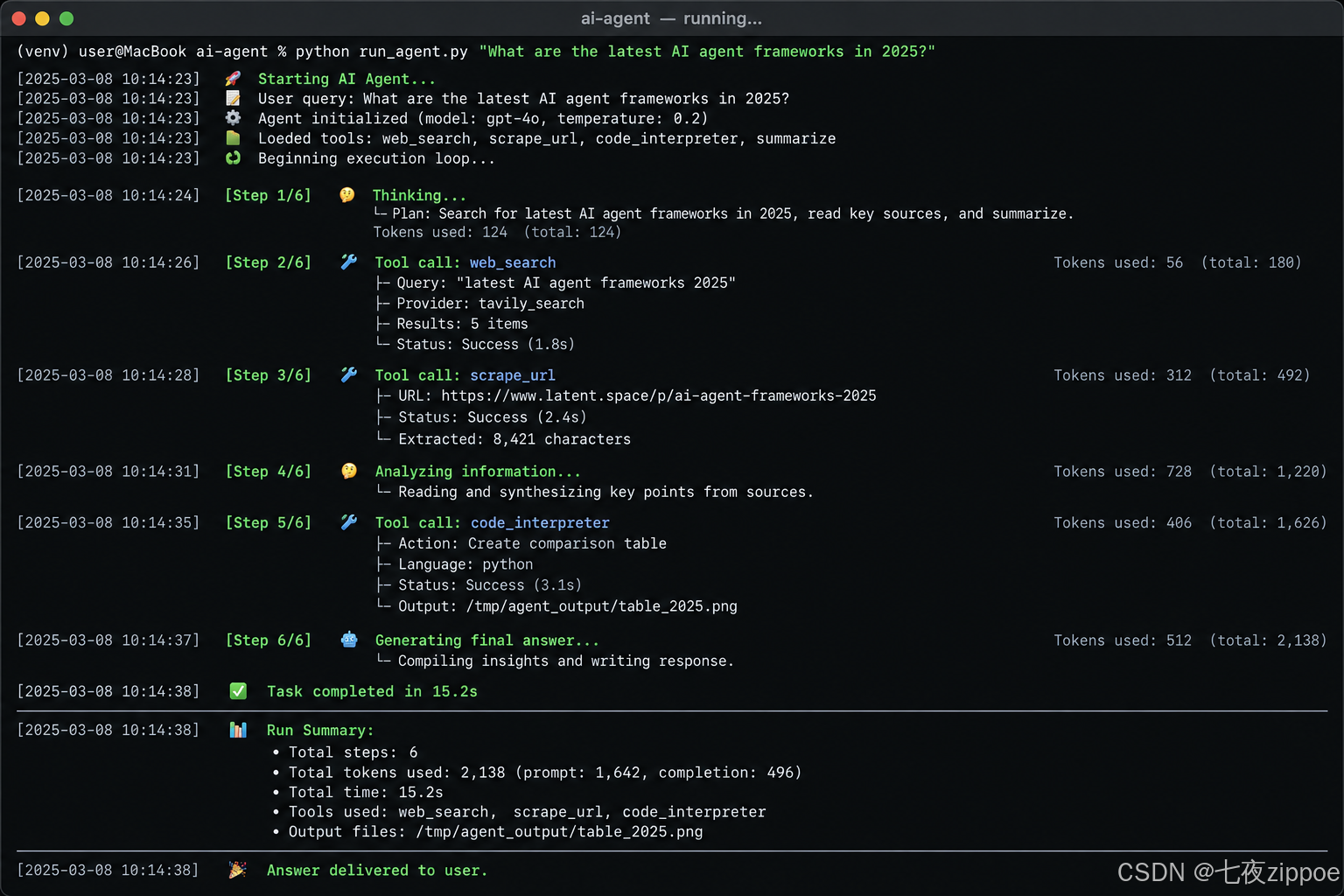
图:Agent 运行时的日志输出效果
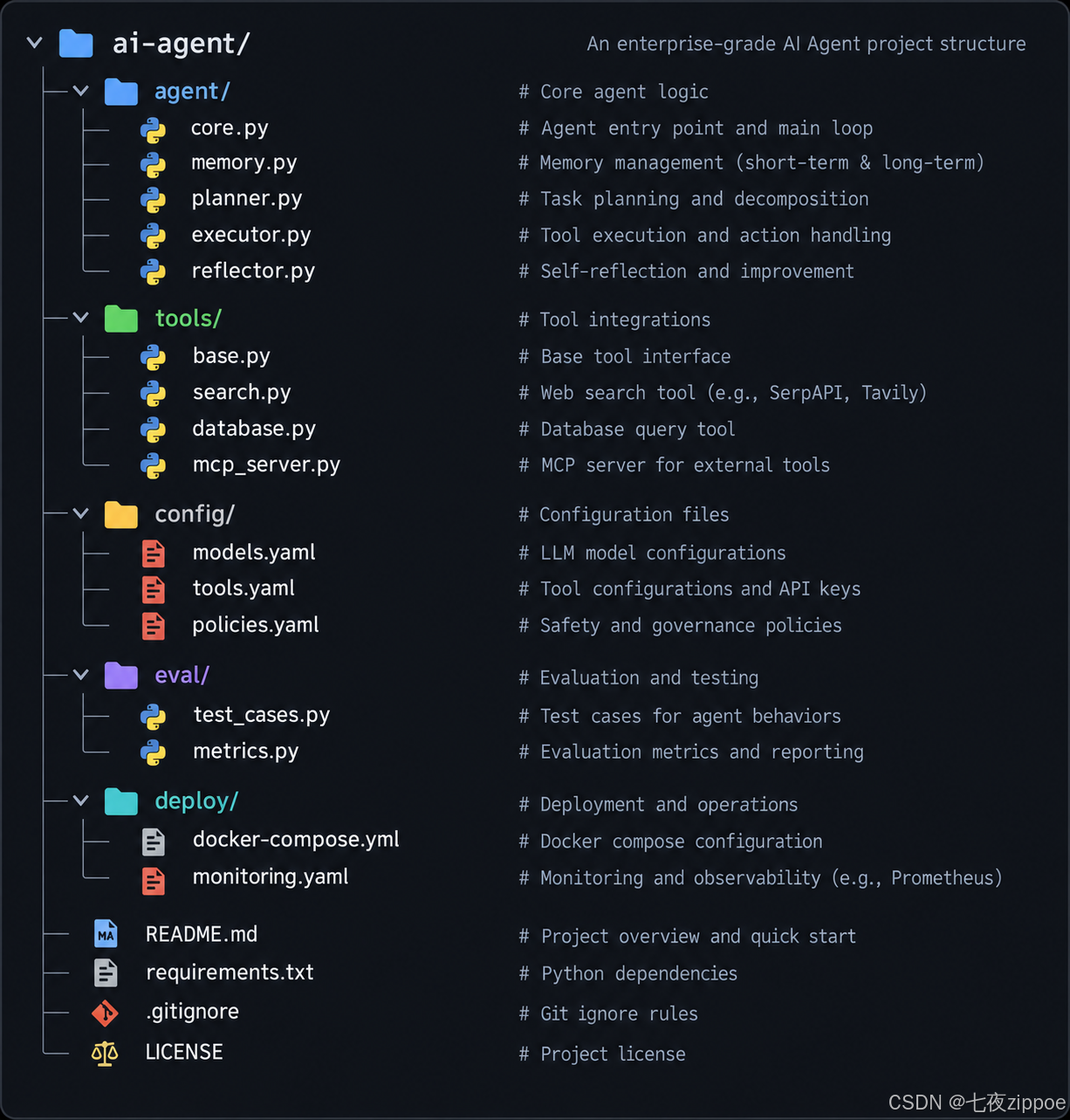
图:Agent项目的模块化代码结构组织
五、Agent 的状态分析
5.1 状态机视图
#mermaid-svg-AW2bV5hyum7kABzs{font-family:\”trebuchet ms\”,verdana,arial,sans-serif;font-size:16px;fill:#333;}@keyframes edge-animation-frame{from{stroke-dashoffset:0;}}@keyframes dash{to{stroke-dashoffset:0;}}#mermaid-svg-AW2bV5hyum7kABzs .edge-animation-slow{stroke-dasharray:9,5!important;stroke-dashoffset:900;animation:dash 50s linear infinite;stroke-linecap:round;}#mermaid-svg-AW2bV5hyum7kABzs .edge-animation-fast{stroke-dasharray:9,5!important;stroke-dashoffset:900;animation:dash 20s linear infinite;stroke-linecap:round;}#mermaid-svg-AW2bV5hyum7kABzs .error-icon{fill:#552222;}#mermaid-svg-AW2bV5hyum7kABzs .error-text{fill:#552222;stroke:#552222;}#mermaid-svg-AW2bV5hyum7kABzs .edge-thickness-normal{stroke-width:1px;}#mermaid-svg-AW2bV5hyum7kABzs .edge-thickness-thick{stroke-width:3.5px;}#mermaid-svg-AW2bV5hyum7kABzs .edge-pattern-solid{stroke-dasharray:0;}#mermaid-svg-AW2bV5hyum7kABzs .edge-thickness-invisible{stroke-width:0;fill:none;}#mermaid-svg-AW2bV5hyum7kABzs .edge-pattern-dashed{stroke-dasharray:3;}#mermaid-svg-AW2bV5hyum7kABzs .edge-pattern-dotted{stroke-dasharray:2;}#mermaid-svg-AW2bV5hyum7kABzs .marker{fill:#333333;stroke:#333333;}#mermaid-svg-AW2bV5hyum7kABzs .marker.cross{stroke:#333333;}#mermaid-svg-AW2bV5hyum7kABzs svg{font-family:\”trebuchet ms\”,verdana,arial,sans-serif;font-size:16px;}#mermaid-svg-AW2bV5hyum7kABzs p{margin:0;}#mermaid-svg-AW2bV5hyum7kABzs defs #statediagram-barbEnd{fill:#333333;stroke:#333333;}#mermaid-svg-AW2bV5hyum7kABzs g.stateGroup text{fill:#9370DB;stroke:none;font-size:10px;}#mermaid-svg-AW2bV5hyum7kABzs g.stateGroup text{fill:#333;stroke:none;font-size:10px;}#mermaid-svg-AW2bV5hyum7kABzs g.stateGroup .state-title{font-weight:bolder;fill:#131300;}#mermaid-svg-AW2bV5hyum7kABzs g.stateGroup rect{fill:#ECECFF;stroke:#9370DB;}#mermaid-svg-AW2bV5hyum7kABzs g.stateGroup line{stroke:#333333;stroke-width:1;}#mermaid-svg-AW2bV5hyum7kABzs .transition{stroke:#333333;stroke-width:1;fill:none;}#mermaid-svg-AW2bV5hyum7kABzs .stateGroup .composit{fill:white;border-bottom:1px;}#mermaid-svg-AW2bV5hyum7kABzs .stateGroup .alt-composit{fill:#e0e0e0;border-bottom:1px;}#mermaid-svg-AW2bV5hyum7kABzs .state-note{stroke:#aaaa33;fill:#fff5ad;}#mermaid-svg-AW2bV5hyum7kABzs .state-note text{fill:black;stroke:none;font-size:10px;}#mermaid-svg-AW2bV5hyum7kABzs .stateLabel .box{stroke:none;stroke-width:0;fill:#ECECFF;opacity:0.5;}#mermaid-svg-AW2bV5hyum7kABzs .edgeLabel .label rect{fill:#ECECFF;opacity:0.5;}#mermaid-svg-AW2bV5hyum7kABzs .edgeLabel{background-color:rgba(232,232,232, 0.8);text-align:center;}#mermaid-svg-AW2bV5hyum7kABzs .edgeLabel p{background-color:rgba(232,232,232, 0.8);}#mermaid-svg-AW2bV5hyum7kABzs .edgeLabel rect{opacity:0.5;background-color:rgba(232,232,232, 0.8);fill:rgba(232,232,232, 0.8);}#mermaid-svg-AW2bV5hyum7kABzs .edgeLabel .label text{fill:#333;}#mermaid-svg-AW2bV5hyum7kABzs .label div .edgeLabel{color:#333;}#mermaid-svg-AW2bV5hyum7kABzs .stateLabel text{fill:#131300;font-size:10px;font-weight:bold;}#mermaid-svg-AW2bV5hyum7kABzs .node circle.state-start{fill:#333333;stroke:#333333;}#mermaid-svg-AW2bV5hyum7kABzs .node .fork-join{fill:#333333;stroke:#333333;}#mermaid-svg-AW2bV5hyum7kABzs .node circle.state-end{fill:#9370DB;stroke:white;stroke-width:1.5;}#mermaid-svg-AW2bV5hyum7kABzs .end-state-inner{fill:white;stroke-width:1.5;}#mermaid-svg-AW2bV5hyum7kABzs .node rect{fill:#ECECFF;stroke:#9370DB;stroke-width:1px;}#mermaid-svg-AW2bV5hyum7kABzs .node polygon{fill:#ECECFF;stroke:#9370DB;stroke-width:1px;}#mermaid-svg-AW2bV5hyum7kABzs #statediagram-barbEnd{fill:#333333;}#mermaid-svg-AW2bV5hyum7kABzs .statediagram-cluster rect{fill:#ECECFF;stroke:#9370DB;stroke-width:1px;}#mermaid-svg-AW2bV5hyum7kABzs .cluster-label,#mermaid-svg-AW2bV5hyum7kABzs .nodeLabel{color:#131300;}#mermaid-svg-AW2bV5hyum7kABzs .statediagram-cluster rect.outer{rx:5px;ry:5px;}#mermaid-svg-AW2bV5hyum7kABzs .statediagram-state .divider{stroke:#9370DB;}#mermaid-svg-AW2bV5hyum7kABzs .statediagram-state .title-state{rx:5px;ry:5px;}#mermaid-svg-AW2bV5hyum7kABzs .statediagram-cluster.statediagram-cluster .inner{fill:white;}#mermaid-svg-AW2bV5hyum7kABzs .statediagram-cluster.statediagram-cluster-alt .inner{fill:#f0f0f0;}#mermaid-svg-AW2bV5hyum7kABzs .statediagram-cluster .inner{rx:0;ry:0;}#mermaid-svg-AW2bV5hyum7kABzs .statediagram-state rect.basic{rx:5px;ry:5px;}#mermaid-svg-AW2bV5hyum7kABzs .statediagram-state rect.divider{stroke-dasharray:10,10;fill:#f0f0f0;}#mermaid-svg-AW2bV5hyum7kABzs .note-edge{stroke-dasharray:5;}#mermaid-svg-AW2bV5hyum7kABzs .statediagram-note rect{fill:#fff5ad;stroke:#aaaa33;stroke-width:1px;rx:0;ry:0;}#mermaid-svg-AW2bV5hyum7kABzs .statediagram-note rect{fill:#fff5ad;stroke:#aaaa33;stroke-width:1px;rx:0;ry:0;}#mermaid-svg-AW2bV5hyum7kABzs .statediagram-note text{fill:black;}#mermaid-svg-AW2bV5hyum7kABzs .statediagram-note .nodeLabel{color:black;}#mermaid-svg-AW2bV5hyum7kABzs .statediagram .edgeLabel{color:red;}#mermaid-svg-AW2bV5hyum7kABzs #dependencyStart,#mermaid-svg-AW2bV5hyum7kABzs #dependencyEnd{fill:#333333;stroke:#333333;stroke-width:1;}#mermaid-svg-AW2bV5hyum7kABzs .statediagramTitleText{text-anchor:middle;font-size:18px;fill:#333;}#mermaid-svg-AW2bV5hyum7kABzs :root{–mermaid-font-family:\”trebuchet ms\”,verdana,arial,sans-serif;}
有tool_call
无tool_call
是
否
是(重试)
否
未超限
超过max_steps
接收输入
调用模型
检查输出
执行工具
返回结果
工具成功?
错误处理
可恢复?
返回降级
检查步数
超限截断
图:Agent 运行时的完整状态机
5.2 各状态的数据流
#mermaid-svg-OwDVdymqQQJJJDmX{font-family:\”trebuchet ms\”,verdana,arial,sans-serif;font-size:16px;fill:#333;}@keyframes edge-animation-frame{from{stroke-dashoffset:0;}}@keyframes dash{to{stroke-dashoffset:0;}}#mermaid-svg-OwDVdymqQQJJJDmX .edge-animation-slow{stroke-dasharray:9,5!important;stroke-dashoffset:900;animation:dash 50s linear infinite;stroke-linecap:round;}#mermaid-svg-OwDVdymqQQJJJDmX .edge-animation-fast{stroke-dasharray:9,5!important;stroke-dashoffset:900;animation:dash 20s linear infinite;stroke-linecap:round;}#mermaid-svg-OwDVdymqQQJJJDmX .error-icon{fill:#552222;}#mermaid-svg-OwDVdymqQQJJJDmX .error-text{fill:#552222;stroke:#552222;}#mermaid-svg-OwDVdymqQQJJJDmX .edge-thickness-normal{stroke-width:1px;}#mermaid-svg-OwDVdymqQQJJJDmX .edge-thickness-thick{stroke-width:3.5px;}#mermaid-svg-OwDVdymqQQJJJDmX .edge-pattern-solid{stroke-dasharray:0;}#mermaid-svg-OwDVdymqQQJJJDmX .edge-thickness-invisible{stroke-width:0;fill:none;}#mermaid-svg-OwDVdymqQQJJJDmX .edge-pattern-dashed{stroke-dasharray:3;}#mermaid-svg-OwDVdymqQQJJJDmX .edge-pattern-dotted{stroke-dasharray:2;}#mermaid-svg-OwDVdymqQQJJJDmX .marker{fill:#333333;stroke:#333333;}#mermaid-svg-OwDVdymqQQJJJDmX .marker.cross{stroke:#333333;}#mermaid-svg-OwDVdymqQQJJJDmX svg{font-family:\”trebuchet ms\”,verdana,arial,sans-serif;font-size:16px;}#mermaid-svg-OwDVdymqQQJJJDmX p{margin:0;}#mermaid-svg-OwDVdymqQQJJJDmX .entityBox{fill:#ECECFF;stroke:#9370DB;}#mermaid-svg-OwDVdymqQQJJJDmX .relationshipLabelBox{fill:hsl(80, 100%, 96.2745098039%);opacity:0.7;background-color:hsl(80, 100%, 96.2745098039%);}#mermaid-svg-OwDVdymqQQJJJDmX .relationshipLabelBox rect{opacity:0.5;}#mermaid-svg-OwDVdymqQQJJJDmX .labelBkg{background-color:rgba(248.6666666666, 255, 235.9999999999, 0.5);}#mermaid-svg-OwDVdymqQQJJJDmX .edgeLabel .label{fill:#9370DB;font-size:14px;}#mermaid-svg-OwDVdymqQQJJJDmX .label{font-family:\”trebuchet ms\”,verdana,arial,sans-serif;color:#333;}#mermaid-svg-OwDVdymqQQJJJDmX .edge-pattern-dashed{stroke-dasharray:8,8;}#mermaid-svg-OwDVdymqQQJJJDmX .node rect,#mermaid-svg-OwDVdymqQQJJJDmX .node circle,#mermaid-svg-OwDVdymqQQJJJDmX .node ellipse,#mermaid-svg-OwDVdymqQQJJJDmX .node polygon{fill:#ECECFF;stroke:#9370DB;stroke-width:1px;}#mermaid-svg-OwDVdymqQQJJJDmX .relationshipLine{stroke:#333333;stroke-width:1;fill:none;}#mermaid-svg-OwDVdymqQQJJJDmX .marker{fill:none!important;stroke:#333333!important;stroke-width:1;}#mermaid-svg-OwDVdymqQQJJJDmX .edgeLabel{background-color:rgba(232,232,232, 0.8);}#mermaid-svg-OwDVdymqQQJJJDmX .edgeLabel .label rect{fill:rgba(232,232,232, 0.8);}#mermaid-svg-OwDVdymqQQJJJDmX .edgeLabel .label text{fill:#333;}#mermaid-svg-OwDVdymqQQJJJDmX :root{–mermaid-font-family:\”trebuchet ms\”,verdana,arial,sans-serif;}
初始化
调用模型
可能包含多个
执行
追加
最终回答
USER_INPUT
string
question
MESSAGES
list
history
int
token_count
LLM_RESPONSE
string
content
list
tool_calls
int
tokens_used
TOOL_CALL
string
name
json
arguments
TOOL_RESULT
bool
success
json
data
string
error
FINAL_ANSWER
图:Agent 各组件之间的数据实体关系
六、常见问题与排障
6.1 模型不调用工具
现象:Agent 直接回答问题,不调用 search_web。
原因:可能是 System Prompt 不够明确,或模型认为它已经知道答案。
解决:
- 在 System Prompt 中明确"对于需要最新信息的问题,必须使用 search_web 工具"
- 使用 tool_choice="auto" 或 tool_choice="required" 参数
response = client.chat.completions.create(
model="gpt-5-mini",
messages=messages,
tools=TOOLS,
tool_choice="auto", # auto/none/required
)
6.2 无限循环
现象:Agent 反复调用同一个工具,不停下来。
原因:模型可能对搜索结果不满意,或 System Prompt 没有定义"何时停止搜索"。
解决:
- 设置 max_steps 限制
- 在 System Prompt 中加入"搜索3次后即使信息不充分也需生成回答"
6.3 Token 消耗过高
现象:一个简单问题消耗上万 Token。
原因:搜索结果太长,全部塞入上下文。
解决:
- 限制搜索结果数量(max_results=3)
- 截断每条搜索结果的长度(body[:200])
- 使用更便宜的模型(如 gpt-5-mini 而非 gpt-5)
# 截断搜索结果
formatted = [
{"title": r["title"], "body": r["body"][:150]} # 截断到150字
for r in results[:3] # 最多3条
]
七、适用边界
7.1 这个 Agent 适合做什么
✅ 适合:
- 需要搜索互联网获取最新信息的研究任务
- 简单的信息汇总和总结
- 学习 Agent 原理的入门项目
7.2 不适合做什么
⚠️ 不适合:
- 需要访问私有数据源的场景(需要替换搜索工具)
- 需要高可靠性的生产环境(缺少完善错误处理和监控)
- 需要跨会话记忆的场景(记忆系统太简单)
- 需要多步复杂推理的任务(50行代码的 Agent 能力有限)
7.3 下一步升级方向
| 加入更多工具 | 第08篇:Function Calling |
| 用 MCP 标准化工具 | 第09-10篇:MCP 协议 |
| 加入分层记忆 | 第14-15篇:记忆系统 |
| 加入错误恢复 | 第37篇:错误处理体系 |
| 加入成本控制 | 第53篇:成本控制 |
| 加入监控 | 第49篇:监控体系 |
| 迁移到框架 | 第02篇:框架横评 |
八、总结
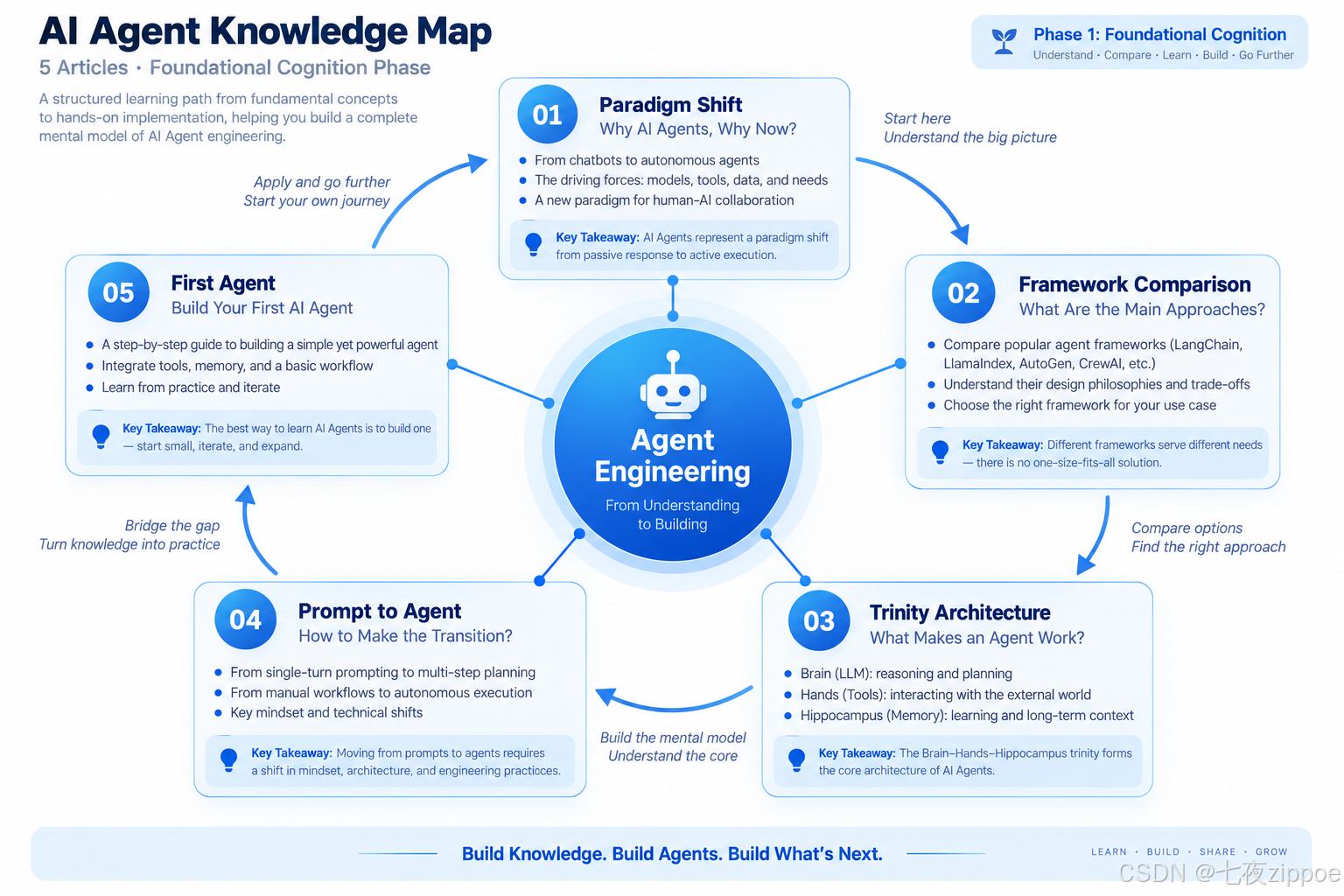
图:认知奠基五篇文章的知识体系总结图
8.1 回顾
本文用不到 50 行 Python 代码搭建了一个最小可用的 AI Agent。这个 Agent 能自主决定是否搜索互联网、选择搜索关键词、判断信息是否充分、生成结构化总结——这就是 Agent 的"自主性"。
50 行代码只是起点。我们逐步加入了错误处理、记忆和日志,展示了从"能跑的 Demo"到"能用的原型"的工程化路径。但要达到"能上线生产",还需要本系列后续 95 篇文章涵盖的架构设计、错误恢复、监控告警、成本控制、安全审计等工程能力。
8.2 核心认知
读完本文,你应该建立三个核心认知:
第一,Agent 的核心是一个循环。不是单次 API 调用,而是"调用模型→检查输出→执行工具→结果返回模型"的循环。这个循环是 Agent 区别于 ChatBot 的本质。
第二,自主性来自工具描述。Agent 之所以能"自己决定"什么时候搜索,是因为 search_web 工具的 description 字段告诉了模型这个工具能做什么。工具描述的质量直接决定 Agent 的决策质量。
第三,50行只是开始。生产级 Agent 需要的错误处理、记忆管理、成本控制、监控告警等工程能力,每一项都是独立的工程领域。这也是为什么需要 100 篇文章来系统覆盖。
8.3 第一阶段总结
本文是第一阶段(认知奠基 01-05)的最后一篇。回顾这 5 篇:
| 01 | 范式跃迁 | Agent 不是更好的 ChatBot,而是不同的范式 |
| 02 | 框架横评 | 没有"最好"的框架,只有"最适合场景"的框架 |
| 03 | 三位一体 | Agent = 模型 + 工具 + 记忆,三者循环交互 |
| 04 | 范式转变 | 从"优化 Prompt"到"设计系统" |
| 05 | 第一个 Agent | 50行代码跑通一个能自主搜索+总结的智能体 |
读完这 5 篇,你已经有:Agent 的完整认知框架、框架选型的判断能力、架构原理的理解、第一个能跑的代码。下一阶段(06-20)我们将深入核心技能——Function Calling、MCP、Prompt 工程、记忆系统、RAG 2.0、安全设计,每一篇一个专题。
8.4 下篇预告
下一篇《LLM 选型指南:Agent 场景下大模型的核心能力评估框架》将进入核心技能阶段,系统分析在 Agent 场景下如何评估和选择大模型——不是泛泛的"模型横评",而是从推理能力、工具调用稳定性、上下文管理、成本效率四个维度建立可量化的评估框架。
参考资料
- OpenAI Function Calling 文档
- DuckDuckGo Search Python
- OpenAI Python SDK
- 本系列第01篇:从 ChatBot 到自主智能体的范式跃迁