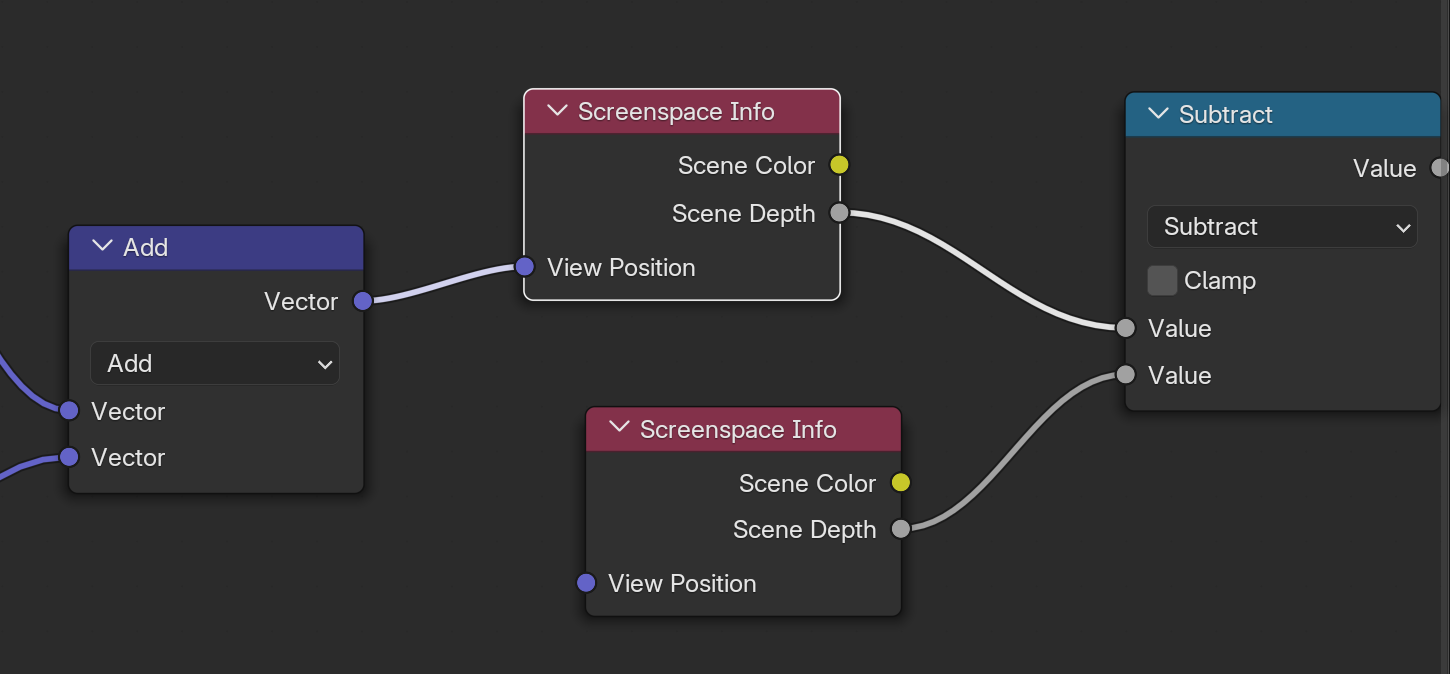
先引用 Goo Engine 官方实现与说明来源,再解释 Scene Depth 的真实含义。
一、节点来源(官方实现位置)
Screenspace Info 是 Goo Engine 在 Eevee 中新增的自定义 shader node。 源码在 Goo Engine 仓库的节点实现中:
-
(GitHub) source/blender/nodes/shader/nodes/node_shader_screenspace_info.cc
该节点属于 Goo Engine 为 NPR(Anime / toon rendering)加入的自定义屏幕空间信息节点。官方说明:
Goo Engine adds several custom shader nodes to Eevee for NPR rendering workflows. (GitHub)
其中之一就是 Screenspace Info。
二、Screenspace Info 节点输出含义
节点有三个输出:
Scene Color
Scene Depth
以及输入:
View Position
本质上它访问 当前帧缓冲 / GBuffer 的屏幕空间数据。
换句话说,它不是几何数据,而是 屏幕空间 buffer 采样。
三、Scene Depth 的官方语义
Scene Depth 的含义:
当前屏幕像素的深度缓冲值(Depth Buffer Value)
即:
Depth = depth buffer at screen UV
也就是 当前 pixel 在相机空间中的深度信息。
等价于常见实时渲染里的:
DepthTexture
SceneDepth
ZBuffer
四、计算逻辑(根据节点输入)
该节点输入是:
View Position (3D position in view space)
流程本质是:
1️⃣ 将 View Position 投影到屏幕空间
clip = ProjectionMatrix * viewPos
uv = clip.xy / clip.w
2️⃣ 用 uv 采样当前帧的 depth buffer
depth = tex2D(scene_depth, uv)
3️⃣ 输出 depth
五、Depth 值的空间含义
注意这里的 Scene Depth 不是线性深度。
通常 Eevee / GPU depth buffer 是:
depth = z / w (non-linear depth)
也就是标准透视深度。
如果需要线性化,需要:
linearDepth = (2*n) / (f+n – depth*(f-n))
其中
n = near
f = far
六、Scene Depth 与 Scene Color 的关系
节点的两个输出来自 同一屏幕位置:
Scene Color = framebuffer color
Scene Depth = depth buffer
用途一般是:
1 屏幕空间描边
常见 Goo NPR:
edge = abs(depth – neighborDepth)
2 深度遮挡
例如:
if depth < objectDepth
object hidden
3 接触阴影 / AO
4 toon outline thickness
七、为什么 Goo Engine 要加这个节点
因为 原版 Blender Shader Node 无法直接访问 Scene Depth。
Blender Eevee 的限制:
Shader Node
不能直接访问 depth buffer
Goo Engine 为 NPR 加入:
Screenspace Info
Curvature
Shader Info
Set Depth
这些节点都是为了 屏幕空间风格化渲染。 (GitHub)
八、与 Unity / UE 的等价物
如果你做实时渲染,会非常熟悉:
| Scene Depth | _CameraDepthTexture | SceneDepth |
| Scene Color | _CameraOpaqueTexture | SceneColor |
本质完全一致:
sample depth buffer
九、结论
Goo Engine 的 Scene Depth 本质是:
当前屏幕像素对应的 Depth Buffer 值(非线性 Z 深度), 通过 View Position 投影到屏幕 UV 后采样得到。
数学等价:
depth = Sample(SceneDepthTexture, ScreenUV)
用途:
-
屏幕空间描边
-
深度边缘检测
-
遮挡判断
-
NPR toon outline
-
接触阴影
Goo Engine Screenspace Info 节点内部是 GLSL 逻辑(源码里的 GPU shader),可以和 Unity _CameraDepthTexture / UE SceneDepth 做逐行对应。