/* MD / 富文本中的 .toc(含博客园搬家等嵌套结构);.toc-box 在侧栏,不受影响 */
#content_views .toc,
/* 编辑器常在目录前后插入空 p(:empty 仍占 20px),一并去掉避免顶空隙 */
#content_views.markdown_views > p:empty:has(+ .toc),
#content_views.markdown_views > .toc + p:empty,
/* 富文本旧版目录标记 */
#content_views.htmledit_views #main-toc,
#content_views.htmledit_views #hr-toc,
#content_views.htmledit_views p[id*=\”-toc\”] {
display: none !important;
}
/* 目录去掉后,紧跟的首个标题不再多出一块上边距 */
#content_views.markdown_views > .toc + h1,
#content_views.markdown_views > .toc + h2,
#content_views.markdown_views > .toc + h3,
#content_views.markdown_views > .toc + h4,
#content_views.markdown_views > .toc + p:empty + h1,
#content_views.markdown_views > .toc + p:empty + h2,
#content_views.markdown_views > .toc + p:empty + h3,
#content_views.markdown_views > .toc + p:empty + h4 {
margin-top: 0 !important;
}
背景:业务服务最开始以单机服务部署为主,随着用户的增加和需求量的提高,过渡到微服务架构。微服务架构实现将一个大的服务分为多个小的服务,实现服务之间的解耦,同时提高服务的维护。但多实例管理也有弊端:远程调用的 URL 是固定写死的,当提供服务的一端 URL 被修改或者是我们想要更换服务器,就必须修改 URL,再重新打包部署到服务器上,虽然难度不会很高,但是却大大增加了人工成本。
概念介绍
服务注册中心:将提供服务的一端的信息保存在服务注册中心中,当服务端信息发生修改时,会同步到注册中心上,这样当服务消费者需要调用服务端时,向注册中心查询服务提供者的地址,注册中心可以准确地把查询结构告知服务消费者,实现调用服务提供者的接口,注册中心相当于是一个中间人,在服务消费者和服务提供者之间搭起一座康桥。
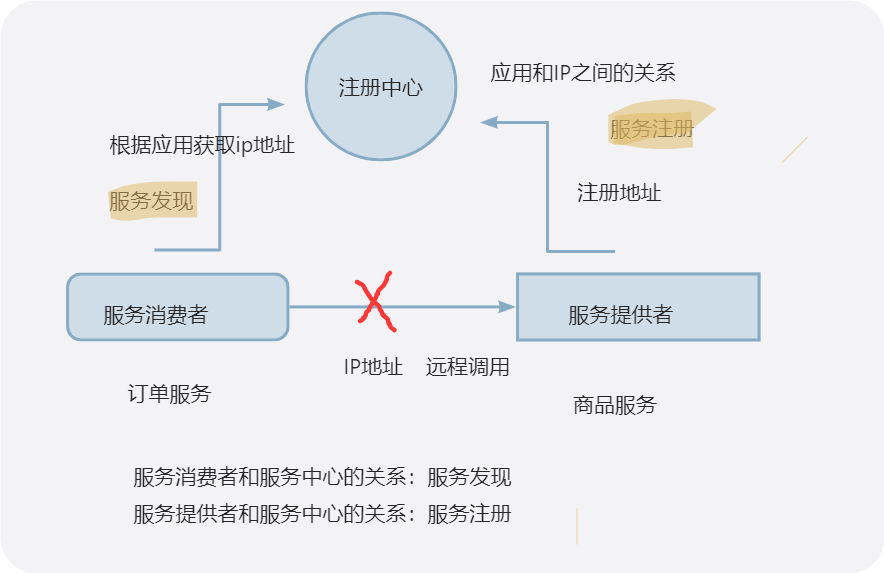
服务注册:将自身的信息注册在注册中心上,当信息发生修改时,会同步到注册中心。同时在一定时间内发送心跳包,当服务长时间未使用时,注册中心会注销掉该服务。
服务发现:向注册中心查询服务提供者的信息,调用服务端的接口,实现业务。
常见实现注册中心的组件:Eureka、Zookeeper、Nacos……
一、什么是 Eureka
1.1 Eureka 简介
【介绍 Eureka 归属 Netflix,由两大部分组成:Eureka Server、Eureka Client】
Eureka 是 Netflix 公司旗下的一个组件,实现了注册中心,主要保存服务提供者的信息。主要有两大部分组成:Eureka Server、Eureka Client。
1.2 Eureka 三大核心角色
| Eureka Server | Eureka 服务端,注册中心核心。保存所有微服务实例注册信息,接收客户端的注册、心跳续约请求,提供服务注册表查询能力;支持集群部署,节点间同步服务数据。 |
| 服务提供者 Provider | Eureka 客户端,对外提供业务接口。启动时向 Eureka Server 注册自身服务信息;定时发送心跳续约,证明实例存活;下线时主动向服务端发起注销。 |
| 服务消费者 Consumer | Eureka 客户端,调用其他微服务。定期从 Eureka Server 拉取并本地缓存服务实例列表;调用服务时,基于本地实例列表做负载均衡,发起远程请求。 |
1.3 Eureka 基础工作流程
服务提供者向服务中心登记注册自己的地址等信息,注册之后,注册中心会永久同步修改服务提供者的信息,确保地址的正确。同时服务提供者会在一定时间内发送心跳包告知注册中心自己的状态,让注册中心知道该服务使用正常。当服务消费者向注册中心查询服务注册表时,注册中心将服务提供者的地址告知服务消费者,服务消费者可以通过地址调用服务提供者的接口,完成远程调用,实现业务处理。当服务提供者发生异常时,会主动下线,注册中心未接收到心跳包后会先发送请求,若无响应,就会将服务提供者删除。
1.4 CAP 视角分析:Eureka 选择 AP
CAP理论:
C:强一致性
A:可用性
P:分区容错性
| 强一致性 | 不管什么时候,主库和从库对外提供的服务是一致的 |
| 弱一致性 | 服务修改时,主库和从库会随着时间的推移最终实现服务一致 |
| 可用性 | 接受请求时,不管请求是否正确,都会响应 |
| 分区容错性 | 在网络分区的情况下,依旧可以提供服务(微服务分布式必须具备) |
由于P理论必须存在,所以分为两个架构:AP架构和CP架构:
AP:在提供服务的前提下,优先保证数据的可用性,无论数据是否正确,做到事事有回应
CP:在提供服务的前提下,优先保证数据的正确性,绝对不返回脏数据,做到服务严谨
二、代码实操演示(SpringBoot)
3.1 环境版本说明
SpringBoot 版本:3.1.6 SpringCloud 版本:2022.0.3
JDK 版本:17.0.9(Java 17) Maven 版本:3.9.15
版本兼容性注意事项:
- SpringBoot 2.7.x 与 SpringCloud 2021.0.x(Jubilee)为官方兼容组合,可正常配合使用。
- SpringCloud 2021.0.x 使用 Spring Cloud Netflix Eureka 3.1.x,对应 Eureka Server 1.10.x,支持 JDK 8 及以上版本。
- JDK 8 与 SpringBoot 2.7.x 兼容良好;若使用 JDK 11 或 17,需注意部分旧版依赖(如 Javax 相关包)可能需要额外适配。
- Maven 3.6.3 可正常解析 SpringBoot 2.7.x 与 SpringCloud 2021.0.x 的依赖,无需额外配置。
- 若使用更高版本的 SpringBoot 3.x,需搭配 SpringCloud 2022.0.x 及以上版本,且 JDK 需升级到 17 及以上,同时需将 Javax 替换为 Jakarta 命名空间。
3.2 搭建 Eureka‑Server 注册中心
<dependency>
<groupId>org.springframework.cloud</groupId>
<artifactId>spring-cloud-starter-netflix-eureka-server</artifactId>
</dependency>
@EnableEurekaServer
@SpringBootApplication
public class EurekaApplication {
public static void main(String[] args) {
SpringApplication.run(EurekaApplication.class,args);
}
}
server:
port: 10010
spring:
application:
name: eureka-server
eureka:
instance:
hostname: localhost
client:
fetch-registry: false # 表示是否从Eureka Server获取注册信息,默认为true.因为这是一个单点的Eureka Server,不需要同步其他的Eureka Server节点的数据,这里设置为false
register-with-eureka: false # 表示是否将自己注册到Eureka Server,默认为true.由于当前应用就是Eureka Server,故而设置为false.
service-url:
# 设置Eureka Server的地址,查询服务和注册服务都需要依赖这个地址
defaultZone: http://${eureka.instance.hostname}:${server.port}/eureka/
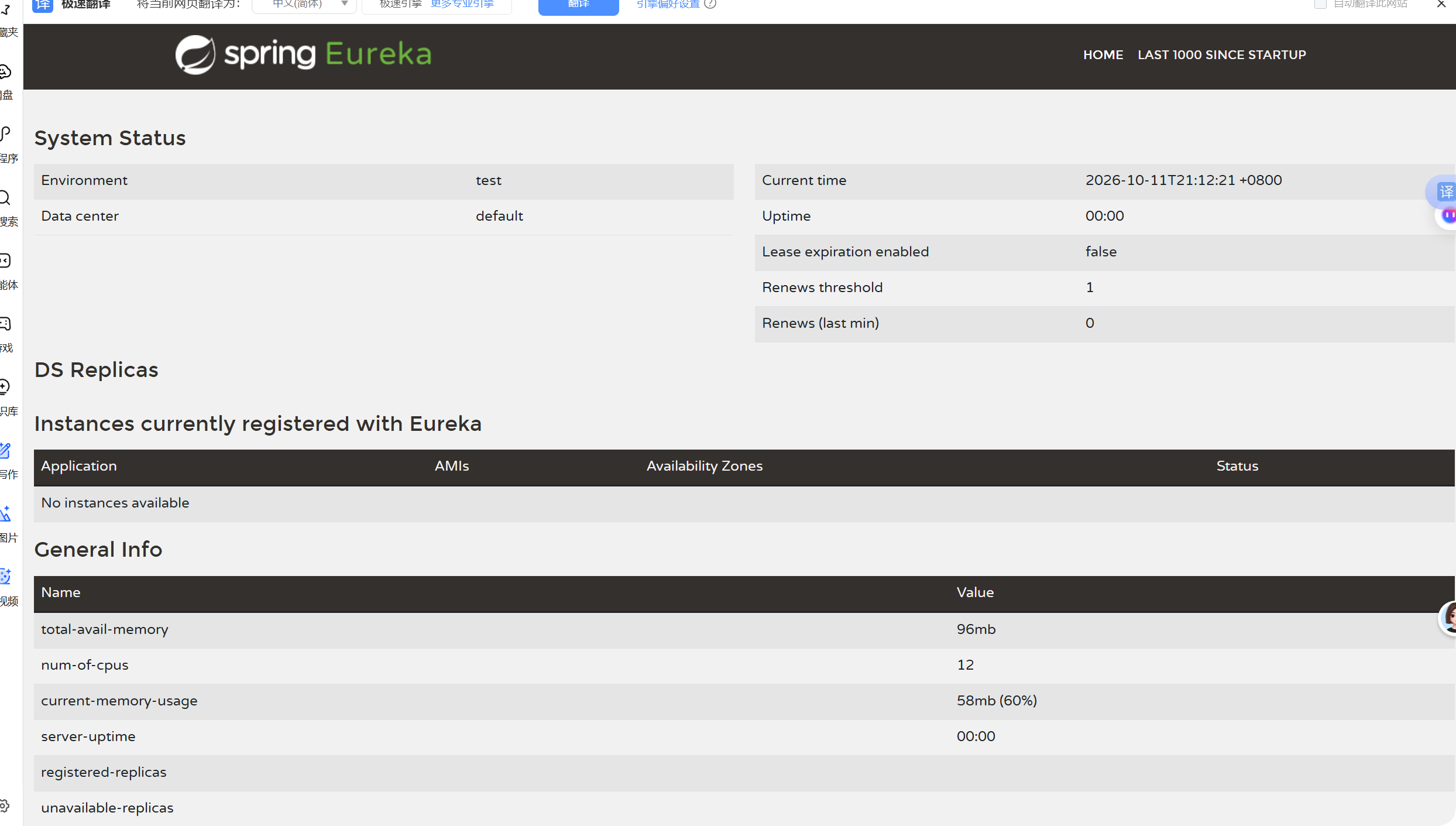
启动微服务后访问:http://localhost:配置的端口号,如果Eureka配置成功会跳转到该页面:
3.3 搭建服务提供者(Eureka Client)
以product-service为例
详细实现过程参考: 基于springBoot实现订单服务
- pom.xml 依赖
<dependencies>
<dependency>
<groupId>org.springframework.boot</groupId>
<artifactId>spring-boot-starter-web</artifactId>
</dependency>
<dependency>
<groupId>com.mysql</groupId>
<artifactId>mysql-connector-j</artifactId>
</dependency>
<!–mybatis–>
<dependency>
<groupId>org.mybatis.spring.boot</groupId>
<artifactId>mybatis-spring-boot-starter</artifactId>
</dependency>
<!–eureka依赖–>
<dependency>
<groupId>org.springframework.cloud</groupId>
<artifactId>spring-cloud-starter-netflix-eureka-client</artifactId>
</dependency>
</dependencies>
- 启动类代码
springBoot版本为1.x的需要在启动类手动添加@EnableEurekaClient
@SpringBootApplication
public class ProductDemoApplication {
public static void main(String[] args) {
ApplicationContext context = SpringApplication.run(ProductDemoApplication.class, args);
}
}
- 配置信息
server:
port: 9090
spring:
application:
name: product-server
datasource:
url: jdbc:mysql://127.0.0.1:3306/cloud_product?characterEncoding=utf8&useSSL=false
username: root
password: BY@yyds.666
driver-class-name: com.mysql.cj.jdbc.Driver
mybatis:
configuration: # 配置打印 MyBatis 执行的 SQL
map-underscore-to-camel-case: true #自动驼峰转换
#Eureka Client
eureka:
client:
service-url:
defaultZone: http://127.0.0.1:10010/eureka/
- 测试
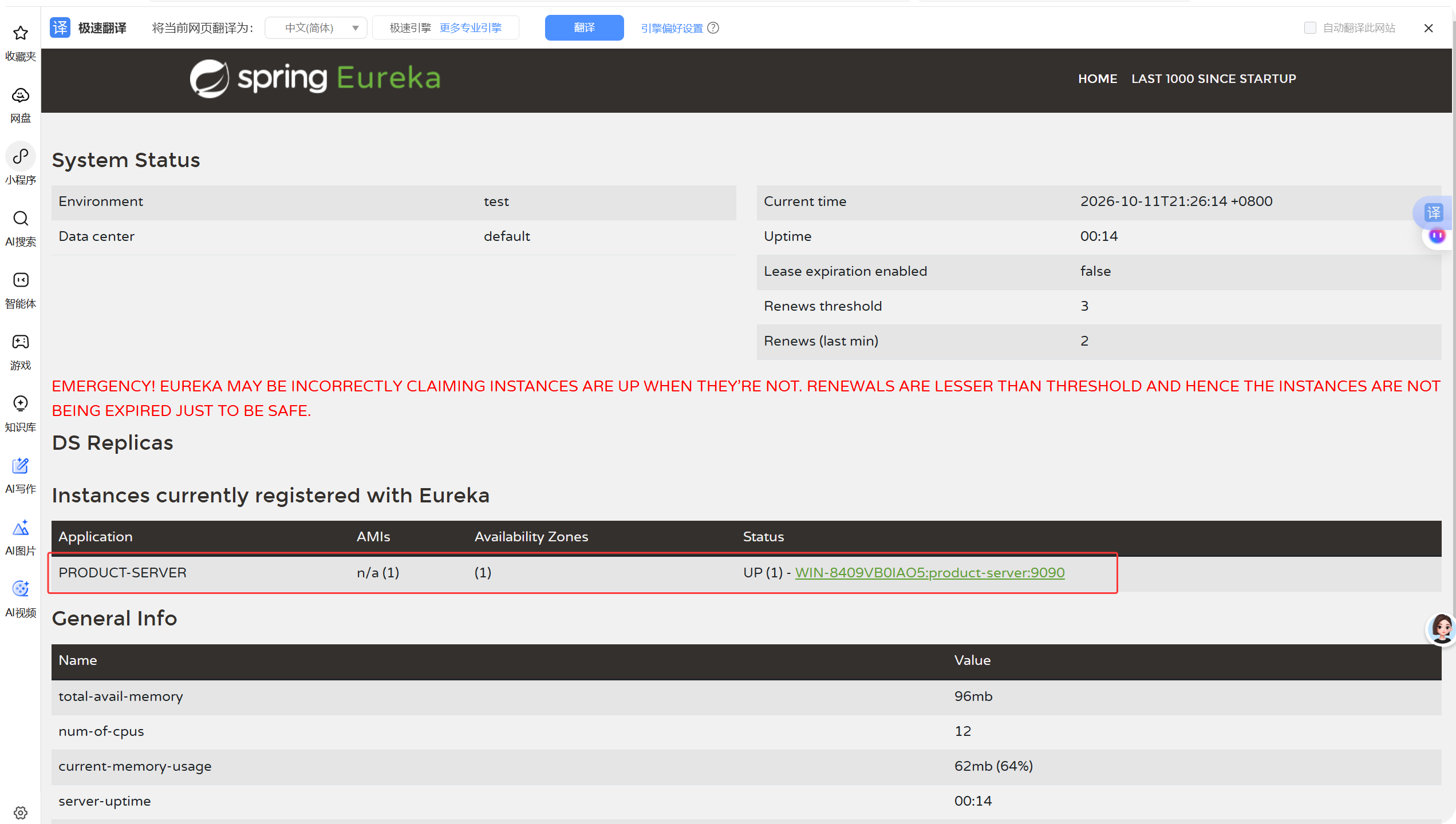
启动product-service服务,刷新eureka页面可以看到produce-service已经被注册
3.4 搭建服务消费者(Eureka Client)
以order-service为例(详细过程参考:
- pom.xml 依赖
<dependencies>
<dependency>
<groupId>org.springframework.boot</groupId>
<artifactId>spring-boot-starter-web</artifactId>
</dependency>
<dependency>
<groupId>com.mysql</groupId>
<artifactId>mysql-connector-j</artifactId>
</dependency>
<!–mybatis–>
<dependency>
<groupId>org.mybatis.spring.boot</groupId>
<artifactId>mybatis-spring-boot-starter</artifactId>
</dependency>
<!–eureka依赖–>
<dependency>
<groupId>org.springframework.cloud</groupId>
<artifactId>spring-cloud-starter-netflix-eureka-client</artifactId>
</dependency>
</dependencies>
- yml 配置
server:
port: 8080
spring:
application:
name: order-server
datasource:
url: jdbc:mysql://127.0.0.1:3306/cloud_order?characterEncoding=utf8&useSSL=false
username: root
password: BY@yyds.666
driver-class-name: com.mysql.cj.jdbc.Driver
mybatis:
configuration: # 配置打印 MyBatis 执行的 SQL
map-underscore-to-camel-case: true #自动驼峰转换
#Eureka Client
eureka:
client:
service-url:
defaultZone: http://127.0.0.1:10010/eureka/
- 使用RestTemple进行远程调用
@Configuration
public class RestfulConfig {
@Bean
@LoadBalanced
public RestTemplate restTemplate(){
return new RestTemplate();
}
}
@Slf4j
@Service
public class orderService {
@Autowired
orderMapper orderMapper;
@Autowired
RestTemplate restTemplate;
private List<ServiceInstance> lists;
@Autowired
DiscoveryClient discoveryClient;
//目的是为了固定启动服务后,产品服务的列表
@PostConstruct
public void init(){
lists=discoveryClient.getInstances("product-server");
}
public orderInfo getOrderInfo(Integer id){
orderInfo orderInfo = orderMapper.selectOrderInfoById(id);
String url="http://product-server/product/"+orderInfo.getProductId();
log.info("访问的商品服务器ip+端口号:"+url);
productInfo productInfo = restTemplate.getForObject(url, productInfo.class);
orderInfo.setProductInfo(productInfo);
return orderInfo;
}
}
- 测试
启动服务,查看eureka页面是否已经注册成功:

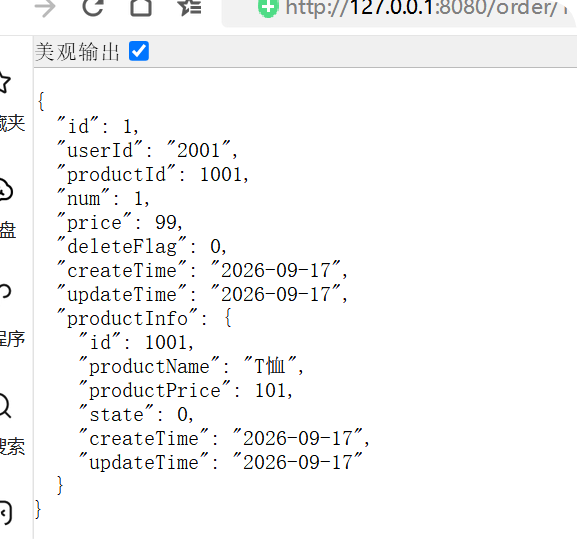
发送请求,查看远程调用是否成功 http://127.0.0.1:8080/order/1
四、重要补充:Eureka 维护状态
Netflix Eureka 2.x 停止开源维护 【说明停止维护现状,列举替代组件:Nacos、Consul 等,简单对比】
总结
Eureka 的优点:
- 服务注册与发现机制简单直观,客户端只需引入依赖并配置地址即可完成接入,学习成本低。
- 支持心跳续约与主动下线,能够及时感知服务实例的存活状态,保障注册表信息的有效性。
- 支持集群部署,节点之间同步服务数据,具备良好的横向扩展能力。
- 与 Spring Cloud 生态集成度高,配合 RestTemplate、OpenFeign 等组件可快速实现服务间调用与负载均衡。
Eureka 的短板:
- 采用 AP 架构,在网络分区时优先保证可用性,牺牲强一致性,服务注册表可能出现短暂的不一致。
- Netflix Eureka 2.x 已停止开源维护,社区活跃度下降,新项目直接使用存在一定的维护风险。
- 缺少配置管理、命名空间隔离等能力,功能相对单一,复杂场景下需要额外引入其他组件配合。
适用业务场景:
- 中小型微服务项目,对服务注册与发现有基础需求,且希望快速上手落地。
- 已有 Spring Cloud Netflix 技术栈的存量系统,继续使用 Eureka 可以保持架构一致性。
- 对数据一致性要求不高、更看重服务可用性的业务场景。
技术选型思考:如果是从零搭建新项目,建议优先考虑 Nacos 或 Consul 等仍在活跃维护的注册中心。Nacos 同时支持 AP 与 CP 模式切换,并内置配置管理功能,更适合国内微服务生态;Consul 则提供更完善的服务网格与健康检查能力。若项目规模较小、追求简单快速,Eureka 依然是一个可用的选择,但需评估长期维护成本。